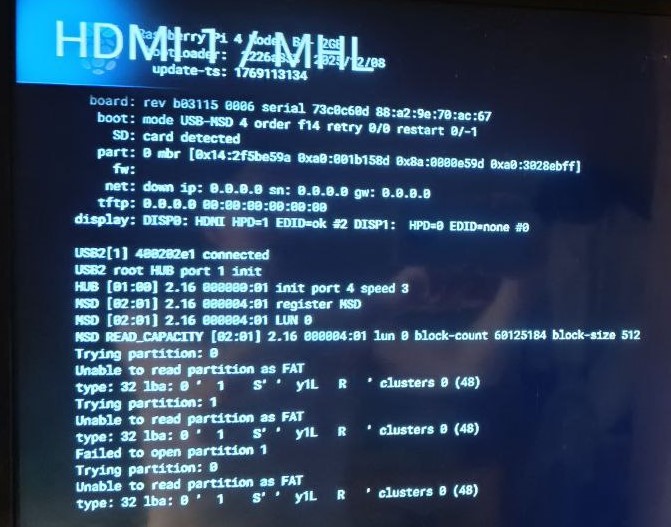
The image shows exactly what is happening. Your EEPROM configuration is correct - the bootloader IS attempting USB first (“mode USB-MSD 4 order f14”). The USB drive IS detected and enumerated:
The 30GB SanDisk is recognized at hardware level. However, partition reads fail:
Trying partition: 0
Unable to read partition as FAT
type: 32 lba: 0 ' 1 S' y1L R ' clusters 0 (48)
This is garbled partition data. The bootloader cannot read valid FAT partition structure, so it falls back to SD card.
This is a known problem with SanDisk Ultra Fit drives. These drives have firmware quirks that prevent proper reinitialization during warm reboot because USB power does not cycle - the drive remains powered but does not reset its internal state. Cold boot works because full power cycle forces complete reinitialization.
Had you mentioned the exact USB hardware in your initial post, this would have saved time and effort - SanDisk Ultra Fit compatibility issues with Raspberry Pi bootloaders are well documented.
I researched this problem extensively in the past in this thread:
Your options:
Add EEPROM timing parameters to force USB power cycling during reboot. Edit bootloader config and add:
Use a different USB drive. SanDisk Extreme Portable or Samsung drives generally work better. Avoid “Fit” style drives that run hot and have aggressive power management firmware.
Accept the limitation - use cold boot (power cycle) when switching to OSMC, use Volumio reboot only when staying within Volumio.
These parameters are stored in the Raspberry Pi EEPROM bootloader configuration, not in any file on the SD card or USB drive.
You have two options:
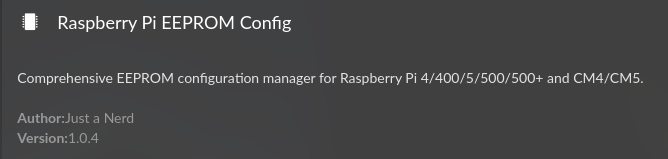
Use the Raspberry Pi EEPROM Config plugin (shown in screenshot)
This plugin provides a GUI interface to modify EEPROM bootloader parameters. Install it from the Volumio plugin store, then navigate to its settings page. Add the timing parameters there and apply.
Via SSH command line
sudo rpi-eeprom-config --edit
This opens the bootloader configuration in a text editor. Add the three lines under the [all] section:
Hi,
pay attention when you have an Argon One Case if you want to enable the powerbutton.
Therefore you must download and run a script argon1.sh, this can be downloaded and executed:
curl https://download.argon40.com/argon1.sh | bash
When its running it does an sudo apt-get update and sudo apt-get UPGRADE in the EEPROM section starting from line 793 in argon1.sh
So the whole Volumiosystem is upgraded! (an apt-get upgrade has to be avoid, it can brick the system they told me???)
So luckely i had an image 4.086 and reflashed it
I download the argon1.sh file, delete the EEPROM section, ran the Raspberry Pi EEPROM Firmware Updater plugin and ran the EDITED argon1.sh file (sudo chmod 755 ./argon1.sh sudo ./argon1.sh)
Maybe a little bit too carefull, but now volumio4 in the argoncase runs smooth and the button does his job!
Question: is sudo apt-get upgrade harmfull for Volumio4???
Good catch on reviewing that script before running it blindly. Your caution was warranted.
To answer your question directly: yes, sudo apt-get upgrade is harmful to Volumio and should be avoided.
Volumio OS is purposefully built for bit-perfect audio reproduction. The system uses a carefully curated set of packages with specific versions that have been tested together for stability and audio performance. Mainstream Debian packages are configured for generic desktop use - running a full upgrade is a sledgehammer approach that replaces these curated components with versions that may break audio subsystems, kernel modules, or Volumio’s own services.
Using sudo apt install for a specific package is generally fine - Volumio does this internally and plugins do as well. The key difference is selectivity. Installing one known-compatible package is surgical. Upgrading everything blindly replaces components that Volumio depends on with untested versions.
The “bricking” warning is not exaggeration. A full upgrade can replace kernel modules, ALSA components, systemd units, or libraries that Volumio requires. The result ranges from audio playback failures to a system that will not boot.
Your approach - editing the script to remove the dangerous sections and handling EEPROM separately via the dedicated plugin - was the correct solution.
For anyone else reading: always inspect third-party scripts before execution, especially those that call apt-get upgrade or modify system packages. If a vendor script requires a full system upgrade to function, that script is not designed with Volumio compatibility in mind.
The diagnostic data confirms the issue. The W5500 driver (w5100-spi) does not implement proper link detection:
operstate: “unknown” (should be “up” or “down”)
ip link state: “UNKNOWN”
ethtool: Minimal output - no speed, no duplex info
dmesg: No link state change events when cable unplugged/reconnected
The W5500 chip is a simple SPI-to-Ethernet controller. The Linux driver is basic and does not report link state changes to the kernel. The carrier value stays at 1 regardless of physical cable state.
Volumio’s Single Network Mode relies on kernel link state events to switch between ethernet and WiFi. Since the W5500 never reports link changes, Volumio always believes ethernet is available.
Your options:
WiFi only - remove dtoverlay=w5500 from userconfig.txt permanently
Ethernet only - always keep cable connected, no WiFi fallback
I was nursing an idea of testing IP Address presence, which will only work with DHCP client, not static setup.
This is a hardware/driver limitation of the W5500, not a Volumio bug.
The Linux kernel default keeps WiFi and Bluetooth enabled (default_state=1). Raspberry Pi overrides this via the raspberrypi-sys-mods package, which sets default_state=0 - radios disabled at boot for regulatory compliance (country code must be configured before transmission).
Volumio manages regulatory compliance through its own mechanisms, making the Raspberry Pi default unnecessary. Currently Volumio uses a boot service (volumio_rfkill_unblock.service) to undo the Pi’s default.
The PR simplifies this by setting the kernel module parameter at build time:
I tried to do it according to point 1.
Anyway, with a warm reboot, it won’t boot from USB, but volumio will load from SD. It is loaded from USB during a cold start.
I updated from 4.084 to 4.089 a few days ago and am running into similar issues I had posted about and got nerd’s analysis in this post about sync state being an issue. I hadn’t had the issue in a long time running 4.084 but after updating its happened multiple times and is same behavior so I figured I would post a log.
Here is the log. I caught it at Jan 23 10:48:26 right after CCR/Creedence Clearwater Revival/CCR - Chronicles - 00 - Green River.mp3" played.
I performed a new installation of V 4.073 two weeks ago (Raspi 5 with NVMe). Everything worked fine until I installed the update to 4.084 the day before yesterday. After restarting, the device ran in a boot loop (where the Volumio logo appears). Not very confidence-inspiring. I had to reinstall it. However, I copied the image directly using a USB-to-NVMe adapter. This saves you having to go via the SD card. Before the next update, I will also create an image of the NVMe as a backup.
Not sure if this is the right thread - but I want to avoid double posts:
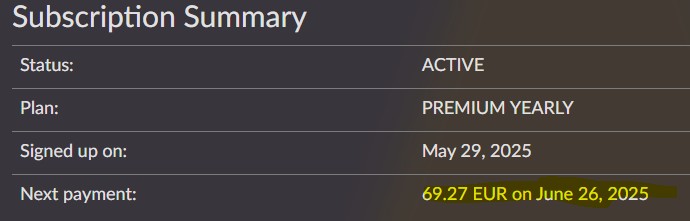
Since yesterday ALL of my Voluimio 4 devices restart every few seconds (using Volumio Premium on a PI 4B since months, the PI Zero 2 W is new). I am not able to listen to music and the interface gets stuck every few seconds. What I have seen is that the next refresh date of my premium account is 2025 this is wrong!
Hi! From the logs I see that the units are crashing because they try to contact a device (Sonos or similar) into your network and the response is malformed.
To fix this:
Try first to restart your network (turn off and on the router
Once done, restart your Volumio devices
If that does not work, try to think which other device you added that might misbehave and restart it
Let us know
A few things do not add up here and I need clarification before drawing any conclusions.
First - 4.084 OTA has been verified working on Pi5 with NVMe boot on multiple systems, including control units that have successfully updated entire OTA sequences through, including 4.028 → 4.084 → 4.089 without issue. So “4.084 breaks Pi5+NVMe” is not a general truth.
Questions:
Actual symptom
You describe “boot loop where the Volumio logo appears” - what exactly happened after the logo appeared?
Did the system reboot repeatedly? Or did it freeze at the logo?
How long did you wait before concluding it was stuck?
Original installation method
How was 4.073 originally installed on the NVMe?
Did you use Install to disk from UI, or did you flash directly to NVMe via USB adapter?
Plugins
What plugins were installed before the update?
Display configuration
Did you ever edit /boot/config.txt, /boot/volumioconfig.txt, or /boot/userconfig.txt?
What display setup - HDMI, DSI, or headless?
You mention you reinstalled by copying image directly via USB-to-NVMe adapter. I hypothesize this may bypass partition alignment that Install to disk enforces - needs verification.
@mchief - “same problem” is not investigation basis. Please confirm: