Hello
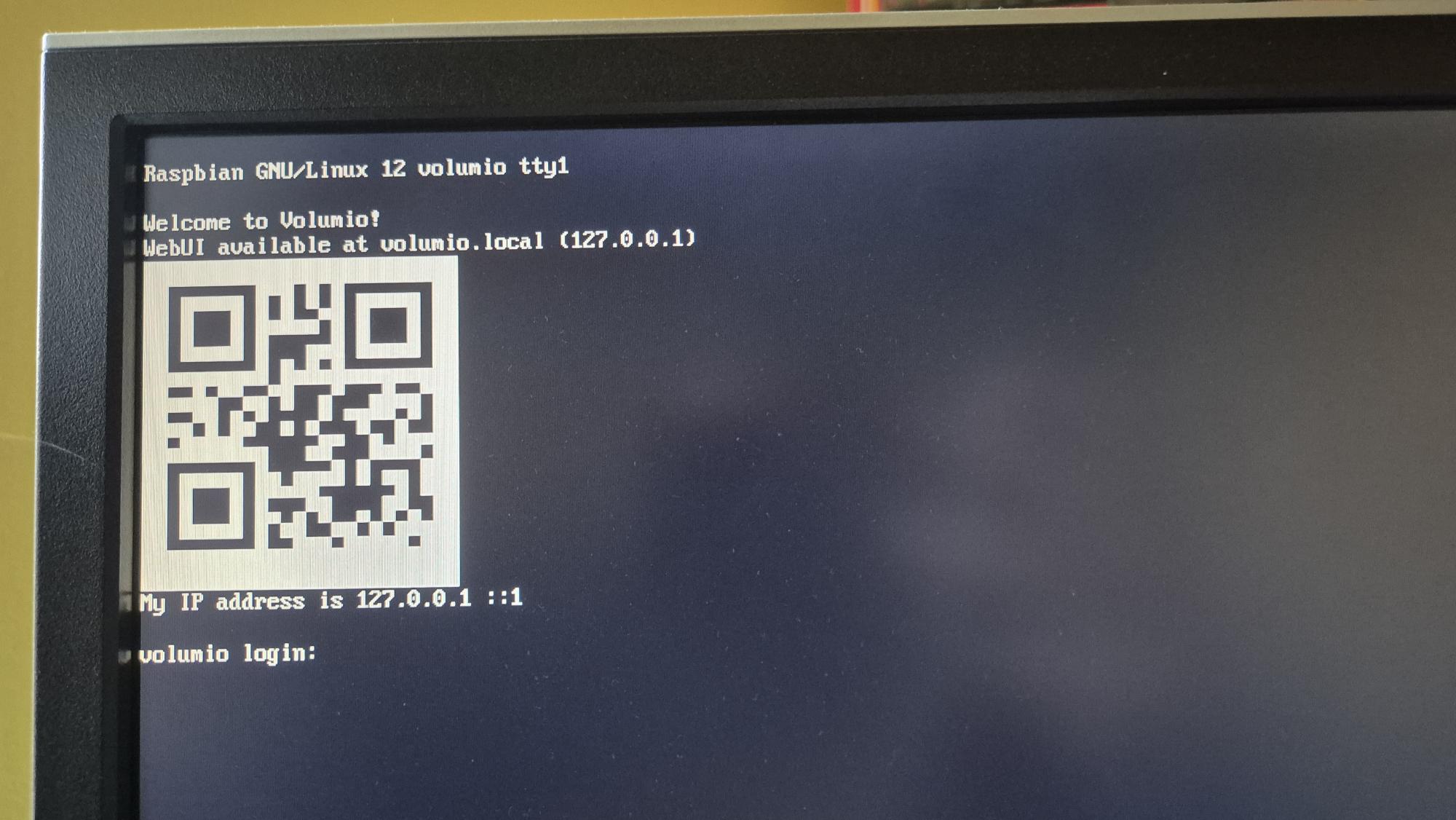
Have been using Volumio 3.xx on the same hardware - Raspberry Pi 3B+ for many years. Last year I re-flashed the 8GB micro SD with version 4.069 and it got stuck on the screen below (showing a QR code and an IP address of 127.0.0.1). Tried 4.073 and 4.084 and they all do the same. Images were downloaded from Volumio.com and flashed successfully with Raspberry Pi imager software. There is no hotspot and if I manually change the Eth0 address from the terminal with ifconfig, the system responds to a ping, but there is no GUI available in a browser - it just times out. Have changed to an official Raspberry Pi PSU as the other one was showing undervoltage on a different system (OctoPrint). Pi also has a HiFiBerry DAC installed.
What can I do from here to get it running?
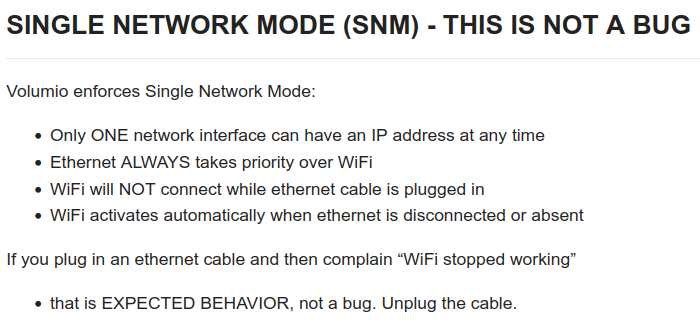
Also, you did not mention how did you flash volumio, etc, etc.
Literally few posts up.
Kind Regards,
Cable now unplugged, system power cycled and still showing the same screen. I originally plugged Ethernet in after the WiFi/Hotspot did not work. I should have added that there is an Edimax WiFi dongle plugged in - it has a blue light on it - but this illuminates after the 127.0.0.1 is displayed.
Test version 4.089 runs smooth, all apps doing fine! Otherwise stable version 4.084 has issues with webradio.
Ludo
Where can I download an image for 4.089?
Ok - you are right (tested short - and have to retest) but after shuting down my Sonso Era 100 it seems to work - see log here:
http://logs.volumio.org/volumio/T42FZPS.html
But the devce is not new - it is in my network since weeks. And there was no update since I added it to the netwerk. The only thing I did yesterday is activating “Hey Sonos”.
And why is Volumio trying to contact the sonos device - I have no sonos plug in or else installed.
-
Actual symptom
It stuck at “please wait to finish startup” and the animation above was continous rebulding
it freeze at that point but the animation was moving on
I was waiting for five minutes and then i powered off and on and the symptom has repeated. -
Original installation method
It was installed the recommended way from the UI.
3.Plugins
Autostart 4.0.4
Peppy Screensaver 3.1.1
Touch Display 3.6.0
Rotary Encoder II 2.2.1
Screensaver was disabled before update as i did it several times before in V 3.x
- Display config
HDMI WIMAXIT 7" 1024 x 600
Settings:
hdmi_force_edid_audio=1
max_usb_current=1
hdmi_force_hotplug=1
config_hdmi_boost=7
hdmi_group=2
hdmi_mode=87
hdmi_drive=2
display_rotate=0
hdmi_cvt 1024 600 60 6 0 0 0
Only the actual working installation was done by a direct image copy with usb-to NVMe adapter.
The the former install was done from the UI (SD install). So you can ignore partiton alignment errors.
Device: Raspberry Pi 5 Model B Rev 1.0 4 GB
NVMe: WD Blue SN580 NVMe SSD 1 TB
SMSL D1 DAC
Ok - as soon I start the sonos device again - the trouble start after a few seconds. So it is no issue with the license - it is an issue with Volumio.
But why is Volumio contacting the Sonos device?
Update: Also removing “Hey Sonos” and Alexa does not help. Sonos on - Volumio dead - Sonos off - Volumio works. But as said - the devices (Volumio and Sonos) are in the network since weeks and no problem until yesterday.
Attached the full log - looks a little bit differnt (the Qobuz failures are gone at the end):
http://logs.volumio.org/volumio/VUyBQdD.html
Hey @becool,
This is progress. The symptom you describe - stuck at “please wait to finish startup” with animation running - indicates kernel booted successfully and HDMI output is working. You can see the screen, which means display is functioning at some configuration.
One critical question remains:
Which file did you place these display settings in?
hdmi_force_edid_audio=1
max_usb_current=1
hdmi_force_hotplug=1
config_hdmi_boost=7
hdmi_group=2
hdmi_mode=87
hdmi_drive=2
display_rotate=0
hdmi_cvt 1024 600 60 6 0 0 0
If these were in /boot/config.txt or /boot/volumioconfig.txt - OTA overwrote them. These files are system-managed and replaced during updates.
If these were in /boot/userconfig.txt - they should have survived.
Based on the format and content, I suspect these were placed in config.txt directly rather than userconfig.txt. If so, this would explain the startup hang - Touch Display plugin attempting to initialize against a display configuration that no longer exists.
For reference, only /boot/userconfig.txt is preserved during OTA. All custom dtoverlay, dtparam, and display settings must go there.
Did you try to connect a keyboard directly to Pi and press “TAB” or “ESC” key to see the output message?
Kind Regards,
Ok - Sonos went to off - but also without this there are a lot of strange things on the PI4B and also the PI Zero 2 W. Here are the logs:
PI4B: http://logs.volumio.org/volumio/3Swv2SV.html
PIZero: http://logs.volumio.org/volumio/2wWroGI.html
Thirst I have noticed (only PI4b): The icon marked red in the ios app is blinking Green/White:
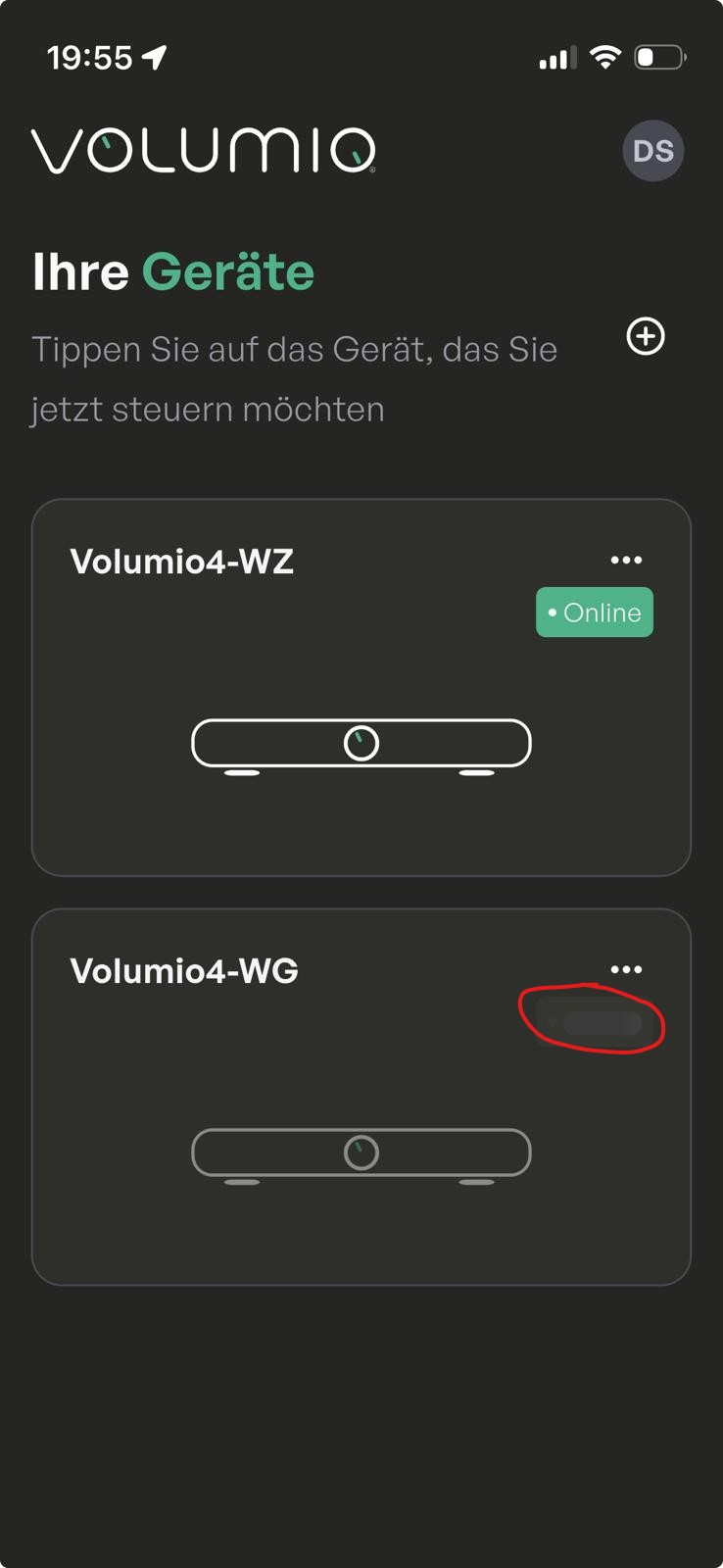
This happens in the same frequency as the following sequnce appears in the log:
Jan 25 19:57:16 volumio4-wg volumio[1160]: info: Received Get System Info
Jan 25 19:57:16 volumio4-wg volumio[1160]: info: CoreCommandRouter::executeOnPlugin: system , getSystemInfo
Jan 25 19:57:16 volumio4-wg volumio[1160]: info: CoreCommandRouter::executeOnPlugin: volumiodiscovery , getThisDevice
Jan 25 19:57:16 volumio4-wg volumio[1160]: info: Discovery: Getting this device information
Jan 25 19:57:16 volumio4-wg volumio[1160]: info: CoreCommandRouter::volumioGetState
Jan 25 19:57:16 volumio4-wg volumio[1160]: info: CorePlayQueue::getTrack 0
Jan 25 19:57:16 volumio4-wg volumio[1160]: info: CoreCommandRouter::executeOnPlugin: network , getCachedIPAddresses
Jan 25 19:57:16 volumio4-wg volumio-remote-updater[759]: Test mode enabled
Jan 25 19:57:16 volumio4-wg volumio-remote-updater[759]: Alpha mode disabled
Jan 25 19:57:16 volumio4-wg volumio-remote-updater[759]: Alpha legacy test mode disabled
Jan 25 19:57:16 volumio4-wg volumio[1160]: info: Update Ready: {“changeLogLink”:“”,“description”:“You’re already on the latest version”,“title”:“No Updates Available”,“updateavailable”:false}
Jan 25 19:57:16 volumio4-wg volumio[1160]: info: CoreCommandRouter::executeOnPlugin: updater_comm , setUpdateMessageCache
Jan 25 19:57:16 volumio4-wg volumio[1160]: info: CoreCommandRouter::executeOnPlugin: my_volumio , getMyVolumioStatus
Jan 25 19:57:16 volumio4-wg volumio[1160]: info: CoreCommandRouter::executeOnPlugin: my_volumio , getMyVolumioStatus
Jan 25 19:57:16 volumio4-wg volumio[1160]: info: CoreCommandRouter::executeOnPlugin: my_volumio , getMyVolumioToken
Jan 25 19:57:17 volumio4-wg volumio[1160]: info: CoreCommandRouter::executeOnPlugin: my_volumio , getMyVolumioStatus
Jan 25 19:57:17 volumio4-wg volumio[1160]: info: CoreCommandRouter::executeOnPlugin: my_volumio , getMyVolumioStatus
Jan 25 19:57:17 volumio4-wg volumio[1160]: info: CoreCommandRouter::executeOnPlugin: my_volumio , getMyVolumioToken
Jan 25 19:57:17 volumio4-wg go-librespot[1537]: time=“2026-01-25T19:57:17+01:00” level=trace msg=“sent dealer ping”
Jan 25 19:57:17 volumio4-wg go-librespot[1537]: time=“2026-01-25T19:57:17+01:00” level=trace msg=“received dealer pong”
Jan 25 19:57:18 volumio4-wg volumio[1160]: info: CoreCommandRouter::executeOnPlugin: my_volumio , getMyVolumioStatus
Jan 25 19:57:18 volumio4-wg volumio[1160]: info: CoreCommandRouter::executeOnPlugin: my_volumio , getMyVolumioToken
Jan 25 19:57:19 volumio4-wg volumio5-onboarding[2843]: time=2026-01-25T19:57:19.578+01:00 level=INFO msg=“authenticated Firebase client” component=volumio/firebase userId=SDgXMYxEcvWoiJ6S0qyRIqG7UHL2 tokenExpiry=2026-01-25T20:57:19.578+01:00
Jan 25 19:57:20 volumio4-wg bluetoothd[731]: src/advertising.c:add_client_complete() Failed to add advertisement: Rejected (0x0b)
Jan 25 19:57:20 volumio4-wg volumio[1160]: info: CoreCommandRouter::volumioGetState
Jan 25 19:57:20 volumio4-wg volumio[1160]: info: CorePlayQueue::getTrack 0
Jan 25 19:57:20 volumio4-wg volumio[1160]: info: Listing playlists
Jan 25 19:57:20 volumio4-wg volumio[1160]: info: Listing playlists
Jan 25 19:57:23 volumio4-wg volumio5-onboarding[2843]: failed to run app: failed to run BLE manager: bluetooth: could not start advertisement: Failed to register advertisement
Jan 25 19:57:23 volumio4-wg systemd[1]: volumio5-onboarding.service: Main process exited, code=exited, status=1/FAILURE
Jan 25 19:57:23 volumio4-wg systemd[1]: volumio5-onboarding.service: Failed with result ‘exit-code’.
Jan 25 19:57:23 volumio4-wg systemd[1]: volumio5-onboarding.service: Scheduled restart job, restart counter is at 44.
Jan 25 19:57:23 volumio4-wg systemd[1]: Stopped volumio5-onboarding.service - Volumio5 Onboarding Server.
Jan 25 19:57:23 volumio4-wg systemd[1]: Started volumio5-onboarding.service - Volumio5 Onboarding Server.
Jan 25 19:57:23 volumio4-wg volumio5-onboarding[2857]: time=2026-01-25T19:57:23.648+01:00 level=INFO msg=“running volumio5-device-gateway” version=9838fecf+CHANGES buildDate=2026-01-16T16:06:14Z
Jan 25 19:57:23 volumio4-wg volumio[1160]: verbose: New Socket.io Connection to localhost:3000 from 127.0.0.1 UA: Go-http-client/1.1 Engine version: 3 Transport: websocket Total Clients: 9
Jan 25 19:57:23 volumio4-wg volumio[1160]: verbose: New Socket.io Connection to localhost:3000 from 127.0.0.1 UA: Go-http-client/1.1 Engine version: 3 Transport: websocket Total Clients: 9
Jan 25 19:57:23 volumio4-wg volumio5-onboarding[2857]: time=2026-01-25T19:57:23.694+01:00 level=INFO msg=“listening for BLE messages” address=D8:3A:DD:28:EB:E8%00
Jan 25 19:57:23 volumio4-wg volumio5-onboarding[2857]: time=2026-01-25T19:57:23.707+01:00 level=INFO msg=“listening for WebSocket messages” address=[::]:7331
Jan 25 19:57:23 volumio4-wg volumio[1160]: info: Received Get System Info
Jan 25 19:57:23 volumio4-wg volumio[1160]: info: CoreCommandRouter::executeOnPlugin: system , getSystemInfo
Jan 25 19:57:23 volumio4-wg volumio[1160]: info: CoreCommandRouter::executeOnPlugin: volumiodiscovery , getThisDevice
Jan 25 19:57:23 volumio4-wg volumio[1160]: info: Discovery: Getting this device information
Jan 25 19:57:23 volumio4-wg volumio[1160]: info: CoreCommandRouter::volumioGetState
Jan 25 19:57:23 volumio4-wg volumio[1160]: info: CorePlayQueue::getTrack 0
Jan 25 19:57:23 volumio4-wg volumio[1160]: info: CoreCommandRouter::executeOnPlugin: network , getCachedIPAddresses
Jan 25 19:57:23 volumio4-wg volumio[1160]: info: CoreCommandRouter::executeOnPlugin: wizard , getShowWizard
Jan 25 19:57:23 volumio4-wg volumio[1160]: info: CoreCommandRouter::executeOnPlugin: system , getShowWizard
Jan 25 19:57:23 volumio4-wg volumio5-onboarding[2857]: time=2026-01-25T19:57:23.716+01:00 level=INFO msg=“BLE descriptor updated” deviceId=6347d8933a04fb0b384825c1ab24c642 deviceName=Volumio4-WG deviceModel=
Jan 25 19:57:23 volumio4-wg volumio5-onboarding[2857]: time=2026-01-25T19:57:23.716+01:00 level=INFO msg=“mDNS descriptor updated” deviceId=6347d8933a04fb0b384825c1ab24c642 deviceName=Volumio4-WG deviceModel=
Jan 25 19:57:23 volumio4-wg volumio5-onboarding[2857]: time=2026-01-25T19:57:23.745+01:00 level=INFO msg=“bootstrapping state” hasInternet=true
Jan 25 19:57:23 volumio4-wg volumio[1160]: info: Received Get System Info
Jan 25 19:57:23 volumio4-wg volumio[1160]: info: CoreCommandRouter::executeOnPlugin: system , getSystemInfo
Jan 25 19:57:23 volumio4-wg volumio[1160]: info: CoreCommandRouter::executeOnPlugin: volumiodiscovery , getThisDevice
Jan 25 19:57:23 volumio4-wg volumio[1160]: info: Discovery: Getting this device information
Jan 25 19:57:23 volumio4-wg volumio[1160]: info: CoreCommandRouter::volumioGetState
Jan 25 19:57:23 volumio4-wg volumio[1160]: info: CorePlayQueue::getTrack 0
Jan 25 19:57:23 volumio4-wg volumio[1160]: info: CoreCommandRouter::executeOnPlugin: network , getCachedIPAddresses
Jan 25 19:57:23 volumio4-wg volumio-remote-updater[759]: Test mode enabled
Q: Why is the system trying to update all the time (the PI4B device is the older - I started here with an Beta version of Volumio 4 a long time ago). And what is Volumio5-onboarding?
Both devices: There is a banner from Volumio3 in the log:
Jan 25 19:50:55 volumio4-wg volumio[1160]: info: -------------------------------------------
Jan 25 19:50:55 volumio4-wg volumio[1160]: info: ----- Volumio3 ----
Jan 25 19:50:55 volumio4-wg volumio[1160]: info: -------------------------------------------
Both devices: a lot of errors like this:
Jan 25 19:53:09 volumio4-wz volumio[1015]: error: Cannot start Volumio Streaming Daemon
Jan 25 19:53:09 volumio4-wz volumio[1015]: error: Failed initialization of streaming services: Error: Error: Command failed: /usr/bin/sudo systemctl restart volumio-streaming-daemon.service
Jan 25 19:53:09 volumio4-wz volumio[1015]: Failed to restart volumio-streaming-daemon.service: Unit volumio-streaming-daemon.service not found.
Jan 25 19:54:09 volumio4-wg systemd[1]: upmpdcli.service: Scheduled restart job, restart counter is at 11.
Jan 25 19:54:09 volumio4-wg systemd[1]: Stopped upmpdcli.service - UPnP Renderer front-end to MPD.
Jan 25 19:54:09 volumio4-wg systemd[1]: Started upmpdcli.service - UPnP Renderer front-end to MPD.
Jan 25 19:54:09 volumio4-wg upmpdcli[2232]: Could not open config: /tmp/upmpdcli.conf
Jan 25 19:54:09 volumio4-wg systemd[1]: upmpdcli.service: Main process exited, code=exited, status=1/FAILURE
Jan 25 19:54:09 volumio4-wg systemd[1]: upmpdcli.service: Failed with result ‘exit-code’.
Bluetooth: On PI4B I get this errors - on PI Zero it works (but on both bluetooth support is disabled):
Jan 25 19:51:59 volumio4-wg volumio5-onboarding[1652]: failed to run app: failed to run BLE manager: bluetooth: could not start advertisement: Failed to register advertisement
And other errors. I do not want to waste your time - but the systems are not running stable at the moment. So how can I help?
I always use in /boot/userconfig.txt
Hi.
I tried to do it according to point 1.
Anyway, with a warm reboot, it won’t boot from USB, but volumio will load from SD. It is loaded from USB during a cold start.
[all]
BOOT_ORDER=0xf14
BOOT_UART=0
WAKE_ON_GPIO=1
POWER_OFF_ON_HALT=0
USB_MSD_DISCOVER_TIMEOUT=10000
USB_MSD_PWR_OFF_TIME=2000
USB_MSD_STARTUP_DELAY=2000
USB_MSD_BOOT_MAX_RETRIES=2
ENABLE_SELF_UPDATE=1
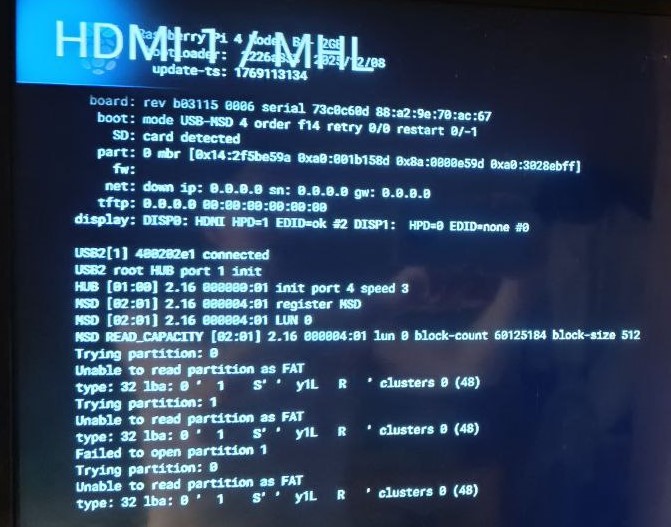
Hey @maxxxmm,
The EEPROM timing parameters confirmed what I suspected - this is a hardware limitation that cannot be resolved through software configuration.
The Raspberry Pi 4 uses the VL805 USB controller chip, which has documented problems with certain USB storage device controllers during warm reboot. Your SanDisk Ultra Fit uses an internal controller that does not properly reinitialize when USB power does not fully cycle.
As I previously shared in my research on this topic, known problematic controllers include:
- JMicron JMS578, JMS580, JMS583
- ASMedia ASM1153, ASM235CM
- Realtek RTL9210, RTL9210B
- VIA VL715, VL716
- SanDisk internal controllers (Ultra Fit, Cruzer series)
Known good adapters that work reliably with Raspberry Pi 4 warm reboot:
- StarTech USB3S2SAT3CB
- Sabrent EC-SS31
- Adapters using ASMedia ASM1153E with firmware 141126 or later (not all ASM1153 - firmware matters)
Your options:
- Replace the SanDisk Ultra Fit with a known compatible USB drive or use an SSD with a StarTech or Sabrent adapter from the list above.
- Accept the limitation - use cold boot (power cycle) when switching to OSMC, use Volumio reboot only when staying within Volumio.
- There is a new USB stick released by Raspberry Pi - however, I have not had a chance to test it yet.
There is no software fix for this hardware incompatibility.
Kind Regards,
Hey @MisterP,
This was previously discussed in this thread:
We need diagnostic logs before we can investigate. The wireless debug log will show exactly what wireless.service decides during boot and why.
- Boot with ethernet cable connected to router
- Check your router’s DHCP client list for Volumio’s IP address
- Access GUI at http://volumio-ip
- Enable wireless debug via SSH:
sudo sed -i 's/DEBUG_WIRELESS=false/DEBUG_WIRELESS=true/' /volumio/.env
- Reboot:
sudo reboot
- After reboot, unplug ethernet cable
- Wait 30 seconds - check with your smartphone for a WiFi network called “Volumio-xxxxx” (the hotspot)
- Plug ethernet cable back in
- Generate log link via http://volumio-ip/dev
- Download wireless.log via SFTP:
- Download FileZilla (or any SFTP client)
- Host: your Volumio IP
- Username: volumio
- Password: volumio
- Port: 22
- Navigate to /tmp/
- Download wireless.log to your computer
- Zip the file on your computer and upload to file transfer service of your choice like https://wetransfer.com or https://catbox.moe
- Share both the log link and the zip file link here
The timestamps must be from the same session so we can correlate events between both logs.
Kind Regards,
Hey @becool,
The screen not showing expected output does not mean the system is not running. Volumio backend may be fully operational - we need logs to see what is actually happening.
Do NOT reboot or power cycle before retrieving logs - /tmp and /var/log are volatile and contents are lost on reboot.
If connected via ethernet:
- From another device on same network, open browser
- Go to http://volumio.local/dev or http://<IP_address>/dev
- Send logs and paste the URL here
If not connected via ethernet:
- Check if Volumio hotspot appears in your WiFi networks on a phone or laptop
- Connect to the hotspot
- Complete network configuration via the setup wizard
- Once connected to your network, go to http://volumio.local/dev
- Send logs and paste the URL here
Until we have logs, we cannot determine what is causing the startup to hang while the animation continues.
Kind Regards,
Hey @LooserDS,
I have completed preliminary analysis of all five log files. The evidence points to a clear cause for your crash loop.
Primary Issue - Multiroom plugin crash on Sonos UPnP 403 response
The crash pattern is consistent across your logs. Example from VUyBQdD.html:
Jan 25 17:58:28 volumio4-wg volumio[1142]: WARNING: FATAL ERROR
Jan 25 17:58:28 volumio4-wg volumio[1142]: Error: upnp: Request failed with status code 403///
Jan 25 17:58:28 volumio4-wg volumio[1142]:     at /myvolumio/plugins/audio_interface/multiroom/node_modules/sonos/lib/services/Service.js:90:25
This crash repeats continuously - over 15 occurrences between 17:58 and 18:09 alone, each followed by volumio.service restart.
The multiroom plugin performs SSDP network discovery. It finds your Sonos Era 100, attempts a UPnP API request to query device capabilities, receives HTTP 403 Forbidden, and crashes because the error is not handled gracefully. The unhandled exception terminates the entire Volumio backend.
Your observation “the only thing I did yesterday is activating Hey Sonos” correlates with Sonos firmware update 85.0 (July 2025) which introduced new security settings affecting UPnP behavior.
Sonos deployed these changes without advance notice to third-party developers:
- Sonos employee Keith confirmed on Reddit: “It was not announced in advance. Definitely aware of how changes like this can cause an unexpected hiccup.”
- Sonos official announcement (A new player update is live! | Sonos Community) states: “Enabling/Disabling them may affect how certain third-party apps or legacy components interact with your system.”
- Sonos now officially describes UPnP as “the unsupported UPnP protocol” that is “no longer actively maintained.”
This is a breaking change that Sonos pushed to devices without warning, affecting all third-party systems that rely on UPnP discovery - including Home Assistant, original Sonos desktop controllers, and evidently Volumio’s multiroom plugin.
Workaround - Check Sonos Security Settings
- Open Sonos App on iOS/Android
- Go to Account menu
- Select Privacy and Security
- Under Connection Security, verify:
- Authentication: OFF (if ON, blocks third-party UPnP requests with 403)
- UPnP: ON
- Guest Access: ON
If Authentication was enabled during “Hey Sonos” activation or a firmware update, this would cause the 403 responses.
Secondary issue - wireless.js CPU consumption
From T42FZPS.html (version 4.089) process list:
root 772 1 99 16:56 ? 00:05:35 node /volumio/app/plugins/system_controller/network/wireless.js start
The wireless.js process is consuming 99% CPU. This issue was addressed in 4.084, but the log shows it persisting in 4.089. Your PI4B is connected via ethernet while WiFi is in “Not-Associated” state. This needs further investigation - please confirm if this is still occurring and we can look into whether the fix regressed.
Additional issues observed
upmpdcli service failure (both devices):
Jan 25 19:50:49 volumio4-wg upmpdcli[755]: Could not open config: /tmp/upmpdcli.conf
The UPnP renderer service cannot start because its configuration file is not being created before the service launches. Restart counter reaches 30+. This prevents UPnP renderer functionality but is not related to your primary crash issue.
volumio5-onboarding BLE failure (PI4B only):
Jan 25 19:51:51 volumio4-wg volumio5-onboarding[1652]: failed to run app: failed to run BLE manager: bluetooth: could not start advertisement: Failed to register advertisement
Restart counter reaches 44. The bluetoothd daemon rejects advertisement registration. You mention bluetooth is disabled - yet volumio5-onboarding still attempts BLE advertising. Since your device is already configured, this failure does not affect normal operation but the service should respect the bluetooth disabled setting.
Answering your questions
“Why is the system trying to update all the time?”
It is not. The log shows:
Jan 25 19:57:16 volumio4-wg volumio[1160]: info: Update Ready: {"updateavailable":false,"title":"No Updates Available"}
This is the iOS app polling for system information on each connection. The response confirms no update is available. Normal behavior.
“What is Volumio5-onboarding?”
A Volumio 4 service (volumio5-device-gateway) handling BLE device discovery for mobile app onboarding, WebSocket communication on port 7331, mDNS device advertising, and Firebase authentication. It allows new devices to be configured via Bluetooth. The service failing on your already-configured device does not affect playback.
“Why is Volumio contacting the Sonos device?”
The multiroom plugin includes network discovery using SSDP protocol. It automatically discovers all UPnP devices on your network. When it finds your Sonos Era 100 and queries it, Sonos returns 403 Forbidden due to their recent security changes, and the plugin crashes.
“Volumio3 banner in log”
Volumio 3 and Volumio 4 share the exact same backend codebase, reason of which was communicated to the community more times than I can count. The “Volumio3” banner in logs is expected - your system is running Volumio 4.089.
Actions to take
- Check Sonos security settings as described above
- After adjusting Sonos settings, reboot your Volumio devices
- Submit new logs if crashes continue
- Confirm if wireless.js CPU issue persists - this needs investigation
The upmpdcli and volumio5-onboarding issues are separate problems that should be addressed, but they are not causing your crash loop.
Kind Regards,
Small Print:
I do not play blame games and not looking for problems where there isn’t any. Sticking to facts and evidence supported claims only.
OK, next time (i do not hope so) i can do this.  Now the NVMe is overwritten.
Thank you very much
@nerd and all the other users here: This is the best help I have got from an community forum. This ansewer is more than perfect - Thanks!
So - I hope I can give feedback and forget nothing. Thirst the logs:
Pi4B: http://logs.volumio.org/volumio/oAHYyb6.html
I have to say that I also did a fresh install of the newest stable version yesterday - because I started with this device during the beta test. And - see the log - a lot of the errors and problems are gone - this is also the case for the loop with the blinking Online icon in the app. So it seem that the upgrading process did something wrong.
PIZero: http://logs.volumio.org/volumio/2N9mj7u.html
Sonos: This logs are after changing the Sonos setting as written above and a fresh restart. On my Sonos device all three were off. Changing it to your settings solved the problem → Thanks
wireless.js CPU consumption: Sorry - I do not know what I should confirm or check here. How can I see if it uses 99%? The Pi4B is on ethernet with wifi disabled in the GUI → So could this also a problem from the updates of this device? The PIZero is only on wifi
upmpdcli service failure (both devices): I have disabled UPNP on both devices - could this be the cause? If not - which function is affected by this problem?
volumio5-onboarding BLE failure (PI4B only): Ok → means here is nothing to do for me - you must fix this?
Why is the system trying to update all the time?: You can see that this sequence loops on the PI4B every few seconds - in the same frequnency the Online button in the app is flashing. I had this after every reboot - and it looped forever. Gone since the fresh install (I think).
Thanks!