Ok - here is the wireless Log:
https://oc.bachmann.info/index.php/s/TPCQ3HpJRRgmNXr
Hey @LooserDS,
The wireless.log reveals the actual problem - it is NOT Single Network Mode blocking WiFi. The WiFi radio is RF-kill blocked:
SIOCSIFFLAGS: Operation not possible due to RF-kill
This appears at lines 30, 110, and 149 - every attempt to bring wlan0 up fails due to RF-kill.
The boot log showed rfkill_unblock ran and reported everything unblocked, but something is re-blocking it afterward.
Please run via SSH:
sudo rfkill list
And:
dmesg | grep -i rfkill
Post both outputs here.
Kind Regards,
As a happy (reasonably) Volumio user and occasional contributer to this forum,it seems to me that part of the problem with the WiFi connection problem arises because new users are presented with version 4.073 from the outset. New users are not likely to be familiar with the test channel and therefore not able to access later beta versions. This thread can be confusing and, at times, misleading; especially to novices. Maybe a .txt “read me” file included in the initial Volumio download package with more detailed installation advice/instructions would help.
4 Likes
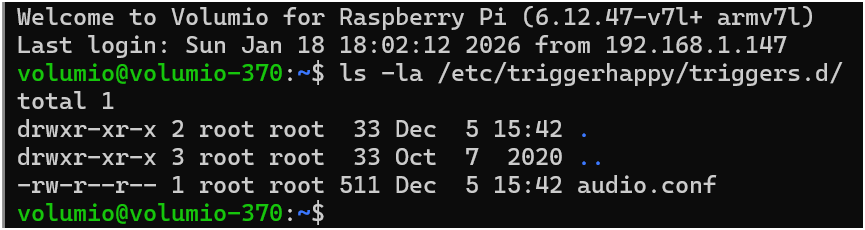
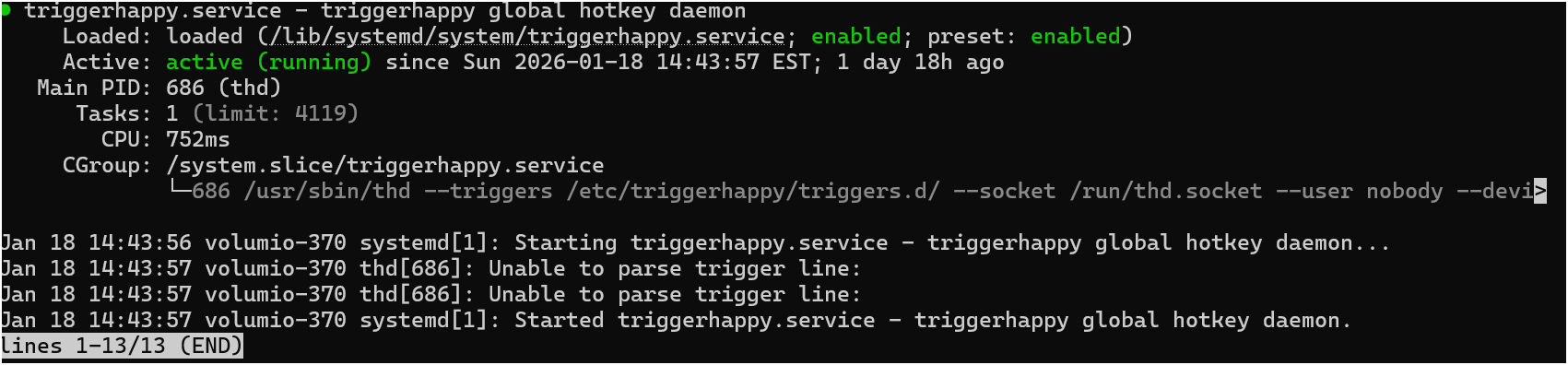
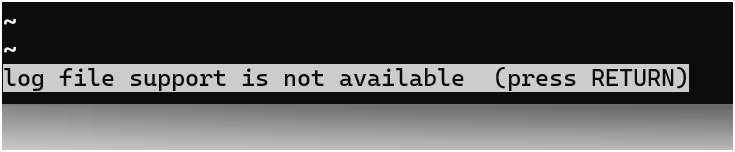
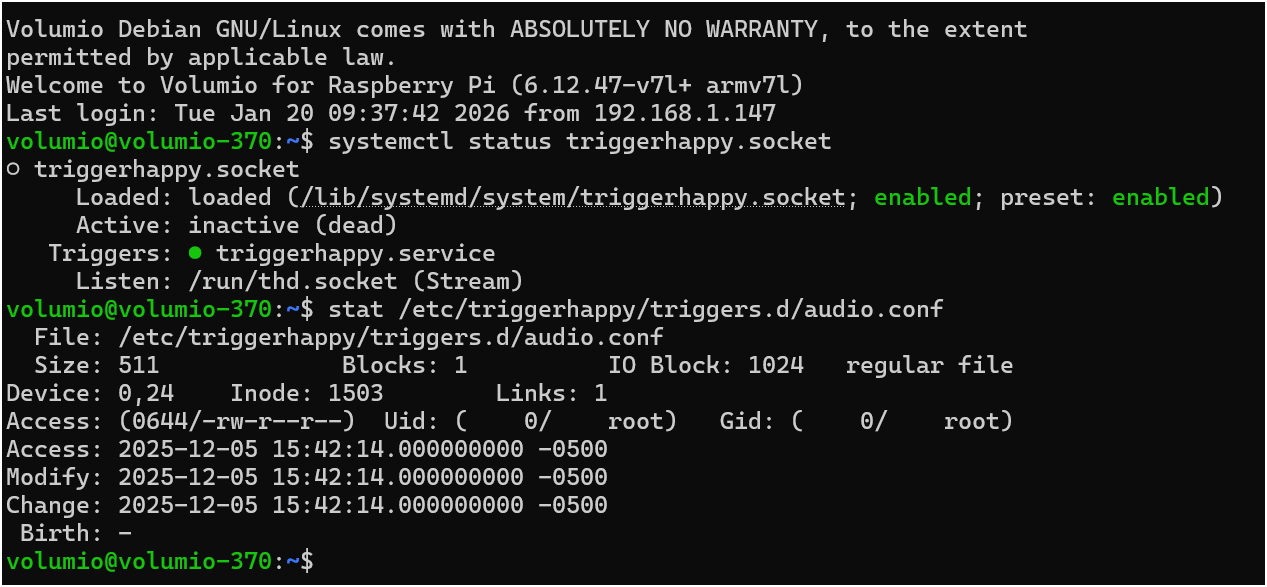
@nerd I did the last two again and got the following:
Hey @backenst,
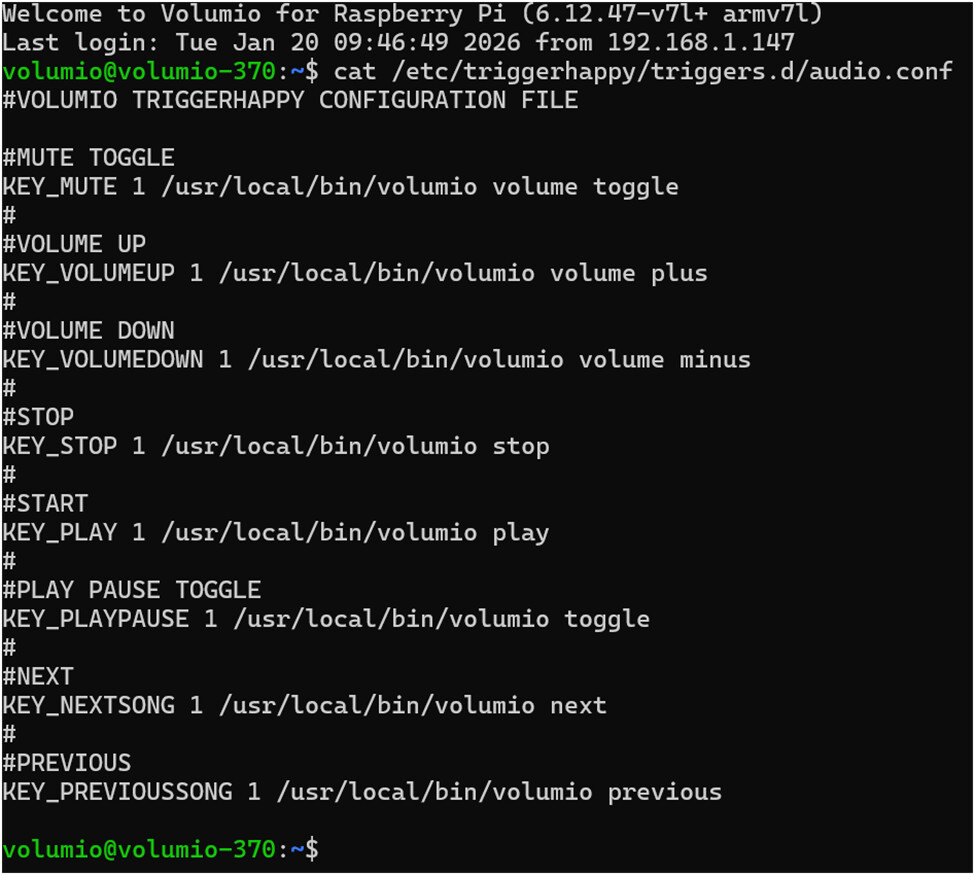
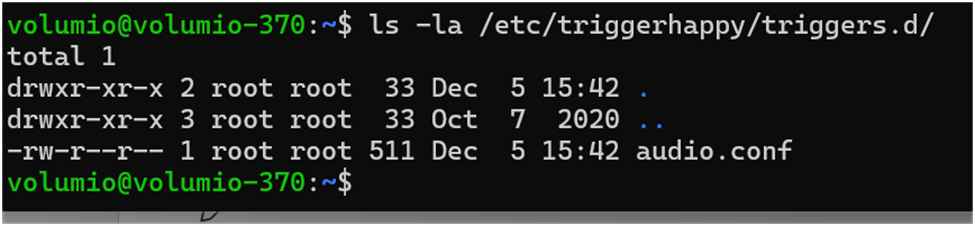
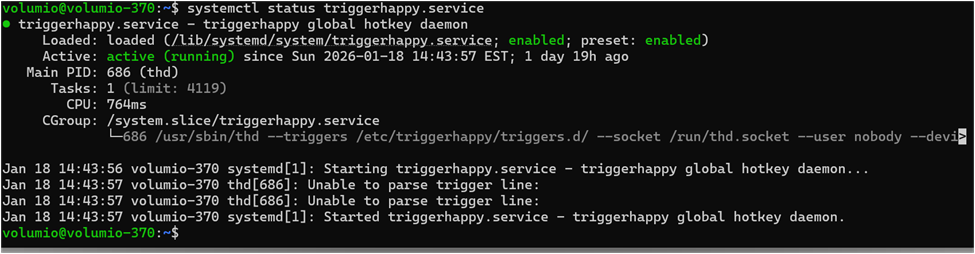
The diagnostics got mixed up. When running commands like thd --dump, you need to press Ctrl+C to exit before running the next command. When running systemctl status, press q to exit the pager.
Please run these tests again, one at a time:
cat /etc/triggerhappy/triggers.d/audio.conf
(should show text content, press Ctrl+C if it hangs)
ls -la /etc/triggerhappy/triggers.d/
systemctl status triggerhappy.service
(press q to exit)
systemctl status triggerhappy.socket
(press q to exit)
The stat output you provided shows the file is 511 bytes and was last modified 2025-12-05 - this is the Volumio build date, meaning the file has never been altered. It should contain the default key mappings.
Once you confirm the file content displays correctly with cat, restart the service:
sudo systemctl restart triggerhappy
Then re-test your FLIRC remote.
Kind Regards,
Hey @Newbiggen,
Valid observation. The gap between 4.073 (stable) and 4.084 (test) creates a real UX problem for new users who have no reason to know about test channel builds or how to access them.
The thread length compounds this - 100+ posts is daunting for someone just trying to get WiFi working on a fresh install.
A readme file or improved first-run guidance would help. That feedback belongs with Volumio Core Team since they control the stable release cycle and onboarding documentation.
From my side, I can only maintain the test builds and document the path to them. Stable release timing is outside my scope.
@volumio - FYI
Kind Regards,


FYI, the version 4.084 has been promoted as stable, soon it will be available for download at volumio.com
in the meanwhile, it can be downloaded from the following links:
https://updates2.volumio.org/pi/volumio/4.084/Volumio-4.084-2025-12-25-pi.zip
https://updates2.volumio.org/x86_amd64/volumio/4.084/Volumio-4.084-2025-12-25-x86_amd64.zip
This version should solve most of the problems related to WiFi setup reported by several users
4 Likes
@nerd I think I figured it out. I am trying to do this using the new Remoto. I just tested trying this with the Preciso off and when I did that THEN it worked! I could Fast Forward, Pause and all of that was possible as long as the Precisio was off. But obviously I need the Preciso to be on and want the Remoto to control the Preciso (for certain commands) and the pi4 (for other commands) at the same time. So the Flirc is working fine as long as the Precisio is off.
UPDATE: It is now working but a little clunky because i have the Pi4 directly on top of the Preciso but I am able to run both devices using the Remoto and it is pretty awesome.
Thank you @Nerd for all your help on this. Really appreciate it. Part of why Volumio is so fun, the DYI aspects of it. Also I am on 4.084 now as it just came out and installed.
1 Like
Hey @backenst,
Good news - this is a confirmed regression and the fix is now submitted.
The problem: triggerhappy runs as user “nobody” which is not a member of the “input” group. Since /dev/input/event* devices have permissions 660 (root:input), triggerhappy cannot read any input events. This affects all USB HID devices - FLIRC, keyboards, remotes, DACs with HID controls.
Last known working build was 4.062 pre-release.
Workaround (immediate fix for your system):
sudo usermod -a -G input nobody
sudo systemctl restart triggerhappy
No reboot required. Your FLIRC should work immediately after running these commands.
Note: This change persists across reboots but will be lost on factory reset. Once the fix reaches the build system, a factory reset will be required before OTA update can apply it - the build script only runs during fresh image installation, not during OTA.
PR submitted: fix: add nobody user to input group for triggerhappy by foonerd · Pull Request #344 · volumio/volumio-os · GitHub
Thanks for reporting this and providing the diagnostic information - it was essential for tracking down the root cause.
@volumio - FYI
Kind Regards,
2 Likes
Thanks - here is the output:
volumio@volumio4-wz:/tmp$ sudo rfkill list
0: hci0: Bluetooth
Soft blocked: yes
Hard blocked: no
1: phy0: Wireless LAN
Soft blocked: yes
Hard blocked: no
volumio@volumio4-wz:/tmp$ dmesg | grep -i rfkill
volumio@volumio4-wz:/tmp$ dmesg | grep -i rfkill
volumio@volumio4-wz:/tmp$
Shouldn’t Volumio be updating the image on their main page at least somewhat regularly, especially considering the significance of the issue?
As a customer this really smacks of “DGAS”…
Hey @LooserDS,
Confirmed. Both WiFi and Bluetooth are soft blocked. The boot script unblocked them, but something re-blocked them afterward.
Run via SSH:
sudo rfkill unblock all
rfkill list
Then immediately try enabling WiFi in the GUI.
If it works, something running after boot is re-blocking the radios. If it fails again, post the new rfkill list output and /tmp/wireless.log
Kind Regards,
a “test” image is promoted as “stable” and published on the website after an extensive QA test.
sometimes performing QA takes a bit more than usual, especially during holidays period.
anyhow, the version 4.084 has been promoted as stable a few minutes ago, please see my previous post
Ok - after this I am able to activate Wifi and it also stays on after a reboot. But - when I disconnect the Ethernet cable there is no connection to Wifi and also a hotspot gets not visible. After connecting the Ethernet cable again I can connect via Ethernet anf the Wifi in the settings stays enabled.
Here is the link to the log with Debug enabled:
https://oc.bachmann.info/index.php/s/Rkbc5wrCgZMp8ir
rfkill list shows no block.
Hey @LooserDS,
RF-kill issue seem better - no more blocking errors in the log.
The new log shows every Single Network Mode transition reports ethernet as “connected”. There is no transition showing ethernet disconnected, which is what would trigger WiFi connection or hotspot fallback.
Hypothesis: The W5500 is not reporting carrier loss when the cable is unplugged. Volumio never sees ethernet as disconnected, so it never activates WiFi.
To verify, run these commands while ethernet cable is unplugged:
cat /sys/class/net/eth0/carrier
cat /sys/class/net/eth0/operstate
ip link show eth0
sudo ethtool eth0
If carrier shows “1” and operstate shows “up” with no cable connected, the W5500 driver or hardware does not support link detection. That would explain why WiFi never activates - Volumio thinks ethernet is still available.
Note: You will lose SSH access when you unplug the cable. Either run the commands via serial console, or run them with cable connected, unplug, wait 30 seconds, reconnect, then check dmesg for any link state changes:
dmesg | grep -i eth0
Kind Regards,
Ok - other idea. When I remove the w5500 line from the userconfig.txt it should also trigger WiFi because no Ethernet is available - right?
Hey @LooserDS,
Removing the dtoverlay=w5500 line from /boot/userconfig.txt and rebooting would disable the W5500 entirely. With no ethernet interface present, Volumio should fall back to WiFi or start the hotspot.
This would confirm WiFi and hotspot work when ethernet is absent.
However, the carrier detection data is still needed. If the W5500 does not report link state changes, you will face the same problem whenever the ethernet cable is unplugged during normal operation - Volumio will not switch to WiFi because it still believes ethernet is connected.
Both tests provide different information:
- Removing overlay: Confirms WiFi/hotspot work in isolation
- Carrier detection commands: Reveals whether W5500 supports link detection
If W5500 lacks link detection, your options would be:
- Always keep ethernet cable connected
- Disable Single Network Mode (allows both interfaces active simultaneously)
- Use only WiFi (remove overlay permanently)
The carrier behavior determines which solution is appropriate for your use case.
Kind Regards,
Hi.
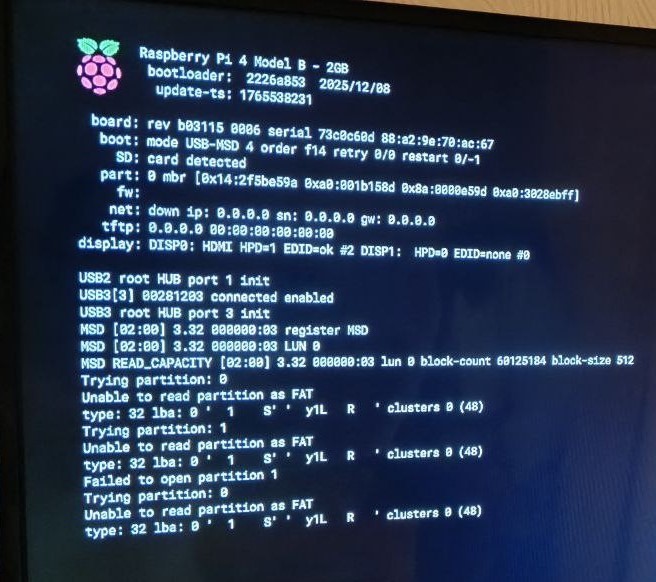
Volumio 4.073
volumio@volumio:~$ vcgencmd bootloader_version
2025/12/08 19:23:42
version 2226a853bb9f5fd80392e3a4a89e457aeca88008 (release)
timestamp 1765221822
update-time 1765538231
capabilities 0x0000007f
volumio@volumio:~$ vcgencmd bootloader_config
[all]
BOOT_UART=0
WAKE_ON_GPIO=1
ENABLE_SELF_UPDATE=1
BOOT_ORDER=0xf14
NET_INSTALL_AT_POWER_ON=1
volumio@volumio:~$ cat /proc/cpuinfo | grep Revision
Revision : b03115
volumio@volumio:~$
USB SanDisk Ultra Fit 32 Gb