Volumio 4 Feedback Thread

Using Version 4.089

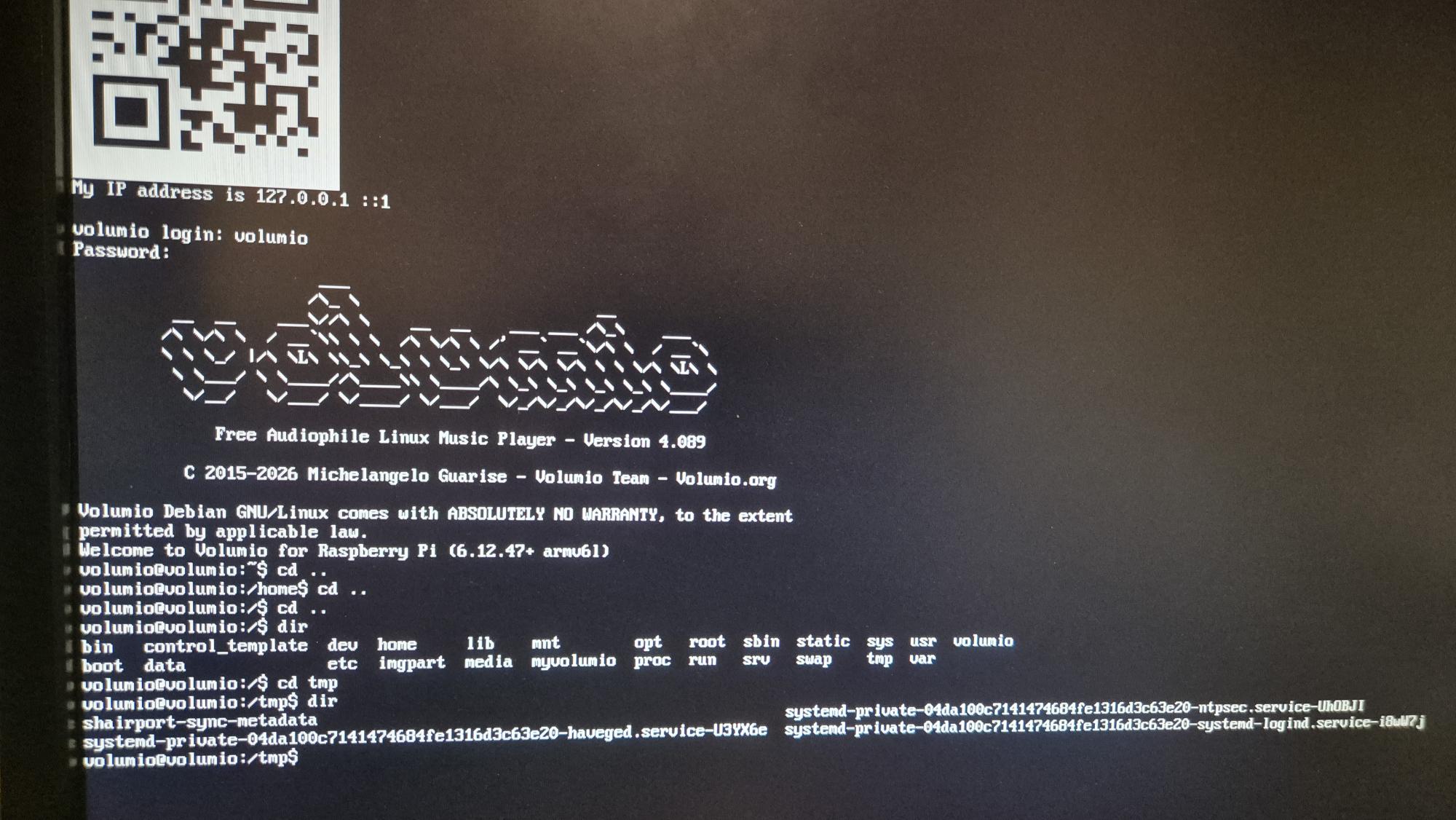
Wireless hotspot did not appear, even after several reboots.

Have enabled wireless debug with the command

sudo sed -i ‘s/DEBUG_WIRELESS=false/DEBUG_WIRELESS=true/’ /volumio/.env

Enabled SSH using raspi-config and was able to connect using FileZilla after setting up ethernet with ifconfig. Navigated to tmp directory but only the directories shown are present and they are all empty.

With network cable plugged in volumio.local appears on the network and shows port 80 as open. Trying the IP address from a browser show a refused connection.

Ethernet cable removed and system rebooted, no hotspot and no wireless activity is shown.

Hey @MisterP,

Several things in your screenshot do not match a clean Volumio installation.

Red flags observed:

  1. Kernel shows “6.12.47+ armv6l” - Pi 3B+ should show armv7l. I need to check this carefully.

  2. No wireless.log exists in /tmp despite enabling debug - the wireless.service either did not run or crashed before logging.

  3. You wrote “Enabled SSH using raspi-config” - SSH on Volumio is enabled via the GUI at http://volumio.local/dev, not raspi-config.

  4. 127.0.0.1 persists even with ethernet connected at boot - DHCP is not functioning.

These symptoms point to the flashing process.

Please describe exactly what you did:

  1. Where did you download the Volumio image from? (exact URL)
  2. In Raspberry Pi Imager, after selecting the image and storage, did a dialog appear asking about “OS customisation settings”?
  3. Did you click “EDIT SETTINGS” or configure anything (hostname, WiFi, SSH, username) before writing?
  4. Did you select a specific Raspberry Pi model in the Imager?

The answers will determine next steps.

Kind Regards,

Hey @LooserDS,

Thank you for the kind words and the follow-up logs. I have analyzed both new logs and can confirm the status of each issue.


Sonos UPnP 403 crash - RESOLVED

Both logs show zero Sonos 403 errors and zero FATAL ERROR entries. Changing the Sonos security settings resolved the crash loop. Your devices are now stable. This also caught an eye where it should and fix is being implemented - no ETA.

wireless.js - CPU Consumption

From oAHYyb6.html process list (PI4B, ethernet with WiFi disabled in GUI):

root 831 1 60 19:34 ? 00:08:58 node /volumio/app/plugins/system_controller/network/wireless.js start

Breaking down this process listing:

  • root - user running the process
  • 831 - process ID (PID)
  • 1 - parent process ID (PPID=1 means direct child of systemd/init)
  • 60 - CPU utilization percentage at snapshot time
  • 19:34 - process start time
  • ? - no controlling terminal (daemon process)
  • 00:08:58 - cumulative CPU time consumed (8 minutes 58 seconds)
  • node … wireless.js start - the command

The concerning values: 60% CPU utilization at snapshot, and 8 minutes 58 seconds of cumulative CPU time since boot at 19:33. This indicates sustained high CPU consumption. As every snapshot, this may be incidental.

From 2N9mj7u.html process list (PI Zero 2W, WiFi connected):

root 565 1 46 19:32 ? 00:07:46 node /volumio/app/plugins/system_controller/network/wireless.js start

PI Zero 2W shows 46% CPU utilization and 7 minutes 46 seconds cumulative CPU time.

PI4B shows elevated CPU for wireless.js despite WiFi being disabled in the GUI. The fix implemented in 4.084 may have regressed or may not cover this specific scenario. This needs further investigation.

To check current CPU usage, run via SSH:

top -b -n 1 | grep wireless.js

volumio5-onboarding BLE failure - RESOLVED

The fresh install resolved this issue. The volumio5-onboarding service is no longer present in the PI4B process list, and no BLE advertisement failures appear in the new log. Nothing further required from you.

Update polling / Online icon flashing - RESOLVED

You confirm this issue is gone since the fresh install. The upgrade process from beta appears to have left the system in an inconsistent state. Fresh install resolved it.

Summary

  • Sonos crash loop: RESOLVED by changing Sonos security settings
  • volumio5-onboarding BLE failure: RESOLVED by fresh install
  • Update polling / flashing icon: RESOLVED by fresh install
  • wireless.js CPU: Still elevated on PI4B (60%) - needs investigation

Kind Regards,
1 Like

Hello - “top -b -n 1 | grep wireless.js” on the PI4B returns - nothing:

Welcome to Volumio for Raspberry Pi (6.12.47-v7l+ armv7l)
volumio@transportds-wg:~$ top -b -n 1 | grep wireless.js
volumio@transportds-wg:~$

Also on the PiZero this command returns the same - nothing.

But I saw that the process shairport-sync is running - but I have disabled shairport. Is ths correct?

@nerd Many thanks for your response.

The URL I used was this one:

In Raspberry Pi imager, I was selecting the device type, Rapsberry Pi 3, and then either a custom image or the volumio image under the Media Player OS menu. I did not edit any customisation settings.
To check there were no issues caused by the DAC, I removed the system from the case and detached the DAC from the Pi board. It was at this point I realised I had made a fundamental error. The Rasperry Pi B+ was not a version 3(B+), but was a version 1.2(B+). I checked the original Volumio News release from November 2025 and can see that support for Raspberry Pi 1 and Zero has been stopped.
I have since re-flashed the SD card and am now back to a fully working system running Volumio 3.886.
I should have checked the version of the Pi hardware, but in my haste I overlooked it and assumed it was the same hardware as the other Pi I have running OctoPrint.
Many thanks for your support.

How the hell i enter this plugin?
And why SSH doesn’t get enabled in Volumio 4?

Go to volumioaddress/dev

Select enable test plugins, then you should see it in your plugins menu.

Also enable ssh in the /dev screen. It’s always off by default.

Maybe check the instructions above and ask more politely next time.

lol you are right, I am very very sorry, I am not rude in general, but I had so many issues getting this Volumio 4 alive on RPI 5 that… Anyway.
This is the problem, I know very well the /dev thing, works like a charm in Volumio 3 (i have 4 devices with subscription). In this thing nothing happens. I press the SSH “ENABLE” button and nothing happens. To go to EEPROM config do I go to some special menu or URL or it should be available through normal items in menus…

EDIT: Changed browser from Firefox to Chrome and I see the menus now!!
SSH still doesn’t work, I ll open the case on other thread

@alexopth1512

Where did you download the image from?

Official site

And with official site you mean volumio.com?
As you’re one of the 1st to mention it’s not working, so i guess something else is wrong.

  • You enabled SSH on <your-IP-Address>/dev
  • You try to connect via putty or ?

Once you have logged in to Volumio, the eeprom config plugin is in the plugin store.

Yes volumio.com
Yes enabled on /dev
Worked the EEPROM plugin, everything good!
Yes with putty. Getting “connection refused”, meaning TCPIP stack answers that SSH service is not running

What does happen if you run from cmd:
ssh volumio@<your-ip-address>

if it errors out again, reboot and try again. If it still errors out post the log

error: Cannot enable SSH service: Error: Command failed: /usr/bin/sudo /bin/systemctl start ssh.service && /usr/bin/sudo /bin/systemctl enable ssh.service
Job for ssh.service failed because the control process exited with error code.
See “systemctl status ssh.service” and “journalctl -xeu ssh.service” for details

@alexopth1512,

This discussion has no relevance to the EEPROM plugin functionality.

Moved to the generic Volumio v4 thread.

Kind Regards,

@alexopth1512,

Here is what we need from you:

  1. Device and storage - What hardware are you running Volumio on? Is it booting from SD card, SSD, or USB?

  2. Volumio version - The exact version number. You can find this in Settings, then System. It looks like “4.567” or similar.

  3. Log link - This is the most important part. Go to http://volumio.local/dev in your browser, click “Send,” and paste the URL it gives you here.

  4. Problem description - What happened, what you expected to happen, and any steps that trigger the issue.

  5. Exact flashing steps, one after another, skip nothing, no matter how small it may seem.

There is a helpful guide that explains all this in detail:

Take your time reading through it. Once you reply with those details, this community can actually dig into what is going wrong.

Kind Regards,

  1. RPI 5 2GB. SD card
  2. Just updated to 4.094 to see if alpha update helps
  3. Check that
    Starting ssh.service - OpenBSD Secure Shell server…
    Unable to load host key: /etc/ssh/ssh_host_rsa_key
    Unable to load host key: /etc/ssh/ssh_host_dsa_key
    Unable to load host key: /etc/ssh/ssh_host_ecdsa_key
    sshd: no hostkeys available – exiting
  4. Don’t bother I ll try to reflash tomorrow
    5.http://logs.volumio.org/volumio/DKagGCr.html

reflashed downloading latest image and now everything works

… and thank you…

1 Like

Hello everyone (I’m using Google Translate),
Installation: Volumio on Raspberry Pi 4 B Allo Digione
Volumio 4.084
I’m using Audirvana to send the stream to Audirvana.
My PC and my Raspberry Pi have static IP addresses.
Since the Volumio update last week, Audirvana has been having trouble finding Volumio.
I have to either restart everything or turn off UPnP (I followed the tip I found on the forum) to get Volumio working again in Audirvana.
Is this because with the new version 4 of Volumio, the Raspberry Pi 4 takes much longer to boot and UPnP goes into standby mode (?), a problem I didn’t have with the previous version 4 before the update?