Hello, same problem tonight, resolved after disabling and re-enabling UPnP.
Logs:
UPNP false
http://logs.volumio.org/volumio/fRLWDaj.html
Hello, same problem tonight, resolved after disabling and re-enabling UPnP.
Logs:
UPNP false
http://logs.volumio.org/volumio/fRLWDaj.html
I’m seeing a misalignment between touch input and the underlying display with v4.095. The problem does not seem to exist in v4.084.
Hardware:
Test:
At this point all seems well. The cursor tracks the touch points perfectly. In a remote shell window:
volumio@volumioaf:~$ DISPLAY=:0.0 xrandr --query
xrandr: Failed to get size of gamma for output default
Screen 0: minimum 800 x 480, current 800 x 480, maximum 800 x 480
default connected 800x480+0+0 0mm x 0mm
   800x480        0.00*
Now the the cursor appears at the same Y coordinate as the touch point, but some distance to its right. Toward the left edge of the screen the offset approaches zero, but in increases as X increases, to nearly 50 pixels approaching the right edge. Remote shell again:
volumio@volumioaf:~$ DISPLAY=:0.0 xrandr --query
Screen 0: minimum 320 x 200, current 848 x 480, maximum 7680 x 7680
HDMI-1 connected primary 848x480+0+0 (normal left inverted right x axis y axis) 0mm x 0mm
   1024x768      60.00
   800x600       60.32    56.25
   848x480       60.00*
   640x480       59.94
HDMI-2 disconnected (normal left inverted right x axis y axis)
DSI-1 connected 800x480+0+0 (normal left inverted right x axis y axis) 0mm x 0mm
   800x480       60.03*+
A phantom HDMI-1 connection seems to have appeared, overlaid on DSI-1, and the touch input is mapped to it (or the combination of the two, for the same effect), mapping to 848x480+0+0 rather than 800x480+0+0 as it should.
Hello,
I am a new user, currently learning Volumio, and so far I really like it.
However, I have encountered a problem that seems to be the same as the one discussed in this thread: /74379/407
(Sorry, as a new user I allowed only two links in this post…)
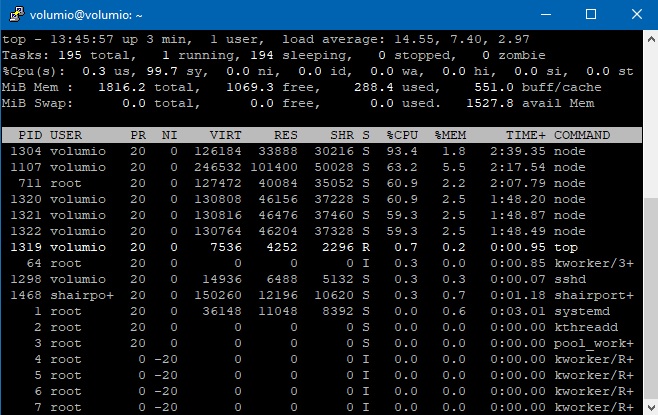
After booting, I experience near full CPU load for about 5 minutes. This slows down the loading of plugins and the entire system.
Details:
-Raspberry Pi4B, USB boot, wired network, Volumino 4.084
-It does this even after a clean install
-I did not add media sources, no database indexing
-I tried USB3 NVME drive and USB3 card reader as boot device
-I tried booting from a USB2 port
-I tried with and without HDMI monitor
Always the same result:
About 1:40 after power-up, Live Log indicates Boot completed, but the top command shows near full CPU load until about 5:20. After that, everything returns to normal, about 1% load idle.
Here is the log created during the full CPU load phase:
http://logs.volumio.org/volumio/B2IFOzp.html
This log was created after the system had settled into its usual state:
http://logs.volumio.org/volumio/hRHmobI.html
Here is a screenshot of the top command.
Thank you!
Hi @Vaclav
I don’t think high CPU load for the first 5 minutes is anything too unusual, as long as it calms down after, which yours does.
There has been some work on lowering CPU use recently, but that might only be available if you update channel selection to ‘Test’ in ipaddress/dev
Hello everyone,
Immediately after upgrading to version 4.094
An error message appeared:
“Could not stream to the selected output device…” Output device is Hifi Berry Digi+Pro, worked fine before the upgrade.
http://logs.volumio.org/volumio/5PRG3jP.html
Am I doing right by posting in this thread or should I post it somewhere else?
Regards Dmitry
@Dmitry_Tektonidi from your log
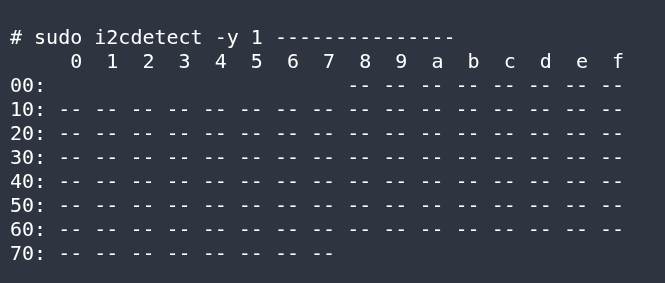
the RPI cannot find the WM8804 of your HAT on the I2C bus
please try to remove power, wait 30 seconds and apply power again
if it still doesn’t work, it’s most probably a HW issue
Hi All,
Is anybody able to find and use the Bluetooth plugin that lets you send audio from Volumio to Bluetooth speakers mentioned on the Volumio 4 announcement post (Volumio 4 is Here: A Year in the Making, Built for What's Next - Volumio)?
Thanks!
Hey @rabuchanan,
Good report - the xrandr comparison between versions is useful. Before I can investigate further, I need the following.
Please provide a log link from http://volumio.local/dev with v4.095 running and the issue present.
Current contents of these files:
cat /boot/userconfig.txt
cat /boot/cmdline.txt
cat /proc/cmdline
Display connector status:
cat /sys/class/drm/card1-HDMI-A-1/status
cat /sys/class/drm/card1-HDMI-A-2/status
cat /sys/class/drm/card1-DSI-1/status
Driver initialization sequence:
dmesg | grep -i "hdmi\|dsi\|hotplug\|vc4\|drm" | head -40
Also confirm: is anything physically connected to either HDMI port on the Pi 4B? Cable, adapter, cap, anything at all?
And which version of the Touch Display plugin is installed?
Kind Regards,
Hey @Mimibreizh,
Thank you for providing both logs - that is exactly what is needed for a proper comparison.
Your system: Raspberry Pi 4B, Volumio 4.084, Allo DigiOne, WiFi on Livebox-ECF0_5GHz (192.168.1.100), Audirvana on PC at 192.168.1.140.
What the logs show:
Both logs confirm upmpdcli (the UPnP renderer that Audirvana connects to) takes multiple attempts to start at boot. This is expected - it depends on the Volumio backend to create its configuration file in /tmp, and /tmp is empty at every boot. Once the backend is ready, upmpdcli starts and is listening. This is normal behaviour and not a bug.
The problem is that by the time upmpdcli is fully running, Audirvana has already completed its UPnP device discovery scan and found nothing. Audirvana does not continuously re-scan for new devices, so it misses the renderer that came online late.
Your working log confirms exactly this - after toggling UPnP off and back on, upmpdcli restarts cleanly, sends a fresh SSDP advertisement, and Audirvana picks it up immediately. The log shows 11 active connections from your PC to the renderer after the toggle, versus zero before.
To answer your specific question: yes, Volumio 4 has a longer startup sequence than previous versions. The underlying operating system moved from Debian Buster to Debian Bookworm with a significantly newer kernel (6.12.x), and the boot process includes additional initialisation steps. This means the window where upmpdcli is not yet available is longer than before, making discovery timing failures with Audirvana more noticeable.
Your workaround of disabling and re-enabling UPnP is the correct approach and the most reliable solution available at this time.
Additional observations from your logs not related to the UPnP issue:
wireless.js is consuming significant CPU (99% in the first log, 69% in the second). This is a known issue being worked on and does not directly cause the Audirvana discovery problem, but it does contribute to slower system responsiveness after boot.
“setdatetime-helper: all HTTPS Date fallbacks failed” appeared at boot - this is a transient issue when the network is not yet available for time synchronisation. It resolves once the connection is established.
The MyVolumio “USER_NOT_FOUND” and “DEVICE_NOT_FOUND” errors indicate no active MyVolumio subscription. These are harmless if you are not using MyVolumio features.
Kind Regards,
Hey @breakthru,
Good question. The Volumio 4 announcement post does mention a plugin for sending audio from Volumio to Bluetooth speakers. However, this plugin is not currently visible in the plugin store, nor is it present in the community Bookworm plugins repository.
What I can tell you is this:
I do not have visibility on who is developing this plugin or what the current timeline is, but will follow up with findings.
Kind Regards,
Log Link:
http://logs.volumio.org/volumio/ZhMgFLs.html
Debug Info (v4.096):
#######################################
/boot/userconfig.txt
=======================================
# Add your custom config.txt options to this file, which will be preserved during updates

#######################################
/boot/volumioconfig.txt
=======================================
### DO NOT EDIT THIS FILE ###
### APPLY CUSTOM PARAMETERS TO userconfig.txt ###

# Compute Module 4 USB configuration
[cm4]
dtoverlay=dwc2,dr_mode=host
otg_mode=1

# Pi 5 NVMe/PCIe support
[pi5]
# dtparam=uart0_console # Disabled by default
dtparam=nvme
dtparam=pciex1_gen=2

# DRM/KMS graphics driver - per-board to avoid Pi Zero 2 W boot issues
# Firmware auto-remaps overlay to board-specific variant
[pi2]
dtoverlay=vc4-kms-v3d
[pi3]
dtoverlay=vc4-kms-v3d
[pi4]
dtoverlay=vc4-kms-v3d
[pi5]
dtoverlay=vc4-kms-v3d

# Pi Zero 2 W - KMS omitted due to boot failures and no DSI connector
# HDMI works via firmware framebuffer without KMS
[pi02]

# Common settings
[all]
arm_64bit=0
dtparam=audio=on
audio_pwm_mode=2
dtparam=i2c_arm=on
disable_splash=1
hdmi_force_hotplug=1
force_eeprom_read=0
display_auto_detect=1

#######################################
/boot/cmdline.txt
=======================================
splash plymouth.ignore-serial-consoles dwc_otg.fiq_enable=1 dwc_otg.fiq_fsm_enable=1 dwc_otg.fiq_fsm_mask=0xF dwc_otg.nak_holdoff=1 quiet console=serial0,115200 console=tty1 imgpart=UUID=b0b466fc-4556-43af-9f97-ebe56fe4abe4 imgfile=/volumio_current.sqsh bootpart=UUID=0428-C7E4 datapart=UUID=82051e0e-a859-4f54-aa9f-0cc23a932af8 uuidconfig=cmdline.txt rootwait bootdelay=7 logo.nologo vt.global_cursor_default=0 net.ifnames=0 snd_bcm2835.enable_hdmi=1 snd_bcm2835.enable_headphones=1 loglevel=0 nodebug use_kmsg=no

#######################################
/proc/cmdline
=======================================
coherent_pool=1M 8250.nr_uarts=0 snd_bcm2835.enable_headphones=0 cgroup_disable=memory numa_policy=interleave nvme.max_host_mem_size_mb=0 snd_bcm2835.enable_hdmi=0 video=HDMI-A-1:640x480M@60D numa=fake=1 system_heap.max_order=0 smsc95xx.macaddr=88:A2:9E:37:BF:FB vc_mem.mem_base=0x3ec00000 vc_mem.mem_size=0x40000000  splash plymouth.ignore-serial-consoles dwc_otg.fiq_enable=1 dwc_otg.fiq_fsm_enable=1 dwc_otg.fiq_fsm_mask=0xF dwc_otg.nak_holdoff=1 quiet console=ttyS0,115200 console=tty1 imgpart=UUID=b0b466fc-4556-43af-9f97-ebe56fe4abe4 imgfile=/volumio_current.sqsh bootpart=UUID=0428-C7E4 datapart=UUID=82051e0e-a859-4f54-aa9f-0cc23a932af8 uuidconfig=cmdline.txt rootwait bootdelay=7 logo.nologo vt.global_cursor_default=0 net.ifnames=0 snd_bcm2835.enable_hdmi=1 snd_bcm2835.enable_headphones=1 loglevel=0 nodebug use_kmsg=no

#######################################
/sys/class/drm/card1-HDMI-A-1/status
=======================================
connected

#######################################
/sys/class/drm/card1-HDMI-A-2/status
=======================================
disconnected

#######################################
/sys/class/drm/card1-DSI-1/status
=======================================
connected

#######################################
dmesg | grep -i "hdmi\|dsi\|hotplug\|vc4\|drm" | head -40
=======================================
[    0.000000] Kernel command line: coherent_pool=1M 8250.nr_uarts=0 snd_bcm2835.enable_headphones=0 cgroup_disable=memory numa_policy=interleave nvme.max_host_mem_size_mb=0 snd_bcm2835.enable_hdmi=0 video=HDMI-A-1:640x480M@60D numa=fake=1 system_heap.max_order=0 smsc95xx.macaddr=88:A2:9E:37:BF:FB vc_mem.mem_base=0x3ec00000 vc_mem.mem_size=0x40000000  splash plymouth.ignore-serial-consoles dwc_otg.fiq_enable=1 dwc_otg.fiq_fsm_enable=1 dwc_otg.fiq_fsm_mask=0xF dwc_otg.nak_holdoff=1 quiet console=ttyS0,115200 console=tty1 imgpart=UUID=b0b466fc-4556-43af-9f97-ebe56fe4abe4 imgfile=/volumio_current.sqsh bootpart=UUID=0428-C7E4 datapart=UUID=82051e0e-a859-4f54-aa9f-0cc23a932af8 uuidconfig=cmdline.txt rootwait bootdelay=7 logo.nologo vt.global_cursor_default=0 net.ifnames=0 snd_bcm2835.enable_hdmi=1 snd_bcm2835.enable_headphones=1 loglevel=0 nodebug use_kmsg=no
[    0.021616] /soc/cprman@7e101000: Fixed dependency cycle(s) with /soc/dsi@7e700000
[    0.021802] /soc/dsi@7e700000: Fixed dependency cycle(s) with /soc/dsi@7e700000/bridge@0
[    0.021818] /soc/dsi@7e700000: Fixed dependency cycle(s) with /soc/cprman@7e101000
[    0.021833] /soc/dsi@7e700000/bridge@0: Fixed dependency cycle(s) with /soc/dsi@7e700000
[    0.021848] /soc/dsi@7e700000/bridge@0: Fixed dependency cycle(s) with /panel_disp@1
[    0.022192] /soc/cprman@7e101000: Fixed dependency cycle(s) with /soc/dsi@7e700000
[    0.023304] /soc/cprman@7e101000: Fixed dependency cycle(s) with /soc/dsi@7e700000
[    0.023347] /soc/dsi@7e700000: Fixed dependency cycle(s) with /soc/dsi@7e700000/bridge@0
[    0.023363] /soc/dsi@7e700000: Fixed dependency cycle(s) with /soc/cprman@7e101000
[    0.023400] /soc/dsi@7e700000/bridge@0: Fixed dependency cycle(s) with /soc/dsi@7e700000
[    0.023414] /soc/dsi@7e700000/bridge@0: Fixed dependency cycle(s) with /panel_disp@1
[    2.296037] v3d fec00000.v3d: [drm] Transparent Hugepage support is recommended for optimal performance on this platform!
[    2.306096] [drm] Initialized v3d 1.0.0 for fec00000.v3d on minor 0
[    2.313661] /soc/dsi@7e700000: Fixed dependency cycle(s) with /soc/dsi@7e700000/bridge@0
[    2.321365] /panel_disp@1: Fixed dependency cycle(s) with /soc/dsi@7e700000/bridge@0
[    2.327707] /soc/dsi@7e700000/bridge@0: Fixed dependency cycle(s) with /soc/dsi@7e700000
[    2.327874] /soc/dsi@7e700000/bridge@0: Fixed dependency cycle(s) with /panel_disp@1
[    2.451222] vc4-drm gpu: bound fe400000.hvs (ops vc4_hvs_ops [vc4])
[    2.451456] [drm] forcing HDMI-A-1 connector on
[    2.452314] rc rc0: vc4-hdmi-0 as /devices/platform/soc/fef00700.hdmi/rc/rc0
[    2.452409] input: vc4-hdmi-0 as /devices/platform/soc/fef00700.hdmi/rc/rc0/input0
[    2.453793] input: vc4-hdmi-0 HDMI Jack as /devices/platform/soc/fef00700.hdmi/sound/card1/input1
[    2.454024] vc4-drm gpu: bound fef00700.hdmi (ops vc4_hdmi_ops [vc4])
[    2.455966] rc rc1: vc4-hdmi-1 as /devices/platform/soc/fef05700.hdmi/rc/rc1
[    2.456112] input: vc4-hdmi-1 as /devices/platform/soc/fef05700.hdmi/rc/rc1/input2
[    2.457880] input: vc4-hdmi-1 HDMI Jack as /devices/platform/soc/fef05700.hdmi/sound/card2/input3
[    2.460716] vc4-drm gpu: bound fef05700.hdmi (ops vc4_hdmi_ops [vc4])
[    2.461585] vc4-drm gpu: bound fe700000.dsi (ops vc4_dsi_ops [vc4])
[    2.461899] vc4-drm gpu: bound fe004000.txp (ops vc4_txp_ops [vc4])
[    2.462089] vc4-drm gpu: bound fe206000.pixelvalve (ops vc4_crtc_ops [vc4])
[    2.462261] vc4-drm gpu: bound fe207000.pixelvalve (ops vc4_crtc_ops [vc4])
[    2.462411] vc4-drm gpu: bound fe20a000.pixelvalve (ops vc4_crtc_ops [vc4])
[    2.462512] vc4-drm gpu: bound fe216000.pixelvalve (ops vc4_crtc_ops [vc4])
[    2.462671] vc4-drm gpu: bound fec12000.pixelvalve (ops vc4_crtc_ops [vc4])
[    2.464915] [drm] Initialized vc4 0.0.0 for gpu on minor 1
[    2.975479] vc4-drm gpu: [drm] fb0: vc4drmfb frame buffer device
[   15.334939] systemd[1]: Starting modprobe@drm.service - Load Kernel Module drm...
[   15.395598] systemd[1]: modprobe@drm.service: Deactivated successfully.
[   15.395985] systemd[1]: Finished modprobe@drm.service - Load Kernel Module drm.
Based on my own testing and semi-informed speculation, I suspect the HDMI hot-plug feature is at the root of this behavior. I’ve found several things that make the problem go away without obviously breaking anything else in my own use case:
== OR ==
[pi4]
dtoverlay=vc4-kms-v3d
== OR ==
hdmi_force_hotplug=0
The last would be the obvious workaround for me, but I’m sure you would prefer not to require hand editing this file for such a simple use case, or break hotplugging for everyone else.
Nothing physically connected to either at any time.
3.6.0
Hope this helps.
Hey @rabuchanan,
Excellent diagnostic work - your xrandr comparison between versions pinpointed the problem precisely.
Your hdmi_force_hotplug=0 workaround is correct and sufficient if HDMI will not be dynamically connected. You can also declare your display explicitly in /boot/userconfig.txt:
dtoverlay=vc4-kms-dsi-7inch
This removes the dependency on auto-detection.
There is no one-size-fits-all display configuration. Volumio ships defaults that cover the common headless and HDMI auto-detect cases, but the moment you deviate from that - DSI panel, non-standard HDMI, rotation, DPI - those defaults can become obstacles. Manual fixes in userconfig.txt work, but OTA updates can reintroduce conflicts through volumioconfig.txt.
For a more resilient approach, the pi_screen_setup plugin is available in the Volumio plugin store. It manages the full display configuration lifecycle including OTA drift protection - when Volumio updates overwrite volumioconfig.txt, the plugin detects the change and presents you with options to restore your display configuration. Install from the store and run the wizard selecting “Official Raspberry Pi Touch Display (Original)”.
Kind Regards,
Presumably the hdmi_force_hotplug=0 should be reasonably robust against OTA updates unless someone does something antisocial like reorder the includes in config.txt, right?
I hadn’t looked at pi_screen_setup because touch_display had been up to now doing everything I needed in a hardware configuration I chose in large part because it seemed as simple and comonplace as such a thing could be. It was, until now, “as simple as possible, but no simpler.” If this configuration can’t be supported any longer without “requiring advanced knowledge”, i.e. editing boot files or even (it seems) pi_screen_setup, what can? This would be a loss. There are several “build your own streamer without advanced technical skills” tutorials out there on the interweb, and being a centerpiece of such systems is one of Volumio’s keys strengths, IMO.
I appreciate the assistance. My own problem and curiosity have been satisfied, so I’m not complaining or asking for more, just offering food for thought.
Thanks again.
Stay tuned for a couple of questions on those startup “node” processes… 
Rpi 3b+ i-sabre v4 dac volumio 4.096,
Software volume control seems to be broken. Playing at full volume irregardless of the volume set.
### DO NOT EDIT THIS FILE ###
### APPLY CUSTOM PARAMETERS TO userconfig.txt ###
initramfs volumio.initrd
gpu_mem=128
gpu_mem_256=32
gpu_mem_512=32
gpu_mem_1024=128
max_usb_current=1
[pi5]
usb_max_current_enable=1
[all]
include volumioconfig.txt
include userconfig.txt

#### Volumio i2s setting below: do not alter ####
dtoverlay=hifiberry-dac
edit: After setting the mixer to none and back to software it works.
Thanks for narrowing it down.
This leaves only 200+ options to choose for the DAC.
Please provide exact DAC and the output of cat /boot/config.txt
Thanks a lot @rabuchanan
I encountered the same touchscreen offset issue with my Pi CM4 and the official Raspberry V2 display after updating to version 4.096. Thank you very much for your solution: hdmi_force_hotplug=0 in /boot/userconfig.txt
Thanks Nerd for all the explanations!
Now I understand how it works much better.
Tonight, I simply booted up Volumio on the Raspberry Pi, waited 5 minutes, and launched Aurdirvana. No problem. Hooray for this forum!
Hey!
Volumio on rpi4 working smoothly for a long time, but since update to 4096, no more touch screen. It just stays dark. It works because I see Volumio logo when starting up, but thats it…
Did a clean install on sd but had trouble installing the touch display plugin. Tried several solutions found in this topic, but nope…
Volumio 4.096
Waveshare 7"hdmi touch display
http://logs.volumio.org/volumio/JO6G3ky.html
No other issues as far as i can see: volume works fine, spotify plugin works normal. I had the peppy basic and Now Playing plugins installed after the first time I updated, but after display fail I did a clean install…
I can play en cmd with app and webUI, but screen just wont work.
Maybe there will be an update (v. 3.60 right now…)?
Or a solution to this…
Hello @SimonE
Thanks for replay! I’ve tried the fresh test release, same result.
With Touch and Now Playing plugins it is very unconfortable.
I have to wait minutes for diplay and controls. And If I add my
library it’ll be more sluggish…
I hope it will be fixed.
Regards
A post was merged into an existing topic:  New Volumio Mobile App – Beta Release