I replaced the cables as first measure that didn’t help. With this base plate I physically cannot use the bridges anyway, so I am using separate cables.
Disabled early KMS setup, as you recommended - touch is not working and Touch Display plugin stopped working too, it loads up, then screen blanks, and only way to get the screen back is disabling the plugin (red error saying that some Xorg files are missing, is flashing in the display corner), then cold reboot. Just restarting the OS brings Volumio up, but the screen will stay blank.
Before installing the Volumio 4, I did install latest Moode (Trixie based). With that, the screen needed basic HDMI timing and touch worked out of the box. But it had quite many backend issues and the UI wasn’t that great even today, so I decided to install Volumio back. It seems that this combo has serious issues with Bookworm based OS-es, previous official PI OS didn’t even boot, if I tried it.
Yesterday, after couple uninstalls and installs I got Touch Display plugin working again and it works with disable_fw_kms_setup=1 too, without any issues.
Now only thing that does not work is touch input. Any other ideas, what could cause it to fail :)?
It worked before and works now only the touch and HDMI cables connected, never needed to connect third one. Now only quirk that I haven’t sorted out is 2 second white flash before the Volumio UI is displayed, but it was present with later Volumio 3 builds too, might be some timing issue.
Hi, can somebody please point me in the right direction as to the settings needed to force a resolution of 1280x800.
I am using an old laptop screen with an aftermarket driver board.
With a pi 4 and Volumio 3 I could force a resolution of 1280x800 with the following userconfig;
hdmi_group=2
hdmi_mode=27
I’m now trying to use the same display with a pi 5 and Volumio 4.
Unfortunately it keeps defaulting to a resolution of 1366x768 which is almost, but not quite a screenful.
I have read the topic and have tried the following at various times;
However the display keeps reverting to the 1366 x 768 resolution.
Edit…. Apologies… I’ve just figured out that the touch display plugin is working correctly, filling the screen. It is the peppy screensaver that is too small.
Another edit…
So to sum up,
The screen is filled with Volumio screen.
Using peppy screensaver I can still see a border of the Volumio screen around the peppy screen.
I tried to install the touch display plugin on volumio version 3.886 but it crashes due to chromium dependencies:
The following packages have unmet dependencies:
chromium-browser : Depends: chromium-codecs-ffmpeg-extra (= 92.0.4515.98~buster-rpt2) but it is not going to be installed or
chromium-codecs-ffmpeg (= 92.0.4515.98~buster-rpt2) but it is not going to be installed
Depends: libraspberrypi0 but it is not installable
Recommends: chromium-browser-l10n but it is not going to be installed
Can someone explain what changed in Volumio version 4 in regards to displays? I rebuilt one of my players after the SD card corrupted.
Latest download of Volumio is of the v4 four branch so I went with that. Previous was 3.9 or something similar.
The settings from the userconfig.txt file I had backed up don’t work on this fresh install on same hardware.
It’s a Togtratric 8.8" HDMI, which I believe someone on here mentioned previously.
Yes, I did find and try that plugin after reading through the forum here. Didn’t get anywhere with it after a few hours of tweaking.
I’ll have to mess around and see if I can somehow get it to work with the config info that works under the older version.
For now, I found a Pi image of the 3.x branch and at least now have everything working under that.
But I’m guessing eventually I’ll have to move to 4, so I’ll have to get a spare SD card to experiment with as I’m assuming eventually the 3 branch will be EOL.
Is there a way to add more languages on the virtual keyboard? I need greek characters to be able to search for greek music in spotify.
I am using volumio on rapsberry 4 with a waveshare 7" touchscreen. I have enabled the virtual keyboard of the touchscreen plugin.
First, the Help category is not the right place for this. The Touch Display plugin is a community plugin, not part of Volumio OS, and what you are asking for is a feature request. Feature requests belong in the plugin’s own forum thread so the plugin author sees them, not in Help.
Second, on the request itself: the virtual keyboard you see is a Chromium extension loaded into the kiosk browser by the Touch Display plugin. It is a separate component from the plugin and from Volumio OS, and broad multi-language layout coverage is not on its roadmap. Raising it in the plugin thread is still the correct route, but please set expectations accordingly - there is no hidden setting on your system that will add a Greek layout.
Thanks so much for answering!
I will post in the plugins forum.
I thought it was an os thing and I hoped that it would be easy to add a language…
Best,
Vagelis
Hi,
I have built a rapsberry pi standalone volumio player and I use the virtual keyboard to search for music in spotify.
I was wondering if it would be possible to add greek language to be able to search for greek music.
Subject: Rotary Encoder 2 plugins stop working after extended Sleep mode
Description: I am running Volumio v4.19 on a Raspberry Pi with the Touch Display plugin installed. I have configured the screensaver/sleep settings within the Touch Display plugin to trigger after a period of inactivity.
The issue occurs when the system stays in Sleep mode for an extended period (typically several hours). After waking Volumio up, the Rotary Encoder 2 plugins fail to function. To restore their functionality, I currently have to manually go into the settings of each plugin and click “Save,” or toggle the plugin off and then back on.
Could anyone help identify why this is happening and suggest a permanent fix?
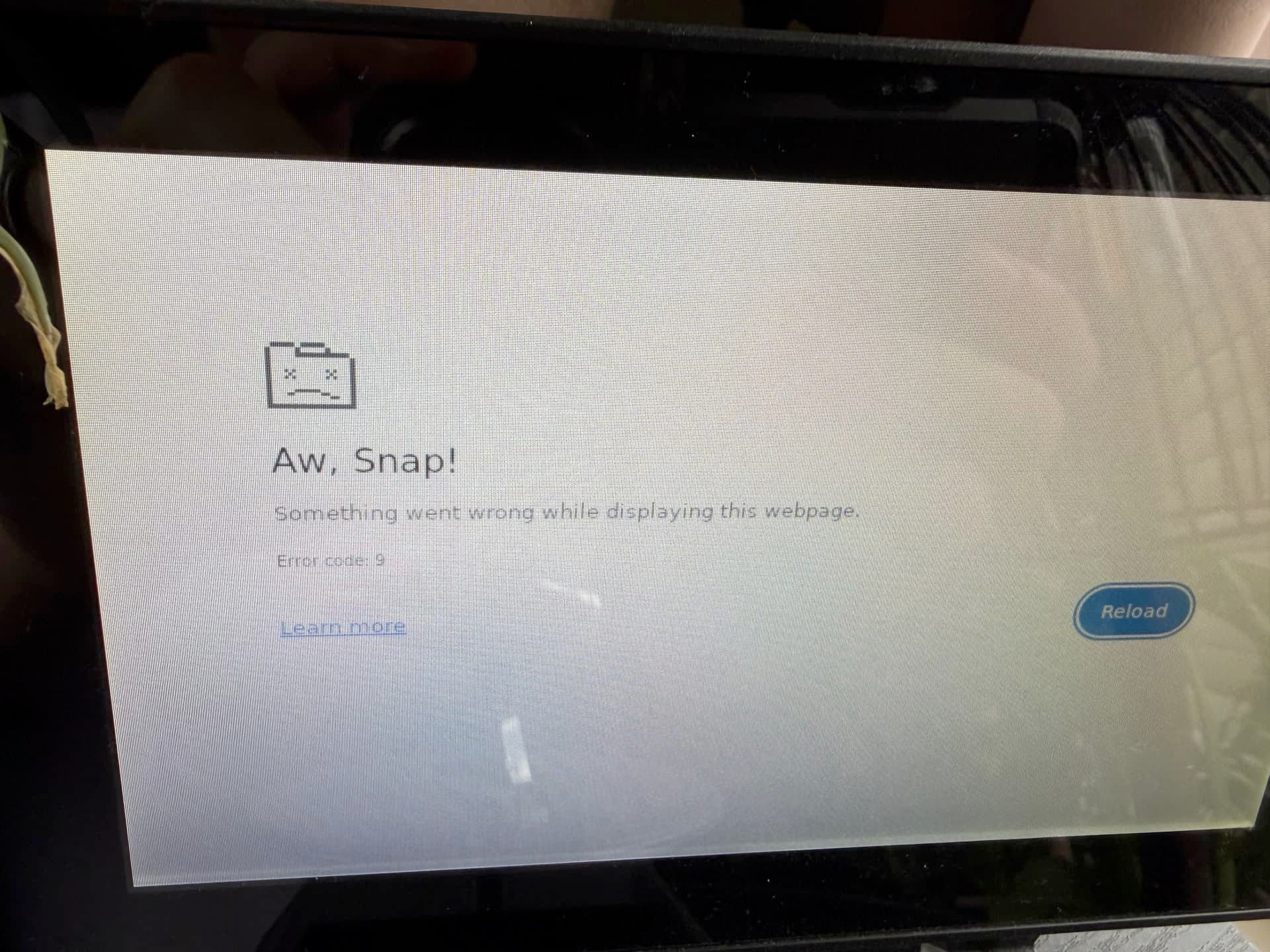
Unsure whether this is related to the plugin, but since moving to Volumio 4.x (on my homemade raspberry pi player) my touchscreen always looks like the following screenshot when it comes back from sleep. Touch works, and I can tap reload to get the player’s interface back, but as soon as the screen sleeps, the interface disappears again.
I had some free time so I removed the memory card from my Pi to reinstall the operating system. The reinstallation went smoothly, but I can’t install the touchscreen plugin, even though my system and screen were working normally before the reinstallation. I would really appreciate any help.