@Jersinger Could you please report the inxi output (see first post in this thread)? I seem to need it after all to check the RTL8111H NIC revision (this is why we need to see what the system reports, not what the glossy specs say).
how do I get the inxi file?
read the first post.
Similar to the log file, boot with or without WiFi, wait till Volumio loaded, ctrl-F1, log in and type
sudo inxi -Fxxx > hardware.txt
sudo lshw >> hardware.txt
copy the file to a usb stick and upload here please.
where does it save to? I can’t find them
Error 22: Unsupported option: Fxxx
Check -h for correct parameters.
volumio1
description: Desktop Computer
product: NP691 (Default string)
vendor: NP691
version: 1.0
serial: SSN
width: 64 bits
capabilities: smbios-3.0.0 dmi-3.0.0 smp vsyscall32
configuration: boot=normal chassis=desktop family=Default string sku=Default string uuid=3b903780-4f79-1018-816e-aeb2724778a7
*-core
description: Motherboard
product: NP691
vendor: NP691
physical id: 0
version: 1.0
serial: BSN12345678912345679
slot: Default string
*-firmware
description: BIOS
vendor: American Megatrends Inc.
physical id: 0
version: BATJPA06
date: 10/28/2022
size: 64KiB
capacity: 5MiB
capabilities: pci upgrade shadowing cdboot bootselect socketedrom edd int5printscreen int9keyboard int14serial int17printer acpi usb biosbootspecification uefi
*-memory
description: System Memory
physical id: b
slot: System board or motherboard
size: 8GiB
*-bank:0
description: SODIMM DDR3 Synchronous 1600 MHz (0.6 ns)
product: TIMETEC-S8G-1600
vendor: Unde
physical id: 0
serial: 00002031
slot: ChannelA-DIMM0
size: 8GiB
width: 64 bits
clock: 1600MHz (0.6ns)
*-bank:1
description: DIMM [empty]
physical id: 1
slot: ChannelA-DIMM1
*-cache:0
description: L1 cache
physical id: 10
slot: CPU Internal L1
size: 112KiB
capacity: 112KiB
capabilities: synchronous internal write-back
configuration: level=1
*-cache:1
description: L2 cache
physical id: 11
slot: CPU Internal L2
size: 2MiB
capacity: 2MiB
capabilities: synchronous internal write-back unified
configuration: level=2
*-cpu
description: CPU
product: Intel(R) Celeron(R) CPU N3350 @ 1.10GHz
vendor: Intel Corp.
physical id: 12
bus info: cpu@0
version: 6.92.9
slot: SOCKET 0
size: 1094MHz
capacity: 2400MHz
width: 64 bits
clock: 100MHz
capabilities: lm fpu fpu_exception wp vme de pse tsc msr pae mce cx8 apic sep mtrr pge mca cmov pat pse36 clflush dts acpi mmx fxsr sse sse2 ss ht tm pbe syscall nx pdpe1gb rdtscp x86-64 constant_tsc art arch_perfmon pebs bts rep_good nopl xtopology tsc_reliable nonstop_tsc cpuid aperfmperf tsc_known_freq pni pclmulqdq dtes64 monitor ds_cpl vmx est tm2 ssse3 sdbg cx16 xtpr pdcm sse4_1 sse4_2 x2apic movbe popcnt tsc_deadline_timer aes xsave rdrand lahf_lm 3dnowprefetch cpuid_fault cat_l2 ibrs ibpb stibp tpr_shadow flexpriority ept vpid ept_ad fsgsbase tsc_adjust smep erms mpx rdt_a rdseed smap clflushopt intel_pt sha_ni xsaveopt xsavec xgetbv1 xsaves dtherm arat pln pts vnmi md_clear arch_capabilities cpufreq
configuration: cores=2 enabledcores=2 microcode=72 threads=2
*-pci
description: Host bridge
product: Celeron N3350/Pentium N4200/Atom E3900 Series Host Bridge
vendor: Intel Corporation
physical id: 100
bus info: pci@0000:00:00.0
version: 0b
width: 32 bits
clock: 33MHz
*-display
description: VGA compatible controller
product: HD Graphics 500
vendor: Intel Corporation
physical id: 2
bus info: pci@0000:00:02.0
logical name: /dev/fb0
version: 0b
width: 64 bits
clock: 33MHz
capabilities: pciexpress msi pm vga_controller bus_master cap_list rom fb
configuration: depth=32 driver=i915 latency=0 resolution=1920,1080
resources: irq:129 memory:80000000-80ffffff memory:90000000-9fffffff ioport:f000(size=64) memory:c0000-dffff
*-multimedia
description: Audio device
product: Celeron N3350/Pentium N4200/Atom E3900 Series Audio Cluster
vendor: Intel Corporation
physical id: e
bus info: pci@0000:00:0e.0
logical name: card0
logical name: /dev/snd/controlC0
logical name: /dev/snd/hwC0D0
logical name: /dev/snd/hwC0D2
logical name: /dev/snd/pcmC0D0c
logical name: /dev/snd/pcmC0D0p
logical name: /dev/snd/pcmC0D3p
logical name: /dev/snd/pcmC0D7p
logical name: /dev/snd/pcmC0D8p
version: 0b
width: 64 bits
clock: 33MHz
capabilities: pm msi bus_master cap_list
configuration: driver=snd_hda_intel latency=32
resources: irq:130 memory:82510000-82513fff memory:81000000-810fffff
*-input:0
product: HDA Intel PCH HDMI/DP,pcm=7
physical id: 0
logical name: input10
logical name: /dev/input/event7
*-input:1
product: HDA Intel PCH HDMI/DP,pcm=8
physical id: 1
logical name: input11
logical name: /dev/input/event8
*-input:2
product: HDA Intel PCH HDMI/DP,pcm=3
physical id: 2
logical name: input9
logical name: /dev/input/event6
*-communication
description: Communication controller
product: Celeron N3350/Pentium N4200/Atom E3900 Series Trusted Execution Engine
vendor: Intel Corporation
physical id: f
bus info: pci@0000:00:0f.0
version: 0b
width: 64 bits
clock: 33MHz
capabilities: pm msi bus_master cap_list
configuration: driver=mei_me latency=0
resources: irq:131 memory:8251e000-8251efff
*-generic UNCLAIMED
description: Unclassified device
product: Celeron N3350/Pentium N4200/Atom E3900 Series Integrated Sensor Hub
vendor: Intel Corporation
physical id: 11
bus info: pci@0000:00:11.0
version: 0b
width: 64 bits
clock: 33MHz
capabilities: pm cap_list
configuration: latency=0
resources: memory:82516000-82517fff memory:8251b000-8251bfff
*-sata
description: SATA controller
product: Celeron N3350/Pentium N4200/Atom E3900 Series SATA AHCI Controller
vendor: Intel Corporation
physical id: 12
bus info: pci@0000:00:12.0
logical name: scsi1
version: 0b
width: 32 bits
clock: 66MHz
capabilities: sata msi pm ahci_1.0 bus_master cap_list emulated
configuration: driver=ahci latency=0
resources: irq:127 memory:82514000-82515fff memory:8251a000-8251a0ff ioport:f090(size=8) ioport:f080(size=4) ioport:f060(size=32) memory:82519000-825197ff
*-disk
description: ATA Disk
product: DOGFISH SSD 128G
physical id: 0.0.0
bus info: scsi@1:0.0.0
logical name: /dev/sda
version: 1105
serial: AA000000000000001093
size: 119GiB (128GB)
capabilities: gpt-1.00 partitioned partitioned:gpt
configuration: ansiversion=5 guid=2e574a34-2627-4072-a2a4-36372cf2f438 logicalsectorsize=512 sectorsize=512
*-volume:0
description: Windows FAT volume
vendor: SYSLINUX
physical id: 1
bus info: scsi@1:0.0.0,1
logical name: /dev/sda1
logical name: /boot
version: FAT32
serial: 6218-8677
size: 365MiB
capacity: 365MiB
capabilities: boot fat initialized
configuration: FATs=2 filesystem=fat label=boot mount.fstype=vfat mount.options=rw,nosuid,nodev,noexec,relatime,fmask=0111,dmask=0000,allow_utime=0022,codepage=437,iocharset=utf8,shortname=mixed,utf8,errors=remount-ro name=primary state=mounted
*-volume:1
description: EXT4 volume
vendor: Linux
physical id: 2
bus info: scsi@1:0.0.0,2
logical name: /dev/sda2
logical name: /imgpart
version: 1.0
serial: 3f06cc5a-6a9b-457e-a762-7ec23630efac
size: 5455MiB
capabilities: journaled extended_attributes large_files huge_files dir_nlink recover 64bit extents ext4 ext2 initialized
configuration: created=2025-12-25 09:38:41 filesystem=ext4 label=volumio lastmountpoint=/mnt/imgpart modified=2025-12-29 11:38:34 mount.fstype=ext4 mount.options=rw,relatime mounted=2025-12-29 11:38:34 name=primary state=mounted
*-volume:2
description: EXT4 volume
vendor: Linux
physical id: 3
bus info: scsi@1:0.0.0,3
logical name: /dev/sda3
version: 1.0
serial: 1ceb5326-9335-4ddc-b585-cf0d63bb20ab
size: 113GiB
capacity: 113GiB
capabilities: journaled extended_attributes large_files huge_files dir_nlink recover 64bit extents ext4 ext2 initialized
configuration: created=2025-12-25 09:38:42 filesystem=ext4 label=volumio_data lastmountpoint=/ modified=2025-12-29 11:36:48 mounted=2025-12-29 11:36:48 name=primary state=clean
*-pci:0
description: PCI bridge
product: Celeron N3350/Pentium N4200/Atom E3900 Series PCI Express Port A #1
vendor: Intel Corporation
physical id: 13
bus info: pci@0000:00:13.0
version: fb
width: 32 bits
clock: 33MHz
capabilities: pci pciexpress msi pm normal_decode bus_master cap_list
configuration: driver=pcieport
resources: irq:120 ioport:e000(size=4096) memory:81b00000-824fffff ioport:a0a00000(size=10485760)
*-network
description: Wireless interface
product: Wi-Fi 6 AX200
vendor: Intel Corporation
physical id: 0
bus info: pci@0000:01:00.0
logical name: wlan0
version: 1a
serial: c8:b2:9b:2e:a6:03
width: 64 bits
clock: 33MHz
capabilities: pm msi pciexpress msix bus_master cap_list ethernet physical wireless
configuration: broadcast=yes driver=iwlwifi driverversion=6.12.57-volumio firmware=77.f31a351f.0 cc-a0-77.ucode ip=192.168.5.58 latency=0 link=yes multicast=yes wireless=IEEE 802.11
resources: irq:22 memory:81b00000-81b03fff
*-pci:1
description: PCI bridge
product: Celeron N3350/Pentium N4200/Atom E3900 Series PCI Express Port A #2
vendor: Intel Corporation
physical id: 13.1
bus info: pci@0000:00:13.1
version: fb
width: 32 bits
clock: 33MHz
capabilities: pci pciexpress msi pm normal_decode bus_master cap_list
configuration: driver=pcieport
resources: irq:121 ioport:d000(size=4096) memory:81100000-81afffff ioport:a0000000(size=10485760)
*-network
description: Ethernet interface
product: RTL8111/8168/8411 PCI Express Gigabit Ethernet Controller
vendor: Realtek Semiconductor Co., Ltd.
physical id: 0
bus info: pci@0000:02:00.0
logical name: eth0
version: 15
serial: 00:30:18:03:c7:fc
capacity: 1Gbit/s
width: 64 bits
clock: 33MHz
capabilities: pm msi pciexpress msix bus_master cap_list ethernet physical tp mii 10bt 10bt-fd 100bt 100bt-fd 1000bt-fd autonegotiation
configuration: autonegotiation=on broadcast=yes driver=r8169 driverversion=6.12.57-volumio firmware=rtl8168h-2_0.0.2 02/26/15 latency=0 link=no multicast=yes port=twisted pair
resources: irq:23 ioport:d000(size=256) memory:81104000-81104fff memory:81100000-81103fff
*-pci:2
description: PCI bridge
product: Celeron N3350/Pentium N4200/Atom E3900 Series PCI Express Port A #3
vendor: Intel Corporation
physical id: 13.2
bus info: pci@0000:00:13.2
version: fb
width: 32 bits
clock: 33MHz
capabilities: pci pciexpress msi pm normal_decode bus_master cap_list
configuration: driver=pcieport
resources: irq:122
*-pci:3
description: PCI bridge
product: Celeron N3350/Pentium N4200/Atom E3900 Series PCI Express Port A #4
vendor: Intel Corporation
physical id: 13.3
bus info: pci@0000:00:13.3
version: fb
width: 32 bits
clock: 33MHz
capabilities: pci pciexpress msi pm normal_decode bus_master cap_list
configuration: driver=pcieport
resources: irq:123
*-pci:4
description: PCI bridge
product: Celeron N3350/Pentium N4200/Atom E3900 Series PCI Express Port B #1
vendor: Intel Corporation
physical id: 14
bus info: pci@0000:00:14.0
version: fb
width: 32 bits
clock: 33MHz
capabilities: pci pciexpress msi pm normal_decode bus_master cap_list
configuration: driver=pcieport
resources: irq:124
*-pci:5
description: PCI bridge
product: Celeron N3350/Pentium N4200/Atom E3900 Series PCI Express Port B #2
vendor: Intel Corporation
physical id: 14.1
bus info: pci@0000:00:14.1
version: fb
width: 32 bits
clock: 33MHz
capabilities: pci pciexpress msi pm normal_decode bus_master cap_list
configuration: driver=pcieport
resources: irq:125
*-usb
description: USB controller
product: Celeron N3350/Pentium N4200/Atom E3900 Series USB xHCI
vendor: Intel Corporation
physical id: 15
bus info: pci@0000:00:15.0
version: 0b
width: 64 bits
clock: 33MHz
capabilities: pm msi xhci bus_master cap_list
configuration: driver=xhci_hcd latency=0
resources: irq:126 memory:82500000-8250ffff
*-usbhost:0
product: xHCI Host Controller
vendor: Linux 6.12.57-volumio xhci-hcd
physical id: 0
bus info: usb@1
logical name: usb1
version: 6.12
capabilities: usb-2.00
configuration: driver=hub slots=8 speed=480Mbit/s
*-usb:0
description: Mouse
product: Telink Wireless Receiver
vendor: Telink
physical id: 2
bus info: usb@1:2
logical name: input4
logical name: /dev/input/event1
logical name: /dev/input/mouse0
logical name: input5
logical name: /dev/input/event2
logical name: input6
logical name: /dev/input/event3
logical name: input7
logical name: /dev/input/event4
logical name: input7::capslock
logical name: input7::compose
logical name: input7::kana
logical name: input7::numlock
logical name: input7::scrolllock
version: 1.00
capabilities: usb-1.10 usb
configuration: driver=usbhid maxpower=50mA speed=12Mbit/s
*-usb:1
description: Bluetooth wireless interface
physical id: 7
bus info: usb@1:7
version: 0.01
capabilities: bluetooth usb-2.01
configuration: driver=btusb maxpower=100mA speed=12Mbit/s
*-usbhost:1
product: xHCI Host Controller
vendor: Linux 6.12.57-volumio xhci-hcd
physical id: 1
bus info: usb@2
logical name: usb2
version: 6.12
capabilities: usb-3.00
configuration: driver=hub slots=7 speed=5000Mbit/s
*-isa
description: ISA bridge
product: Celeron N3350/Pentium N4200/Atom E3900 Series Low Pin Count Interface
vendor: Intel Corporation
physical id: 1f
bus info: pci@0000:00:1f.0
version: 0b
width: 32 bits
clock: 33MHz
capabilities: isa bus_master
configuration: latency=0
*-pnp00:00
product: PnP device PNP0c02
physical id: 0
capabilities: pnp
configuration: driver=system
*-pnp00:01
product: PnP device PNP0501
physical id: 1
capabilities: pnp
configuration: driver=serial
*-pnp00:02
product: PnP device PNP0501
physical id: 2
capabilities: pnp
configuration: driver=serial
*-pnp00:03
product: PnP device PNP0303
physical id: 3
capabilities: pnp
configuration: driver=i8042 kbd
*-pnp00:04
product: PnP device PNP0f13
physical id: 4
capabilities: pnp
configuration: driver=i8042 aux
*-pnp00:05
product: PnP device PNP0c02
physical id: 5
capabilities: pnp
configuration: driver=system
*-pnp00:06
product: PnP device PNP0c02
physical id: 6
capabilities: pnp
configuration: driver=system
*-pnp00:07
product: PnP device PNP0b00
physical id: 7
capabilities: pnp
configuration: driver=rtc_cmos
*-serial
description: SMBus
product: Celeron N3350/Pentium N4200/Atom E3900 Series SMBus Controller
vendor: Intel Corporation
physical id: 1f.1
bus info: pci@0000:00:1f.1
version: 0b
width: 64 bits
clock: 33MHz
configuration: driver=i801_smbus latency=0
resources: irq:20 memory:82518000-825180ff ioport:f040(size=32)
*-input:0
product: Power Button
physical id: 1
logical name: input0
logical name: /dev/input/event0
capabilities: platform
*-input:1
product: Video Bus
physical id: 2
logical name: input8
logical name: /dev/input/event5
capabilities: platform
@Jersinger
After investigating support for the RTL8111H(S), it appears that this is due to a driver issue.
According to the RealTek website, R8169 is part of a family of Realtek NICs sharing the same driver:
RTL8110S/RTL8169S/RTL8110SB/RTL8169SB/RTL8110SC/RTL8169SC
The RTL8111H isn’t in that list, but there is a different list of NICs where it does appear.
For these, RealTek has a proprietary R8168 driver in source code, which must be compiled into the kernel using DKMS (Dynamic Kernel Module Support), which Volumio cannot support out-of-the-box.
The source code is also available from Debian as a package, but only tested up to kernel 6.11!
With the necessary skills you could do it yourself and blacklist the r8169 to stop it loading.
But be aware that this has to be repeated each time Volumio updates the kernel. First because this will likely break OTA and secondly because the driver needs to match the exact same kernel version.
This is highly impractical and therefore I would personally advice against it.
I don’t have Touch Display in my plugin list.
Please advise how to install the plugin on the x86 version. I updated Volumio to 4.073 and now I can’t get Touch Display back. The old version, which worked with version 3, won’t install and gives an error.
There is no Touch Display plugin for x86, display is already part of the image. No need to install anything else.
Apart from the QR code, nothing else is displayed. Do I need to enable it separately in the settings?
Please advise me on what to do and how to do it.
Thank you
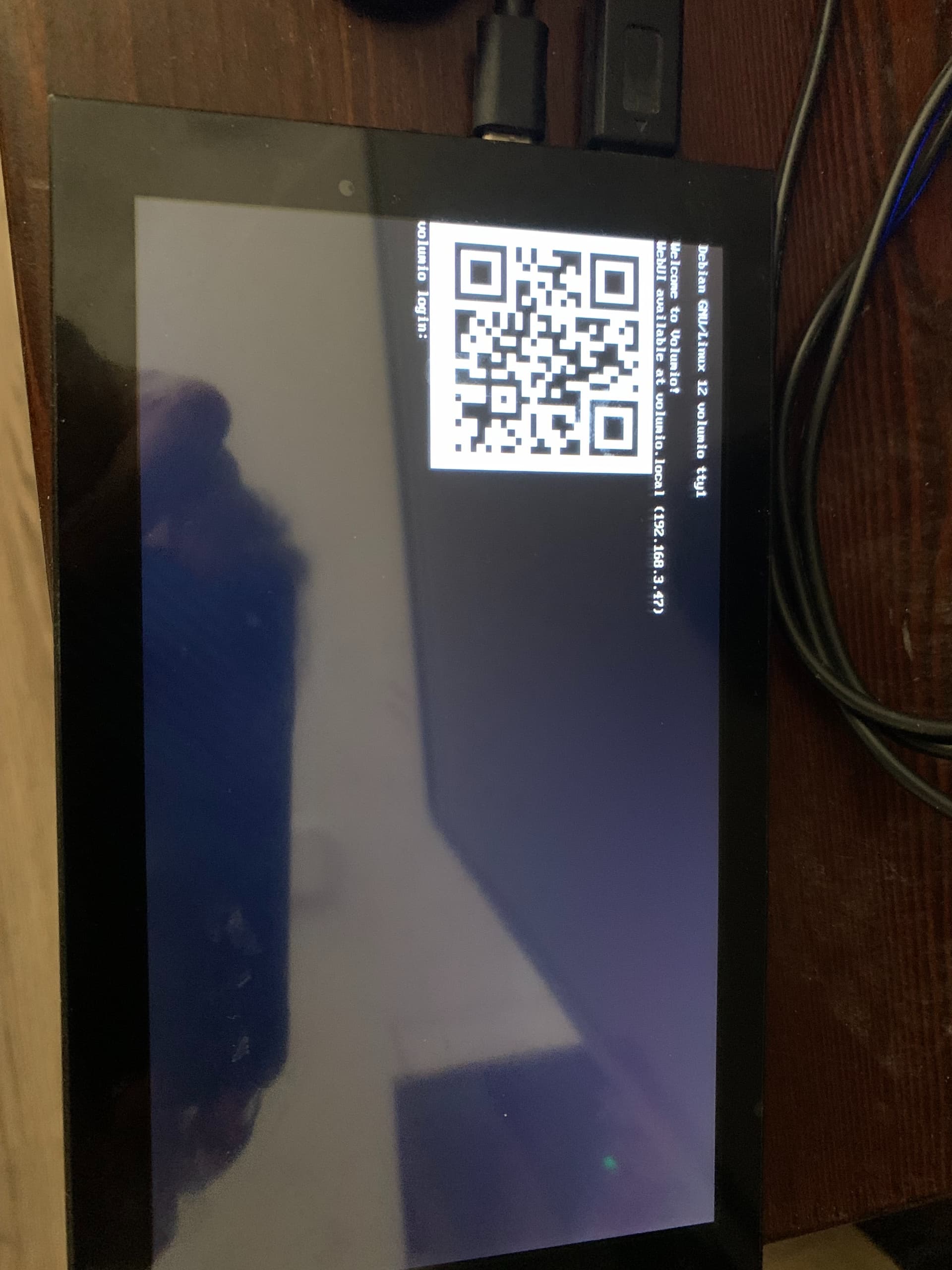
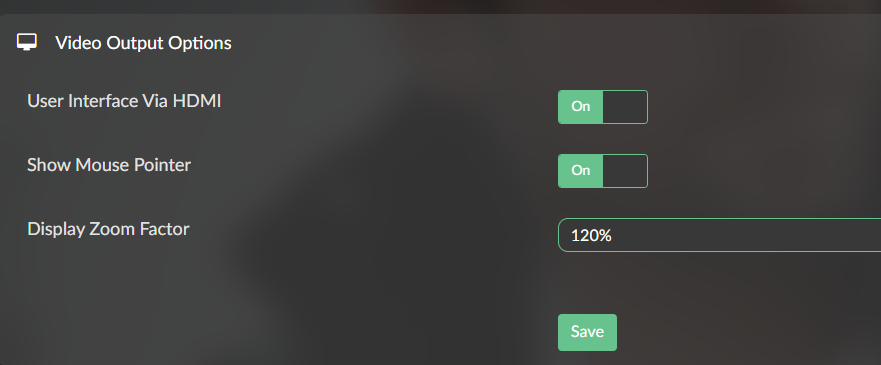
By default display output is enabled on x86 images by default. If yours is not doing this it might be hardware related. So we need to sort it out.
Some questions:
- You’ve downloaded the image from Get Started - Volumio?
- You burned the image with Raspberry Pi Imager, without making any changes to customizations?
- Please provide a log when device is fully loaded
- Read the opening post and provide the details requested under (**
 Reporting**)
I’m using Volumio 4 on a Zotac ID41 mini PC, and I’m encountering two problems:
- The device has an optical port, but there is no sound output when it is selected. The 3.5mm port works normally. The red light on the optical port is not illuminated, as if it hasn’t been activated.
- I went to the plugins section but nothing showed up. The installed plugins section was displayed, but the plugin store section was blank.
If anyone has encountered these two problems and managed to fix them, please help me.
Hi, please read the very first topic in this thread and supply the information requested.
Most important is the log, but we’re also interested the “inxi” output.
This information should help us to get a good idea what kind of hardware components you are running Volumio on, allowing us to help locating the issue.
Also, if possible, could you give us the output from
amixer
It could show us whether spdif is in mute state.
Hi,
I’ve ben using Volumio for a couple of years now, first on RPi3 with a HifiBerry, then on RPi4 with a Sanskrit USB DAC, no issues there, and now on a ThinkCentre M720q tiny (with an intel Core i5 8400T) and Volumio 3.886 and a MOTU Ultralite mk5 soundcard, connected to my Pre-Amp - mainly to implement room correction through FusionDSP/CamillaDSP (I had to create a udev rule to ensure the primary network interface kept its eth0 name, otherwise it went offline. But I had an issue with the M720q, as it creates electrical noise, which was hearable on my speakers, so I recently changed hardware platform to a newer ThinkCentre M72s Gen5 with an AMD Ryzen 5 CPU (The electrical noise is gone, because of a better hardware build).
I downloaded Volumio and created a usb stick so I could install it (I wasn’t aware of version 4 was the one I got downloaded) - Install went smooth, I created the network interface udev rule.
I noticed I was on Volumio 4, since the CamillaDSP interface has changed a lot.
What I have noticed so far for version 4:
- The analogue source input (UltraLite-mk5) is still there, but sound is not being captured. The audioinput.sh script that gets created, fails with the sox command, as it will not take plughw:5,0 as a legal format (My MOTU is created as Card 5, Device 0) - so the input isn’t working.
- in CamillaDSP i can not enable resampling (this used to lock the MOTU into 96kHz samplerate, as my convolution filter is created at that sample rate) - which means that switching between samplerates on different tracks takes 1-2 seconds, ending up the music missing the first couple of seconds, and I end up restarting the selected track, to get them from the beginning - it’s a quirk on the MOTU for the time it takes to switch samplerate, but as I understand - it’s primarily created for static samplerates, the sampleswitch quirks is there on Volumeio 3 as well, but since CamillaDSP used to lock the samplerate, it has not been an issue.
- I can set the samplerate in volumio interface (Which was not recommended in Volumio 3, using CamillaDSP), which will first lock the samplerate in to place when the first track is started (I have to restart the track to get the first couple of seconds) - it then stays locked.
- I had to remake the DSP configuration, as I could not import the cfg from volumio 3. (I think it’s a major change between CamillaDPS 1.0.67 and 1.0.7x?)
I have tried to switch back to Volumio 3, I get all my functionality back, but end up with another issue, DSD files from DSD128+ stutters, and the CPU goes haywire - but I suppose this has to go to another post regarding Volumio 3 - I also only see 8 logical cpu’s out of 12 on that version.
At the moment, I am back on my old tiny, disregarding the electrical noise, and Volumio 3, as I can not use the new version. I’ve tried to troubleshoot since wednessday this week where I got the new machine, and it drives me nuts - I like Volumio, because it suit my needs, but version 4 is a no-go from my point of view  and version 3 on the new machine is propably also a no-go. I’ll attempt to install Volumio 3 a couple of times, and see if I can get it to work properly on the AMD machine.
Any interest in logfiles etc, let me know - I’ll just install Volumio 4 again, and do the testing that is needed. I mainly have two issues:
- Analogue input is not being captured because the sox command failes for ‘-t plughw:5,0’
- Soundcard/DAC is not being locked into 96kHz a startup and samplerate can not be enabled in CamillaDSP, which used to lock it into place.
With kind regards
Yngve
Hey @Yngve,
Your ThinkCentre M72s Gen5 with AMD Ryzen 5 is x86/amd64 hardware. For x86-specific issues on Volumio 4, please continue your report in the dedicated thread:
The thread introduction explains what information is needed for investigation.
Kind Regards,
1 Like

@nerd @Yngve
I did move the issue to the x86 section, but from reading the post I’m not convinced that these are the typical x86 issues the thread was intended for. This thread does NOT cover FusionDSP/CamillaDSP issues, nor does it support user-defined udev rules without reasoning why this was done without supplying log information for it.
So please, for securing support remove FusionDSP/ CamillaDSP first before supplying log data for the remaining issue(s).
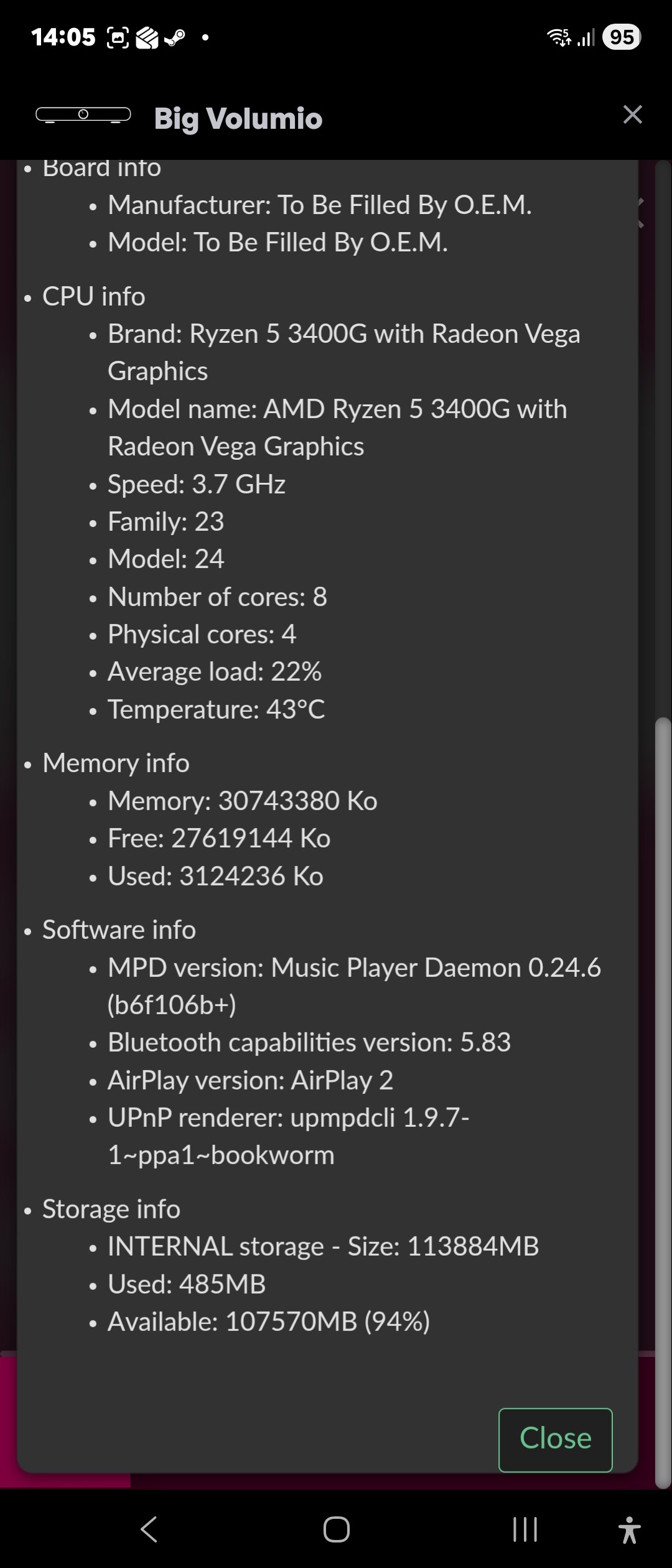
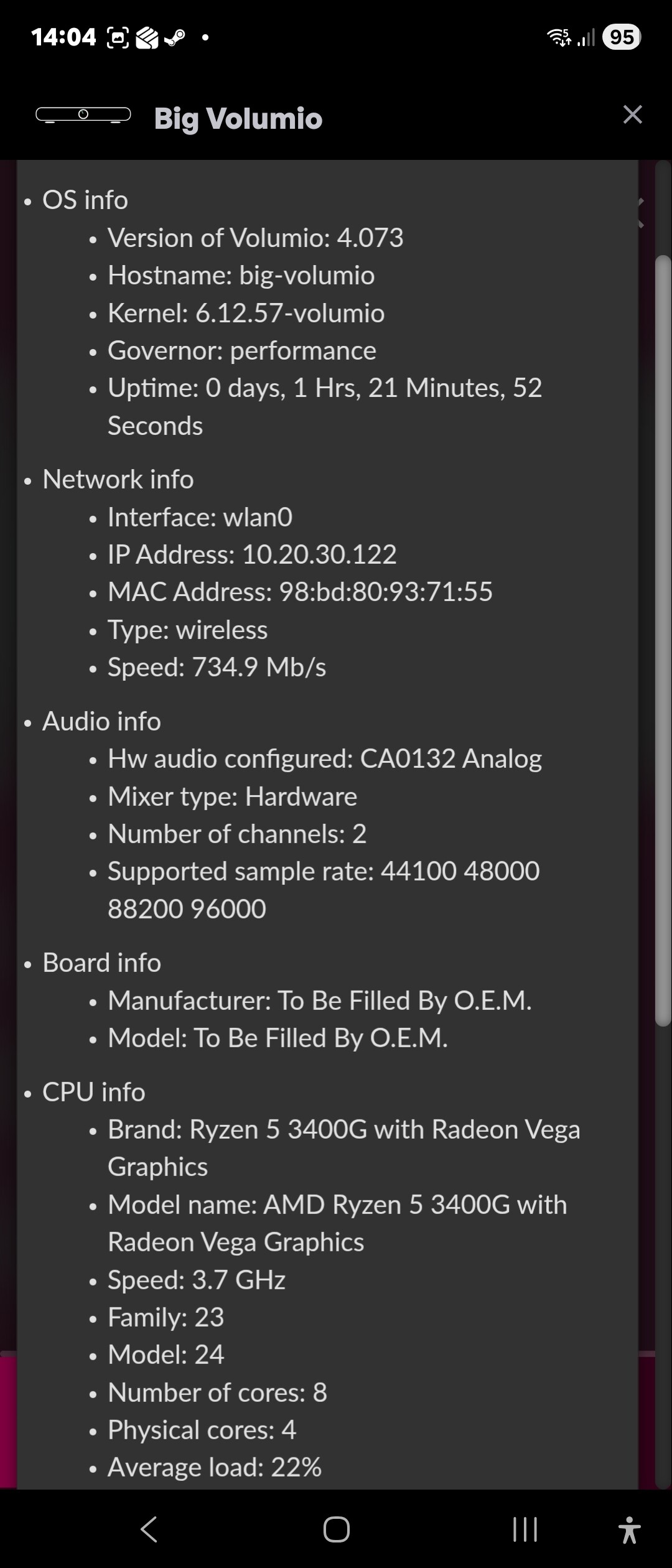
Hello, I’m trying to configure a second x86 computer. My problem is that it has a Creative Sound Blaster EA5-plus sound card. In playback devices, it appears as CA0132, and in alsamixer as HDA-CREATIVE. However, even with all channels enabled, there’s no sound. I’ve installed the corresponding drivers, but it’s not working. What do I need to install to make it work?
@gurusto
Please read post #1 and supply the requested information.
Volumio Version:4.084
Hardware: jetway mp21 pico itx
DAC:no dac
- install card
- turn system on
- setting - network
Intel be200 wifi card not showing speed on connection.
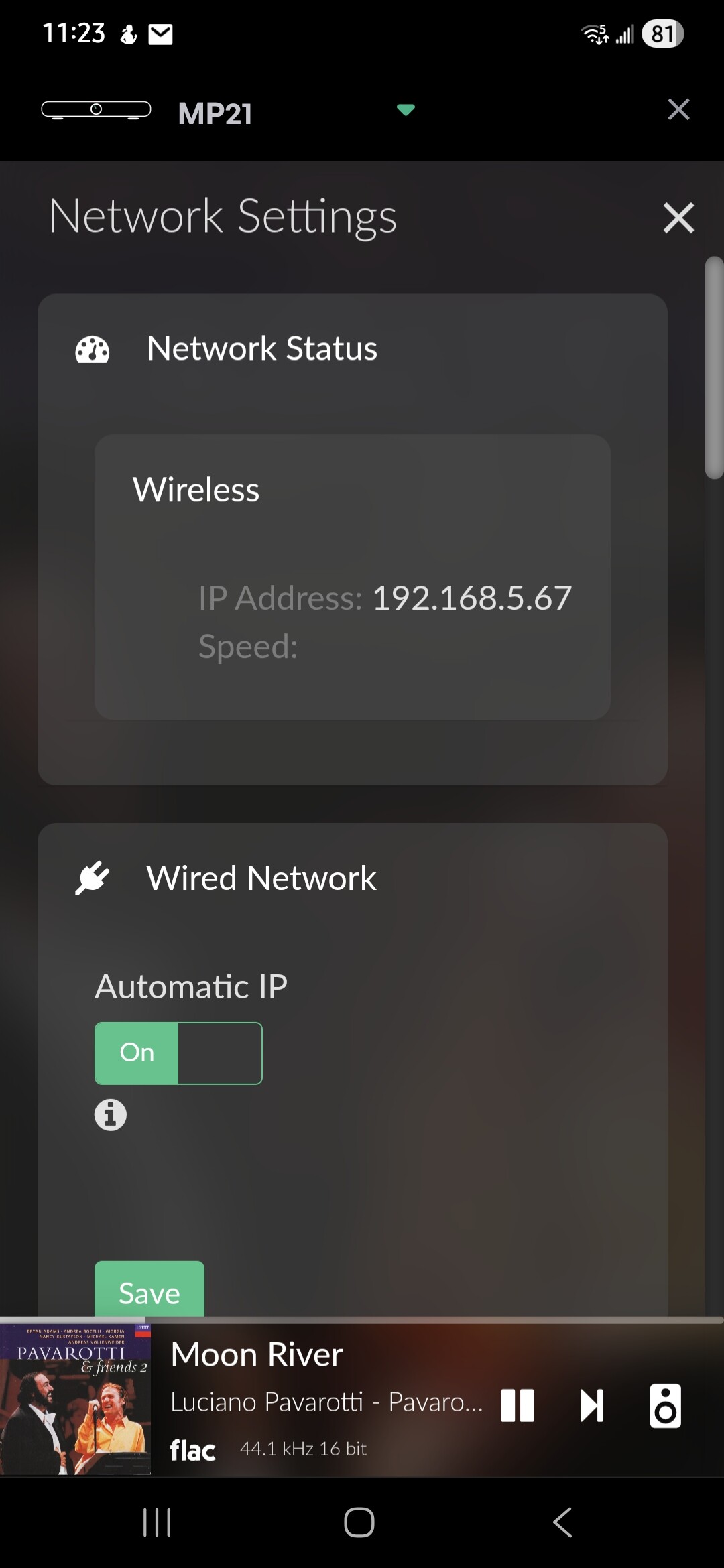
@Jersinger
Your information is too general for us to diagnose the issue.
Please read the Opening Post and report the information requested (the log is an absolute MUST in this case).