Sorry @nerd, still no music  new log here
Hey @joew,
Typo in the Advanced Options field. You entered the two values separated by a space:
vers=2.1 noserverino
The kernel rejected it at 09:16:42:
CIFS: VFS: Unknown vers= option specified: 2.1 noserverino
Options must be comma-separated, no space. It should be:
vers=2.1,noserverino
Fix that, save, and let the library rescan.
Kind Regards,
1 Like
Thanks @nerd I think the 09:16 kernel rejection was from prior to the earlier attempt though?The log shows comma-separation at 10:00:24
Problem: The volume seems stuck on max and moving the volume slider down doesn’t reduce it.
Log here http://logs.volumio.org/volumio/nsFKVG4.html
Versioninfo:
Welcome to Volumio for Raspberry Pi (6.12.74-v7+ armv7l)
volumio@volumio4shower:~$ cat /proc/cpuinfo |grep -i revision
CPU revision : 4
CPU revision : 4
CPU revision : 4
CPU revision : 4
Revision : a02082
volumio@volumio4shower:~$ cat /proc/cpuinfo |grep -i model
model name : ARMv7 Processor rev 4 (v7l)
model name : ARMv7 Processor rev 4 (v7l)
model name : ARMv7 Processor rev 4 (v7l)
model name : ARMv7 Processor rev 4 (v7l)
Model : Raspberry Pi 3 Model B Rev 1.2
volumio@volumio4shower:~$ cat /proc/device-tree/compatible | tr ‘\0’ ‘\n’
raspberrypi,3-model-b
Brcm,bcm2837
Details:
I have just installed v.4.119 on a couple of Pi 3B systems, both fitted with Hifiberry Amp 2 v1.1, both previously running v3.912. One seems OK so far, the other has the volume on or near max. Moving the slider up or down has no effect on the volume coming out (the slider position moves and stays in it’s new position, but there is no effect on the speakers).
I don’t think there were any differences in the way I installed them - flash a microSD using the Chromebook Recovery Utility extension, pop it in the Pi with ethernet cable connected to router with static IP address, enter that IP address on browser and wait for the startup configurator to appear. Create Tidal connection, select a track and play.
If it helps, this is the log from the system on which volume is working OK
Note I have in the past had volume problems with these systems using Volumio v.3, where after a reboot the volume reverts to max. In those cases the slider still worked so I was able to reduce it. Unfortunately I don’t have any logs for then, it was intermittent and not 100% sure whether all or just some systems were affected (I have 4 systems in this rack, driving speakers in different rooms).
I’m having a problem with Volumio 4.119 on a Raspberry Pi 3A+ that I sent to a friend of mine who wanted to use it with a HAT (hardware attached on top) DAC.
Unfortunately I no longer have the hardware at hand and cannot send any logs, but it does not start, while it did so regularly with previous versions as reported in the beta version forum (4.071).
Curiously, the microSD with Volumio moved to the later models works without any problems. Do you have any ideas on how to fix this? Or rather, have any of you had the same experience and found a workaround, such as updating the microSD card on different hardware and putting it back in the 3A+?
This hardware currently only works with any version of Volumio 3 and of course it has no problems booting with the 64-bit images provided by Raspberry Pi.
I have just installed Volumio-4.119-2026-03-24-pi on a Pi 4b. Added my NAS music library via Network Drives using nfs and added a few of my fav Internet radio stations. Have connected via USB C to a Gustard A26 DAC, I have had no issues and it sounds absolutely amazing. Nice work 
1 Like
Solved, you need to replace fixup.dat and start.elf in the /boot folder. It might be a good idea to do this before releasing Volumio version 4.149. My friend is now using the latest stable version with the Raspberry Pi 3A+ I sent him.
3 posts were split to a new topic: Text on menu items act as button press
PC Stick - Intel SC1-INT - Volumio x86 version 4.103
Upgrade to 4.119 fails and suggests reboot to try again,reboot, fails again
Attempting log send never supplies a URL to logfile
despite this the unit works as expected with current version
removed all plugins - same results
Hoping someone has a suggestion
Thanks !
Seems there are right issues with V4.143.
All plugins that need storage in /data/INTERNAL are owned by root.
This breaks plugins as folders are not accesible.
Peppy: Unable to load templates
FusionDSP: Unable to save filters.
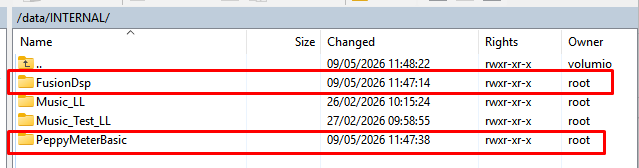
If I try to take ownership for Volumio, it errors out with:
chown: changing ownership of 'FusionDsp/presets/EQ15': Operation not permitted
chown: changing ownership of 'FusionDsp/presets': Operation not permitted
chown: changing ownership of 'FusionDsp/.mpdignore': Operation not permitted
chown: changing ownership of 'FusionDsp/readme.txt': Operation not permitted
chown: changing ownership of 'FusionDsp/presets.tar': Operation not permitted
chown: changing ownership of 'FusionDsp': Operation not permitted
Same for x86, V4.119, owned by volumio:
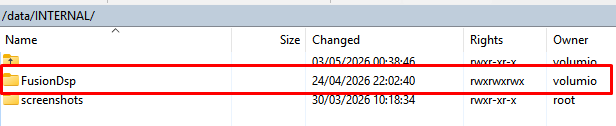
Upgraded V4.119 to V4.143, rights are still ok:
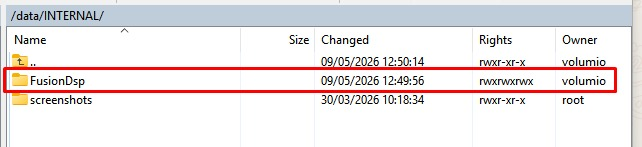
Connecting a HDD, owner for everything in /data/INTERNAL becomes root:
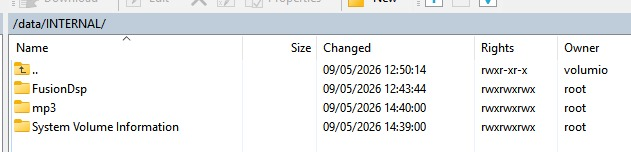
sudo chmod -R ugo+rwxXst .
HI
I’m resurrecting this request to ask when the issue of no wireless in Raspbeery Pi 3+ installs might be resolved. I am using version 4.119 which still does not contain a fix. Can anyone say when ot point me to published information? Thanks.
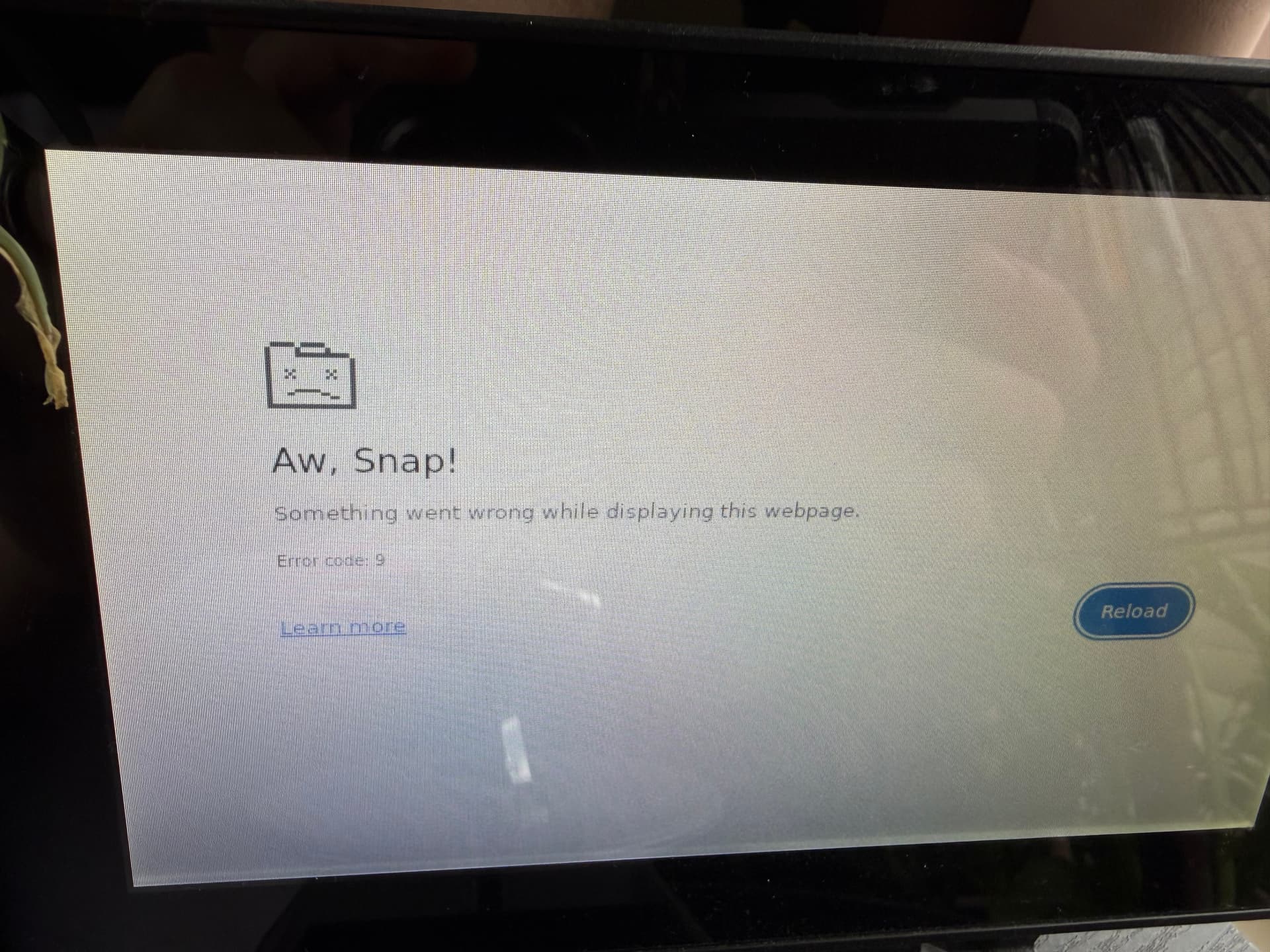
I am running Volumio on my Raspberry Pi. Ever since upgrading to v4 I’m running into an issue with my touchscreen. Every time I walk up and touch the screen to “wake” it, i’m greeted by the attached screenshot. A reload works every time, but I’d like to stop this from happening - it never did so on v3.
Hi @krztoff
Please try using this plugin to configure your screen.
Well that was fun. It broke everything for about an hour and now everything is back to exactly as it was before I ran that plugin.
Hello,
My devices work with your excellent software.
However, I don’t understand: is Volumio 4 a software update for everyone who has a device that works with your software or is it something specifically related to Volumio devices?
Thanks in advance
Simon
It’s currently for non-Volumio devices like the Raspberry Pi. V4 for Volumio devices is in beta, soon to be released. Note that you can’t simply update from V3. You need to reflash. This is explained better and in more detail above.
Also take a reading:
Hey there,
Besides Raspberry Pi and x86/x64 platforms, we’re starting to roll out Volumio 4 for our devices as well, starting May 4th. You can find all the details in this thread.
A reflash is only required on Raspberry Pi and x86/x64, for our products there’s no need to: the update will show up directly in the app once the image for your device goes public (or about 10 days earlier if you want to join the beta, the process is covered in the same thread).
I hope that with next major update of Volumio (e.g. Volumio 5) that I won’t have to rebuild all my favorite songs and playlists from scratch. I was able to restore the backup of Volumio 3 in Volumio 4. But it fails to to play songs from the playlists. I am using a local hard disk of 2TB.
I don’t know if the restoration would work if I had used a NAS? Sorry for my bad English. I hope everyone will be able to understand what I have written.
Maybe a sollution would be: " Local Drive: When using a 2TB local hard disk, Volumio assigns an internal ID to the disk. If this ID changes upon restoring the backup, the playlist points to the “old” disk ID and fails to play"