Hey @joew,
Thanks for the thorough write-up and the two logs - that made this a lot easier to separate into the actual distinct issues you are hitting. Let me take them one at a time.
- NAS share browses but shows no music
The good news: the share itself mounted fine. networkfs negotiated it, forced SMB vers=2.1 for the guest mount (you did not need to add that manually, the plugin does it for you on guest shares in 4.x), and df confirms it sees 27 GB total with 2.8 GB used. From the kernel’s point of view the mount is healthy.
The problem is one layer up, in MPD. Your mpd.log has these:
  2026-04-08T19:02:33 exception: Failed to access /var/lib/mpd/music/NAS/USB/CD_burns: Value too large for defined data type
  2026-04-08T19:02:50 exception: Failed to access /var/lib/mpd/music/NAS/USB/CD_burns: Value too large for defined data type
  2026-04-08T19:03:26 exception: Failed to access /var/lib/mpd/music/NAS/USB/CD_burns: Value too large for defined data type
“Value too large for defined data type” is the glibc wording for EOVERFLOW coming back from stat(). The mount.cifs man page documents this failure mode directly: when the cifs kernel driver exposes the server’s UniqueID as the inode number (the default “serverino” behaviour on SMB2+), those UniqueIDs are frequently larger than 2^32 and will not fit in a 32-bit stat() result. Volumio’s userland is 32-bit armhf, and MPD is a 32-bit binary, so it trips this.
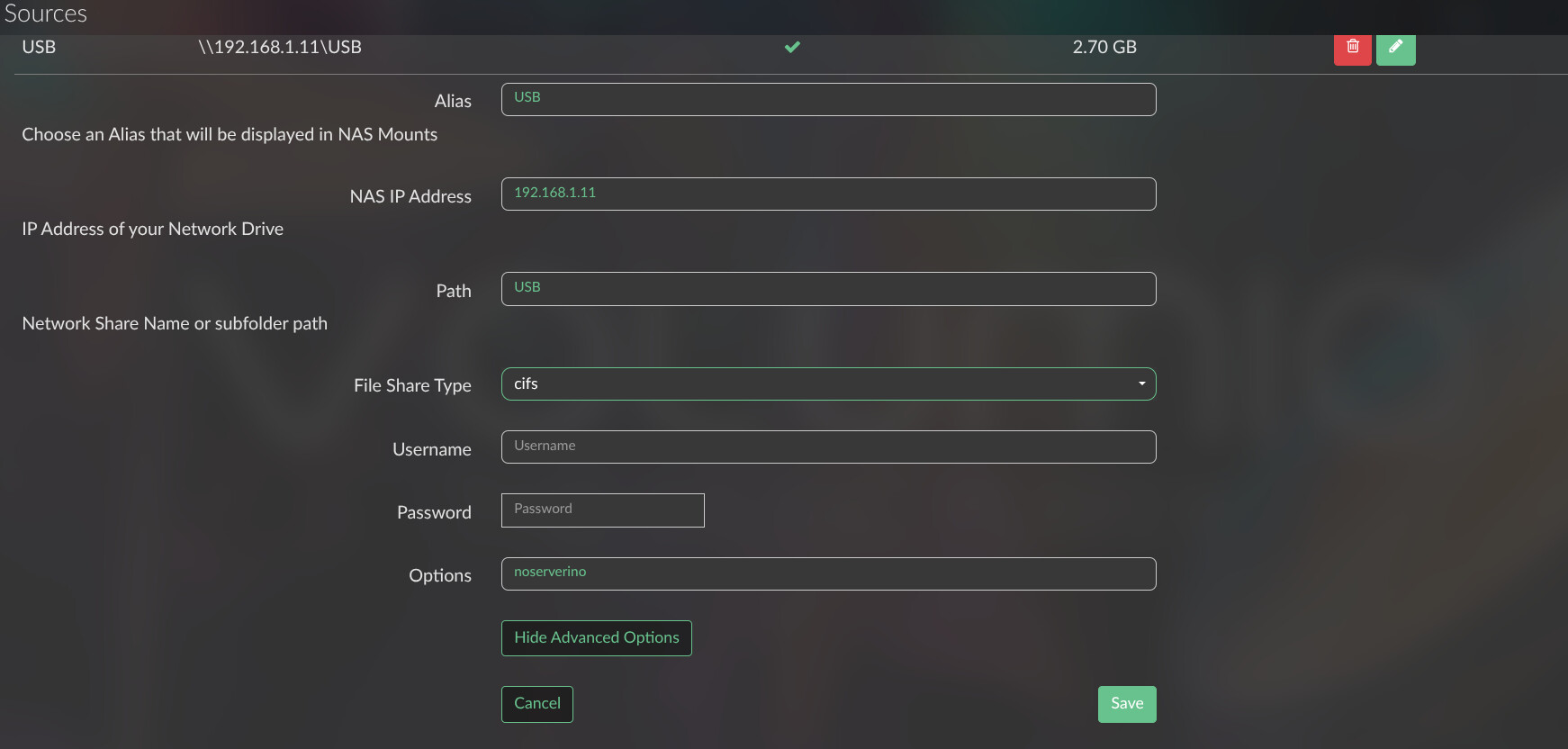
The documented workaround is to mount with “noserverino”, which makes the cifs client generate its own inode numbers locally, within 32-bit range. To try that:
- Go to Settings, My Music, browse to the offending source and open it for editing.
- In the Advanced Options field, add: noserverino
- Save and let the library rescan.
Then give it a couple of minutes and check whether CD_burns starts populating. If it does, problem solved. If it does not, please grab a fresh log from http://volumio.local/dev straight after the failed rescan and post the link - there is one other scenario that produces the same error message (filesystem timestamps past year 2038 getting exposed to a 32-bit time_t) and that needs a different fix, but it is the less likely of the two here given the source is a USB stick shared from another Pi rather than a large ext4 NAS volume.
One thing worth noting for context: your three other Pi 3B systems on 3.912 read the same share fine because they are running a different kernel cifs driver version. This is not a Volumio 4 bug so much as a difference in how the newer kernel exposes cifs inode numbers to 32-bit stat(). The noserverino mount option exists precisely for this.
- WiFi does not connect while the ethernet cable is plugged in
This one is by design, not a fault, and it is new in Volumio 4 compared to Volumio 3. Volumio 4 runs what we call Single Network Mode (SNM): exactly one network interface holds an IP address at any time, and ethernet always takes priority. The wireless.js log is explicit about it:
  Single Network Mode enabled (default) - only one network device can be active at a time between ethernet and wireless
  Action: Switch to ethernet (WiFi scan mode)
  Single Network Mode: Ethernet active, maintaining WiFi scan capability
  SNM: Maintaining wlan0 UP without IP (scan mode)
  SNM: Users can configure WiFi via WebUI while ethernet is active
So what you are seeing is correct: your WiFi credentials were accepted and saved, wlan0 is kept UP so you can still scan and configure it from the UI, but the interface will not be given an IP while eth0 is up. To actually use WiFi on this box, you need to physically unplug the ethernet cable. Once the cable is out, SNM is supposed to bring wlan0 up on its own.
I hear you on the UI messaging. The Network Settings page could certainly be a lot louder about the fact that a plugged-in cable will block WiFi from activating. That is fair feedback, noted.
- Unplugging the cable did not switch to WiFi, you had to power-cycle
This one I cannot diagnose from the log you sent, because the log was captured with the cable still plugged in and nothing in it covers an ethernet-removal event. If you are willing to reproduce it, the sequence I need is:
- Boot with ethernet plugged in, confirm you are reachable on the wired IP.
- Physically unplug the ethernet cable.
- Wait at least 60 seconds. Do not reboot.
- Regardless of whether WiFi came up or not, capture a log from http:///dev and post the link.
With that I can see whether the SNM failover path actually ran and, if it did, why it did not complete.
- The painful first install over WiFi
Without logs from the failed boot attempts I cannot say anything useful about what went wrong, and neither can anyone else - by the time you captured the log everything was working. What I can say is that the Pi 3B v1.2 has the weakest built-in WiFi radio on any full-size Pi (Broadcom BCM43430, single-band 2.4 GHz, single-stream, single antenna), and first-boot setup over that radio in a headless rack full of other 2.4 GHz Pi radios is genuinely marginal. The SSID briefly showing as “Volumio” before becoming “Volumio-XXXX” is normal behaviour during hotspot bring-up, not a symptom of anything wrong.
Your conclusion - use ethernet for first boot on a Pi 3B, then deal with WiFi afterwards - is the right one and is what I would recommend anyway.y.
Please start with the noserverino change on the share and let me know how you get on. Once that is either fixed or confirmed not fixed, we can look at the WiFi failover question with a targeted log.
Kind Regards,