I have something weird going on as well. Fresh install of V4 and all is good. A few days later the rightside of the 7" screen does not respond to touch, but the left side is good. If I rebuild the systems its all good for a while and then the smame thing happens. Currently its on 4.096
Very strange…
I have not received any interest in my issue. Does that mean I am probably looking at a hardware issue and not Volumio? I just want to know if anyone else has reported problems with being unable to “touch” parts of the screen after working fine for a few days. Rebuild seems to fix the problem temporarily. However if i am the only person with this issue its probably a defective screen. Thanks
Hi. I’d check the cable or the screen. I can’t see how software could impact half the screen.
If it errors out, so only the left part is working, does the cursor follow you finger or does it moves rapidly to the right corner (faster then your finger movement)?
Hey @Vaclav,
Welcome to Volumio, glad you are enjoying it.
What you are observing is a known area of active work. A few points to clarify what is happening on your system.
When the Live Log shows “Boot completed” at around 1:40, that is systemd reporting that the OS boot sequence finished. This is not the same as the Volumio backend being fully ready. After systemd hands off, Node.js still has to load all plugins, initialize playback controls, set up network services, authenticate MyVolumio, start the albumart service and its worker processes, and more. The CPU activity you see between 1:40 and 5:20 is that backend initialization phase, not the system idling under unnecessary load.
The question of whether that phase takes longer than it should is exactly what recent development work has been addressing. Multiple fixes targeting CPU consumption during and after startup have been introduced and are currently being tested in pre-release channels.
You mentioned trying a “fresh test release” without improvement. To evaluate whether your test included the relevant fixes, I need the exact version number you tested - not “test release” but the specific number shown in Settings, for example 4.xxx. This matters because some of the fixes may only be available on the Alpha channel rather than Test.
Can you confirm:
- The exact version number you tested on the Test channel
- Your Pi 4B RAM variant (1GB, 2GB, 4GB, 8GB)
Kind Regards,
I’ll check the cable connections next.
Hello @nerd!
Thanks for the answer and your work!
My Pi 4B has 2 GB of RAM.
The test relese what I’ve tried with same result was 4.096.
Now I updated to 4.097 with same result, then changed
the release cannel to Alpha and updated to 4.100 and I experienced the same thing.
I found a Pi 3B+ 1GB board in my drawer, installed the 4.096 and
updated to Alpha 4.100. Both version behaved the same with high CPU load till approx 5 min.
I took measurement with Pi 3B+ and 4.100: I get the “Boot completed” message in live log after 2:38, the high CPU load lasted 5:15.
Regards,
Peter
1 Like
Until two days ago, I had no idea Volumio even existed. I’m trying to install it on a Raspberry Pi 4 B with 8 GB of RAM I got today. I tried several times in different ways and it’s just not working.
I tried both flashing the card using the Volumio image that comes with the Raspberry Pi Imager, and later the image that I just downloaded from the Volumio website.
But in both instances, Volumio starts booting and then the monitor goes blank and gets no signal. Today I left it like that, came back hours later, and it was still in sleep mode. Moving the mouse and pressing the keyboard didn’t wake it up.
I know the machine works because in another card I have the Raspberry Pi OS and it works perfectly fine.
Is this a known problem?
Hello,
I have a Pi4 running Volumio 3.XXX, with a WaveShare 7.9 and an Innomaker DAC Pro, or USB output to an Amanero and Ethernet connection.
I want to install Volumio 4 to test the new features, but it won’t start.
I flash the SD card with Pi Imager.
I’ve tried different SD cards and two different distributions, but nothing works.
When I start it up, I see the Pi information, then the screen gradually darkens and only colored lines remain.
I tried disconnecting the screen and DAC to run only the Pi, but nothing works.
Am I missing something or am I doing something wrong?
Thank you for your help.
Please be sure to:
- Only use raspberry pi imager
- Unzip the downloaded image from Volumio (not the one provide by the raspberry imager)
- Make sure to flash the *.img file.
We need some info to understand your issue.
Please be sure to:
- Only use raspberry pi imager
- Unzip the downloaded image from Volumio (not the one provide by the raspberry imager)
- Make sure to flash the *.img file.
What do you mean with two different distributions?
Once the system is booted you need to add parameters to /boot/userconfig.txt to configure your waveshare screen. When correct it will show the Volumio boot logo.
Next step is to install the Touch Display plugin.
If you don’t know how to configure your Waveshare screen, there is a plugin in V4 to assist you, called: “Pi Screen Setup”.
But the Waveshare 7.9" screens works fine with Volumio:
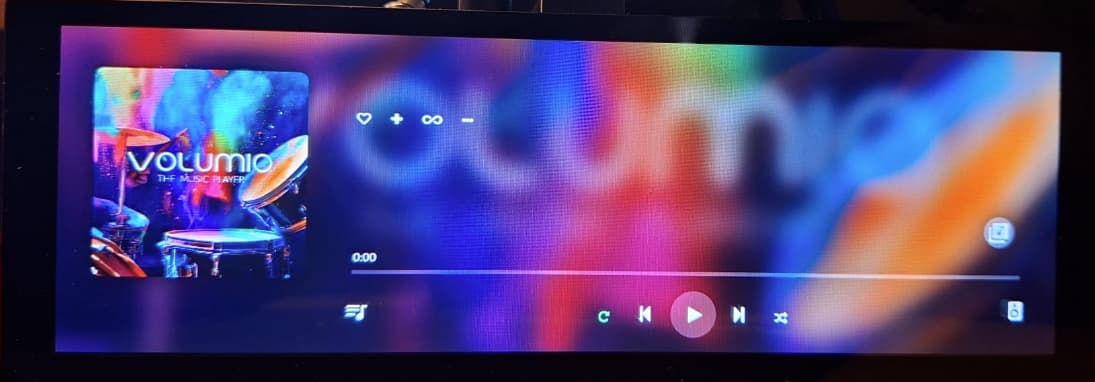
I downloaded Volumio 4 at the end of December and at the end of January, and the two versions do not have the same number.
So, I don’t unzip the files before putting them into Pi Imager; I let the software do that.
Writing to the SD card works perfectly and goes all the way through.
I’ll try unzipping them first to test it out.
I made a new SD card and it worked…
I don’t understand anything!!!
Anyway, I need to test it on an old Pi because I now have a problem with the screen configuration… I’ll read up more on the subject.
In any case, thanks for the help.
Very basic.
Volumio is not distributed as a zipped image format. So if you flash the zip file, Raspberry Pi Imager will unzip the file and write the 2 files *.img and checksum to the SD Card. While the *.img file needs to be unpacked and written.
Sorry, I thought I had made that clear in my post. I did exactly what you put here the first time. When booting up the Pi 4, what happened was what I described, shows a screen that it’s loading, then stops sending video to the monitor, which causes it to go to sleep, and never wakes up.
Second time, I flashed the card using the Volumio image that comes with the Raspberry Pi Imager, with the same result.
Third time, I re-downloaded the image from the Volumio website, again flashed it to the card using the Raspberry Pi imager choosing the file that I had unzipped from the download, and it let to the same result. But this time, having read the notes somewhere in this forum, I also used the Raspberry Pi imager to format the card completely before I flashed it. Same exact result. This is a Lexar 128 GB card that I had used before to flash the Raspberry Pi 64 bit OS and booted with no problems.
After all this, I took out the card, I inserted another card that has the Raspberry Pi OS, and it booted just fine, so I don’t think it’s the computer. Maybe there is something I can do via SSH from my PC?
I just repeated the steps to figure out what wasn’t working.
@PluggedIn, I think this might help you.
1-Download the latest version from the Volumio website.
2-Unzip the file into a separate folder.
3-Open Pi Imager and select your Pi.
4-When selecting the OS, go to the folder you created and select the image file (ignore the other one).
5-Start writing.
Then install as usual, like Volumio 3.XXX, and that’s it!
That’s what I said I did in my post.
Until a few days ago, I had no idea Volumio even existed. I only learned of it because I was going through the list of OSes that the Pi Imager can flash, and since I’m an audiophile, it caught my attention. Therefore, I have no idea how Volumio 3 was, or that the current version is 4. I just downloaded the Pi file from the Volumio website.
Hy @PluggedIn,
Welcome to the community. Although you have stated that you have experience with setting up Raspberry Pi, however Volumio ecosystem differs from the typical Pi OS.
Please take a look at our guide, especially around customization, which is a common trap for new users.
Kind Regards,
I don’t know what to tell you then.
For me, just selecting the img file worked. There is a second img.md5 file in the directory, but don’t use that one.
cable connections are good. I just reseated both ends. problems continues. when i first boot up the touch on the right side works, a few minites later nothing. however the left side is still good. so strange. not sure what to try next…