Damn. I can’t check now… tonight.
@flatric does it work with other output? Try to save system name , dac, and volume mixer in volumio. What is mixer name ?
Yes with HDMI as output it’s working. No mixer is shown if my Hifiberry is activated
Edit: Now as I installed Volumio 2 directly and not over OTA there is a Softwaremixer shown. Maybe it will work now
Edit v2: If I have the Softwaremixer enabled I got no sound generally and your plugin isn’t working with Softwaremixer and without
I found where the problem did come…Softvolume ! I corrected it, but if you select software mixer, even if the plugin works, there is no sound… (Same as the other Spotify plugin). With “none” as mixer, you’ll get sound. If you don’t want to re-install the whole plugin, you can just copy “index.js” in your plugin folder (/data/plugins/music_service/volspotconnect) and “killall node” to restart. After you have to save “dac” and “volume option”. Sometime you have to refresh the page to see “software volume”…
https://github.com/balbuze/volumio-plugins/blob/master/plugins/music_service/volspotconnect/volspotconnect.zip
and
https://github.com/balbuze/volumio-plugins/blob/master/plugins/music_service/volspotconnect/index.js
Thank you, but I’m not at home currently, can try it not earlier than Monday
Gesendet von meinem Bacon mit Tapatalk
Get this error when installing:

Yep, I temporarily disabled the repo due to an attack earlier today…
Now the repo is up and I saw a error in the install script… It’ s corrected.
But remains something, with software mixer the plugin works, but in my case I get no sound 
To be test with other DAC
And do forget to save output and mixer after saving plugin settings
@balbuze I get generally no sound with softwaremixer…
Edit: But it’s working shown as active and shown in Spotify, but as said before no sound:/
Gesendet von meinem Bacon mit Tapatalk
for me with ‘none’ as mixer I get sound…With softvol the plugin works, because if you enter something wrong it can’t start, but no sound  I can’t find why… If anybody have a idea …
Same for me… Do you have sound with softwaremixer if you use other sources? (nas, Spotify plugin) I already created a bug report because for me the softwaremixer is not working
Gesendet von meinem Bacon mit Tapatalk
An other point : I forgot something in install script from today. So on a fresh install you have to disable family share in plugin setting or sudo apt-get install avahi-utils via ssh. I’ll correct it tomorrow.
Disabled it anyway:D
Hey,
I got it to work:)
After it was active with softwaremixer I just changed to no mixer and pressed safe. It was still active and I can use it except the fact that I can’t change volume over the Spotify application.
Hi,
one or two weeks ago I tried to install the connect plugin on my Raspberry B+ with a HifiBerry DAC+ RCA and failed.
Now I tried it again and it works for me.
Here are my steps:
- fresh installation of Volumio 2.001-2016-10-15 . The trick here is really to wait at least 15 min for the first start. The system is doing a lot in the background e.g. reinstalling the ssh certificate things
- Changing the WLAN settings (-> remember the password is volumio2 )
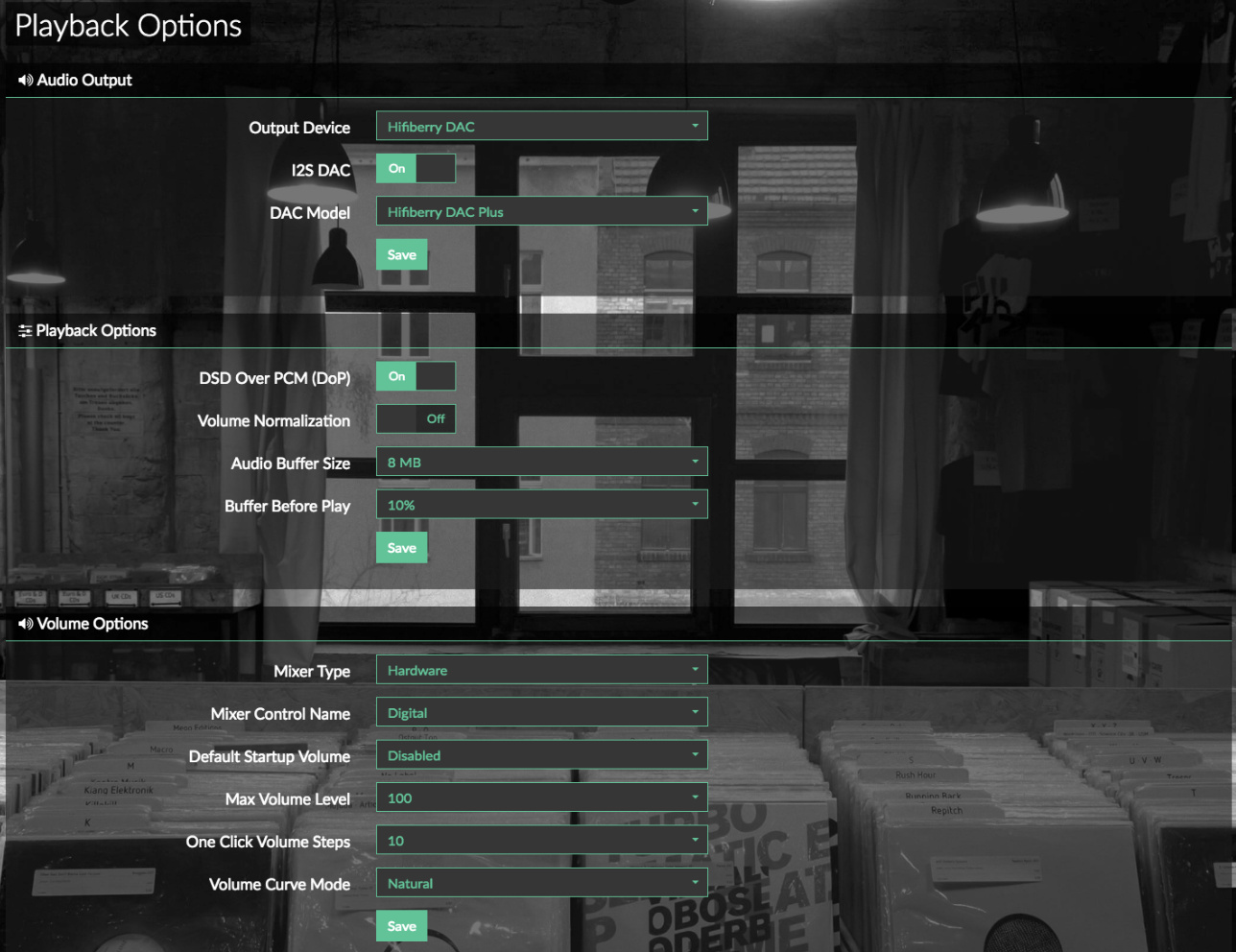
- Check if the sound settings works out of the box with a webradio channel (see settings in attached image)
- I installed the balbuze post from yesterday (Oct 17th)
- l don’t installed the avaho-utils (the two lines are commented in the installerscript) because the seemed to be only needed for familyshare
- enable the plugin and add my spotify credentials
- Press save in evry group of the playback sessions (btw I only have the Mixer Type Hardware, not sure about the softmixer discssions…
- Wait a second until the Volumio pops up in Spotify Conncet and choose it.
It works now. Switching between Spotify Connect and “normal” Volumio is still a bit shaky (starting a song in the volumio lib fires some red popups with some audio messages. But I think stopping the current music source and then switcih to the other avoid this.
here the status of the volspotconnct.service on my raspberry
volumio@volumio:~$ systemctl status volspotconnect
● volspotconnect.service - Volspotconnect Daemon
Loaded: loaded (/etc/systemd/system/volspotconnect.service; disabled)
Active: active (running) since Tue 2016-10-18 14:04:48 UTC; 33min ago
Main PID: 2187 (bash)
CGroup: /system.slice/volspotconnect.service
├─2187 /bin/bash /data/plugins/music_service/volspotconnect/spotify-connect-web/startconnect.sh
├─2190 /bin/bash ./spotify-connect-web --username USERNAME --password PASSWORD --bitrate 320 --name Volumio --playback_device hw:1 --mixer Digital --mixer_device_index 1
├─2195 /bin/bash -c cd /usr/src/app && python main.py --username USERNAME --password PASSWORD --bitrate 320 --name Volumio --playback_device hw:1 --mixer Digital --mixer_device_index 1
└─2196 python main.py --username USERNAME --password PASSWORD --bitrate 320 --name Volumio --playback_device hw:1 --mixer Digital --mixer_device_index 1
Thanks,
Caunus
One thing I have to add: the volume settings are a little bit tricky. I have to set spotify to 100%! Then it’s depend also on the volume setting in Volumio and of the seetings of the conncet device…
hi all,
newbie there and have some issue with spotify connect.
Just installed, seems to works fine : “activate”. But can’t find volumio inside players list of spotify app (android by wifi or windows by ethernet, both on same network than RPI).
Do i have to install also the other spotify plugin ?
I have a classic RPI 3, no DAC so far. I’ve just connected the RPI to ethernet and power (no real HDMI or jack output connected yet - could be the issue ?)
Many thanks
hi!,
welcome !
when said plugin is active, do you mean the green dot ? You have nothing else to install. Try to save in “playback options” the output and the mixer.
In “system” save the name
If you install the package from yesterday, you have to disable family share before saving settings. Or re-install with the one from today.
I never tested it rpi 3 but it should be fine…
many thanks 
yep, green dot !
and works now, was my mistake. I’ve put my mail and not my username…
many thanks
great work !
Good
Just one point, the jack output of the RPI is rather (very) bad. Using a true DAC i2c or USB even cheap is miles away better…
Unfortunately it is still not working for me with my USB DAC. I set the Audio Output to STU, which is the only setting shown. Mixer Type is hardware… but somehow Volume is not showing up as an Spotify Connect device.
[code]volumio@volumio:~$ systemctl status volspotconnect -l
● volspotconnect.service - Volspotconnect Daemon
Loaded: loaded (/etc/systemd/system/volspotconnect.service; disabled)
Active: active (running) since Tue 2016-10-18 17:25:54 UTC; 1min 38s ago
Main PID: 1383 (bash)
CGroup: /system.slice/volspotconnect.service
├─1383 /bin/bash /data/plugins/music_service/volspotconnect/spotify-connect-web/startconnect.sh
└─1410 avahi-publish-service Volumio _spotify-connect._tcp 4000 VERSION=1.0 CPath=/login/_zeroconf
Oct 18 17:25:56 volumio volumio[1383]: File “loader.py”, line 3, in
Oct 18 17:25:56 volumio volumio[1383]: File “runpy.py”, line 180, in run_module
Oct 18 17:25:56 volumio volumio[1383]: File “runpy.py”, line 72, in _run_code
Oct 18 17:25:56 volumio volumio[1383]: File “/data/plugins/music_service/volspotconnect/spotify-connect-web/main.py”, line 56, in
Oct 18 17:25:56 volumio volumio[1383]: connect_app = Connect(web_error_callback, web_arg_parser)
Oct 18 17:25:56 volumio volumio[1383]: File “/data/plugins/music_service/volspotconnect/spotify-connect-web/connect.py”, line 87, in init
Oct 18 17:25:56 volumio volumio[1383]: lib.SpPlaybackUpdateVolume(mixer_volume)
Oct 18 17:25:56 volumio volumio[1383]: OverflowError: integer 66190 does not fit ‘16-bit unsigned int’
Oct 18 17:25:56 volumio volumio[1383]: Failed to execute script loader
Oct 18 17:25:57 volumio volumio[1383]: Established under name ‘Volumio’[/code]
And after a restart
[code]volumio@volumio:~$ systemctl status volspotconnect -l
● volspotconnect.service - Volspotconnect Daemon
Loaded: loaded (/etc/systemd/system/volspotconnect.service; disabled)
Active: active (running) since Tue 2016-10-18 17:33:22 UTC; 11min ago
Main PID: 1252 (bash)
CGroup: /system.slice/volspotconnect.service
├─1252 /bin/bash /data/plugins/music_service/volspotconnect/spotify-connect-web/startconnect.sh
└─1275 avahi-publish-service Volumio _spotify-connect._tcp 4000 VERSION=1.0 CPath=/login/_zeroconf
Oct 18 17:33:23 volumio volumio[1252]: File “runpy.py”, line 72, in _run_code
Oct 18 17:33:23 volumio volumio[1252]: File “/data/plugins/music_service/volspotconnect/spotify-connect-web/main.py”, line 14, in
Oct 18 17:33:23 volumio volumio[1252]: from connect import Connect
Oct 18 17:33:23 volumio volumio[1252]: File “/data/plugins/music_service/volspotconnect/spotify-connect-web/connect.py”, line 9, in
Oct 18 17:33:23 volumio volumio[1252]: from console_callbacks import audio_arg_parser, mixer, error_callback, connection_callbacks, debug_callbacks, playback_callbacks, playback_setup
Oct 18 17:33:23 volumio volumio[1252]: File “/data/plugins/music_service/volspotconnect/spotify-connect-web/console_callbacks.py”, line 104, in
Oct 18 17:33:23 volumio volumio[1252]: mixer = alsa.Mixer(args.mixer, **mixer_card_arg)
Oct 18 17:33:23 volumio volumio[1252]: alsaaudio.ALSAAudioError: Unable to find mixer control Digital,0 [hw:5]
Oct 18 17:33:23 volumio volumio[1252]: Failed to execute script loader
Oct 18 17:33:24 volumio volumio[1252]: Established under name ‘Volumio’[/code]
It did work with the version released 10/01 and stopped working later on. Any idea why it stopped working?