was an old built of volumio but the new 7" display I bought didnt work so i did the following
1 install new Trixie o/s on a different sd card and the screen works fine even from boot I can see the logo etc and the tough works when on home screen so all good.
2 wiped sd card and installed fresh volumio o/s from raspberry image writer unsure of version but the updater says its the latest
3 installed latest plugin for touch display 3.5.1
4 read many posts on this from various people tried a few changes to the userconfig.txt but alas
still now screen
can anyone help please?
many thanks
Hey @Fredothegreat,
Your report is missing critical information required for investigation. The Trixie test confirms your hardware works, so this is a Volumio-specific configuration issue - but I cannot diagnose without proper details.
Critical ambiguities:
-
Volumio version unknown
- “unsure of version but the updater says its the latest” is not actionable
- Touch Display plugin 3.5.1 is a Volumio 3 version
- Volumio 4 uses Touch Display 3.6.0
- Run this via SSH or check in UI: cat /etc/os-release
- Report exact VERSION_ID value
-
Installation method potentially destructive
- “raspberry image writer” - did you use Raspberry Pi Imager?
- If yes: did you apply ANY OS customization settings (hostname, SSH, WiFi, user/password)?
- Raspberry Pi Imager customization creates a firstrun.sh script designed for Raspberry Pi OS
- Volumio has its own first boot sequence - applying customization WILL break it
- Correct procedure: Flash with NO customization whatsoever, configure via Volumio wizard only
-
Display model unknown
- “new 7 inch display” is insufficient
- Is it: Official RPi 7" DSI (v1), Official RPi 7" DSI v2 (1280x720), HDMI display, other?
- Provide exact manufacturer and model number
-
Raspberry Pi4 model unknown
- Different Pi models require different KMS overlays
- Identify your board: [GUIDE] Identifying Your Raspberry Pi Board on Volumio: A Comprehensive Guide to Revision Codes
-
Current userconfig.txt contents unknown
- You said you “tried a few changes” - what is the current state?
- Provide complete contents of /boot/userconfig.txt
-
Log link missing - MANDATORY
- Generate log from http://volumio.local/dev (or http://[your-volumio-IP]/dev)
- Paste the resulting URL here
- No log = no help. Ever.
Provide:
- Exact Volumio version
- Exact Raspberry Pi model (revision code)
- Exact display model with manufacturer
- Complete /boot/userconfig.txt contents
- Step-by-step description of Raspberry Pi Imager usage (every option selected)
- Log link from /dev page
Kind Regards,
Thanks for the comprehensive reply and apologies for my lack of info I really appreciate it.
hope all info required is below:
volumio@volumio:~$ cat /etc/os-release
PRETTY_NAME=“Raspbian GNU/Linux 10 (buster)”
NAME=“Raspbian GNU/Linux”
VERSION_ID=“10”
VERSION=“10 (buster)”
VERSION_CODENAME=buster
ID=raspbian
ID_LIKE=debian
VOLUMIO_BUILD_VERSION=“cc50ad4a2058d01de272214eb33827883bd2b7d8”
VOLUMIO_FE_VERSION=“35f8f4439f0076a62fefa72fd80b70701b3d6cbd”
VOLUMIO_FE3_VERSION=“bcca17b6b6b26edfb999e6fd7da1b222a88a61d2”
VOLUMIO_BE_VERSION=“502750e5d54ecf269d25125b622bfabc030fb553”
VOLUMIO_ARCH=“arm”
VOLUMIO_VARIANT=“volumio”
VOLUMIO_TEST=“FALSE”
VOLUMIO_BUILD_DATE=“Wed 12 Nov 2025 06:58:02 PM CET”
VOLUMIO_VERSION=“3.874”
VOLUMIO_HARDWARE=“pi”
VOLUMIO_DEVICENAME=“Raspberry Pi”
VOLUMIO_HASH=“4ae6504ed6f22e44c01a6e93b16badbd”
volumio@volumio:~$ cat /proc/cpuinfo | grep -i revision
CPU revision : 3
CPU revision : 3
CPU revision : 3
CPU revision : 3
Revision : c03111
volumio@volumio:~$ cat /proc/cpuinfo | grep -i model
model name : ARMv7 Processor rev 3 (v7l)
model name : ARMv7 Processor rev 3 (v7l)
model name : ARMv7 Processor rev 3 (v7l)
model name : ARMv7 Processor rev 3 (v7l)
Model : Raspberry Pi 4 Model B Rev 1.1
display is a Raspberry Official DSI v2 1280x720
D/5720/KIT
NC 2116338FFH
2438Q
userconfig.txt appears blank!
Add your custom config.txt options to this file, which will be preserved during updates
writing the sd card I used pi imager V2 selected Rpi4 board then the sd card and selected skip customisation
Hey @Fredothegreat,
Thank you for the detailed information - this makes diagnosis straightforward.
Problem:
Your Official Raspberry Pi Touch Display 2 is not working because the required device tree overlay is missing. The log confirms the system is using legacy HDMI framebuffer (bcm2708_fb at 640x480) instead of detecting your DSI display.
The Touch Display 2 (ili9881 controller, 1280x720) requires explicit overlay configuration - it does not auto-detect on Volumio.
Solution:
Edit /boot/userconfig.txt via SSH and add:
# Add your custom config.txt options to this file, which will be preserved during updates

# Official Raspberry Pi Touch Display 2 (1280x720)
dtoverlay=vc4-kms-v3d
dtoverlay=vc4-kms-dsi-ili9881-7inch
Save the file and reboot.
Explanation:
- vc4-kms-v3d: Required KMS video driver for X11/graphics stack (Touch Display plugin depends on this)
- vc4-kms-dsi-ili9881-7inch: Driver for the Touch Display 2 panel
Rotation (if needed):
If you need to rotate the display, append rotation parameter:
dtoverlay=vc4-kms-dsi-ili9881-7inch,rotation=180
Valid rotation values: 0, 90, 180, 270
Reference:
There is a dedicated community guide for this display:
Notes:
- Your installation method was correct - flashing with Pi Imager and skipping customization is the proper procedure
- Touch Display plugin 3.5.1 should work once the overlay is configured
- If touch input direction is wrong after display works, use invx, invy, or swapxy parameters on the overlay line
After making changes, generate a new log if problems persist.
Kind Regards,
Thats probably the best response to an IT problem I have had in years well done you
great info on the button and fixed the problem.
its now working.
orientation can be changed in the plugin so that also works.
only issue I have is the touch appears to be around 20mm off! i can drag my finger across the screen and with mouse enabled the icon is 20mm behind my finger
is there anyway of calibrating this? I did a search through the links you gave me but coulfnt find a mention of calibration
many thanks again
Hey @Fredothegreat,
Excellent news that the display is working.
The touch offset is likely caused by the Touch Display plugin having been installed and configured when the display was not properly initialised. The plugin captured incorrect parameters from the legacy framebuffer output.
Try first:
- Uninstall the Touch Display plugin via the Volumio UI
- Reboot
- Reinstall the Touch Display plugin
- Configure rotation within the plugin settings
- Test touch accuracy
This clean reinstall with the correct dtoverlay active should resolve the 20mm offset.
If not:
Should the touch offset remain after the reinstall procedure, please report the issue in the Touch Display plugin thread:
Reference this guide thread when posting:
The plugin maintainer and community there have specific experience with xinput calibration procedures for edge cases.
Kind Regards,
Thats great thanks i will give it a go
Project nearly finished!
OK this is now officially weird
trying to resolve the alignment I did a fresh install of Volumio using the same process as before
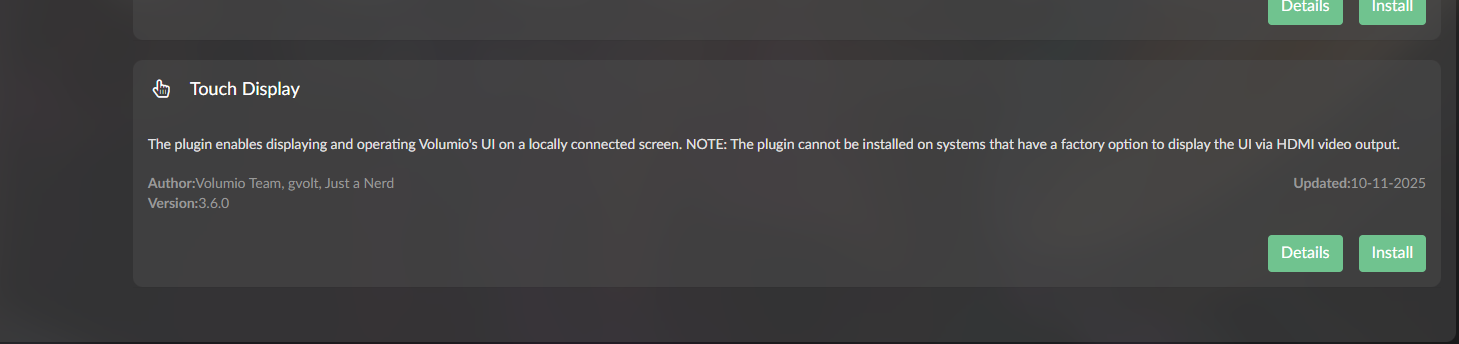
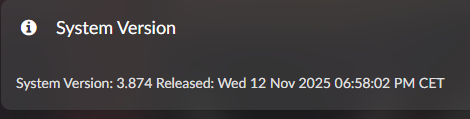
but now when I go to the plugins its showing the touch screen plugin as 3.6 I read above that 3.6 was for v4?
also it fails install just cant find the correct repository.
@nerd just to let you know I fixed (after @aluisperezh help) the touch alignment issue by adding ,nohdmi to the end of the dtoverlay=vc4-kms-v3d
so the userconfig now shows
Official Raspberry Pi Touch Display 2 (1280x720)
dtoverlay=vc4-kms-v3d,nohdmi
dtoverlay=vc4-kms-dsi-ili9881-7inch
aligment fixed
many thanks for your time
Hello.
I don’t think the problem has been fully resolved (at least for me). The screen displays and rotates, but the touchscreen doesn’t. When I adjust the rotation angle in the system settings, only the screen rotates, and the touchscreen remains in its original setting.
Has anyone managed to solve this problem?
Hi @sheliak
Welcome.
Yes, almost everyone solved it.
The difference? They left behind actual information instead of a mysterious riddle carved into a cave wall.
Things like, I know it’s just crazy, but give it a try:
- Which hardware you’re using (not “a Pi‑ish thing with vibes”)
- A direct link to your screen (telepathy still in beta)
- Which version of Volumio — and please, for the love of debugging, don’t say “latest”. That’s what everyone says right before chaos begins.
I’m sorry, but I’m just learning about Volumio and hi-fi music. I’m replying now. I’m using a Raspberry Pi 4 + Hifiberry Digi2+ + Topping E30II, plus a Raspberry Pi Touch Display 2. I’m just building my setup and have installed the latest version of Volumio from their website (Volumio-4.073-2025-12-05-pi).
Hey @sheliak,
Welcome to Volumio.
The symptom you describe - screen rotates but touch does not follow - indicates you are using system settings or the Touch Display plugin UI to rotate the display. This method only rotates the framebuffer via xrandr. The touch input matrix is not updated.
To rotate both display AND touch together, the rotation must be applied via the dtoverlay parameter directly.
Before I can provide the correct configuration, please confirm:
- Is your Touch Display 2 the 5" or 7" version?
- Please provide log link from http://volumio.local/dev
- Current contents of /boot/userconfig.txt
The overlay name differs between sizes, so this detail is required.
Reference guide for this display:
Kind Regards,
HI
I have just updated my previous version to Version 4.119. It is working perfectly regarding the music, but the PI 7" official RPI screen no longer displays the “Now Playing Screen”.
When booting, RPI displays the logo of volumio, then screen stays black. I can connect to volumio and play music by using my phone to select track.
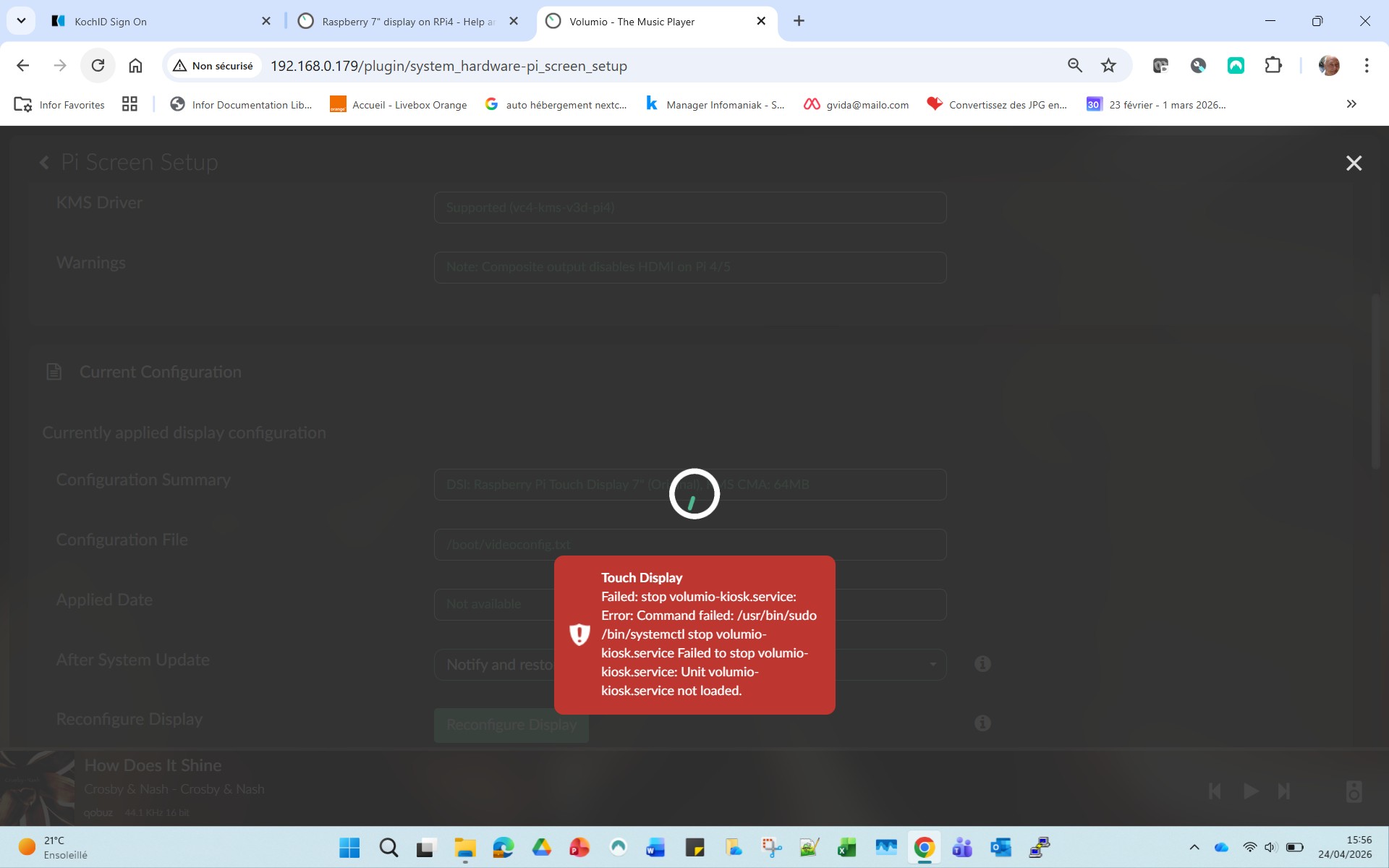
I went in the PI screen setup and change the configuration display from HDMI to DSI I or O,
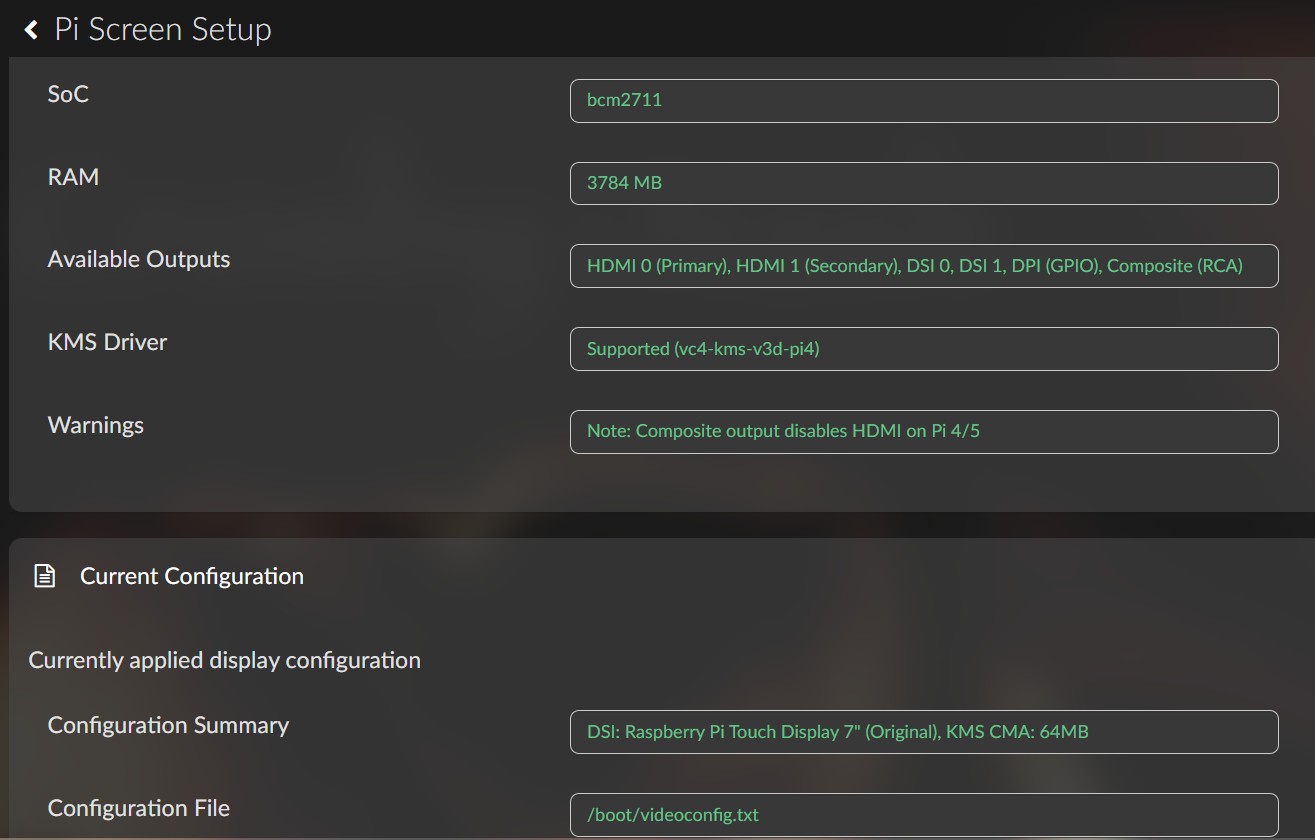
“DSI: Raspberry Pi Touch Display 7” (Original), KMS CMA: 64MB"
then reboot.
Same result the screen is black and the configuration summary stays to
“HDMI0: Auto Detect (EDID), KMS CMA: 64MB”
It sounds that RPI does not take in account the change I did.
Attached two screen copy that hope would help.
Can you help me ?
Georges
Here is the system caracteristics
System Information
OS info
Version of Volumio: 4.119
Hostname: volumio
Kernel: 6.12.74-v7l+
Governor: performance
Uptime: 0 days, 0 Hrs, 9 Minutes, 35 Seconds
Network info
Interface: eth0
IP Address: 192.168.0.179
MAC Address: 2c:cf:67:ae:bf:37
Type: wired
Speed: 1Gb/s
Audio info
Hw audio configured: E30 II
Mixer type: Hardware
Number of channels: 2
Supported sample rate: 44100 48000 88200 96000 176400 192000 384000 768000
Board info
Manufacturer: Raspberry Pi Foundation
Model: Raspberry Pi 4 Model B Rev 1.5
Firmware Version: 2026/01/09 16:12:13 (d76c460359ec31b2fadf3b48e44599673095326f)
CPU info
Brand: BCM2711
Model name: ARMv7 Processor rev 3 (v7l)
Speed: 1.5 GHz
Family: Cortex-A72
Model: 3
Number of cores: 4
Physical cores: 4
BogoMIPS: 270.00
Average load: 84%
Temperature: 49°C
Memory info
Memory: 3874536 Ko
Free: 2664332 Ko
Used: 1210204 Ko
Software info
MPD version: Music Player Daemon 0.24.6 (b6f106b+)
Bluetooth capabilities version: 5.0
AirPlay version: AirPlay 2
UPnP renderer: upmpdcli 1.9.15-1~ppa1~bookworm
Storage info
INTERNAL storage - Size: 9998MB
Used: 1246MB
Available: 8216MB (82%)
Hey @gvida,
To investigate this we need two things from you.
First, a log link captured while the issue is reproducing. Steps:
- Open Pi Screen Setup, select DSI: Raspberry Pi Touch Display 7" (Original) and apply
- Reboot
- With the screen still black, open the web UI from your phone (192.168.0.179 in your case) and navigate to http://192.168.0.179/dev
- Use the Send button under the Log section
- Paste the resulting URL here
Do not reboot again before posting the link.
Second, the contents of /boot/videoconfig.txt and /boot/config.txt. SSH in and paste the output of:
cat /boot/videoconfig.txt
cat /boot/config.txt
Without these the report cannot be advanced.
One note: the “Failed to stop volumio-kiosk.service” error in your screenshot is emitted by the Touch Display plugin, not by Pi Screen Setup. The two plugins are separate.
Kind Regards,
HI
Sorry for the delay, here is the log url
http://logs.volumio.org/volumio/jLDF81l.html
cat /boot/videoconfig.txt
### pi_screen_setup managed - DO NOT EDIT ###
# Generated: 2026-06-04T14:19:04.638Z
# Model: Raspberry Pi 4 Model B Rev 1.5

# KMS Display Driver
dtoverlay=vc4-kms-v3d-pi4,cma-64

# DSI1 Configuration
dtoverlay=vc4-kms-dsi-7inch
cat /boot/config.txt
### DO NOT EDIT THIS FILE ###
### APPLY CUSTOM PARAMETERS TO userconfig.txt ###
initramfs volumio.initrd
gpu_mem=128
gpu_mem_256=32
gpu_mem_512=32
gpu_mem_1024=128
max_usb_current=1
[pi5]
usb_max_current_enable=1
[all]
include volumioconfig.txt
include videoconfig.txt
include userconfig.txt
Hope this would help you
Realy appreciate your support
Georges
Ok so this explains why screen is black? What next step to do ?
Hey @gvida,
Two things confirmed from what you posted:
-
/boot/videoconfig.txt is correctly generated by Pi Screen Setup for the original 7" Touch Display on a Pi 4.
-
/boot/config.txt correctly includes /boot/videoconfig.txt.
From the boot log:
- The kernel is running on the legacy bcm2708 firmware framebuffer at 800x480
- vc4-drm (the KMS driver) does not bind, so no /dev/dri/card0 is created
- The Touch Display plugin shows status FAILED in plugins.json, and no Xorg or Chromium processes are running
That is the chain producing the black screen: KMS is not active, so X cannot start, so Touch Display has nothing to render to.
What is missing is /boot/volumioconfig.txt. SSH in and paste:
cat /boot/volumioconfig.txt
Also, on the Pi Screen Setup plugin page, scroll to the bottom and check whether there is any “OTA drift detected” warning section. If yes, post a screenshot.
Kind Regards,
HI
1-There is no ““OTA drift detected” warning section.” at the bottom of the screen
2-Here is the volumioconfig.txt file as it is
volumio@volumio:~$ cat /boot/volumioconfig.txt
### DO NOT EDIT THIS FILE ###
### APPLY CUSTOM PARAMETERS TO userconfig.txt ###

# Compute Module 4 USB configuration
[cm4]
dtoverlay=dwc2,dr_mode=host
otg_mode=1

# Pi 5 NVMe/PCIe support
[pi5]
# dtparam=uart0_console # Disabled by default
dtparam=nvme
dtparam=pciex1_gen=2

# DRM/KMS graphics driver - per-board to avoid Pi Zero 2 W boot issues
# Firmware auto-remaps overlay to board-specific variant
[pi2]
[pi3]
[pi4]
[pi5]

# Pi Zero 2 W - KMS omitted due to boot failures and no DSI connector
# HDMI works via firmware framebuffer without KMS
[pi02]

# Common settings
[all]
arm_64bit=0
dtparam=audio=on
audio_pwm_mode=2
dtparam=i2c_arm=on
disable_splash=1
force_eeprom_read=0