[PLUGIN] Touch Display

Hi @nerd!

Virtual keyboard works very well. It was really long awaited by many users.

rPi 5 + rPi Touch Display 2 on v4.061 OK!

rPi 4 + rPi Touch Display v4.061 OK!

Many thanks for your dedication, efforts and knowledge that you share!

Best Regards / C

1 Like

Hi,

I’m having an issue with the plugin on my Rapsberry Pi 5.
After one or two days on thumbnail of music files don’t appear and system becomes irresponsive.

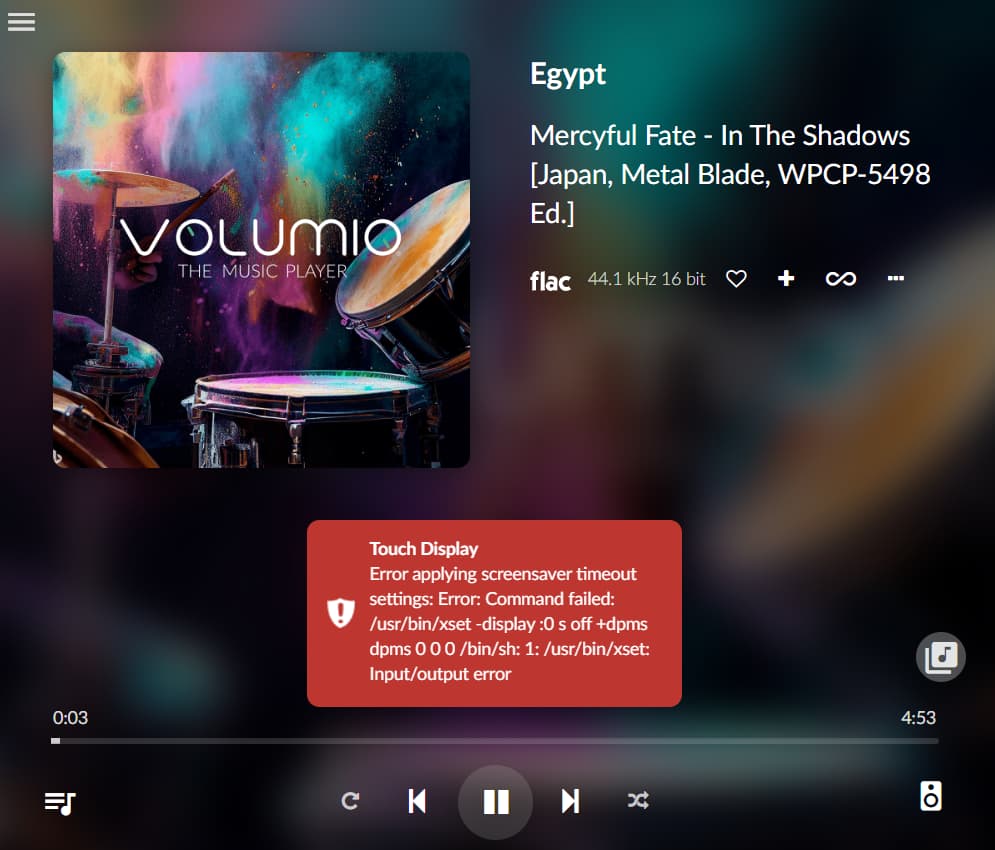
I got this prints (I can’t get a log because it doesn’t get one: as can be seen on second picture).

After this not even rebooting volumio works. I have to hard restart system. After this it all works for the mentioned 1-2 days until everything cycles again in same error and solution.

Any idea?

BR,
Paulo

I have noticed an other problem
I have instal the new version of Volumio
Install the plug-in touch display and when adjust the volume Fi from 100 to 80
It reduce the volume but when i change it to 100 it stays on 80 playing with tidal

Rpi 3b / Volumio version 3823 / audiophonic DAC ES 9028 / touch screen version 351
When playing with touch version 335 everything works correct

Sorry if I place this in wrong see movie

Any suggestions

Hi, after a reset I had to install Touch Display Plugin again.
But it didn’t install, as installation of xinit failed.
This time unfortunately it is not possible anymore to install working version 3.5.1.
Pi4b, external DAC, 7’’ original touch display, Volumio 3.832.
Can you please enable 3.5.1 again? Many tanks!

Downloading plugin at https://plugins.volumio.workers.dev/pluginsv2/downloadLatest/touch_display/volumio/buster/armhf
END DOWNLOAD: https://plugins.volumio.workers.dev/pluginsv2/downloadLatest/touch_display/volumio/buster/armhf
Erstelle Installationspfad
Plugin wird entpackt
Prüfen, ob das Plugin für diese Version von Volumio geeignet ist The plugin can be used with this version of Volumio
Prüfe, ob Plugin bereits existiert
Kopiere Plugin in sein Verzeichnis
Installiere benötigte Komponenten
Re-synchronizing package index files from their sources
Hit:1 https://deb.nodesource.com/node_14.x buster InRelease
Hit:2 http://archive.raspberrypi.org/debian buster InRelease
Hit:3 http://raspbian.raspberrypi.org/raspbian buster InRelease
Reading package lists...
Building dependency tree...
Reading state information...
0 upgraded, 0 newly installed, 0 to remove and 2 not upgraded.
Installing graphical environment
Reading package lists...
Building dependency tree...
Reading state information...
The following additional packages will be installed:
keyboard-configuration libegl-mesa0 libegl1 libegl1-mesa libepoxy0 libevdev2
libfontenc1 libgbm1 libgudev-1.0-0 libinput-bin libinput10 libmtdev1
libpciaccess0 libunwind8 libutempter0 libwacom-bin libwacom-common libwacom2
libwayland-server0 libxaw7 libxcomposite1 libxfont2 libxft2 libxkbfile1
libxmu6 libxmuu1 libxpm4 libxt6 libxxf86dga1 x11-utils x11-xkb-utils xauth
xbitmaps xfonts-base xfonts-encodings xfonts-utils xserver-common
xserver-xorg xserver-xorg-core xserver-xorg-input-all
xserver-xorg-input-libinput xserver-xorg-input-wacom xserver-xorg-legacy
xserver-xorg-video-all xserver-xorg-video-amdgpu xserver-xorg-video-ati
xserver-xorg-video-fbdev xserver-xorg-video-nouveau
xserver-xorg-video-radeon xserver-xorg-video-vesa xterm
Suggested packages:
pciutils mesa-utils xfonts-100dpi | xfonts-75dpi xfonts-scalable xinput
firmware-amd-graphics xserver-xorg-video-r128 xserver-xorg-video-mach64
xfonts-cyrillic
The following NEW packages will be installed:
keyboard-configuration libegl-mesa0 libegl1 libegl1-mesa libepoxy0 libevdev2
libfontenc1 libgbm1 libgudev-1.0-0 libinput-bin libinput10 libmtdev1
libpciaccess0 libunwind8 libutempter0 libwacom-bin libwacom-common libwacom2
libwayland-server0 libxaw7 libxcomposite1 libxfont2 libxft2 libxkbfile1
libxmu6 libxmuu1 libxpm4 libxt6 libxxf86dga1 x11-utils x11-xkb-utils xauth
xbitmaps xfonts-base xfonts-encodings xfonts-utils xinit xserver-common
xserver-xorg xserver-xorg-core xserver-xorg-input-all
xserver-xorg-input-libinput xserver-xorg-input-wacom xserver-xorg-legacy
xserver-xorg-video-all xserver-xorg-video-amdgpu xserver-xorg-video-ati
xserver-xorg-video-fbdev xserver-xorg-video-nouveau
xserver-xorg-video-radeon xserver-xorg-video-vesa xterm
0 upgraded, 52 newly installed, 0 to remove and 2 not upgraded.
Need to get 6582 kB/19.0 MB of archives.
After this operation, 32.1 MB of additional disk space will be used.
Get:2 http://ftp.acc.umu.se/mirror/raspbian/raspbian buster/main armhf libwacom2 armhf 0.32-1 [16.1 kB]
Get:1 http://mirror.nl.leaseweb.net/raspbian/raspbian buster/main armhf keyboard-configuration all 1.193~deb10u1 [404 kB]
Get:4 http://mirror.de.leaseweb.net/raspbian/raspbian buster/main armhf x11-utils armhf 7.7+4 [176 kB]
Get:5 http://archive-bm.raspbian.org/raspbian buster/main armhf xfonts-utils armhf 1:7.7+6 [82.5 kB]
Err:3 http://mirror.truenetwork.ru/raspbian/raspbian buster/main armhf libwacom-bin armhf 0.32-1
Could not connect to mirror.truenetwork.ru:80 (94.247.111.11), connection timed out
Err:6 http://mirror.truenetwork.ru/raspbian/raspbian buster/main armhf xfonts-base all 1:1.0.5
Unable to connect to mirror.truenetwork.ru:http:
Fetched 679 kB in 32s (21.2 kB/s)
Installation of xinit failed
Plugin failed to install!
Cleaning up...
Removing dependencies
Reading package lists...
Building dependency tree...
Reading state information...
Package 'fonts-arphic-ukai' is not installed, so not removed
0 upgraded, 0 newly installed, 0 to remove and 2 not upgraded.
Reading package lists...
Building dependency tree...
Reading state information...
Package 'fonts-arphic-gbsn00lp' is not installed, so not removed
0 upgraded, 0 newly installed, 0 to remove and 2 not upgraded.
Reading package lists...
Building dependency tree...
Reading state information...
Package 'fonts-unfonts-core' is not installed, so not removed
0 upgraded, 0 newly installed, 0 to remove and 2 not upgraded.
Reading package lists...
Building dependency tree...
Reading state information...
Package 'fonts-ipafont' is not installed, so not removed
0 upgraded, 0 newly installed, 0 to remove and 2 not upgraded.
Reading package lists...
Building dependency tree...
Reading state information...
Package 'fonts-vlgothic' is not installed, so not removed
0 upgraded, 0 newly installed, 0 to remove and 2 not upgraded.
Reading package lists...
Building dependency tree...
Reading state information...
Package 'fonts-thai-tlwg-ttf' is not installed, so not removed
0 upgraded, 0 newly installed, 0 to remove and 2 not upgraded.
Reading package lists...
Building dependency tree...
Reading state information...
Package 'chromium-browser' is not installed, so not removed
0 upgraded, 0 newly installed, 0 to remove and 2 not upgraded.
Reading package lists...
Building dependency tree...
Reading state information...
Package 'openbox' is not installed, so not removed
0 upgraded, 0 newly installed, 0 to remove and 2 not upgraded.
Reading package lists...
Building dependency tree...
Reading state information...
Package 'xinit' is not installed, so not removed
0 upgraded, 0 newly installed, 0 to remove and 2 not upgraded.
Deleting /opt/volumiokiosk.sh
Deleting /data/volumiokiosk
Deleting /data/volumiokioskextensions
Deleting /lib/systemd/system/volumio-kiosk.service
Enabling login prompt
Done
Removing plugin directory /data/plugins/user_interface/touch_display
Es ist ein Fehler während der Plugin-Installation aufgetreten Error
Removing temporary directory /tmp/touch_display-yZeZV2TcEr

Your log shows: Unable to connect to mirror.truenetwork.ru:http:
maybe this will help you, changing the repository, as described here:

Hi,

I had some trouble getting my raspberry pi 3b+ and the original 7" touchscreen up and running with volumio. I installed volumio v3.832 and the touchscreen plugin 3.5.1 (both were the most up to date versions available at that time. Everything worked fine, as long as my touchscreen did not go to sleep. It was impossible to wake it up, volumio was still reactive from a browser (and by ssh).

After reading many articles in this forum, I finally came to this thread: https://community.volumio.com/t/3-779-after-upgrade-raspberry-pi-touchscreen-display-does-not-work-any-more/69724/36

I then tried the following in my /boot/userconfig.txt file:
#dtoverlay=rpi-ft5406
dtoverlay=vc4-kms-v3d
dtoverlay=vc4-kms-dsi-7inch

And now everything runs as I expect it to. The screen goes to sleep and I can wake it with a single touch.

I don’t understand why, as I am not activating the touchscreen controller by leaving that command out, but it works. Thought I might share it with you, if someone else struggles with this.

1 Like

Virtual keyboard in the touch display when turned to on indicates a chrome extension that is no longer supported. the display switches to something from chrome. no way to get back to the volumio interface, except a restart

Hey @jocoman,

The virtual keyboard functionality in the Touch Display plugin has been completely reworked and is now on V3, which uses the updated Chromium keyboard implementation. The issue you are describing - where enabling the virtual keyboard causes the display to switch to a Chrome error state - is a symptom of running an outdated version of the plugin.

Before we can proceed, I need you to provide the following:

  1. A log link showing the issue

    • Enable the virtual keyboard setting
    • Trigger the issue
    • Access http://<volumio_IP>/dev
    • Generate and paste the log URL here
  2. Your current Touch Display plugin version

    • Go to Plugins → Installed Plugins
    • Check the version number for Touch Display
  3. Your Volumio version and Raspberry Pi board model

Without a log demonstrating the actual issue, there is no way to diagnose what is happening on your system. The virtual keyboard feature works correctly in the current plugin version - if you are experiencing this problem, it is likely due to one of the following:

  • You have not updated the Touch Display plugin to the latest version
  • You are running an outdated Volumio build
  • There is a configuration or system-level conflict that only a log can reveal

Additionally, this issue belongs in the Touch Display plugin thread, not in the core Bookworm development discussion. Please post your log link and system details in the appropriate thread so we can address this properly.

Kind Regards,

I was working on my main system. I have a seperate sd card that i built a v4 version on.
I found autostart would not work on V4, so I have gone back to V3. I cannot live without autostart as it allows anyone to turn on the music without a menu. I had the timer in v3 set to 35000 and I upped to to 50000 and still no music with autostart. so for me this is the big issue . I cannot provide debug info at this time till autostart is resolved. txs

Dear Volumionauts,

Touch Display Plugin 3.5.7 BETA - Testing Requested

We have just published version 3.5.7 BETA of the Touch Display plugin and would appreciate community testing before the stable release.

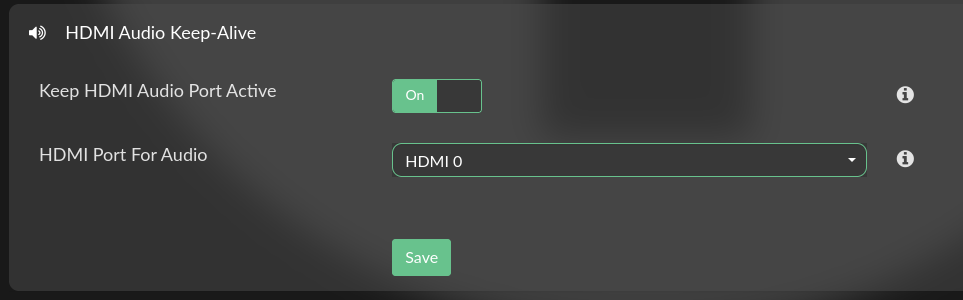
This update introduces HDMI audio keep-alive functionality, which solves a common issue where HDMI audio stops working when the Touch Display interface runs on a DSI or other primary display. The new feature allows you to select a specific HDMI port to remain active for audio output while the visual interface continues on your touch display.

The plugin now automatically detects available HDMI ports and presents them in the configuration interface. When enabled, it maintains the audio routing to your selected HDMI port and automatically calibrates touch input to work correctly on the primary display.

If you are using the Touch Display plugin with HDMI audio output, please consider testing this BETA version and reporting any issues or feedback. Your testing will help ensure a solid stable release.

Kind Regards,

I will find time to do a fresh flash and test this from scratch.

I installed the latest Beta and its all good. Thanks

Will this plugin work with this screen? 5 Inch Touchscreen IPS MIPI DSI Display Compatible with Raspberry Pi 5/4/3, 800x480 Pixel Capacitive Screen Driver-Free Interface

Hey All,
Latest Volumio on RPi4B + Raspberry Pi Touch 2 display.
All worked fine since I noticed that the update of this plugin is available.
When I hit update, the old version was removed but the new one cannot be installed.

I tried to install but every time I have the same error message:

xx=//

“Downloading plugin at https:xxplugins.volumio.workers.dev/pluginsv2/downloadLatestStable/touch_display/volumio/buster/armhf
END DOWNLOAD: https:xxplugins.volumio.workers.dev/pluginsv2/downloadLatestStable/touch_display/volumio/buster/armhf
Creating install location
Unpacking plugin
Checking that the plugin is suitable for this version of Volumio The plugin can be used with this version of Volumio
Checking for duplicate plugin
Copying plugin to location
Installing necessary utilities
Re-synchronizing package index files from their sources
Hit:1 http:xxraspbian.raspberrypi.org/raspbian buster InRelease
Hit:2 https:xxdeb.nodesource.com/node_14.x buster InRelease
Hit:3 http:xxarchive.raspberrypi.org/debian buster InRelease
Reading package lists…
Running apt-get -y install failed
Plugin failed to install!
Cleaning up…
Removing dependencies
Deleting /opt/volumiokiosk.sh
Deleting /data/volumiokiosk
Deleting /data/volumiokioskextensions
Deleting /lib/systemd/system/volumio-kiosk.service
Enabling login prompt
Done
Removing plugin directory /data/plugins/user_interface/touch_display
Removing temporary directory /tmp/touch_display-TUE4F9QRLt
An error occurred while installing the plugin Error”

Appreciate any help!

Try to uninstall if you can, then power off/on and then re-install the plugin.

The plugin was automatically uninstalled when trying to update.

Restart didn’t change anything.

@tomkowski78

Sharing just the plugin log isn’t very helpful on its own.
Could you be more specific than simply saying “latest version of Volumio”? We can’t guess what you mean, are you referring to Buster-based V3.x or Bookworm-based V4.x? Mention the exact version!!

Also, this line indicates a failure:
Running apt-get -y install failed
That typically points to one of the following issues:

  • A repository is unreachable
  • The system date/time is incorrect
  • DNS resolution is failing
  • Network connectivity is unstable

Please check those areas and provide more context so we can help you troubleshoot effectively

1 Like

@nerd

I did a fresh flash and installed the beta with all clean userconfig, etc. and I do not see the option shown in the pic. I rebooted then enabled the plugin, no dice. I thought it might’ve been my soundbar not being on the right input automatically, so rebooted and hard set my soundbar to listen to the HDMI from this Pi4, no joy.

Hey @RedEyeNinja,

This is quite unexpected. Can you confirm plugin version you see installed?

Kind Regards,