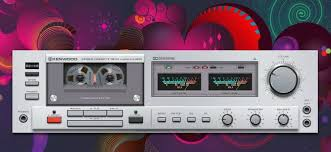
The introduction of profiles brings great convenience, and the refactor/modular-remote version is very stable.
Version E:
publishing the whole thing as an official, extra important and best plugin.
(For you it’s about 1 minute and 24 seconds + 34x  ).
).
1 Like
Thank you for the detailed explanation. This was just a thought I had.
When installing remote display in Windows Power Shell, crashes occur many times. What is the reason? There have been several successful installations. After the configuration was completed, the remote window crashed as soon as it was opened. The same thing happened after several versions of the system were changed.
Hey @Fire,
I appreciate the report, but I am afraid we have hit a familiar wall here.
“Crashes occur many times” and “crashed as soon as it was opened” tells me that something went wrong. Which, respectfully, I had already worked out from the word “crashes.” What it does not tell me is what, why, or where - the three things I actually need to help you.
This has been said before, and it will be said again with the same conviction: no logs, no help. This is not a suggestion. It is not optional. It is not a rule that applies to everyone except you. It applies to everyone, including you, including me, including anyone who has ever looked at a terminal and wondered why it was angry.
The debug tools exist for a reason. The documentation on how to use them exists for a reason. The many previous posts requesting logs before diagnosis exists for a reason. That reason is that I cannot see your screen from here, and my crystal ball is in common sense therapy session.
What I need from you:
- The exact error output from PowerShell when the crash occurs
- The terminal log or traceback, copied in full
- Which version of Windows, which branch you installed from
I do not do guessing, I do check facts only.
Kind Regards,
In case you need a back-up 
1 Like
Hey @Wheaten,
I appreciate the thought, but I am afraid you have selected the entry-level Hocus Pocus 1.00 model. That is fine for party tricks and telling tourists they will meet a tall stranger, but it is woefully underpowered for remote debugging.
For reference, the product tiers are:
-
Hocus Pocus 1.00 (what you found) - Entry level. Can detect “something is wrong.” Which, as established, I can already do from the word “crashes.” Redundant purchase.
-
Mystic Pro 500 - Mid-range. Can identify the operating system and whether the user has tried turning it off and on again. Useful but still requires the user to be in the same postcode.
-
Clairvoyant Ultra 3000 - Professional grade. Can read stack traces through walls and across time zones. Requires monthly calibration with goat sacrifice. Discontinued after HR complaints.
-
OmniScient X - Enterprise class. Full mind-reader grade. Reads terminal output directly from the user’s screen, reconstructs the exact sequence of clicks that led to disaster, and automatically generates the log file the user should have posted in the first place. Currently back-ordered until the heat death of the universe.
-
Abra-Cadabra Compact - Next generation, successor of Abra-Cadabra HardGuess. Does not read the user’s mind. Takes it over. Temporarily seizes motor control of the user’s hands, opens the correct terminal, runs the debug command, copies the output, navigates to the forum, pastes it into a properly formatted post with OS version, branch name, and reproduction steps, then releases the user who blinks twice and wonders why they suddenly feel helpful. Field trials showed a 100% success rate in log submission. Tragically cancelled after test subjects began voluntarily reading documentation. Regulators deemed this level of behavioural modification “too effective” and “frankly unsettling.”
Until the Abra-Cadabra Compact clears regulatory review, we remain bound by the old ways: copy the error, paste the error, post the error.
I do not make the rules. I just enforce them with tedious consistency.
Kind Regards,
3 Likes
Just wondering, how do you all upload templates to Volumio?
PeppyMeter 3.3.2 - “Unity” through division
Dear Volumionauts,
3.3.0 - @Gelo5 had a dream. 3.3.1 - @dewen had a dream. 3.3.2 - the building extension is complete. The sleep clinic now has a dedicated wing for the remote client, which outgrew its cot and demanded its own room.
The Remote Client Grew Up
peppy_remote started life as a simple script. “Display PeppyMeter on a second screen.” A few hundred lines. Innocent.
Then @Gelo5 had a dream. Then @dewen had a dream. Then @pjorgenunes had a dream. Then @Lee.Yan had a dream - on Windows, naturally, which means everything crashes in PowerShell for reasons that remain between Microsoft and God. @Wheaten did not dream. @Wheaten stood in the doorway every 20 minutes asking “are we there yet” which, frankly, was not worse.
The result was 4,264 lines in one file. A config wizard, a network stack, an SMB mount handler, a spectrum renderer, a version checker, and a display compositor sharing one Python file.
It has been gutted and rebuilt. 10 library modules under lib/, each with one job. Nobody loses a wall.
What is New
Multi-profile configuration. Each profile is a complete setup - server, display, templates, theme. Switch from the wizard or the command line (peppy_remote --profile “Living Room”). Existing configs auto-migrate. Nothing breaks. GUI wizard rewritten with tabbed editing and profile manager. CLI wizard has profile management, import, export, and mount-now for theme browsing on both platforms.
Multi-client unicast. Previously, two remote clients on one machine meant UDP packet roulette. Now each client binds ephemeral ports. The server tracks clients by IP and port. Two remotes, one PC, different templates - works.
Version handshake. Server advertises plugin version. Client checks over HTTP before starting. Mismatch gets a clear message, not mysterious rendering failures three hours later.
Bug fixes
@Lee.Yan found remote clients appearing as phantom servers in UDP discovery. Root cause: client copied server config with remote.server.enabled = True and started announcing itself. Fix: force it to False. Simple. Took a diagnostic sniffer and half evening to find.
Kiosk random mode infinite reload loop - folder-only comparison fix. Rotating element AA smudge artifacts - inflate clear rects by 4px per side. Windows image slider clipping at low volume - dirty rect now covers full tip travel. Cross-platform pygame font resolution. cairosvg for consistent SVG rasterization. Time width calculations using render method for accurate sizing.
On the server side
Multi-client unicast networking, plugin version advertisement, and the rendering fixes above. Details in the GitHub release notes.
Install
Plugin: the usual way.
Remote client on Linux:
curl -sSL https://raw.githubusercontent.com/foonerd/peppy_remote/main/install.sh | bash
Remote client on Windows (PowerShell as Administrator):
irm https://raw.githubusercontent.com/foonerd/peppy_remote/main/install.ps1 -OutFile install.ps1
powershell -ExecutionPolicy Bypass -File install.ps1
Requires PeppyMeter Screensaver v3.3.2 with Remote Display Server enabled. Same version on both sides for best compatibility.
Thanks
@Lee.Yan for the phantom server bug and the Windows testing. @Wheaten for testing, moderating, denying all involvement, and the crystal ball recommendation which remains under regulatory review. @Gelo5 - grass restriction lifted. You are free to dream again. Use this privilege responsibly.
I will be checking myself into the Common Sense Ward for an (in)sanity detox. The coffee grinder has been assessed as delivering sufficient workload support for the duration. Do not wake me unless there are logs attached.
As always, provided “as-is”, fridge singing “kumbaya”, etc.
GitHub releases:
Kind Regards,
1 Like
Hey @Lee.Yan
Very carefully and very quickly.
The full answer depends on how far along the spectrum of sanity you are willing to travel.
Template upload methods - Ranked by sanity level
-
Sane: USB stick. Copy folder. Reboot. Tell nobody.
-
Mostly sane: SFTP. FileZilla, WinSCP, whatever your generation uses. Drag, drop, done. The training wheels of remote file transfer.
-
Questionable: rsync over SSH. One line, no GUI, syncs only what changed. Fast. Efficient. Your family will not understand what you are doing and will assume it is illegal.
-
Concerning: Automated script from a password vault, triggered by a git push, pulling templates from a build pipeline, deploying over SSH with key-based auth, logging to a dedicated channel. At this point you are not uploading templates. You are running infrastructure.
-
Clinically committed: Automated pipeline pulls templates from the peppy_templates repo, resizes them to native resolution for a Pi with type 2 DSI 7" screen, boots the Pi, starts all six remote clients plus a Windows VBox (I hate you all for this one), runs inventory, installs latest from whatever branch I choose - or forget to choose, which is its own category of excitement - restarts what needs restarting, and finishes before the coffee is ready. This is roughly one percent of my startup process. The other ninety-nine percent is classified. And all produces my beloved logs.
@Wheaten: Asks if it is done yet before you have started.
@Gelo5: Uploads 1,200 skins by sheer force of will. The method is unknown. Scientists are studying it.
For your situation, SFTP is the practical answer. Connect to your Volumio’s IP, navigate to /data/INTERNAL/peppy_screensaver/templates/, drop the folder in. The plugin restart is not needed.
Kind Regards,
1 Like
Previously, I used WinSCR for uploading, but it wasn’t very efficient. I’ve meticulously refined many templates, cleaning up font size and position, bitmap artifacts, and smearing marks in the background to make them as aesthetically pleasing and comfortable as possible. Therefore, I need to update multiple times across multiple devices and two system templates on each device. I use Beyond Compare (available for Mac) for file synchronization, which clearly shows the latest changes. On Windows, I can synchronize to other devices using the template on the NAS as the standard. For Volumio, I need to modify the permissions of /data/Internal Storage/peppy_screensaver/templates to 777(The folder /data/Internal Storage/peppy_screensaver is owned by Volumio), allowing me to update templates as efficiently as on Windows. Therefore, I’m wondering if it’s possible to add a switch in the PeppyMeter screensaver settings to enable/disable updates via SMB (777-644), or even a simpler logic where entering the settings enables updates and exiting disables them.
What do you think?
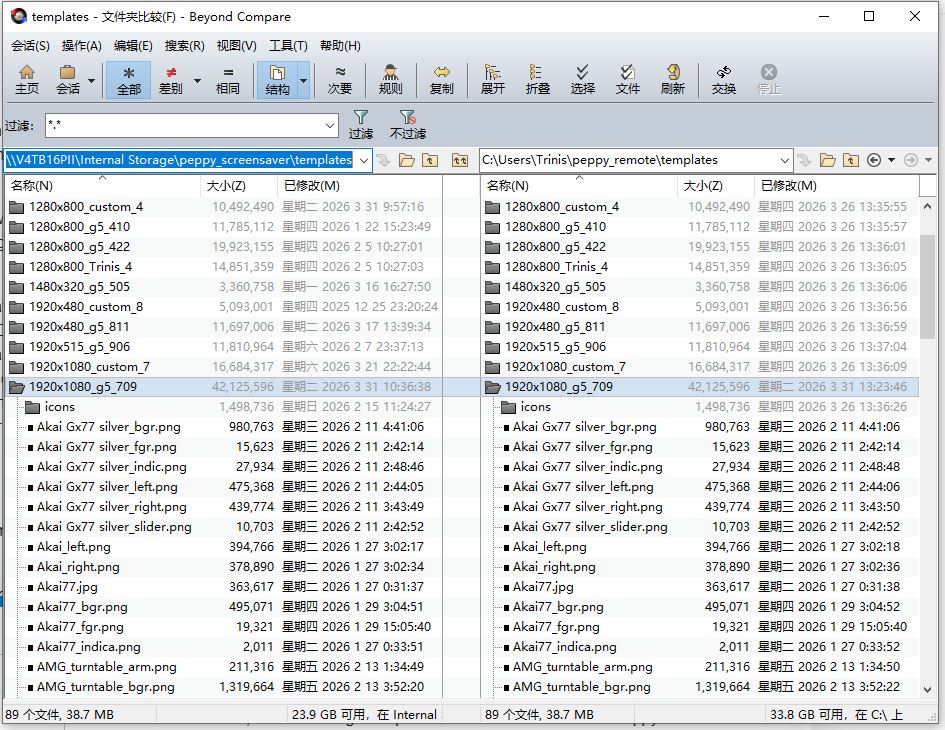
Another requirement is that my computer has multiple monitors. Is there a way to specify the output displayed on the remote client?
I’ve discovered in the last couple of days that the SVG icon rendering remote client and plugin are now identical; there are no differences.
Great!
@nerd
Then put them on Github, everyone will be happy to use them.
1 Like

2 Likes
I’ve wanted to contact you for a long time. I’m not familiar with GitHub, so I’d like to package my changes and send them to you so you can handle the fixes. You are the original creator.
I’ll only send you the modified files from the template; I’ll keep the original directory structure.
Neither are we, but we’ll get there
Excellent stuff possible with this plugin. I use AIMP a lot and was wondering if there was a way to port / recreate skins like this? These skins are made by users in Russia, probably not too keen in open sourcing the designs 
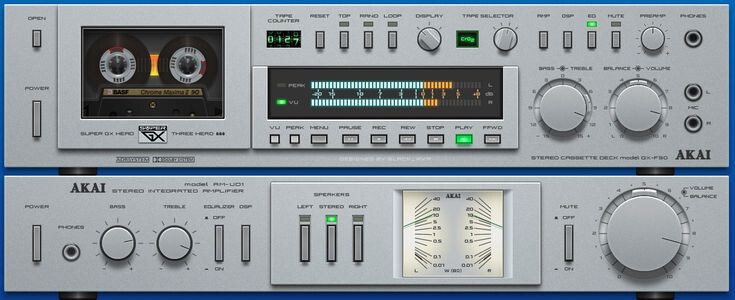
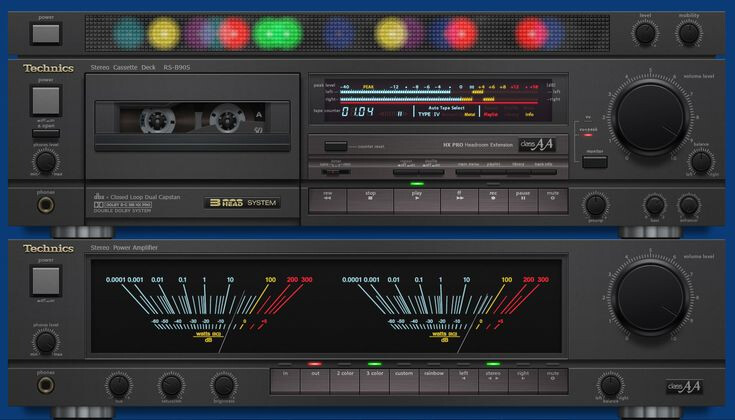
They have about 500+ skins
https://aimp.ru/?do=catalog&os=desktop&id=0
It’s possible, it’s not terribly difficult, but… Peppymeter can’t use linear and circular meters at the same time (@nerd  )
)
1 Like
Those were just samples among many. Most of the skins are just one 1 main component, with UV or Spectrum but not both. Also the deck components can be independently hidden in AIMP.
Better example with just main component.