It’s simple. What model is it? What display?
P.s
Peppymeter supports VU and Spectrum simultaneously!
I try to install: irm https://raw.githubusercontent.com/foonerd/peppy_remote/main/install.ps1 -OutFile install.ps1
This error is displayed, what is the problem? Thanks

Hey @Fire,
The error is clear: “The remote name could not be resolved: ‘github.com’”
Your machine cannot look up github.com in DNS. The installer script downloaded fine (that came from raw.githubusercontent.com), but when it tries to fetch files from github.com, the lookup fails.
Possible causes:
- DNS configuration on that machine
- A proxy between you and the internet that is not configured for PowerShell
- Regional access restrictions - the Chinese characters in your screenshot filename suggest you may be in a region where GitHub access is intermittent or filtered
Quick test - run these in PowerShell:
nslookup github.com
nslookup raw.githubusercontent.com
If the first fails and the second works, something is selectively blocking or not resolving github.com.
If you are behind a proxy, PowerShell may need proxy configuration before the installer can reach GitHub.
This is not a peppy_remote problem - your machine cannot reach github.com. Fix that first, then the installer will work. Perhaps Volumionauts from your region can assist further.
Kind Regards,
Dreaming we are again - are we not?
Kind Regards,
2 Likes
Let’s stop dreaming. Both circular and linear is a bit of overkill…\
1 Like
For me, the plugin is already perfect. It offers more than I expected. What’s still missing is impossible in this world:
- reading the covers from TAG
- reading YEAR from TAG
- track queue
- change of DAB radio station logos (own logos)
- ability to change the indicator display direction
AMEN
1 Like
Dear Volumionauts,
Experimental branch has been bumped to 3.3.3 with a new feature courtesy of @Lee.Yan’s dream.
Allow template updates via network share
New toggle in Global Settings (after “Use System Fonts”). When enabled, your template folders in Internal Storage are opened for write access via the Volumio SMB share. This means you can sync templates from another machine using Beyond Compare, WinSCP, or any file manager that speaks SMB - no more manual chmod on every device.
How it works:
The plugin normalizes file ownership and permissions at three points - on plugin start, on settings save, and every time you open the plugin settings page. That last one is the important one. Volumio’s SMB share maps connections as nobody:nogroup, which means files created or edited over SMB end up owned by nobody. The plugin reclaims them back to volumio:volumio so that SSH, SFTP, and the plugin itself can all access them properly.
The practical workflow:
- Enable the toggle in Global Settings
- Sync your templates via SMB from your preferred tool
- Open PeppyMeter settings in Volumio (this triggers the normalization)
- SSH/SFTP access is restored for all template files
One restriction to be aware of: between an SMB edit and the next time you open the settings page, any SMB-touched files will be read-only over SSH/SFTP. Opening the settings page fixes this instantly. I considered running a background timer to normalize continuously, but with hundreds templates on test system alone, hammering the SD card every 30 seconds seemed like a poor trade-off. The settings-page trigger is the right balance.
When disabled, everything reverts to standard permissions - writable only by volumio over SSH/SFTP, locked to SMB.
This is experimental. As-is. The usual terms apply.
Kind Regards,
1 Like
Hey @Gelo5.
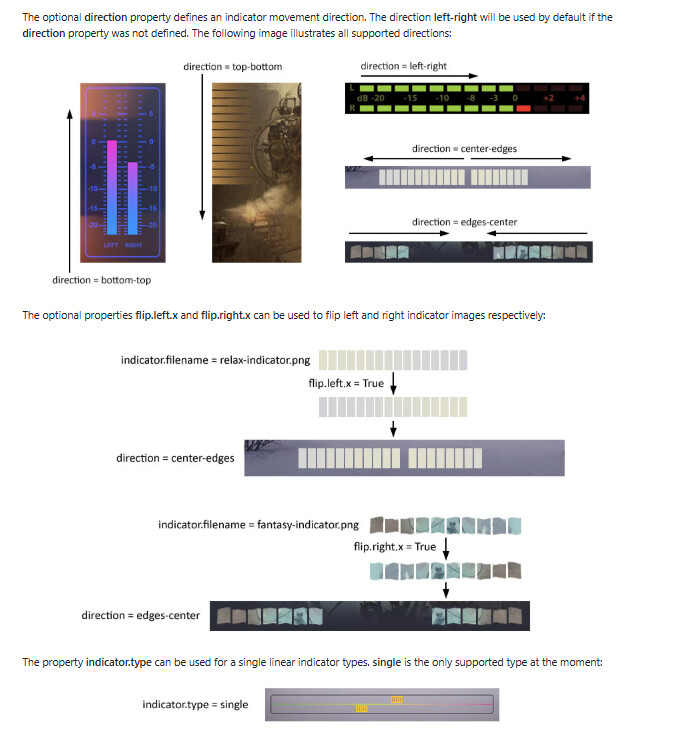
Right-to-left direction for linear meters is done. Next build.
In your meters.txt, set:
direction = right-left
Six directions now available: left-right, right-left, bottom-top, top-bottom, edges-center, center-edges. Mix with indicator.type = single for a moving indicator instead of a growing bar.
Full linear meter parameter reference is now in the wiki:
Linear and circular in the same template is not happening today. That is a different surgery entirely and the patient needs to be stable first.
The rest of your list - TAG covers, TAG year, DAB custom logos - those live upstream in Volumio, not in PeppyMeter. We display what we are given. Take it up with the supplier.
Lastly - install all from experimental - refreshes upstream repos. Will not work if you do not update!
Your prescription for touch grass may become active and unfilled.
Kind Regards,
Template files don’t require write operations in Volumio, right? Avoid using polling unless absolutely necessary.
I have already downloaded version 3.3.3. Thank you.
That’s not what I mean. I did what you’re writing about a long time ago with @peppy.player
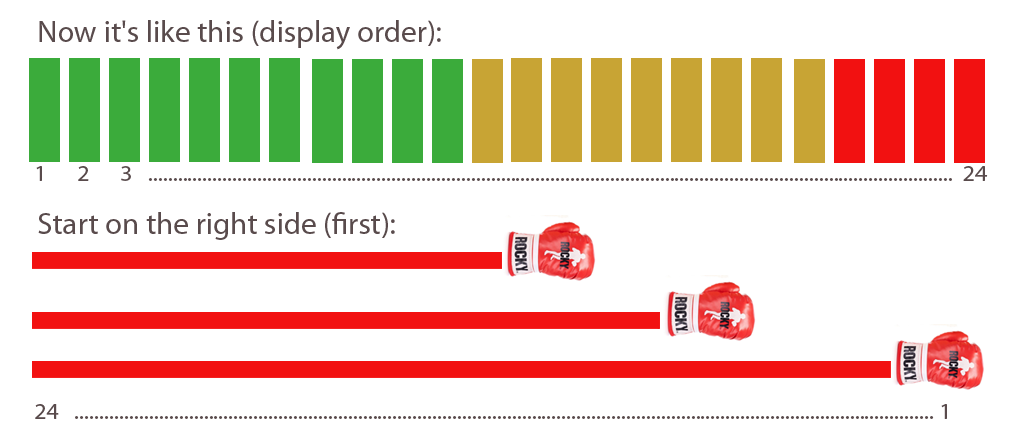
Now with the indicator layout as above, the display starts with green, yellow, red
In the graphic below: the display starts with a “boxing glove” + red tail, at maximum it is the same, only the tail is longer. Boxing glove is always at the beginning of the meter
There’s no point in writing to @volumio .He doesn’t respond to requests.
1 Like
And at Max 

1 Like
Hey @Gelo5,
Looking at your drawing again - I need to understand what I am seeing.
The bottom illustration with the red bars and the boxing glove - to me that looks like the bars are anchored on the left and the glove travels to the right. That would be standard left-to-right with a moving indicator head.
If you wanted right-to-left, I would expect the glove on the right edge and the bars extending leftward behind it. If the glove is factor 1 then it will be always position on the right side of the viewport, not in a middle or anywhere else.
Can you clarify which direction you actually mean? What moves, and how, what is the meter rectangle coordinates with the direction flow?
Kind Regards,
I can’t explain it. I’ll write to @peppy.player
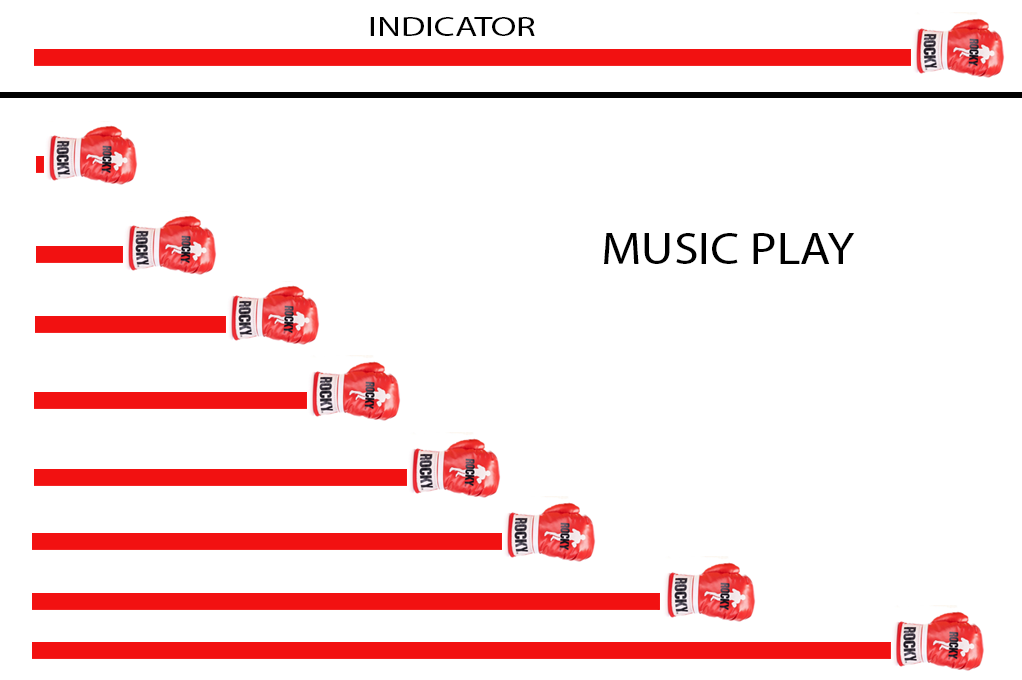
Edit: Just like a progress bar with a head
Edit2: indicator.type = single will only show the boxing glove, no tail
Edit3: Reply @peppy.player :
Hi, it’s not supported at the moment but it should be doable. Though I’m not sure when I could do that.
One more question:
how do I change the font size in: PROGRESS BAR ----> progress.marker.1…5.label = ?
I can’t find it in WIKI
Regards
Dear @Gelo5,
Good question, and the short answer is: you can not. At least not yet.
Marker labels (progress.marker.1…5.label) inherit the theme’s regular font at whatever font.size.regular is set to in your meters.txt. There is no progress.marker.N.fontsize parameter. Nobody has dreamt of that one yet.
Your options today:
-
Change font.size.regular in the meter section. This affects ALL regular-weight text in the theme (artist, album, ticker, etc.), so it is a blunt instrument.
-
Use progress.marker.N.image instead of .label. Make a small PNG of your text at whatever size you want, drop it in the meter folder, and point the parameter at it. Full control over size, font, colour, everything. This is the practical workaround.
If there is genuine demand for a per-marker font size parameter I can add it. It would be something like progress.marker.N.fontsize = 18 in meters.txt. But given that markers are typically just a pipe character or a small symbol, the image approach may serve you better anyway.
Kind Regards,
TY, @nerd

Dear @Gelo5,
You dreamt it. Happy Easter.
progress.marker.N.fontsize = 18
Add it to your meters.txt alongside your existing marker labels. Each marker can have its own size. If you leave it out, nothing changes - it falls back to the regular font size as before.
Available now in the experimental branch. Wiki is updated.
Kind Regards,
1 Like
Hi @nerd
Install 3.3.2
( Headless Server : RPi5,
2 Client : PC Win10 and Macbook Pro 2018 with bootcamp win11 )
All works well, thank you !
1 Like