Thanks @nerd

1 Like
Latest Peppy_meter version:
- Rotating volume knob
- Stop/Play/Pause indicator
- Moving progress bar
Have fun.

3 Likes
Awesome!
This feature is just absolutely awesome. Just love to skip tracks and pause and not having peppymeter exit and reapear.
Also the countdown to extinction  it’s also a great and usefull visual information.
Another great release from the usual suspects
Dear Volumioauts,
PeppyMeter Screensaver v3.1.4 - Bug Fix Freeze
We are now in bug-fixing mode for v3.1.4. No new features until issues are found, resolved and tested. Official bug hunting commence.
To clarify: bugs = code hiccups and functional issues, not PEBKAC. If the meter is upside down because you set angle.start and angle.end backwards, that’s a you problem.
This also serves as a brief pause for @Wheaten and @Gelo5 to catch their breath - I may have been moving the goalposts slightly faster than humanly possible. Consider this your coffee break, gentlemen. The template spec will stop shape-shifting… for now.
Report any issues with current functionality. Wiki documentation is being updated to match reality (a moving target, I know).
Kind Regards,
2 Likes
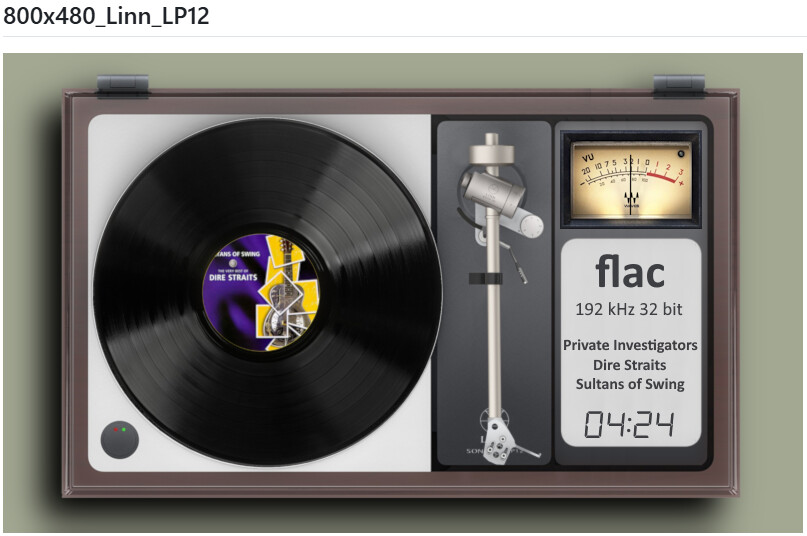
Now you have the skin’s functionality (according to your screenshots).
Were you thinking about something like this?
Note: This only shows the status - it doesn’t work with touch.
1920x1080 + 1280x720

4 Likes
Hello @nerd @Wheaten @Balbuze !
I have FusionDSP and and PeppyMeter Screensaver up and running on one of my rPi4t / rPi Touch display (800x480) and it works pretty well
My rPi5 / rPi Touch Diplay 2 are still not working so well. With both plugins enabled meters needles are gone. PeppyMeter Screensaver works well when disabling FusionDSP. Kind of weird. I reflashed this rPi5 two times with new Volumio rpi img and then updated to 4.089
For best help, here which logs do you need for eventually help me and maybe others with similar problems?
System log? temp logs? other from for ex PeppyMeterScreensaver, hardware , installed plugins etc
I want to give you all facts that you need if possible.
Best Regards / Claes
Many thanks for your hard work, it really is appreciated!
The ‘Keep Display Active’ has solved one of my problems.
It is not particularly a problem but I am no longer getting transition fades. I have done a complete re-flash.
Volumio 4.084
Peppy Plugin now 3.1.4
RPi 5. 8gb
HDMI monitor in HDMI 0
I have noticed in the debugging log;
‘fade lock exists’
and
‘screen_fade_in called, duration=0.0’ (fade actually set to 0.5)
Also there is a file ‘peppy_fade_lock’ of 0 bytes in tmp.
This is probably a case of ’ A little knowledge being a dangerous thing’ but it might just shed some light…
copy of basic debug log…
Blockquote
[16:37:19.894] Debug level set to: basic
[16:37:19.894] === PeppyMeter starting ===
[16:37:19.894] Config file: /data/plugins/user_interface/peppy_screensaver/screensaver/peppymeter/config.txt
[16:37:19.894] Meters file: /data/INTERNAL/peppy_screensaver/templates/1280x720_g5_442_meters/meters.txt
[16:37:20.203] SDL2 positioning: display=1366x768, meter=1280x720, pos=(43,24)
[16:37:20.470] SDL2 window positioned and shown
[16:37:20.795] peppy_meter_start: first_run=True, animation=True, duration=0.0s, cooldown=1.0s
[16:37:20.795] → fade lock exists, age=4050.67s
[16:37:20.795] → will fade (first_run + animation)
[16:37:20.795] screen_fade_in called, duration=0.0
[16:37:20.795] → fade_in with opacity=100%, max_alpha=255
[16:37:20.885] Main loop frame.rate = 30 (from config.txt [screen] section)
[16:37:20.885] === Initializing meter: 11G5_Kenwood Rev ===
[16:37:21.013] Scrolling: mode=skin, artist=40, title=40, album=40
[16:37:21.802] Foreground has 2 opaque regions for selective blit
[16:37:21.802] fgr region 0: x=0, y=368, w=532, h=35
[16:37:21.802] fgr region 1: x=745, y=368, w=535, h=35
[16:37:36.032] peppy_meter_start: first_run=False, animation=True, duration=0.0s, cooldown=1.0s
[16:37:36.032] → fade lock exists, age=15.24s
[16:37:36.032] → will fade (meter change)
[16:37:36.032] screen_fade_in called, duration=0.0
[16:37:36.032] → fade_in with opacity=100%, max_alpha=255
[16:37:36.133] === Initializing meter: 12G5_T+A ===
[16:37:36.243] Scrolling: mode=skin, artist=40, title=40, album=40
[16:37:37.060] Foreground has 1 opaque regions for selective blit
[16:37:37.060] fgr region 0: x=0, y=0, w=1280, h=455
[16:37:51.059] peppy_meter_start: first_run=False, animation=True, duration=0.0s, cooldown=1.0s
[16:37:51.059] → fade lock exists, age=15.03s
[16:37:51.059] → will fade (meter change)
[16:37:51.059] screen_fade_in called, duration=0.0
[16:37:51.059] → fade_in with opacity=100%, max_alpha=255
[16:37:51.158] === Initializing meter: 13G5_Accuphase monoblock ===
[16:37:51.288] Scrolling: mode=skin, artist=40, title=40, album=40
[16:37:52.109] Foreground has 1 opaque regions for selective blit
[16:37:52.109] fgr region 0: x=0, y=0, w=1280, h=319
[16:38:13.060] peppy_meter_start: first_run=False, animation=True, duration=0.0s, cooldown=1.0s
[16:38:13.060] → fade lock exists, age=22.00s
[16:38:13.060] → will fade (meter change)
[16:38:13.060] screen_fade_in called, duration=0.0
[16:38:13.060] → fade_in with opacity=100%, max_alpha=255
[16:38:13.188] === Initializing meter: 14G5_Old2 braun ===
[16:38:13.333] Scrolling: mode=skin, artist=40, title=40, album=40
[16:38:14.103] Foreground has 2 opaque regions for selective blit
[16:38:14.104] fgr region 0: x=118, y=354, w=381, h=82
[16:38:14.104] fgr region 1: x=746, y=353, w=382, h=83
[16:38:14.568] runFlag recreated for fade_out protection
[16:38:14.568] screen_fade_out called, duration=0.0
[16:38:14.568] → fade_out with opacity=100%, max_alpha=255
[16:38:14.640] runFlag removed after fade_out

Dear Volumionauts,
Community Reminder: Support Policy and Debug Requirements
To reiterate what has been stated before and shared by @Wheaten:
This plugin is provided as-is with no maintenance guarantees or support commitment. It is a community resource for those willing to work with it. There is no roadmap, no bug tracking, and no promise of future updates.
New: Comprehensive Debug and Trace System
The latest 3.1.4 debug release includes a complete trace logging system with 20 component-specific switches. This was built specifically so you can diagnose issues yourself - and provide useful information if you need to report a problem.

Full documentation is available here: Debug and Logging · foonerd/peppy_screensaver Wiki · GitHub
The guide covers:
- Debug levels and when to use them
- Which trace switches to enable for specific problems
- How to read log output
- Visual diagrams explaining component overlap issues
This documentation took time to build. Reading it takes minutes.
Requirements for any issue report:
Commits are frequent and not always announced. Before reporting anything…
- Update to the latest version or commit
- Enable the appropriate trace switches for your problem
- Reproduce the issue
- Compress the log file (
/tmp/peppy_debug.log) - Upload to any file sharing service (WeTransfer, Google Drive, Dropbox - your choice)
- Share the link
If you report an issue without providing a trace log link, it will be ignored. No exceptions.
For those who prefer a supported solution: the PeppyMeter plugin from @balbuze in the Plugin Store remains fully functional and maintained.
Kind regards
3 Likes
Thanks!
Now I know what do before asking for help.
BTW. My problem with PeppyMeter Screensaver + FusionDSP on rPi5 4.089 works well now.
It was just my handling.
Kind regards / C
I found a small problem after upgrading from 3.12 to 3.14. After clicking the mouse twice, the screensaver will not turn on again, nor can it be played again. I have to turn off the plug-in and turn it on again. Has anyone tried this?
PeppyMeter 3.2.4 “Clarity” - Release Announcement
Dear Volumionauts,
After many long nights of coding, debugging, and countless cups of coffee, I’m excited to release PeppyMeter 3.2.4 - codename “Clarity”.
Why “Clarity”?
Because things finally work the way they should! No more visual glitches, no more fighting between components, no more “why is my CPU at 100%?” moments.
The name says it all:
- Visual clarity - Elements no longer step on each other’s toes
- Performance clarity - Settings actually do what they say
- Code clarity - Four separate handlers that mind their own business
What Was Wrong Before?
You may have noticed some annoying issues:
- VU meter needles flickering or disappearing when reels spin
- Album art getting corrupted when text scrolls over it
- Format icons causing weird artifacts
- CPU going through the roof on turntable skins
- Frame rate slider… doing absolutely nothing (oops!)
All of these came from the same root problem: components were fighting each other for screen space, constantly overwriting each other’s work.
What’s Fixed Now?
No More Visual Collisions
I’ve completely rewrote how the screen gets drawn. Instead of each component trying to “restore” what was behind it (and accidentally erasing what someone else just drew), everything now works from a single clean background. Draw in order, no fighting, no artifacts.
Before: “I’ll put back what I found!” (but that included half of someone else’s meter needle)
After: “Let me check the original background and redraw properly.”
Template creators can now place components ANYWHERE without worrying about overlap issues. Meters over album art? Fine. Scrolling text near reels? No problem. It just works.
Performance Settings Actually Work!
Remember that Frame Rate field in settings? The one that did nothing no matter what you set it to? Yeah… Python was on joy ride. Fixed!
New Meter Timing Delay setting lets you balance CPU vs responsiveness:
- 10ms (default): Good balance, ~80% CPU on turntable skins
- 15-20ms: Lower CPU, meters slightly slower
- 0-5ms: Snappier meters, higher CPU
Turntable Skins: From 100%+ to 80% CPU at 30fps
The turntable handler was doing way too much work every frame:
- Now composites album art onto vinyl ONCE per track (like a real record!)
- Pre-calculates all tonearm rotation frames at startup
- Result: ~20% CPU reduction
- Lower fps (frames per second) lower CPU usage
Cassette Skins: From 100%+ to Under 40% CPU
The cassette handler was reloading format icons every single frame (thousands of times per minute). Now it loads once and caches. Also smarter about which scrollers need redrawing when reels spin.
DAB/FM/Radio Icons
Finally! Proper icons for DAB and FM radio. The plugin now handles Volumio’s signal strength indicators (those little dots) and shows the right icon.
Progress Bar Gets All the Styles
@Gelo5 asked for vertical progress bars. We went further - progress indicator now supports everything volume does:
- Horizontal bar (default)
- Vertical bar (the request!)
- Arc gauge
- Rotary knob
- Numeric percentage
Same parameters, just replace volume. with progress. in your meters.txt.
Built-in Profiling
For the tinkerers: new profiling tools to see exactly where CPU time goes. Enable in Settings > Profiling. Helps identify if a particular skin is heavy or if something’s wrong.
The Numbers
| Skin Type | Before | After |
|---|---|---|
| Basic | 15-25% | 15-25% fps controlled |
| Spectrum | 25-85% | 15-75% fps controlled |
| Turntable | 100%+ | 55-85% |
| Cassette | 100%+ | 35-80% depending on settings |
Tested on Pi 4, Pi 5, and x64. All hit targets.
Upgrade Notes
Uninstall previous version and install this one.
If you were avoiding turntable or cassette skins because of CPU issues, give them another try!
Thanks
This release represents weeks of architectural work. Special thanks to:
- @Gelo5 for the progress bar feature request that led to the SliderIndicator refactor
- @Wheaten for testing and feedback
- Everyone who reported issues - your bug reports drove these fixes
What’s Next?
We’re looking at:
- Further performance improvements - you know how to report, read up or you will be ignored.
- More template options
- Community template contributions (hint hint!)
Enjoy the clarity!
As always, provided “as-is” - if you need guaranteed support, stick with Plugin Store offerings. But I think you’ll like this one.
Kind Regards,
7 Likes
1920x1080 ---- Requires “Clarity Engine” (3.2.4 or newer) !!! Thank you @nerd

BTW: I can’t find the post, who wanted Akai? (@Fire ??)
2 Likes
With this four meters in a Pi5 i get around 25% CPU, even with 30fps in Rotation FPS.
I only noticed now the right spool / left spool speed setting. With different speeds it’s really an awesome effect.
Now it would just take an auto-setting that the speed would adapt along music time position or, even better, queue list playing LOOOL (it would give that effect of more tape on right spool and less in left spool as long the queue-list advances).
PeppyMeter “Clarity Engine” 3.2.5 - Queue Mode and Realistic Spool Physics
What is new
Queue Mode
Progress indicators can now show position within your entire queue instead of just the current track. Enable this in Settings under Playback Behavior.
Note: Queue mode automatically falls back to track mode for radio streams and other sources without fixed duration.
Adaptive Spool Speeds
Cassette templates now simulate realistic tape physics. The supply spool slows down as it empties while the take-up spool speeds up as it fills - just like a real cassette deck.
This works with both CCW and CW spool configurations and can be enabled globally or per-template.
Enjoy the clarity!
As always, provided “as-is” - if you need guaranteed support, stick with Plugin Store offerings. But I think you’ll like this one.
Kind Regards,
5 Likes
Awesome!!!
PS - it still install v3.2.4… edited Afterwards I could get v.3.2.5