Restart you app, or use a browser
Hey @Gelo5,
Another option it to read from this post down which discussed work around mDNS failures.
Perhaps I will write a wiki page about it.
Kind Regards,
Ok, thanks
I finally received my dongle and installed the plugin yesterday. DAB+ reception is great, FM not so much (I did not search for the best spot to place the antenna anyway, so it’s fine for me).
The only thing I noticed: The MOT Slideshow does not show up on my display. I either get artwork looked up on the internet, or the default dab icon.
In my car, I do see the slideshow on the different stations. What could I do wrong here?
Thanks in advance, and keep up the excellent work 
Hey @gfloener,
Welcome - glad DAB+ is working well for you.
MOT Slideshow is part of the DAB specification and your car does receive it - but that is because your car has a dedicated DAB chip with licensed decoding technology built in. Companies like Gracenote provide this to automotive manufacturers under enterprise licensing agreements.
How much does that cost? Gracenote charges streaming services around $5,000-7,500 per month with 5% annual increases and exclusivity requirements - you cannot combine their data with any other source. Automotive OEM licensing is custom negotiated per-vehicle, and car manufacturers pay significant fees for the privilege.
This is not available to open source projects. Our decoder (dab-cmdline) focuses on audio extraction. It does not decode MOT slideshow data.
What we do instead: parse the DLS text metadata that stations broadcast (artist/title information) and look up artwork via Last.fm. This works well for music but depends entirely on what text the station transmits. If a station only broadcasts its name with no track information, there is nothing to look up.
If you are getting the default DAB icon more often than expected, check your Artwork Confidence setting in plugin settings. Lower values (toward 0%) will attempt lookups on more ambiguous metadata - you may get more artwork but also more false matches. Higher values are stricter. Start around 60% and adjust based on results.
You are not doing anything wrong - this is a fundamental difference between consumer hardware with licensed proprietary decoders and open source software using SDR.
Kind Regards,
Thanks for the information. I get a good result with internet lookup, the default dab logo only shows up when I start listening to a station or when I switch a station. I can live with that 
In the end, I misunderstood this part of a previous announcement:
"MOT Slideshow Support
fn-dab captures broadcast images (slide_*.jpg/png)
Album artwork sent by broadcaster displays directly
No internet lookup required when MOT is available"
I supposed that means full MOT Slideshow support, but thanks to your explanation, I understand that is not possible on this plattform. Good to know that you fixed this missing element by adding artwork from the internet!
I also received the RTL-SDR Blog V4c and the dipole antenna kit I ordered from Amazon.
Since there are no DAB+ stations in Taiwan, I can only test FM reception.
First, I tested FM reception on Windows 10 using SDR# and SDR++, and the results were very good.
When connecting the RTL-SDR to RPi 5 + Volumio plugin, I found that I had to increase the FM Gain to 80 or 100 in order to scan FM stations.
However, the scan results were not very accurate, so I eventually manually added the stations instead.
I am using a UGreen 25 cm USB extension cable (aluminum braid) connected to the RPi 5. Because my Pi is connected to a Waveshare 5.5" AMOLED display, and Volumio is also running from a USB flash drive, I suspect there may be significant interference.
Compared to using the same antenna on a PC, the FM audio quality on the Pi sounds amplified and distorted.
I tried various FM Gain settings, but it did not help much.
With the same antenna position, the audio quality on the PC is clean and undistorted.
I would like to ask whether the FM Gain setting in this plugin corresponds to the RF Gain in SDR# on a PC, or is it simply a percentage-based value?
In SDR#, RF Gain is shown in dB, and the maximum value is 49.6 dB.
I usually set it around 16–20 dB, which gives very good FM audio quality.
Additionally, when I enable Tuner AGC in SDR#, the audio becomes over-amplified and distorted, which sounds very similar to what I hear on the Pi. I am not sure whether Tuner AGC in this plugin is enabled or disabled by default.
SDR# also has a Stereo on/off switch.
Would it be possible for the plugin to add a stereo enable/disable option?
In other words, could the plugin provide user-adjustable options for:
- RTL AGC on/off
- Tuner AGC on/off
- Stereo on/off
- RF Gain (adjustable in dB)
On my PC with SDR#, I must disable AGC and manually set RF Gain to around 20 dB to achieve clean, undistorted FM audio without noise.
I would like to know if similar adjustments can be tested on the Pi.
( with terminal command ? )
When I have time, I will also test and compare the audio quality between the PC version of the Volumin/plugin and the RPi 5.
One more suggestion:
When arranging the station list, could you add move up / move down buttons? This would allow users to move their favorite stations to the top.
Finally, a reminder to everyone:
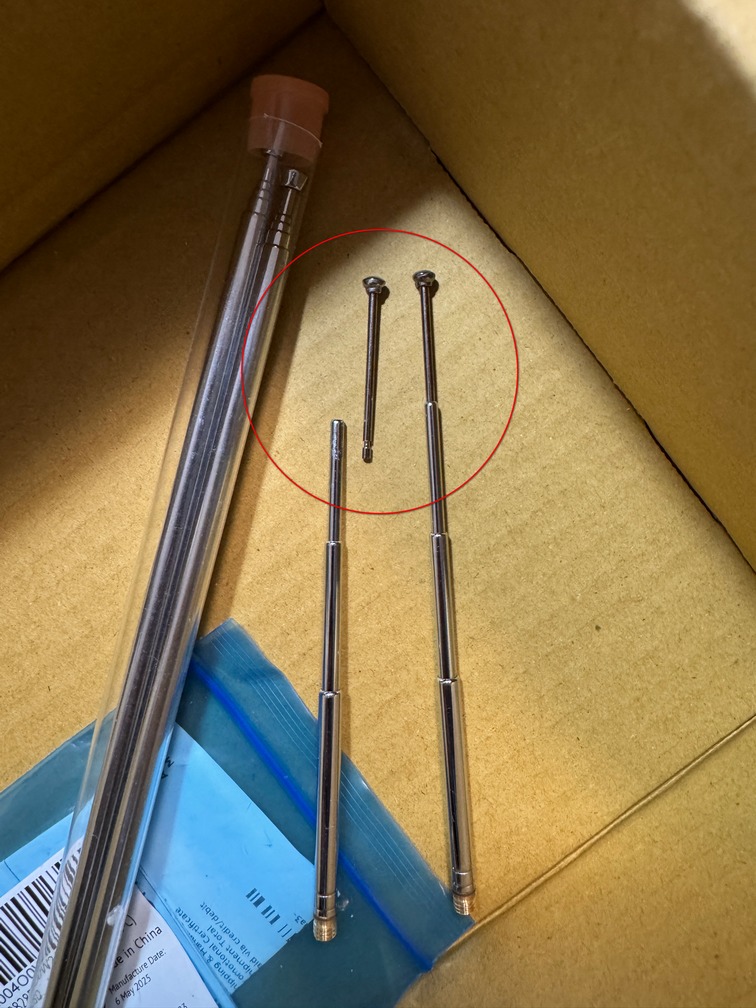
Do not pull the small antenna too hard when adjusting it.
Thank you @nerd and others very much!
I tested the FM/DAB Radio Plugin v1.3.5 on Volumio PC x86.
The sound quality is very similar to what I get on RPi 5, but it feels like the audio is being amplified and causing distortion, especially in the high frequencies.
Because of this, I believe my earlier assumption about USB interference on the RPi 5 was incorrect. The distortion is more likely caused by software-related settings.
I have tested the FM gain across the full range from 0 to 100, but I still cannot achieve the same clean, distortion-free sound that I get on the same PC using Windows 10 + SDRSharp.
Could this be related to the de-emphasis setting (Taiwan requires 50 µs), or some other parameter that causes the audio level to be over-amplified, leading to distortion?
I also noticed that one FM station has a lower default volume, and on Volumio it does not distort at all.
So could this simply be an audio gain / volume amplification issue?
Are there any SSH terminal / command-line parameters available to adjust gain or related settings for testing?
Thank you.
Hey @dewen,
Run these via SSH. Replace 100.0M with a local Taiwan FM frequency.
Test 1 - Current plugin behavior (no de-emphasis):
fn-rtl_fm -f 100.0M -M fm -s 171k -l 0 -A std -g 50 -F 9 | sox -t raw -r 171k -e signed -b 16 -c 1 - -t raw -r 48000 -e signed -b 16 -c 2 - | aplay -D volumio -f S16_LE -r 48000 -c 2
Test 2 - With de-emphasis enabled:
fn-rtl_fm -f 100.0M -M fm -s 171k -l 0 -A std -g 50 -F 9 -E deemp | sox -t raw -r 171k -e signed -b 16 -c 1 - -t raw -r 48000 -e signed -b 16 -c 2 - | aplay -D volumio -f S16_LE -r 48000 -c 2
Test 3 - Lower gain (20 dB) with de-emphasis:
fn-rtl_fm -f 100.0M -M fm -s 171k -l 0 -A std -g 20 -F 9 -E deemp | sox -t raw -r 171k -e signed -b 16 -c 1 - -t raw -r 48000 -e signed -b 16 -c 2 - | aplay -D volumio -f S16_LE -r 48000 -c 2
Press Ctrl+C to stop each test.
Report back:
- Test 1: Does it sound distorted (harsh treble)?
- Test 2: Does adding -E deemp fix the distortion?
- Test 3: Does lower gain sound cleaner than Test 2?
Kind Regards,
Hi ! @nerd
Thanks for the help !
According to the documentation at
https://manpages.ubuntu.com/manpages/jammy/man1/rtl_fm.1.html
the recommended parameters for wbfm are:
[-M modulation (default: fm)]
fm, wbfm, raw, am, usb, lsb
wbfm == -M fm -s 170k -o 4 -A fast -r 32k -l 0 -E deemp
raw mode outputs 2x16 bit IQ pairs
When using the original settings, I observed the following:
Oversampling input by: 8x.
Oversampling output by: 1x.
Sampling at 1368000 S/s.
Output at 171000 Hz.
With this configuration, high-frequency distortion and clipping occur.
After adding the -o 4 parameter
[-o oversampling (default: 1, 4 recommended)]:
Oversampling input by: 4x.
Oversampling output by: 4x.
Sampling at 2736000 S/s.
Output at 171000 Hz.
The audio becomes normal, with no high-frequency distortion.
After additionally adding the -s 200k parameter
[-s sample_rate (default: 24k)]:
Oversampling input by: 4x.
Oversampling output by: 4x.
Sampling at 3200000 S/s.
Output at 200000 Hz.
The sound quality feels even better.
However, I am not sure whether this would have a negative impact on slower hardware such as the RPi 3.
Additional notes
- Adding
-E deempslightly reduces the boosted high frequencies,
but it is not related to the high-frequency clipping issue. - On slower machines,
-A fastseems to be recommended.
On the RPi 5, however, I cannot hear any noticeable difference between-A fastand-A std. - When using
-M wbfm, I experience intermittent playback that sounds like fast-forwarding. I do not know how to fix this yet, and currently it seems that only-M fmworks reliably. ( Edit : if you use -M wbfm, the default -r = 32k, you have to change it to 48k to make it work )
Conclusion
High-frequency distortion is not strongly related to RF gain or de-emphasis,
but is instead related to the sampling rate (S/s).
By changing the oversampling factor to 4 (adding -o 4),
the sampling rate increases from 1,368,000 S/s to 2,736,000 S/s,
which greatly improves sound quality and eliminates distortion.
When the sample rate is increased from 171 kHz to 200 kHz (using -s 200k), the output changes from 171,000 Hz to 200,000 Hz,
and the sound subjectively feels even better.
There does not appear to be a stereo parameter, but at least the high-frequency distortion issue has been resolved.
Thank you!
Edit :
I found that 4× oversampling appears to be buggy.
If I use -s 240k instead of -o 4, the output shows:
Oversampling input by: 8x
Oversampling output by: 1x
Buffer size: 4.27 ms
Sampling at 1,920,000 S/s
Output at 240,000 Hz
With this setup, the sound quality is noticeably better than when using -o 4.
The following command gives me the best results so far:
fn-rtl_fm -f 98.1M -M fm -s 240k -l 0 -A std -E deemp -g 20 -F 9 |
sox -t raw -r 240k -e signed -b 16 -c 1 -
-t raw -r 48000 -e signed -b 16 -c 2 - |
aplay -D volumio -f S16_LE -r 48000 -c 2
This setup seems to provide the cleanest and least distorted audio on my system.
Dear Volumionauts,
RTL-SDR Radio v1.3.6 - FM Audio Quality Options
New release with configurable FM reception settings based on community feedback.
What’s New
Three new options in FM Radio configuration:
| Setting | Options | Default |
|---|---|---|
| FM Oversampling | On/Off | Off |
| FM Sample Rate | 171k / 200k / 240k | 171k |
| FM De-emphasis | On/Off | Off |
Why These Settings?
User @dewen reported FM audio distortion in Taiwan that didn’t occur in UK testing. Investigation revealed regional differences in FM signal characteristics require different reception parameters.
The defaults are optimized for Europe/UK with weaker signals and full RDS support. Users in strong signal regions may benefit from different settings.
Understanding the Trade-offs
| Setting | Benefit | Cost |
|---|---|---|
| Oversampling ON | Reduces audio distortion | Degrades RDS decoding |
| Higher sample rate | Improves audio quality | Reduces RDS reliability |
| De-emphasis ON | Reduces high-frequency harshness | None (standard in EU/Asia/AU) |
RDS includes: Station name, radiotext, now playing info, signal strength indicator
Recommended Configurations
Europe/UK with typical signals:
- Use defaults (171k, oversampling off, de-emphasis off)
- Full RDS support including signal strength
Strong signal regions (Taiwan, urban areas, near transmitters):
- Oversampling: ON
- Sample Rate: 200k or 240k
- De-emphasis: ON
- Expect reduced or no RDS data
Best audio quality (RDS not needed):
- Oversampling: ON
- Sample Rate: 240k
- De-emphasis: ON
Important Notes
- Signal strength indicator requires RDS data - stations without RDS will always show 0/5
- De-emphasis uses 50us standard (Europe/Asia/Australia) - Americas 75us not currently supported
- Settings take effect on next station play
Testing Feedback Welcome
Please share your results with different settings, especially:
- Your region/country
- Which settings work best
- Whether RDS still functions with higher sample rates in your area
Thanks to @dewen for reporting the issue and helping test solutions.
Kind Regards,
1 Like
Thanks @nerd for the update — FM sounds great now!
Here are some observations from my testing in Taiwan:
- Avoid using oversampling at 200 kHz or 240 kHz.
It adds noise at 200 kHz and causes a “Donald Duck” effect at 240 kHz, and RDS becomes less reliable. - I get more stable RDS at 200 kHz / 240 kHz (with oversampling turned off) than at 170 kHz. Signal strength also looks better.
- If 170 kHz sounds noisy, oversampling can help.
But if RDS stops working or still noisy, switching to 200 kHz or 240 kHz without oversampling usually gives both better sound and better RDS.
Best audio quality (RDS not needed):
- Oversampling: ON
- Sample Rate: 240k
- De-emphasis: ON
From the SSH terminal, I can see “Sampling at xxxxxxxx S/s”.
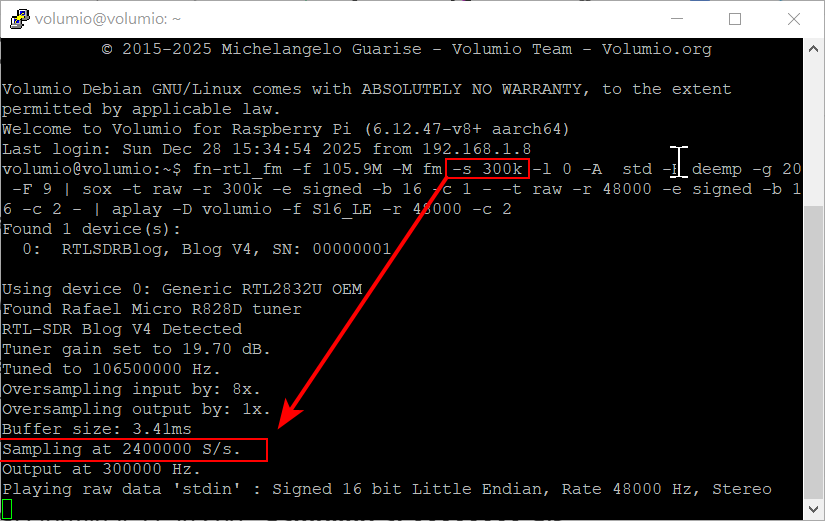
In my testing, this value has a noticeable impact on audio quality. Higher generally sounds better, but if it gets too high (e.g. 3,200,000 S/s), noise starts to appear.
On SDR#, the default 2,400,000 S/s gives me the best balance of quality and noise.
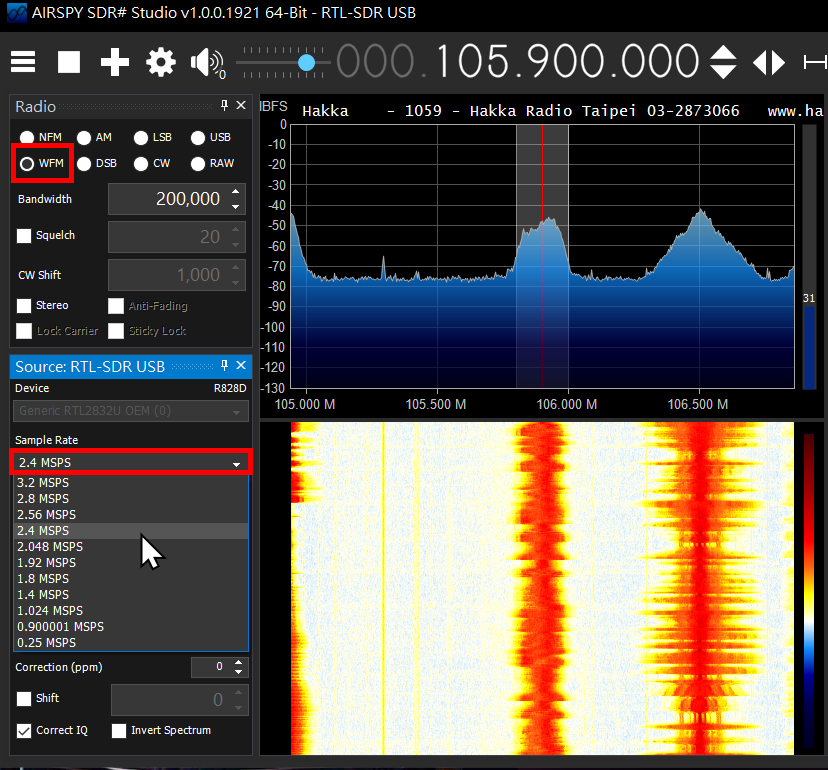
Sample rate vs. reported S/s in my tests:
171 kHz → 1,368,000 S/s (oversampling ON → 2,736,000)
200 kHz → 1,600,000 S/s (oversampling ON → 3,200,000, noisy)
240 kHz → 1,920,000 S/s (oversampling ON → “Donald Duck” sound)
300 kHz → 2,400,000 S/s (oversampling ON → no audio)
To match SDR#’s 2,400,000 S/s,
300 kHz with oversampling OFF gives the cleanest result in my setup.
- Oversampling: OFF
- Sample Rate: 300k
- De-emphasis: ON
- FM gain: can be adjusted manually; I have it set to 20.
Could you kindly consider adding a 300 kHz sample rate option in a future update?
Thank you very much!
Hello ,
Pretty bad that u am living în România where no DAB stations are available …
Have a nice end of the year and a healthy 2026
Regards
I’m in the UK and get zero DAB stations and the one very noisy fm.
Perhaps I’ll ask for some dynamite next Christmas and remove a few hills……
Honestly, I’m impressed you’ve even got internet over there. At this rate, you’ll have paved roads, electricity, and maybe even a functioning train system by… what, 2050?
(If you’re planning to blow away a few hills just to get a radio signal, that actually explains a lot. Maybe that’s why the movie was called Nothing Hill, because after enough frustrated Brits tried to ‘improve reception,’ there were no hills left, mind blowing)

Hi, I just installed NooElec SMArt v5 dongle.
DAB works fine (although I have few stations that are received in this area).
The FM scan consistently finds zero stations.
I tried the test window by setting the frequency to 92.0 MHz, where there’s a strong station, and reception is perfect, so the dongle and the system, so to speak, work.
The scan, however, doesn’t.
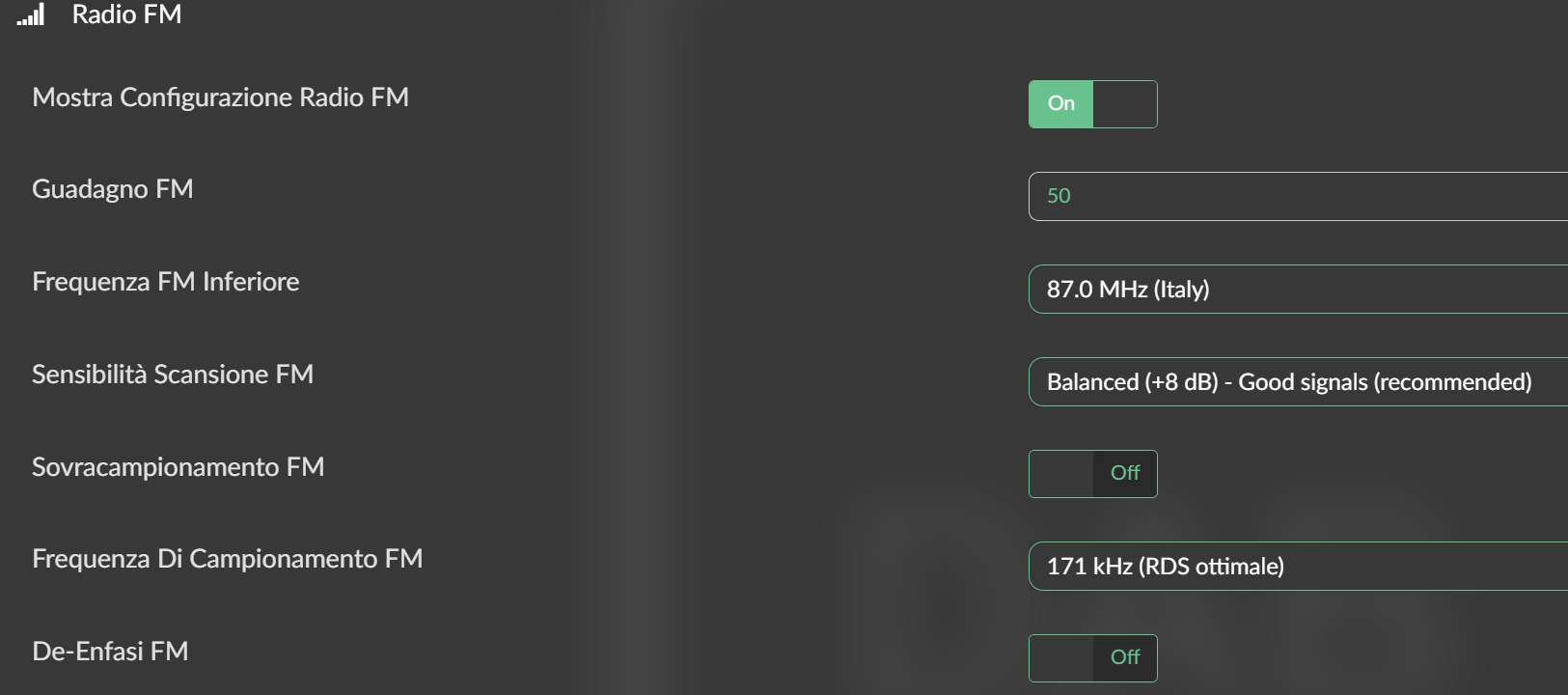
plugin version is 1.3.6
Any idea?
Thank you!
Hey @arkimede,
Thank you for the feedback - glad to hear setup went smoothly and DAB reception is working well with the V4.
To look into the FM scanning situation I will need logs. Could you:
- Play a DAB station - around 1 minute.
- Stop playing and execute FM scan.
- Generate a log using the standard Volumio method: How to send a log link for a bug report?
- Share the log URL here
That will show what noise sensitivity threshold the stations manager is actually using, which will help narrow down what is happening.
Regarding DAB - better antenna, location of it, even small adjustment makes difference. Not much the plugin can do about propagation unfortunately.
Kind Regards,
Hi @nerd ,
Finally, after trying several times, I realized the problem was the settings’ low sensitivity. By increasing the gain to 60 dB and the scan sensitivity to +3 dB (very sensitive), I was able to successfully complete the scan, finding over 40 stations.
The problem now is that the frequencies are all wrong, generally 100 kHz lower than the actual ones…
I looked in the code and found a scan interval of 125 kHz. This seems strange to me, since the channel spacing in Italy is 200 kHz (so at least in multiples of 100 kHz). Could this be the cause? By the way, when I run the command from the shell, I see that the actual spacing is different from the requested one (I think I read something within 40 kHz, but I don’t quite understand…).
I tried changing the value in the code, setting it to, for example, 50 kHz or 100 kHz, but the frequencies identified by the spectral analysis are always incorrect, I imagine due to the incorrect steps.
With programs like SDR Console and similar programs, scanning occurs differently and much more efficiently…
I’d also like to point out other things that don’t seem correct to me:
- During playback, the station’s archived name is displayed on the screen, not the name taken from RDS.
- It’s not possible to easily manually adjust the frequency; for example, it would be better to use the track - / track + buttons to adjust the frequency, perhaps in 5 or 10 kHz steps, which can be set in setup.
- There’s no interface for manual tuning or manual scanning (simple, not in setup). I understand this plugin is heavily oriented toward DAB, but here (and probably in other countries too) DAB isn’t yet widespread, and the main source is FM.
Thanks for the great work, best regards
Dear Volumionauts,
v1.3.8 - FM Regional Standards
This beta introduces FM regional presets for accurate station detection across different broadcast standards.
New Features
FM Radio Region section with 8 presets:
- Europe (87.5-108 MHz, 100kHz spacing, 50us de-emphasis)
- Americas (88-108 MHz, 200kHz spacing, 75us de-emphasis)
- Japan (76-95 MHz, 100kHz spacing, 50us de-emphasis)
- East Asia (88-108 MHz, 200kHz spacing, 50us de-emphasis)
- Australia/Oceania (87.5-108 MHz, 200kHz spacing, 50us de-emphasis)
- Italy (87-108 MHz, 50kHz spacing, 50us de-emphasis)
- OIRT/Russia Legacy (65.8-74 MHz, 30kHz spacing, 50us de-emphasis)
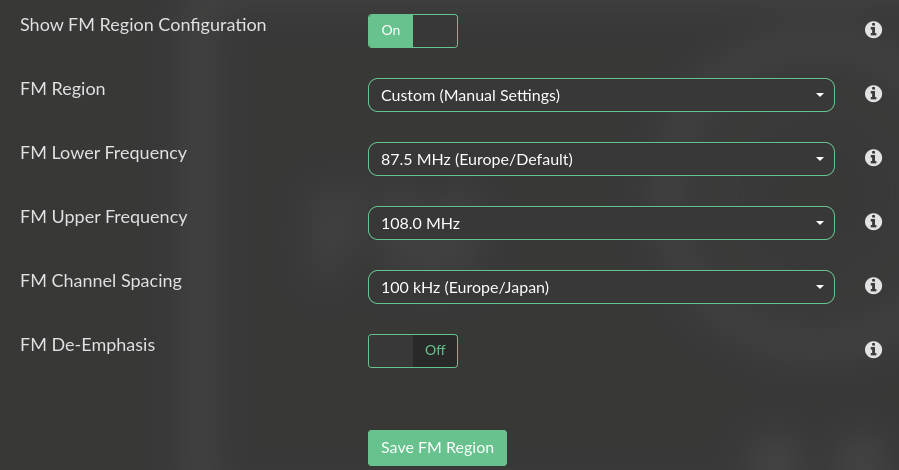
- Custom (manual override fields)
Selecting a region automatically applies the correct frequency band, channel spacing, and de-emphasis for your location. The scan will detect stations at their exact frequencies rather than rounding to 100kHz grid.
UI Changes
Settings are now split into two sections:
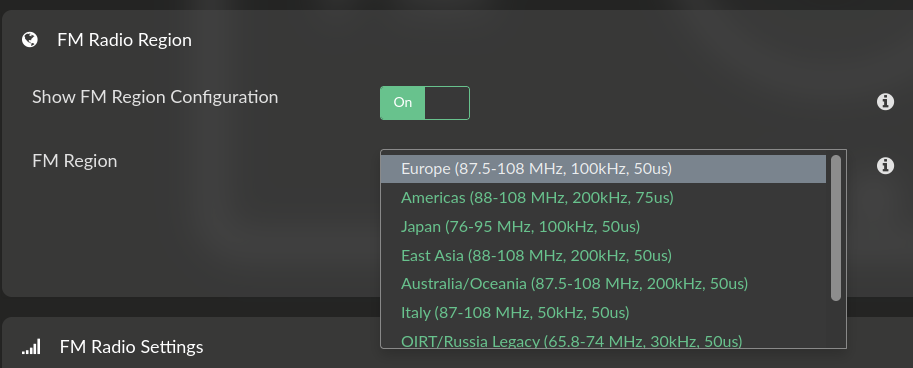
- FM Radio Region - configure your broadcast region
- FM Radio Settings - gain, sample rate, oversampling, scan
The Region section has its own show/hide toggle. When a preset region is selected, manual override fields are hidden. Select “Custom” to reveal them for non-standard configurations.
Bug Fixes
- Fixed 50kHz frequency precision (Italy users: 95.75 MHz no longer rounds to 95.8 MHz)
- Fixed frequency comparison logic throughout playback and favorites
Note
After changing region, a page refresh (F5) is required to update visible fields. This is a Volumio framework limitation.
Installation
Available via beta channel or manual install. After upgrading, clear FM stations and rescan to benefit from correct regional spacing.
Kind Regards,
3 Likes
It keeps getting better. Thanks @nerd