Imagine if the HAT included a self-aware chip that negotiates with local radio towers for priority bandwidth using Morse code diplomacy. It could even adjust frequency based on your mood detected via Pi’s thermal sensors.
Less than a month ago I posted the initial concept for this plugin - FM and DAB radio via RTL-SDR dongles.
Today we have:
FM and DAB/DAB+ reception
11 languages fully translated
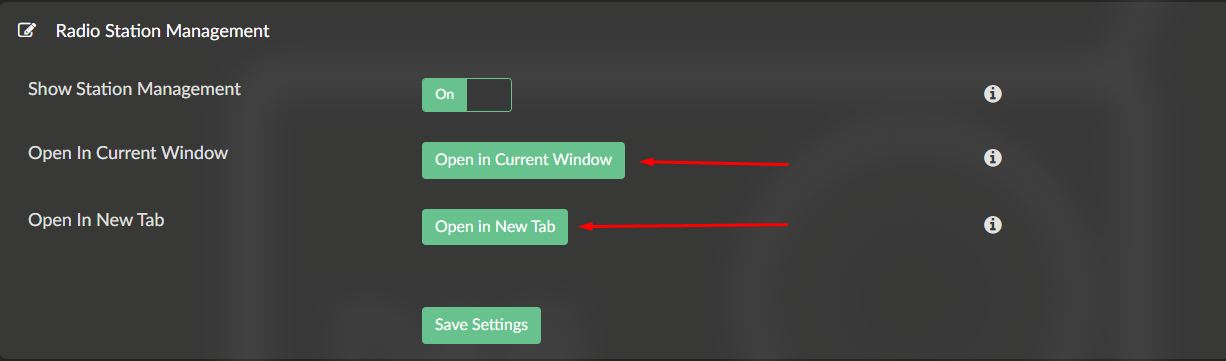
Web-based station manager with search, favorites, hide, rename
Backup and restore system
CSV import/export for bulk editing
Best effort artwork via Last.fm with configurable confidence and blocklist
Classical composer portraits via Open Opus
Real-time signal quality indicators
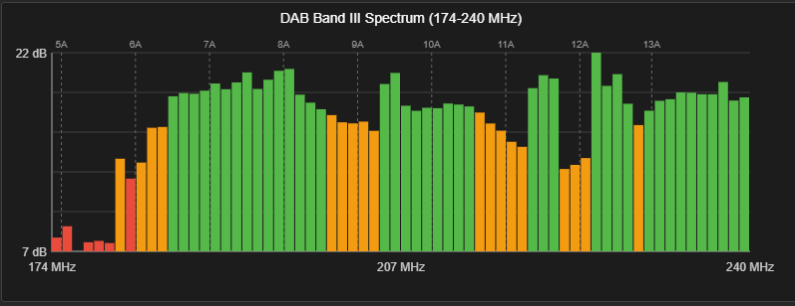
Antenna positioning tools with RF spectrum scan and DAB channel validation
Regional FM frequency support (Japan, Italy, Europe, Americas)
Proper process lifecycle management
Recycle bin for deleted stations
All of this running on hardware as modest as a Pi Zero W2 with budget RTL-SDR dongles.
This was an intense month. The plugin is now feature-complete for its intended purpose - receiving FM and DAB radio through Volumio.
Community feedback summary:
Music fingerprinting - no interest. Current artwork system is sufficient. Not pursuing.
CSV import/export - interest confirmed. Implemented in v1.3.3.
Dedicated hardware HAT - clear interest from multiple users. Points raised:
Active antenna support expected
Compatibility with other HATs desirable
Price point 30-50 EUR considered reasonable for basic HAT
Bundled active antenna would exceed that range but could be optional
Hardware development requires research and focused effort. This is a separate project track from the plugin - different timeline, different skills, different risks. I will share more when there is something concrete to discuss.
Going forward, plugin focus shifts to maintenance:
Bug fixes
Stability improvements
Community support
Thank you for the honest feedback, suggestions, and hours of testing. @Wheaten was foot locked with me through late nights and edge cases. @Darmur, @Steve1 - your real-world testing found issues that bench testing never would.
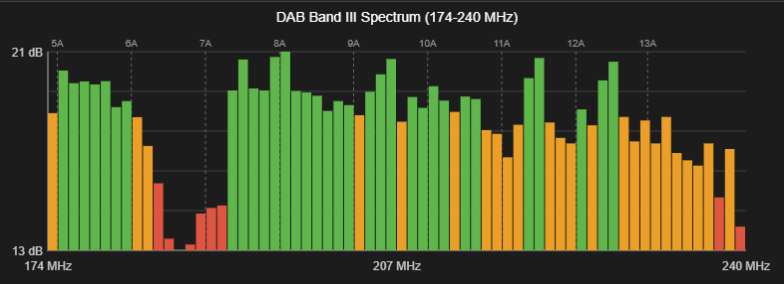
The spectrum analyzer can only show if there is a transmission pressure within a given frequency band. It does not check quality of tuned to nor locked on specific station or assembly. This has been explained when feature was introduced.
You can also try to run my script and optimize gain.
Lower the gain has more impact on the noise then peak levels.
It might boost your overall performance.
You can always explore other active alternatives.
One advantage of buying through Amazon is the easy return process if the product doesn’t meet your expectations.
Yep, that looks good. You’re right about Amazon — I grabbed the RTL-SDR Blog V3, but returned it hassle‑free once speedy @nerd pointed out that V4 was probably the better choice
Have currently 2 active antennas in use.
One with the exposed copper for the windscreen and the one from Amzon. Both work perfectly.
So I think every active DAB+ antenna will do, just avoid those that needs 12V power
This release adds an SNR measurement tool for finding your optimal DAB gain setting, plus a fix for blocklist backup restore.
What’s New in v1.3.5
SNR Measurement Tool (Gain Optimizer)
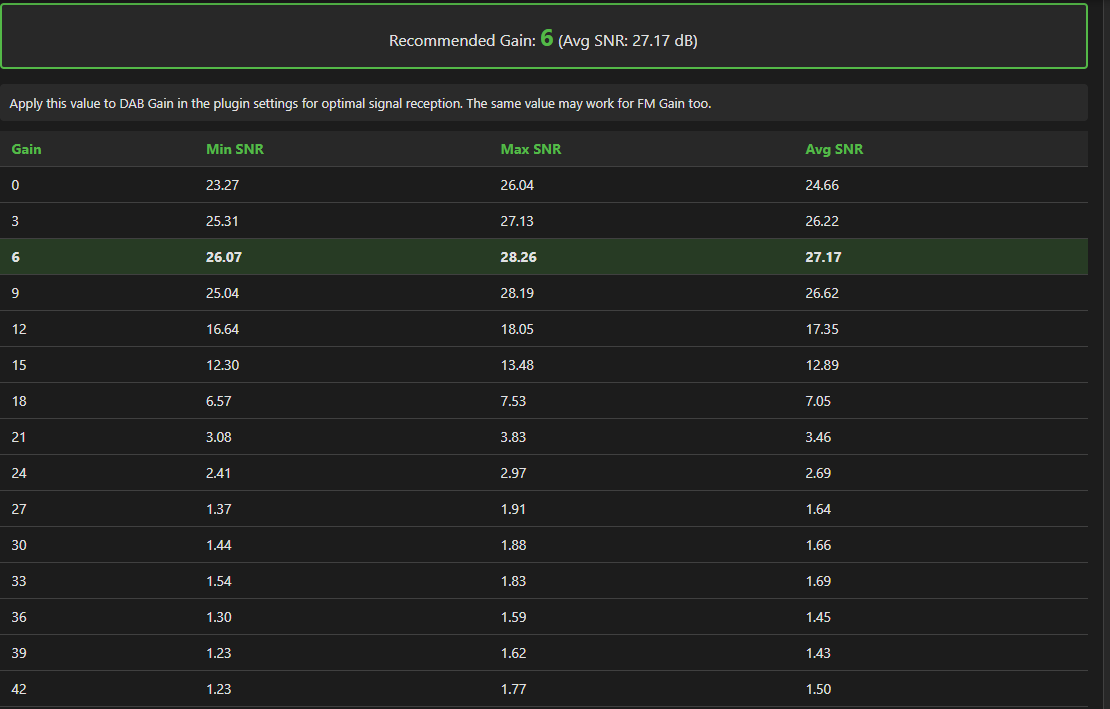
Automatically find the best gain setting for your location and antenna setup. The tool measures Signal-to-Noise Ratio for DAB channels across a range of gain values and identifies which setting produces the highest average SNR.
Location: Station Manager > Antenna Positioning tab > Tool 3
How It Works
The tool uses fn-rtl_power to measure RF power across your DAB channels at each gain step. For every channel, it calculates:
Peak signal level within the channel bandwidth
Noise floor from surrounding frequencies
SNR (the difference between peak and noise)
After sweeping through all gain values, it presents a summary table showing min/max/average SNR per gain setting and highlights the recommended gain.
Channel Selection
Three options for which channels to measure:
Use scanned DAB stations: Automatically detects channels from your existing DAB station list
Use validated channels: Uses results from Tool 2 (Channel Validation) - only channels that successfully decoded
Select manually: Choose specific channels from the grid
Configuration
Gain range: -10 to 100 (covers full RTL-SDR range)
Default Gain range: 0 to 50 (covers all 802/802T RTL-SDR receivers)
Extended Gain range: to 100 (covers all 820D RTL-SDR receivers)
Smaller steps give finer resolution but take longer. For initial testing, the defaults work well. Once you identify a promising range, narrow it down with smaller steps.
How To Use
Open Station Manager
Click Antenna Positioning tab
Scroll to Tool 3: SNR Measurement
Select channel source (scanned stations recommended if you have DAB stations)
Adjust gain range if desired
Click Measure SNR
Wait for sweep to complete (2-3 seconds per gain step)
Note the Recommended Gain value
Update your DAB gain setting in Volumio plugin configuration
Results Display
Summary table: Gain, Min SNR, Max SNR, Avg SNR - best row highlighted
Recommended Gain: The gain with highest average SNR across all channels
Show Details: Expands to show individual measurements per channel per gain
Blocklist Backup Fix
Fixed a regression from v1.3.3 where uploading blocklist backup files failed with “Invalid backup file” error. Blocklist backups now restore correctly via Maintenance > Upload Backup.
Credits
SNR measurement algorithm based on snrd-api_V2.sh by @Wheaten. Beyond the original shell script, @Wheaten provided invaluable testing, feedback, and technical challenges over the past month that significantly improved the implementation - from gain range validation to hardware insights.
Notes
The measurement temporarily stops any playing station to access the tuner
Results depend on your antenna, location, and local RF environment
Different channels may have different optimal gains - the tool finds the best compromise
For best results, run after positioning your antenna using Tools 1 and 2
 )
) Sadly, I don’t see this available in the UK. There are, however, some very similar-looking ones on Amazon and eBay.
 Thanks