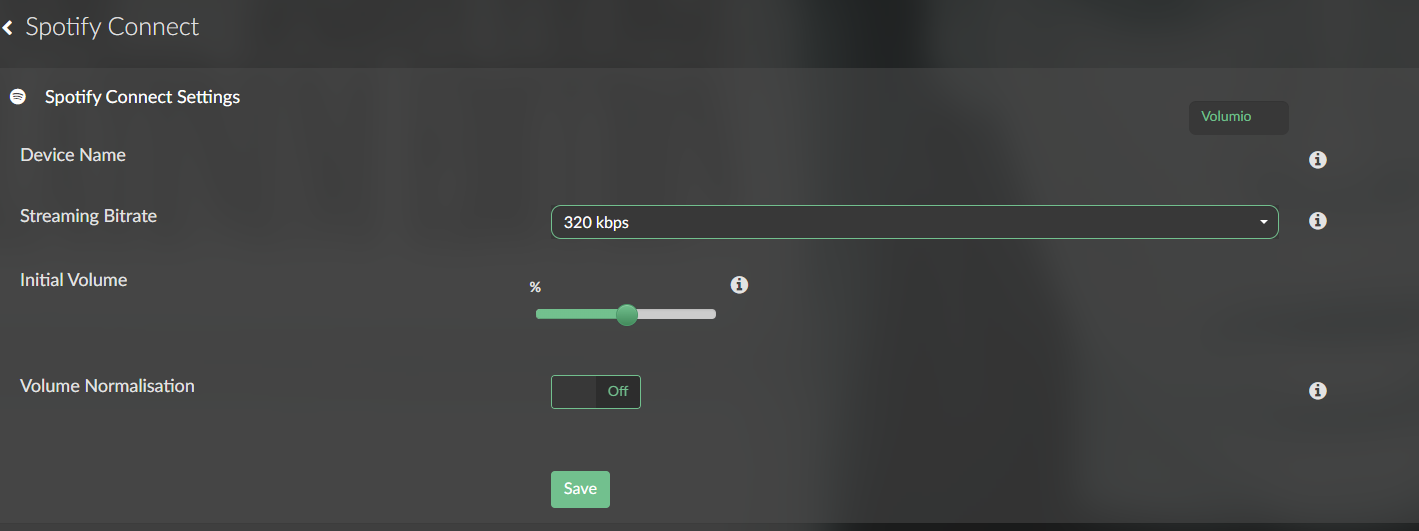
For the time being, this plugin serves as a temporary workaround that provides Spotify Connect only. It has been tested on Raspberry Pi 4, Raspberry Pi 5, CM4, Primo V2, Primo Plus, and Rivo. No Spotify authorization or login is required.
The plugin uses the official Volumio Spotify binaries.
Please note: This is provided as-is and is intended solely as a temporary replacement for the currently broken Login5 functionality. No new features or enhancements will be added.
Installation
Remove the Spotify plugin installed from the Volumio Plugin Store.
Copy the ZIP file to your device.
Run the following commands:
miniunzip volumio-spotify-connect.zip
cd spotify-connect
volumio plugin install
Enable the plugin from the Volumio UI.
Features
Supported
Spotify Connect playback
Playback control via Spotify app or Volumio:
Play
Pause
Stop
Previous track
Next track
Volume control (one-way only, Spotify App. → Volumio not Volumio → Spotify App. )
Initial volume setting
Volume normalization
Custom device name as displayed in the Spotify app (rename supported)
Not Supported
Bidirectional volume synchronization
Login5 authentication
Additional features beyond Spotify Connect functionality
This plugin is intended as a simple, lightweight stopgap until the official Login5 implementation is fixed.
Using Spotify creates an endless loop as indicated by several others. In stumbling across a thread here (Spotify 2023), it seems the current work-around (as of 9hrs ago) requires programming? link
Which is fine, it’s just beyond my abilities as a simple end-user…(which may be an indication I don’t belong here?).
There is no need for programming, only install a plugin manually.
You can also opt to disable the authorization in the plugin from the plugin store, which seems yto do the trick for most.
Like you say, Tidal is a better experience all round - sounds significantly better, huge music database (as good as Spoty at least), has an AI-music slop filter, slightly better artist renumeration, it doesn’t invest huge sums in podcasters with extreme views or AI software for the weapons industry. Plus it works perfectly with Volumio.
*I’ve looked for a tutorial on manual installations so as not to tie up the forum with such a basic question but no luck for someone decades away from navigating in cmd land. I need to put the .zip file in the proper directory for the `miniunzip volumio-spotify-connect.zip, etc to run, but don’t see the /home/volumio folder to drop it in, nor how to navigate to that directory to run the commands …this is what I meant by “programming”…
I use both Volumio and piCorePlayer with the Logitech Media Server (now called Lyrion Media Server). I noticed today that Spotify wasn’t working with the LMS and had to update the Spotify plugin to get ir working. The LMS forum mentioned that Spotify made an API change that broke their Spotify Connect implementation,
So then I fired up Volumio and Spotify was busted as well. I uninstalled the plugin, reinstalled it (v. 4.4.1) and did authorization, which didn’t work. Then I reinstalled it and used Spotify Connect, and was surprised to see it worked!
Finally it is time to listen to new Phoebe Bridgers!
PS: I ssh-ed into the volumio and used wget to put the zip file with the temporary fix on my device. Because you cd into the unzipped file, it does not matter where you put it. Good luck!
I have to admit that with the new spotify soloist I might be looking away from volumio to even more diy with a vanilla linux, flac player with web interface + soloist for spotify lossless. Or even ditch flac completely and go spotify soloist only.
Hey, thanks for pointing out Soloist — this project was completely unknown to me.
I probably won’t develop a Volumio plugin myself since I don’t use Volumio on a daily basis anymore, but Soloist looks like a very interesting path for a future Spotify plugin.
Using PipeWire as the bridge to the local audio output could provide an interesting alternative to the current librespot-based path, especially now that Soloist provides an official Spotify playback engine.
Maybe an evolution of the existing Spotify plugin around this architecture could do the trick.