Thank you guys for the report and good job on the workaround! Signing off should be enough to get it working.
It seems like Spotify killed the authentication flow via Login5 when using stored credentials produced by the AP with an access token with a different client ID than the desktop one.
This seems a structural and definitive change so I am afraid that this functionality will need removing, but it’s worth investigating when I have some time. It might be something stupid like an outdated version string somewhere.
im currently running pi5 8gb with a 1tb nvme ssd in a argo v3 case with the dac from argo.
everything worked flawless till yesterday. where on play the top right on play says player restarting. it will play for 2 min then reboot the player. i reimaged the ssd same issue… i a completely different pi 5 and same issue.
go-librespot-daemon.service: Main process exited, code=exited, status=1/FAILURE
go-librespot-daemon.service: Failed with result ‘exit-code’.
info: Connection to go-librespot Websocket closed
info: MYVOLUMIO: Adding device
info: MYVOLUMIO: Evaluating Server
info: Setting Geolocation for MyVolumio to us4
info: CoreCommandRouter::executeOnPlugin: system , getConfigParam
info: CoreCommandRouter::executeOnPlugin: system , getConfigParam
info: CoreCommandRouter::executeOnPlugin: system , getConfigParam
error: Failed to add MyVolumio device: {“message”:“USER_NOT_FOUND”}
Exactly the same here. I rebuilt the system and so far so good. It may be related to Spotify. Delete the spotify plugin and see if it stabilizes. I am running stable without the spotify plug-in
Hi,
Since 2 days we have problem with Spotify. Problem start on 2 deferent Volumio players. Both updated to the last Volumio ver 4.119 and Spotify plugin 4.4.1.
Spotify browsing still works in Volumio, but playback fails and the devices disappear from Spotify Connect
Log shows successful AP authentication followed by: failed authenticating with login5: INVALID_CREDENTIALS
You tested go-librespot 0.8.0 manually and the exact same INVALID_CREDENTIALS error remains
Re-enabling the Spotify plugin generates a new access token and reports Spotify Successfully logged in, but go-librespot still fails immediately afterward.
Same as the others Volumio 4.119 on 4 different servers, Pi4 and Pi5. I found that deleting Spotify fixed the restarting but did not know why until I found this thread, Deleting Spotify fixes the restarting problem. Note with Spotify installed trying to modify it, it asks you to sign in. I use Tidal as my main streamer so I will wait until there is a fix released before reinstalling Spotify.
It’s been a couple of months without problems with my Rivo. Everything was working, no issues. Then I went away on vacation for three weeks, come back, turned everything on again and still no issues, I thought first. But then I tried to play something on Spotify. Rivo is not appearing in Spotify as Spotify Connect device. Trying to open Spotify locally in Rivo works. Loading all playlists and everything else. Browsing works. Spotify authorised as well. But no playback when I press play. Nothing happens. Tried unistalling Spotify plugin, restarting, installing again - same thing. Any ideas? This IS frustrating!! Tidal works and roon bridge works fine. And yes, I do not have any networking issues. This is definitelly related to Volumio & Rivo.
Not yet. But logging out and using only Spotify Connect is sufficient right now. However… I’m working on a NFC music controller plugin (I’d like to allow my kid to play music using nice album covers with stickers) which would benefit from the fixed authentication. Ran into some other issues after editing the config.yml.
Spotify is pretty important to a lot of people. So i hit this problem and started from scratch by rebuilding my system… I don’t use spotify connect. I install the plugin and go from there. Right now, the plugin is not installed because i dont want to go into a restart loop.
So is there a fix for this? somebody working on it. Timeline? I seem to have to go thru a lot of threads to get information. I am Not impressed. Come on Volumio…
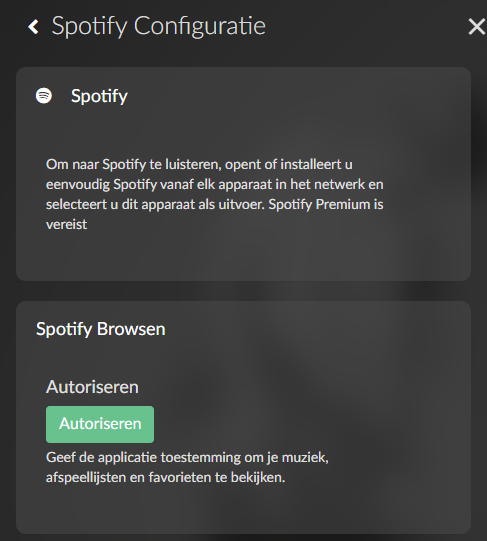
If you go to the settings of the plugin (menu → plugins → installed plugins → Spotify plugin settings) you are able to authorize your Spotify account in the second block. It says “Browse Spotify” or something similar. This allows you to play Spotify directly from your volumio. Spotify will appear as an option in your music library in the volumio UI or app and you will be able to select artists, playlists and the lot. This authorisation seems to be the villain here and makes the plugin crash.
Example of the settings, as you can see I have not authorized:
If you do not authorize, or will remove your authorization. You will still be able to play music from your phone or the spotify app on your pc etc and select the volumio as a source.
There’s some background here… As I understand we are relying on enthousiasts who have to reverse engineer Spotify’s mess. Spotify has closed off the development of their API to the general public and has suddenly changed the way the authorisation works. Devgianlu and the Volumio team are doing their best, but ,since they are not in the loop, some downtime can be expected whenever Spotify decides to make changes like this.
I had pretty much the same kind of Spotify Connect issues on Volumio before I ran into them again on my Antipodes setup.
At some point I stopped trying to fix the integration itself and went around it instead. I ended up building Spotycast for that reason. It just turns Spotify into a standard Icecast/HTTP stream, which is a lot less fragile on older setups.
I understand its not your mess. I object to the lack of clear communication. There should be a banner that says Warning-Volumio restart loops! It is not obvious it a spotify issue.
S I think you need to comminicaye much better.
So you have acknowledged the problem buried in a spotify thread.
not good enough. So now you have acknowledged the issue, lets have status updates on the fix, no matter how long it takes.
Volumio stuck in endless restart loop - Configuration Updated. Player Restarted.
Tried downloading the latest version (4.119) and re-flashing SD card. Hardware is a USBridge by Allo. Only plugin installed is Spotify 4.4.1. If I uninstall Spotify then the restarts stop. Player is of no use to me without Spotify.
Replying to my own post as found a fix. Uninstall the plugin. re-install. DON’T “Authorize” with Spotify under settings. This is causing the plugin to crash and endlessly restart.