All platforms, especially freeware, should be expected to have something less than ideal or missing, features-wise. If it’s a particularly important feature to a given user, perhaps best to just move on or to solve it from the user-end (time/labor-intensive in this case, but otherwise easy).
That moderators and developers have not replied to this thread does not confirm, but perhaps suggests, there is no upcoming solution. If smooth-operating .cue files are a priority, perhaps just use a different platform?
It all boils down to perspective, and personally it’s no biggie. Smallest of first-world-concerns on a recreational interface that I paid nothing for.
Without knowing whether this is a big deal to the majority of those who paid for / pay for Volumio memberships / subscriptions, it’s potentially misleading to guess whether this should even be a priority based on customer demand (especially if it conflicts with something uniquely specific to the Volumio software). Maybe offer to invest a meaningful sum in Volumio on the condition of solving this issue in current and all future editions? 
I think (and don’t get mad at anyone for that) that this cue+flac thing has been working perfectly even in the world’s lamest, free players, for at least 10 years…if it wasn’t so, there wouldn’t be such large albums in FLAC+CUE format… …if there is such a good program as VOLUMIO, and it has been used for years (or, as we can see, CUE already works in it at some level), why not finish that small part of the program normally? Last year, I corresponded with the Chinese developers of the HIBYMUSIC program for weeks. At my request, for example, Gapless and the Balance plugin were included. (that software is not a streamer, it’s just a bit-correct multi-audio player, which is used by about 50 million people!) I’ll say it again, I’m not a programmer, I don’t understand Linux. But handling the cuesheet correctly, since it works even in a crappy file manager, shouldn’t be such a terribly difficult task. I would just respectfully ask the developers to finish this part. If it works, I’ll pay for it. I think the problem is a priority. Or does no one read the hundreds and hundreds of topics about this, all over the Internet, where users have been asking for this for years? This is my opinion, I’ll say it again…and I’d love it if a developer would read this post and respond to it. Anyway, all my respect goes to them, because apart from that, it turned out to be a very good program. Greetings, with friendship, Zoltán
@volumio
Hi Zoli76, I also suffer from the lack of Flac+cue file management and even if Volumio is an excellent interface I would like to try something else. Do you happen to know and/or are you using any alternatives to Volumio? even for a fee?
Hello and thanks
Szervusz! Nekem a piCoreplayer és a Moode audio alkalmazásokat ajánlgatták már. (pont most is a Volumioval kínlódok, tényleg egy csomó albumom cuesheet+FLAC formában van…és még számot léptetni sem tud, sem az adott zeneszámba beletekerni). De amúgy a legjobban az bánt, hogy ez egy teljesen szuper program lehetne, ha befejeznék rendesen…és ha nem lenne tabu, meg hatalmas csend, ha valaki ugyanezt a problémát nehezményezi, mint én… (most is napok óta csend van. Az egyik fejlesztő sem tisztelt meg eddig egy udvarias válasszal sem…hogy pl. menjek a fenébe). Sajnálom, de ez a probléma (meg még néhány apró) úgy látszik, meg fog maradni a Volumioban. Azt sem értem, hogy aki éves licenszet kifizet, azt nem zavarja ez a programhiba? Mindegy, látod, napok teltek el, tisztelettel írtam, nem kaptam érdemi választ. De majd hátha egyszer…Egyelőre én nem váltottam más szoftverre, de kénytelen vagyok BubbleUPNP programmal is kínlódni most. (Azzal is befagy néha a Volumio, meg fájdalmasan lassú az egész). Boldog karácsonyt mindenkinek!
Hello! The piCoreplayer and Moode audio applications have already been recommended to me. (I’m struggling with Volumio right now, I really have a lot of albums in cuesheet+FLAC format…and it can’t even play a track or wrap it around the given track). But the thing that bothers me the most is that this could be a completely great program if I finished it properly… and if it wasn’t a taboo, and there was a huge silence when someone complains about the same problem as me… (still silence for days none of the developers have honored me with a polite answer so far… to say, for example, to go to hell). I’m sorry, but this problem (and a few others) seems to remain in Volumio. I also don’t understand that those who pay for an annual license are not bothered by this program error? Anyway, you see, days passed, I wrote with respect, I didn’t get a meaningful answer. But just in case…I haven’t switched to another software yet, but I’m forced to struggle with the BubbleUPNP program now. (Volumio sometimes freezes with that too, and the whole thing is painfully slow). Merry Christmas for everyone!
Hello all, paid user here.
I have the same problem with FLAC albums. I cannot play individual track. It renders player (almost) useless.
Please fix it.
Support for QUE files was discontinued about a year ago, after numerous reports of MPD crashes. MPD is highly unforgiving when QUE files contain errors.
I stopped using Volumio 3 because it didn’t support CUE+FLAC.
I just installed Volumio 4.069 and I’m really glad to see that CUE+FLAC support is back! I’m very happy about this and hope the support will continue.
you can still use flac+cue with 4.071 version? for me i see the cue twice on folder and when is going to the next track dont change the name of the song and playback time, play next track but in the same first track gui
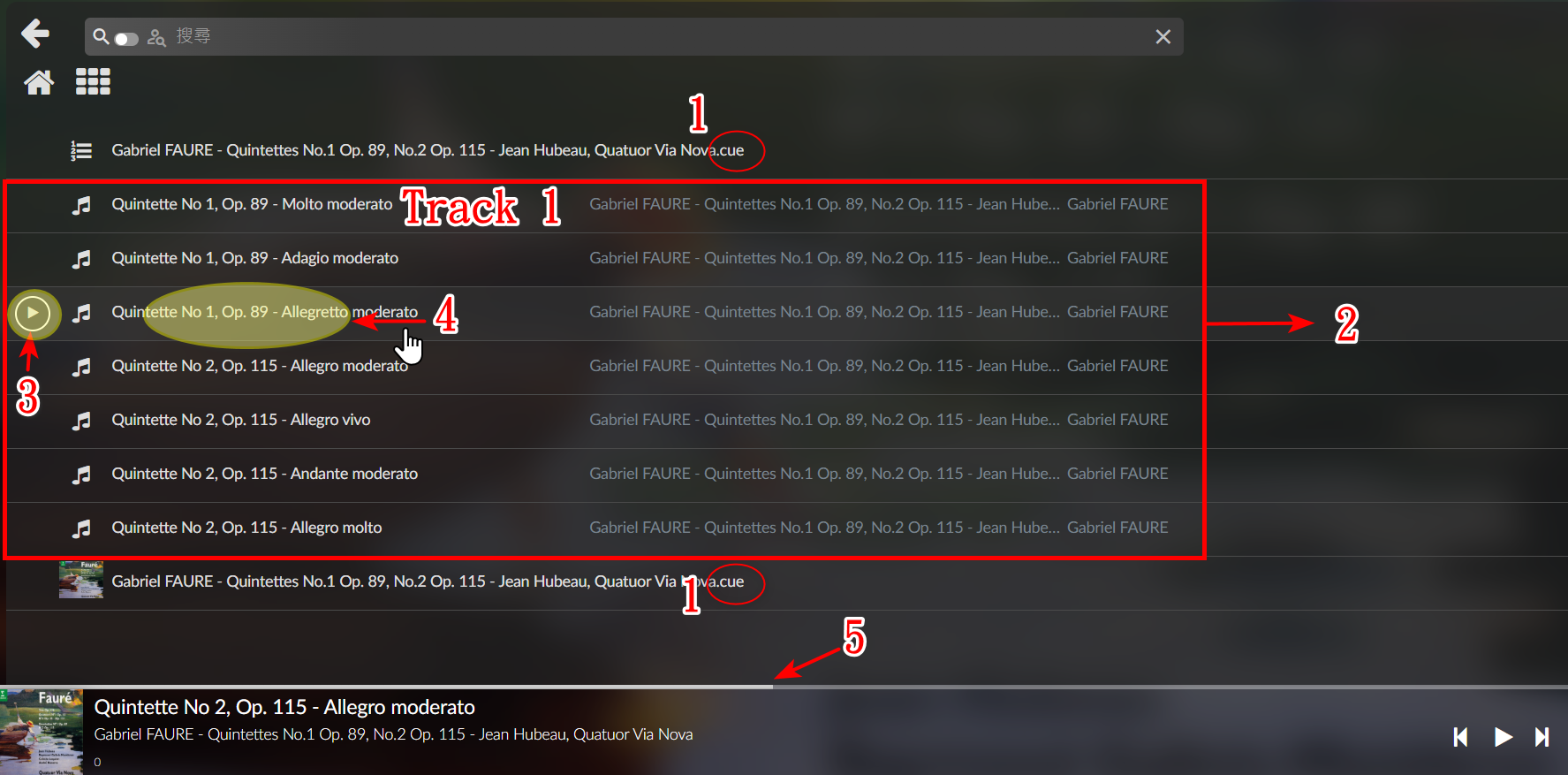
I am currently using Volumio 4.071.
When I enter a folder containing a CUE file and a FLAC file:
- You can see two instances of the CUE file listed at the very top and very bottom of the track listing (as shown in Icon 1).
- Clicking on either of these two CUE files does not play the tracks correctly.
- The items listed between the two CUE file entries are the individual tracks split from the FLAC file (as shown in Icon 2).
- If you click the triangular play button icon (indicated in Icon 3), regardless of which individual track you click, playback will always start from the very first track (this might be a bug… can it be fixed ? ).
The workaround is to click on the area indicated by Icon 4. This allows playback to start directly from the correct track position. Sometimes you need to click 3 then 4 to make it work.
To quickly advance to a specific time within a track, you can click on the area indicated by Icon 5.
The skip to next track and advance to specific time function seems not work in the main GUI playing screen, it may skip to the first track or random order… maybe a bug ?
The trick ( my solution ) is to click icon 1 area in track 1 first, let it play a little, then it seems the skip next track and other function will be better…maybe a bug ?
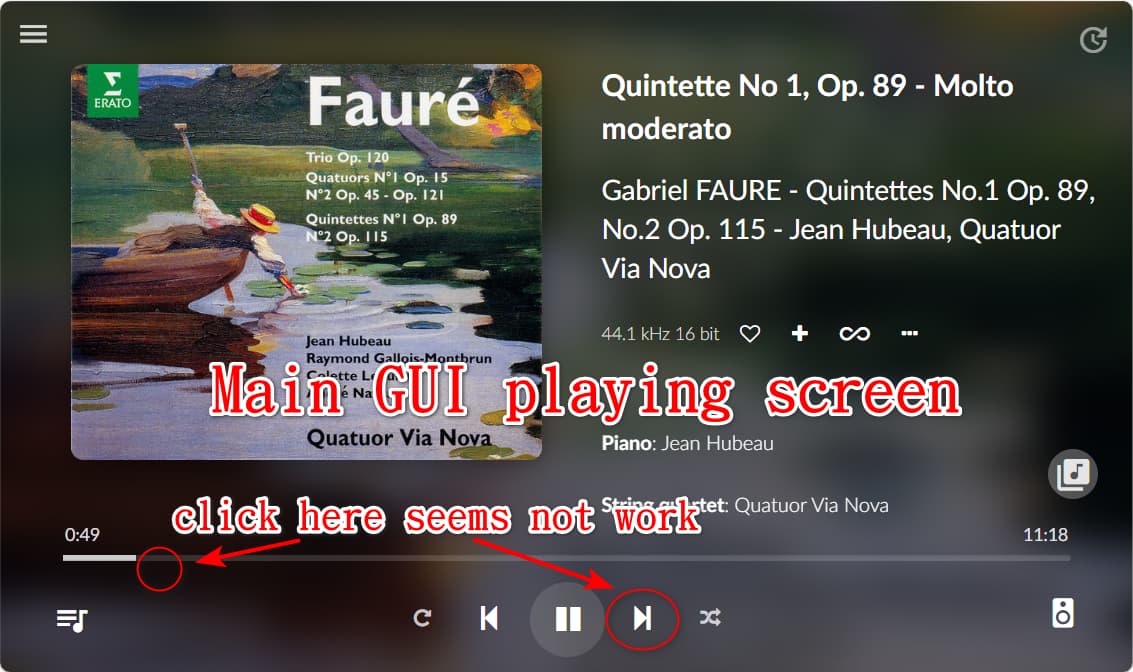
Thanks for sharing, i hope that went fixed in the future versions, for me now the solution was move to PiCorePlayer + LMS
Play flac+cue perfect, flac+cue embedded and Cues with index 00 and 01 (gaps between tracks)
And sorry for my terrible english, is not my native language and dont use translator