Ok, it appeared to be a timing regression in v4 for lower powered x86 configurations, specifically those booting from a usb device, when it is not ready at the time the boot process tries to read from it.
The problem was located, fixed, tested and the solution made available for the next update.
2 Likes
On my MiniPC Volumio using a 7" NON-TOUCH HDMI, under “System”, I’ve unchecked show mouse pointer. However, no matter what I do, it’ll come back. I can’t recall if this started with Volumio 4 betas and I thought it may be resolved over time, but running 4.0.22. it still remains the same. Is that another way to “hard code” away the mouse pointer?
Yes, this does not work for x86, sorry. But don‘t despair, you might even be getting more than you wish.
There is currently work on an x86-specific plugin underway (courtesy @balbuze ) to customize selected x86 screen/ touch screen, cursor and other UI behavior settings.
1 Like
Hi!
I’m running Volumio OS on an old PC with a Creative Sound BlasterX AE-5 that gets detected as “HDA Creative”. This sound card has two devices: analog and S/PDIF. Due to that, I followed this post in order to get the two separate devices in Volumio: No sound from RPI 4 & USB DAC Creative Soundblaster - #11 by gkkpch
The issue is that I can’t get it to output any sound. This card works on Ubuntu 24.04 or Arch, but not on Volumio. I also tried tweaking the settings via alsamixer, but no luck. It might have something to do with selecting the correct output.
Any ideas on where to look next?
@gmelo77
Please read the first post in this thread.
“Old PC” and “Creative Sound blaster” are not very informative.
Without more information and a log, it will be impossible to offer any support.
@gmelo77 After a first quick look, I doubt whether we have any support for this “HDA Creative” device in place atm, it is definitely not the same as the USB device you are referring to.
I would need more info, a log file would already do, as it will show the info we would need to create a proper card profile for it.
Edit: and you will need ssh and some basic editing skills as you will be testing it. I don’t have such hardware here in my “testlab”.
Apologies for missing a lot of info, but this is my first time posting here, hoping someone could help.
Here it goes:
- System Version: 3.832 Released: Sat 26 Jul 2025 11:08:46 AM CEST
- Link to log: http://logs.volumio.org/volumio/ZkitDdW.html
- brand and model of your PC: self-built, but more details coming
- “inxi -Fxxxz” output:
volumio@volumio:~$ inxi -Fxxxz
System:    Host: volumio Kernel: 6.6.32-volumio x86_64 bits: 64 compiler: N/A Console: tty 0 dm: N/A
           Distro: Debian GNU/Linux 10 (buster)
Machine:   Type: Desktop Mobo: ASUSTeK model: P6T DELUXE V2 v: Rev 1.xx serial: <filter> BIOS: American Megatrends v: 1202
           date: 12/22/2010
Battery:   Device-1: hidpp_battery_0 model: Logitech Wireless Touch Keyboard K400 serial: <filter> charge: N/A status: N/A
CPU:       Topology: Quad Core model: Intel Xeon X5670 bits: 64 type: MT MCP arch: Nehalem rev: 2 L2 cache: 12.0 MiB
           flags: lm nx pae sse sse2 sse3 sse4_1 sse4_2 ssse3 vmx bogomips: 64003
           Speed: 4000 MHz min/max: N/A Core speeds (MHz): 1: 4000 2: 4000 3: 4000 4: 4000 5: 4000 6: 4000 7: 4000 8: 4000
Graphics:  Device-1: Advanced Micro Devices [AMD/ATI] Lexa PRO [Radeon RX 550/550X] driver: amdgpu v: kernel bus ID: 02:00.0
           chip ID: 1002:699f
           Display: tty server: X.org 1.20.4 driver: amdgpu,ati unloaded: fbdev,modesetting,vesa tty: 316x85
           Message: Unable to show advanced data. Required tool glxinfo missing.
Audio:     Device-1: AMD Baffin HDMI/DP Audio [Radeon RX 550 640SP / RX 560/560X] driver: snd_hda_intel v: kernel
           bus ID: 02:00.1 chip ID: 1002:aae0
           Device-2: Creative Labs Sound Core3D [Sound Blaster Recon3D / Z-Series] driver: snd_hda_intel v: kernel
           bus ID: 03:00.0 chip ID: 1102:0012
           Sound Server: ALSA v: k6.6.32-volumio
Network:   Device-1: Marvell 88E8056 PCI-E Gigabit Ethernet vendor: ASUSTeK driver: sky2 v: 1.30 port: d800 bus ID: 04:00.0
           chip ID: 11ab:4364
           IF: eth1 state: down mac: <filter>
           Device-2: Marvell 88E8056 PCI-E Gigabit Ethernet vendor: ASUSTeK driver: sky2 v: 1.30 port: e800 bus ID: 05:00.0
           chip ID: 11ab:4364
           IF-ID-1: eth0 state: up speed: 1000 Mbps duplex: full mac: <filter>
Drives:    Local Storage: total: 111.79 GiB used: 1.22 GiB (1.1%)
           ID-1: /dev/sda vendor: Kingston model: SV300S37A120G size: 111.79 GiB speed: 3.0 Gb/s serial: <filter> rev: BBF0
           scheme: GPT
Partition: ID-1: / size: 104.94 GiB used: 248.5 MiB (0.2%) fs: overlay source: ERR-102
           ID-2: /boot size: 168.4 MiB used: 77.9 MiB (46.3%) fs: vfat dev: /dev/sda1
Sensors:   System Temperatures: cpu: 37.0 C mobo: N/A
           Fan Speeds (RPM): N/A
Info:      Processes: 323 Uptime: 7m Memory: 11.69 GiB used: 909.0 MiB (7.6%) Init: systemd v: 241 runlevel: 5 default: 2
           Compilers: gcc: N/A Shell: bash v: 5.0.3 running in: tty 0 (SSH) inxi: 3.0.32
- “aplay -l” output:
volumio@volumio:~$ aplay -l
**** List of PLAYBACK Hardware Devices ****
card 0: HDMI [HDA ATI HDMI], device 3: HDMI 0 [HDMI 0]
  Subdevices: 1/1
  Subdevice #0: subdevice #0
card 0: HDMI [HDA ATI HDMI], device 7: HDMI 1 [HDMI 1]
  Subdevices: 1/1
  Subdevice #0: subdevice #0
card 0: HDMI [HDA ATI HDMI], device 8: HDMI 2 [HDMI 2]
  Subdevices: 1/1
  Subdevice #0: subdevice #0
card 0: HDMI [HDA ATI HDMI], device 9: HDMI 3 [HDMI 3]
  Subdevices: 1/1
  Subdevice #0: subdevice #0
card 0: HDMI [HDA ATI HDMI], device 10: HDMI 4 [HDMI 4]
  Subdevices: 1/1
  Subdevice #0: subdevice #0
card 1: Creative [HDA Creative], device 0: CA0132 Analog [CA0132 Analog]
  Subdevices: 0/1
  Subdevice #0: subdevice #0
card 1: Creative [HDA Creative], device 1: CA0132 Digital [CA0132 Digital]
  Subdevices: 1/1
  Subdevice #0: subdevice #0
I’m pretty comfortable with Linux, so feel free to share some ideas and I will test them.
Thank you in advance!
Edit: CPU actually has 6 cores. Don’t know why it was detected as a quad-core, but it doesn’t matter.
@gmelo77 OK, insert this line into /volumio/apps/plugins/audio_interface/alsa_controller/cards.json, just after the line with HDA C-Media
{"name": "HDA Creative", "multidevice": true, "devices":[{"number":0, "prettyname": "Analog Out", "defaultmixer": ""},{"number":1, "prettyname": "SPDIF/Toslink", "defaultmixer": ""}]},
You might have to unmute the digital device with alsamixer, as with some cards ‘muted’ is default.
When it works, as expected, we’ll add it to the next image.
Thank you, @gkkpch! I’ll give this one a shot later today.
No luck with the analog output. But the digital output is working! This is already a major step forward, since I can connect it to my DAC.
Is there any chance we can try to spend more time around the analog output?
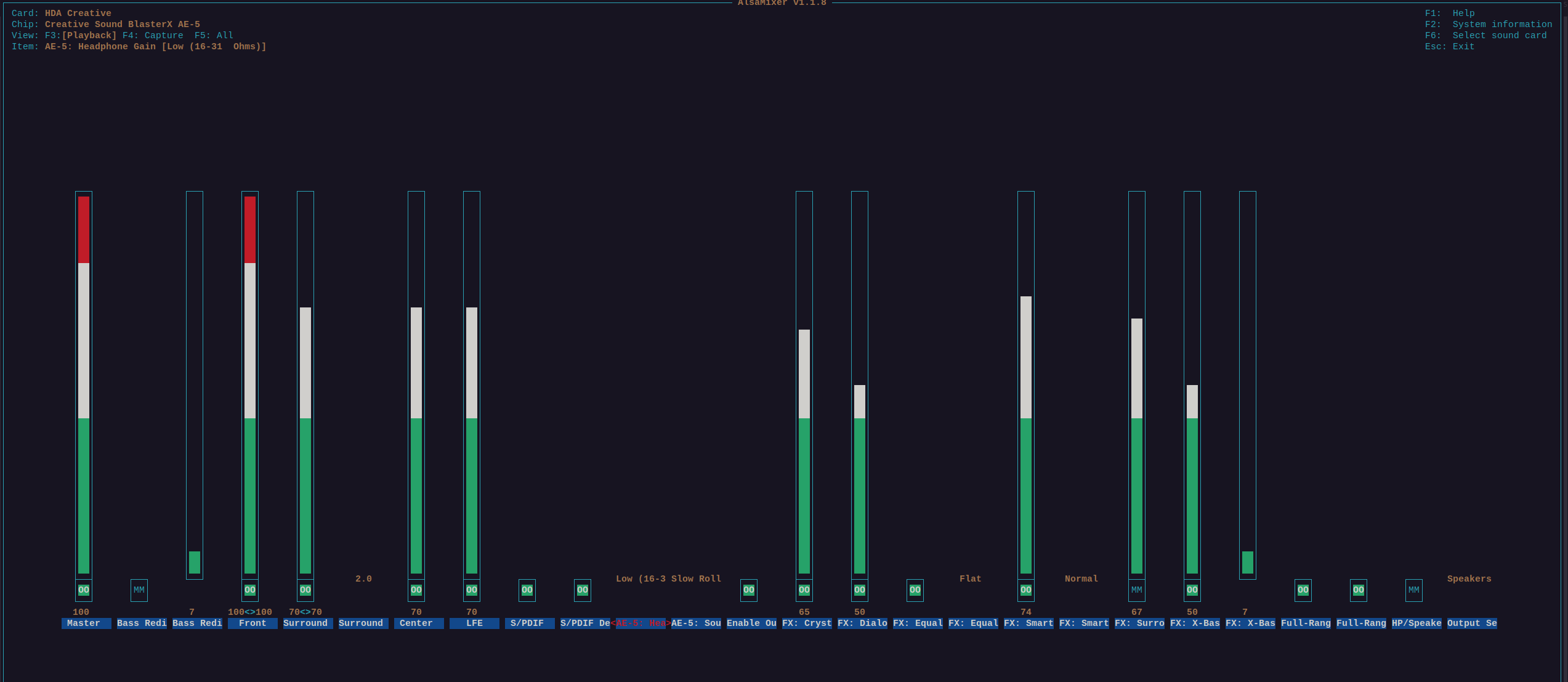
alsamixer looks like this:
Card has 4 physical analog outputs:
- Headphones
- Front
- Rear
- Center/Sub
I have set it to “speakers” via alsamixer, tried plugging to every output, but no sound.
@gmelo77: sure, but it needs going through this thread and my notes first as I believe to have seen something similar before with another soundcard.
→ First try to unmute HP/Speakers (see your alsamixer “MM”).
→ Advice: lower the volume on “Master” and “Front” (red is not a good idea, it might lead to an overdriven signal or clipping)
That’s the auto-detect option.

I currently have it disabled, so that I can manually select “Speakers” instead of “Headphones” or vice-versa. Tried auto-detect on and off, speakers and headphones, but no luck.
Great idea, thank you very much. I was initially maxing it out, so that I could make sure I had output. Now, comes the tweaking part.
Edit: the volume knob doesn’t make any difference for the optical output. So, I might as well set mixer type to “None”.
@gmelo77 Please show
amixer -c1
after you “unmuted” Headphones, just to see what the current control settings are
volumio@volumio:~$ amixer -c1
Simple mixer control 'Master',0
  Capabilities: pvolume pvolume-joined pswitch pswitch-joined
  Playback channels: Mono
  Limits: Playback 0 - 99
  Mono: Playback 82 [83%] [-17.00dB] [on]
Simple mixer control 'Bass Redirection',0
  Capabilities: pswitch pswitch-joined
  Playback channels: Mono
  Mono: Playback [off]
Simple mixer control 'Bass Redirection Crossover',0
  Capabilities: volume volume-joined
  Playback channels: Mono
  Capture channels: Mono
  Limits: 1 - 100
  Mono: 8 [7%]
Simple mixer control 'Front',0
  Capabilities: pvolume pswitch
  Playback channels: Front Left - Front Right
  Limits: Playback 0 - 99
  Mono:
  Front Left: Playback 93 [94%] [3.00dB] [on]
  Front Right: Playback 93 [94%] [3.00dB] [on]
Simple mixer control 'Surround',0
  Capabilities: pvolume pswitch
  Playback channels: Front Left - Front Right
  Limits: Playback 0 - 99
  Mono:
  Front Left: Playback 90 [91%] [0.00dB] [on]
  Front Right: Playback 90 [91%] [0.00dB] [on]
Simple mixer control 'Surround Channel Config',0
  Capabilities: enum
  Items: '2.0' '2.1' '4.0' '4.1' '5.1'
  Item0: '2.0'
Simple mixer control 'Center',0
  Capabilities: pvolume pvolume-joined pswitch pswitch-joined
  Playback channels: Mono
  Limits: Playback 0 - 99
  Mono: Playback 90 [91%] [0.00dB] [on]
Simple mixer control 'LFE',0
  Capabilities: pvolume pvolume-joined pswitch pswitch-joined
  Playback channels: Mono
  Limits: Playback 0 - 99
  Mono: Playback 90 [91%] [0.00dB] [on]
Simple mixer control 'Mic Boost',0
  Capabilities: cenum
  Items: '0 dB' '10 dB' '20 dB' '30 dB'
  Item0: '0 dB'
Simple mixer control 'IEC958',0
  Capabilities: pswitch pswitch-joined
  Playback channels: Mono
  Mono: Playback [on]
Simple mixer control 'IEC958 Default PCM',0
  Capabilities: pswitch pswitch-joined
  Playback channels: Mono
  Mono: Playback [on]
Simple mixer control 'Capture',0
  Capabilities: cvolume cswitch
  Capture channels: Front Left - Front Right
  Limits: Capture 0 - 99
  Front Left: Capture 99 [100%] [9.00dB] [on]
  Front Right: Capture 99 [100%] [9.00dB] [on]
Simple mixer control 'AE-5: Headphone Gain',0
  Capabilities: enum
  Items: 'Low (16-31  Ohms)' 'Medium (32-149  Ohms)' 'High (150-600  Ohms)'
  Item0: 'Low (16-31  Ohms)'
Simple mixer control 'AE-5: Sound Filter',0
  Capabilities: enum
  Items: 'Slow Roll Off' 'Minimum Phase' 'Fast Roll Off'
  Item0: 'Slow Roll Off'
Simple mixer control 'Enable InFX',0
  Capabilities: cswitch cswitch-joined
  Capture channels: Mono
  Mono: Capture [off]
Simple mixer control 'Enable OutFX',0
  Capabilities: pswitch pswitch-joined
  Playback channels: Mono
  Mono: Playback [on]
Simple mixer control 'FX: Crystalizer',0
  Capabilities: pvolume pvolume-joined pswitch pswitch-joined
  Playback channels: Mono
  Limits: Playback 0 - 100
  Mono: Playback 65 [65%] [on]
Simple mixer control 'FX: Dialog Plus',0
  Capabilities: pvolume pvolume-joined pswitch pswitch-joined
  Playback channels: Mono
  Limits: Playback 0 - 100
  Mono: Playback 50 [50%] [on]
Simple mixer control 'FX: Equalizer',0
  Capabilities: pswitch pswitch-joined
  Playback channels: Mono
  Mono: Playback [on]
Simple mixer control 'FX: Equalizer Preset',0
  Capabilities: enum
  Items: 'Flat' 'Acoustic' 'Classical' 'Country' 'Dance' 'Jazz' 'New Age' 'Pop' 'Rock' 'Vocal'
  Item0: 'Flat'
Simple mixer control 'FX: Mic SVM',0
  Capabilities: cswitch cswitch-joined
  Capture channels: Mono
  Mono: Capture [on]
Simple mixer control 'FX: Noise Reduction',0
  Capabilities: cswitch cswitch-joined
  Capture channels: Mono
  Mono: Capture [on]
Simple mixer control 'FX: Smart Volume',0
  Capabilities: pvolume pvolume-joined pswitch pswitch-joined
  Playback channels: Mono
  Limits: Playback 0 - 100
  Mono: Playback 74 [74%] [on]
Simple mixer control 'FX: Smart Volume Setting',0
  Capabilities: enum
  Items: 'Normal' 'Loud' 'Night'
  Item0: 'Normal'
Simple mixer control 'FX: Surround',0
  Capabilities: pvolume pvolume-joined pswitch pswitch-joined
  Playback channels: Mono
  Limits: Playback 0 - 100
  Mono: Playback 67 [67%] [off]
Simple mixer control 'FX: Voice Focus',0
  Capabilities: cswitch cswitch-joined
  Capture channels: Mono
  Mono: Capture [on]
Simple mixer control 'FX: X-Bass',0
  Capabilities: pvolume pvolume-joined pswitch pswitch-joined
  Playback channels: Mono
  Limits: Playback 0 - 100
  Mono: Playback 50 [50%] [on]
Simple mixer control 'FX: X-Bass Crossover',0
  Capabilities: pvolume pvolume-joined
  Playback channels: Mono
  Limits: Playback 1 - 100
  Mono: Playback 8 [7%]
Simple mixer control 'Full-Range Front Speakers',0
  Capabilities: pswitch pswitch-joined
  Playback channels: Mono
  Mono: Playback [on]
Simple mixer control 'Full-Range Rear Speakers',0
  Capabilities: pswitch pswitch-joined
  Playback channels: Mono
  Mono: Playback [on]
Simple mixer control 'HP/Speaker Auto Detect',0
  Capabilities: pswitch pswitch-joined
  Playback channels: Mono
  Mono: Playback [off]
Simple mixer control 'Input Source',0
  Capabilities: cenum
  Items: 'Microphone' 'Line In' 'Front Microphone'
  Item0: 'Microphone'
Simple mixer control 'Output Select',0
  Capabilities: enum
  Items: 'Speakers' 'Headphone'
  Item0: 'Headphone'
Simple mixer control 'VoiceFX',0
  Capabilities: cenum
  Items: 'Neutral' 'Female2Male' 'Male2Female' 'ScrappyKid' 'Elderly' 'Orc' 'Elf' 'Dwarf' 'AlienBrute' 'Robot' 'Marine' 'Emo' 'DeepVoice' 'Munchkin'
  Item0: 'Neutral'
Simple mixer control 'What U Hear',0
  Capabilities: cvolume cswitch
  Capture channels: Front Left - Front Right
  Limits: Capture 0 - 99
  Front Left: Capture 90 [91%] [0.00dB] [on]
  Front Right: Capture 90 [91%] [0.00dB] [on]
volumio@volumio:~$
@gmelo77 hmmm, the only thing that irritates me a little is Playback [off] with HP/Speaker Auto Detect
What if you let it be automatic and plug in headphones or the speakers (=lineout).
Afterwards show
amixer -c1 sget 'HP/Speaker Auto Detect'
volumio@volumio:~$ amixer -c1 sget 'HP/Speaker Auto Detect'
Simple mixer control 'HP/Speaker Auto Detect',0
  Capabilities: pswitch pswitch-joined
  Playback channels: Mono
  Mono: Playback [on]
@gmelo77 and still no sound?
Still no sound on the headphone output, neither on the line out. Fun fact: rear and center outputs is a very loud screech.
@gmelo77 And everything has been wired correctly? (I know, stupid question).
I can’t think of anything else, sorry.
Everything wired correctly, already double-checked.
Do you think trying to load this card’s specific firmware with alsa-firmware would help? Or is it redundant?