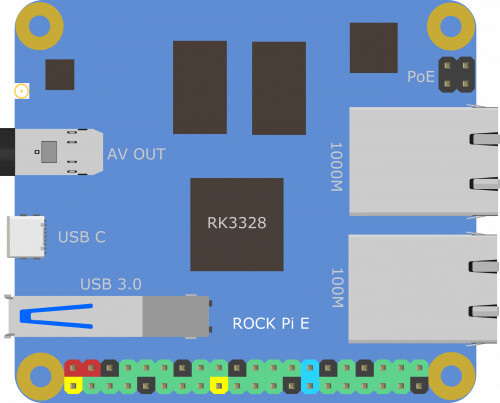
Rockchip RK3328 Quad-core 64 bit Cortex-A53 processor, frequency up to 1.5GHz
Up to 1GB DDR3 RAM
One USB 3.0 port
Gigabit Ethernet LAN
Optional WiFi/BT module
Boot from micro-SD
Boot from EMMC (with optional module)
Onboard DAC with 3.5mm jack
I2S Bus exposed on 40-pin GPIO connector, same pinout as Raspberry Pi
Recommended variant for a smooth Volumio experience
1GB RAM
WiFi5 (AC) / BT4.2 module
Remarks
It is required to connect an IPEX antenna to the WiFi/BT module
For installing Volumio on the EMMC module, it is recommended to use the EMMC-to-SD adaptor
Download Links
Version 3.569 - Update Volumio backend, support for Tidal FLAC Version 3.512 - Update Volumio backend, Supersearch and Infinity playback RC Version 3.503 - Update Volumio backend, Supersearch and Infinity playback Beta Version 3.456 - First Beta release
Known Issues
The Volumio UI doesn’t work properly if the device is connected to the router with the 100M Ethernet port. Please use the 1000M Ethernet port only.
Thanks @gkkpch for sending me the 5.875 image for RockPiE
Hello @Darmur
After reading this article, I have purchased a Radxa RockPiE 1Gb (w/o Wifi, w/o BT). I installed the RockPiE image 3.875. The RockPiE booted ok.
I am finding a few quirks
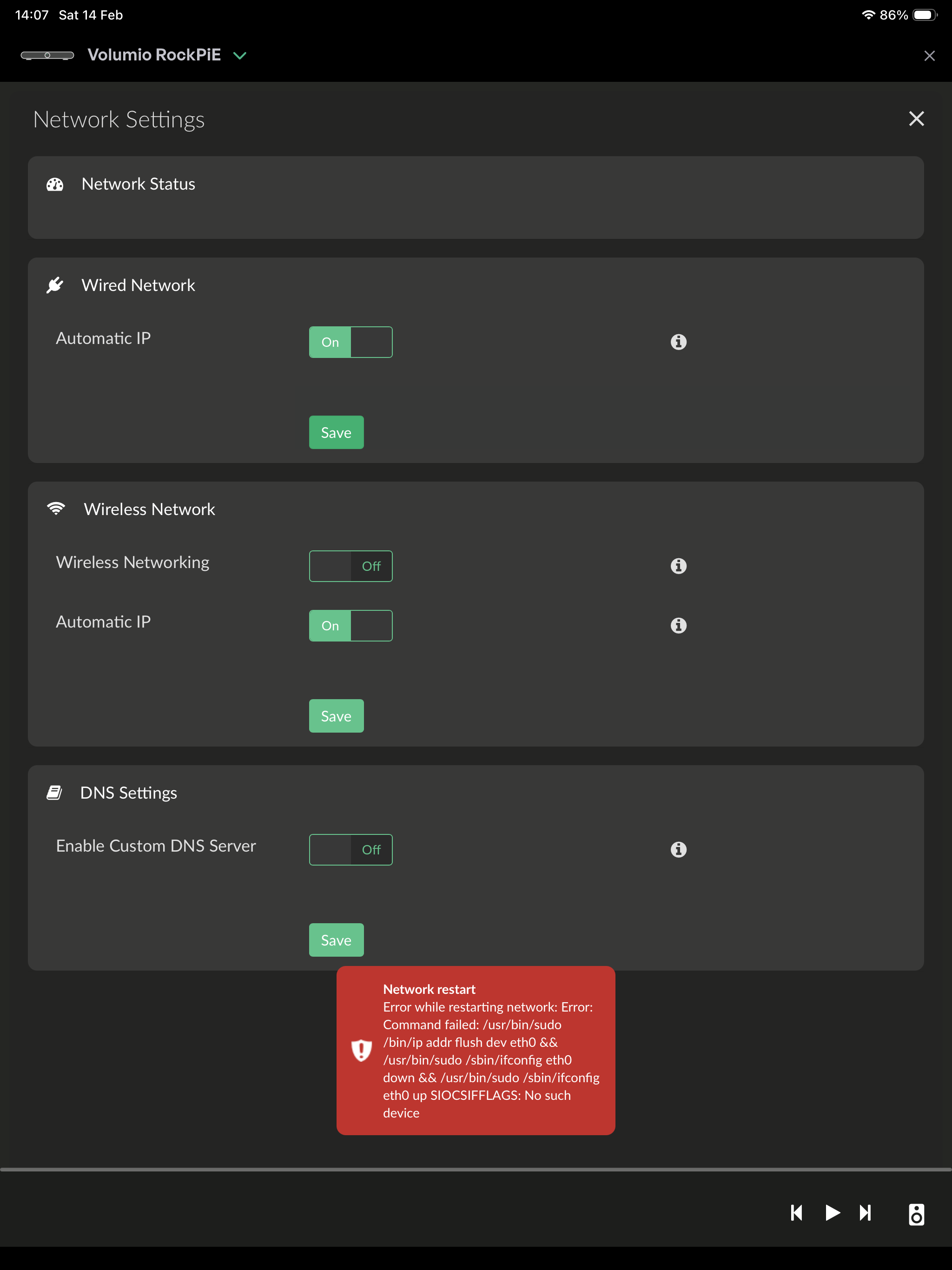
The system / network page does not show an IP address
Clicking on save for Wired Network results in the following error message:
I ordered the Rock Pi E at digitec. Delivery was from Conrad.
The case was directly from KKSB
The RockPiE via USB to my Neukomm CPD126S sounds outstanding, at least the same SQ as Odroid N2/N2+. Much better than a Raspberry. Not really a surprise, as T+A use it inside a 30k Euro DAC with Ethernet in / USB out. Pls be aware that I have an Exsys EX-1181HMS USB hub between the Radxa and the DAC (which is my standard setup).
The only wrinkle is that the USB out port and the USB-C PSU port are very close together. USB cables with slightly thicker plugs won’t fit without putting strain on the USB-C plug.
I have only used the Radxa Rock Pi E to play music from my Synology NAS / MinimServer so far.
Today I gave it to a friend who tried the following configuration:
Radxa Rock Pi E → Exsys EX-1181HMS USB3 Hub → Neukomm CDA126S DAC/Amp.
He then connected a USB m.2 SSD to the Exsys Hub, but the Rock Pi E did not detect the SSD. Is this by design or a bug?
@Darmur
Hi, i’m running this board with an Odroid eMMC module, seems to be compatible and works well.
There are 2 remarks I want to make
Obviously my board needed the nic-8211f overlay.
But editing armbianEnv.txt did not survive an OTA update. Therefore I suggest to use a “userEnv.txt” for parameter “user_overlays”. This only needs a 5-6 line addition to boot.cmd. Just after importing armbianEnv.txt it should also, when existing, import userEnv.txt. So when someone creates userEnv.txt with the user_overlays parameter, it would overrule the empty one in armbianEnv.txt And as Volumio does not know the existance of userConfig.txt, it won’t get overwritten with an OTA. This principle works well with Odroids, it has been used since years.
The only disadvantage: the platform files needs to keep its edited copy of boot.cmd, which I think is doable.
When using an eMMC module, it gets attached to the bottom of the sbc. Sofar ok, Radxa, Odroid and Pine64 versions are compatible. But when fitting one into a case (like the one from KKSB), it becomes cumbersome reflashig the module. Though one would not do this often, you need to disassemble the whole lot and take the eMMC module off. Worse, as you know, the Rockchip tools as an alternative are far too slow to flash over usb.
Instead I developed an installer for the rockpi-e following the already established framework.
SD Autoinstaller images for Volumio 3 and Volumio 4 on Rockpi E eMMC have been developed, more info about those will follow later when released (where to download and how to use).
SD Autoinstaller images are only relevant for users running Volumio on a Rockpi E with an eMMC module (with or without a case), it saves you an SD-to-eMMC writer purchase and, with a case, having to dismantle it first. Plus, an autoinstaller is x-times faster than flashing, less than 50 seconds.
Note: Autoinstallers are hardware- and Volumio-specific, not usable for any other board or other software installations.
OTA compliance for “user_overlays” has also been initiated, image updates to follow within a few days.
@darmur Thanks for the quick support, appreciated!