Turns out it has been a “guy in front of keyboard” kind of problem which makes me feel very uncomfortable.
Actually I got a HiFiBerry Digi+ Pro on my RPi 3B+ - the DAC Plus is installed on my RPi Zero2 W.
After choosing the correct device, playback works like a charm.
I’m sorry, I think I really need vacation.
Oh great, let’s just sprinkle a little more salt on my already bruised ego, why not?
But yes, I’m still brainstorming a masterpiece of fiction to convincingly blame the OS. These things take time, you know.
So far I come up with:
But yes, you know… that thing in the thingy that totally confused the OS and made it do weird stuff? Yeah, still refining that plot twist.
I upgraded from v3 to v4.067. Tried 4.068 and 4.069 as well but the problems are identical.
My setup: Pi0W-2, Sandisk extreme 64GB, Realtek USB DAC, Waveshare 4" HDMI 480x800 ads7846 touch screen.
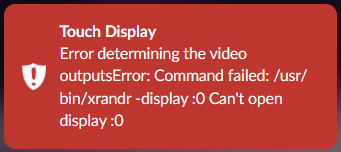
Problem: When I install the Touch Display plugin v3.6.0, the screen goes black and the web ui starts throwing errors about not finding display :0.
I can’t disable or uninstall the plugin as the player immediately restarts when I try, throws the same error again and after Volumio plays its startup sound, I’m back to a plugin status that shows installed and activated.
Any Touch Display plugin settings I try result in the same restart of the player and new error messages about display:0. The settings are automatically reverted to default.
I have tried re-imaging my sd card and starting from scratch with all 3 mentioned v4 versions.
I have tried empty userconfig and my userconfig from v3.
I read the guide about Waveshare 7" and 11" HDMI screens in v4 and added video=HDMI-A-1:800x480M@60,rotate=270 plymouth=270 to cmdline.txt. I tried 480x800M as well, and rotate=0 and 90. The welcome animation shows correctly, it just goes to black instead of the login prompt and QR code after Touch Display is installed.
Current userconfig.txt (this worked perfectly in v3. The Waveshare dtbo is disabled for troubleshooting):
Add your custom config.txt options to this file, which will be preserved during updates
Thank you, much appreciated (and, in addition, also the entire work on version 4). I can confirm the issue exists on a Dell Wyse 3040 with TP-Link Archer T3U Plus AC1300 and 4.067. The device was working correctly with Volumio 3.
I have to say, I found it a bit hard to find a publicly downloadable recent image file for x86-64 to revert to Version 3. I understand you might want to prevent outdated versions circulating but looking at the changelog it seems at present both 3 and 4 are supported (with 3 being updated just recently).
I’ve just installed v. 4.069 on a RPi 4B 8gb ram using the stock RPi USB C psu (15w) - and CD Playback seems to be broken for me. Connected to the Pi are:
an external small factor ssd (Kingston XS1000) for my music library (USB 3 port)
an LG Slim Portable DVD Writer (USB 2 port)
an external USB DAC (Fosi ZD3, with its own independent psu) (USB 3 or 2 port)
Every time I try to play a CD on the LG drive, I get:
a) no audio
b) constant USB SSD drive disconnects & reconnects
c) constant USB dac disconnects & reconnects
This did not happen under any instance of Volumio 3, including the latest version with the Tidal Hotfix (3.874). My main interest in upgrading to v4 was particularly peaked due to the supposed fix for v3’s excessive USB CD drive reads, as per v4’s release information.
Could this be a USB driver issue in v4?
Everything else works well - it just goes bonkers only when I attempt CD playback.
EDIT: also, the LED indicator for SD Card activity is active non-stop. Any idea why? I got it to stop by disconnecting the DVD drive + rebooting the system.
EDIT 2: if I’m inclined to regress to v3 for CD playback functionality, could you please post a link where we can download the 3.874 image from?
Hi @Wheaten ! Thanks for the reply. I haven’t tried a powered USB hub (don’t own one). I thought about it as well as a possibility, but figured that if it works on v3, it shouldwork with v4 as there is no additional power draw from any current or new accessories connected. This specific issue hasn’t happened before.
I’ll replicate the error and post logs for @nerd and the Volumio team.
I’m having a wifi connectivity issue with Volumio 4.069 (and 4.067 before that), on a Raspberry Pi 3B+. I don’t think it’s the same issue as that reported early in this thread by @jocoman, as I’m not using a wifi dongle.
Because my issue has not been discussed at all in this thread, I strongly suspect it’s something I’m doing wrong, and nothing to do with the (most excellent) Volumio software. But it’s not obvious to me what I’m doing wrong …
In short, neither Volumio 4.067 nor 4.069 connects to the wifi network. There’s no issues with the router or signal strength. I have Volumio 3.779 running perfectly well on another Raspberry Pi 3B+ in the same room. And connectivity is fine using a lan cable.
My router sometimes assigns a different IP number to devices depending on whether they are connected via lan cable or wireless. However, that’s not the case here.
Just for what it’s worth, the contents of /etc/wpa_supplicant/wpa_supplicant.conf for the devices I have running on Volumio 4.069 and Volumio 3.779 are identical.
Also for what it’s worth, sudo iw phy0 info yields pretty similar information for both Volumio OS versions, though 3.779 has two additional entries under “Supported extended features”:
[ 4WAY_HANDSHAKE_STA_PSK ]: 4-way handshake with PSK in station mode
[ 4WAY_HANDSHAKE_STA_1X ]: 4-way handshake with 802.1X in station mode
I realise I have to submit a bug report. I can’t, though … the live log reports: info: Cannot send bug report: Error: Command failed: /usr/bin/node /volumio/logsubmit.js ‘Device will not connect to wifi network’ /volumio/logsubmit.js:15 ‘ps -ef’
Before we can investigate this properly, I need you to follow the problem reporting requirements. Your report is missing critical diagnostic information.
What’s missing:
Log link from http://volumio.local/dev - this is MANDATORY. Without a log showing the actual errors, I cannot diagnose what’s happening during plugin installation and X11 initialization.
Complete /boot/userconfig.txt contents - you provided it, but with critical components missing (see below).
Complete /boot/cmdline.txt contents - you mentioned adding video= and plymouth= parameters, but didn’t show the complete resulting cmdline.txt.
Critical configuration error:
Your userconfig.txt is missing the KMS video driver overlay, which is absolutely required for the Touch Display plugin to work on Volumio 4. The Pi Zero W 2 does NOT automatically get this from volumioconfig.txt like Pi4/Pi5 do.
Without KMS, X11 cannot initialize, which explains your “display:0” errors and black screen.
What you need to do:
Add this to the TOP of your /boot/userconfig.txt (before any other settings):
# Add your custom config.txt options to this file, which will be preserved during updates

[all]
# Touch Display plugin requires KMS video driver for X11/graphical interface
dtoverlay=vc4-kms-v3d

# Waveshare 4" HDMI 480x800 configuration
hdmi_group=2
hdmi_mode=87
hdmi_timings=480 0 40 10 80 800 0 13 3 32 0 0 0 60 0 32000000 3
dtoverlay=waveshare-ads7846,penirq=25,xmin=280,xmax=3710,ymin=270,ymax=3650,speed=50000

# Rotation (controlled by plugin - do not manually alter these)
display_lcd_rotate=3
display_hdmi_rotate=3
As @Wheaten already mentioned, we need complete hardware specifications before diagnosis can proceed. This is consistent with the repeated guidance about proper information reporting.
Before investigating this CD playback issue, I need complete hardware specifications. Power budget analysis requires knowing EVERYTHING connected to your system - every pico-amp matters with kernel 6.12.x and Bookworm.
What display is connected? (HDMI monitor? Official 7" touchscreen? DSI display? None?)
If touchscreen: model number, how is it powered?
If HDMI: does it draw power from HDMI port?
3. Boot storage:
What are you booting from? (MicroSD card? NVMe via HAT? USB SSD?)
If MicroSD: which one is in the slot during CD playback?
4. Complete USB port assignment:
Which exact USB port for Kingston XS1000 SSD? (top left, top right, bottom left, bottom right)
Which exact USB port for LG DVD drive?
Which exact USB port for Fosi ZD3 DAC?
5. Complete peripheral inventory:
Any cooling fans? (GPIO-powered or USB-powered?)
WiFi/Bluetooth dongles?
Keyboard/mouse connected?
ANY other USB devices?
Any HATs or GPIO attachments?
6. Power supply verification:
Official Raspberry Pi 15W USB-C PSU - correct?
Any voltage drops or throttling warnings in past logs?
7. Log file when error occurs: Replicate the CD playback problem, then immediately submit log from: http://volumio_IP/dev
Post the log URL here.
Why this matters:
Volumio 3 (Buster, older kernel) was forgiving of USB power budget violations. Volumio 4 (Bookworm, kernel 6.12.x) strictly enforces USB power limits. I need to calculate your exact power consumption across ALL devices to determine if you are exceeding the 1.2A USB budget, which would explain the disconnects and SD card activity during CD playback.
Cannot proceed with diagnosis until I have complete hardware specifications.
I have been using Volumio for many years. Originally on a Pi-1, then in 2019 I bought a Volumio Mini-Boss and a Mini-Boss Player (including amplifier and switched volume control). These sit in my study and kitchen.
Today my iPhone upgraded to Volumio 4, and these Pi-Zero devices have been obsoleted. From the V4 release notes: “we had to make a difficult call. Raspberry Pi 1 and Raspberry Pi Zero are no longer supported”
I get it - that technology moves on and 6 years is a good innings. However, I am confused on my upgrade options.
So my questions are
• Is Volumio 4 compatible with the Raspberry Pi Zero 2? If so, I think that is GPIO header compatible with the Pi-Zero, so happy days, I can swap.
• If not, what are the options to run Volumio on a more modern Pi that I can connect the old analogue circuitry?
For me Volumio was about convenience. I can’t justify the price of the (excellent looking) Volumio products, and my sustainability stance means I’d prefer to reuse the perfectly serviceable analogue components.
i’m sorry but i can’t get an URL.
I have the function “Send Log or bug report”.
When i enter a “reason” why i send a log, i only get “Sending log report, please wait”
It’s been 20 minutes now. I don’t know if it is doing anything at all.