Looks like your hifiberry is not detected at all…
@nerd any idea on this? Maybe we have an I2S regression on this kernel…
Looks like your hifiberry is not detected at all…
@nerd any idea on this? Maybe we have an I2S regression on this kernel…
I’ve just did a clean install on a rpi4 + HFB+ and can confirm it’s miss behaving.
Not sure why it is happening now and not during test (might be I did a OTA for this combo.
What I do notice on first initial install, Volumio is not asking for a reboot due to the added i2c DAC.
However it is /boot/config.txt
volumio@rpi4-hbplus:~$ cat /boot/config.txt
### DO NOT EDIT THIS FILE ###
### APPLY CUSTOM PARAMETERS TO userconfig.txt ###
initramfs volumio.initrd
gpu_mem=128
gpu_mem_256=32
gpu_mem_512=32
gpu_mem_1024=128
max_usb_current=1
[pi5]
usb_max_current_enable=1
[all]
include volumioconfig.txt
include userconfig.txt

#### Volumio i2s setting below: do not alter ####
dtoverlay=hifiberry-dacplus
Only SW or None as mixer, HW is gone.
Hey @Wheaten,
Logs:
Nov 12 19:11:26 rpi4-hbplus kernel: pcm512x 1-004d: Failed to reset device: -121 Nov 12 19:11:26 rpi4-hbplus kernel: pcm512x 1-004d: probe with driver pcm512x failed with error -121
Error -121 is EREMOTEIO - I2C communication failure between Raspberry Pi and the PCM512x DAC chip (at address 0x4d).
Quick check: Run “i2cdetect -y 1” - if you don’t see 0x4d (or 0x4c), the DAC isn’t responding on I2C bus. That points to hardware connection or failure.
Kind Regards,
Also I took all the updates and it was always working. Only on this last update to 4.067 that my system chocked.
@nerd Did we update the kernel revision?
Or is it a regression due to reorganizing pi into devices family?
Hey @volumio,
Of course, with build 4.060.
This is pending. Although build is passing, it is not part of release. Yet.
Kind Regards,
I decided not to delete my previous post, but instead take the full hit for my error… like a true hero who forgot to read the fine print.
Just did a clean install of V4.067 with the HiFiBerry DAC+.
This time I used an rPi4 that actually had a HiFiBerry DAC+ attached.
Turns out, that tiny detail matters. Who knew? 
System works just fine now, sound is alive, HAT is recognized, and my ego is slowly recovering.
Blaming the dog for distracting me during the first setup. He’s clearly not certified for hardware QA.
volumio@volumio:~$ sudo i2cdetect -y 1
     0  1  2  3  4  5  6  7  8  9  a  b  c  d  e  f
00:                         -- -- -- -- -- -- -- --
10: -- -- -- -- -- -- -- -- -- -- -- -- -- -- -- --
20: -- -- -- -- -- -- -- -- -- -- -- -- -- -- -- --
30: -- -- -- -- -- -- -- -- -- -- -- -- -- -- -- --
40: -- -- -- -- -- -- -- -- -- -- -- -- -- UU -- --
50: -- -- -- -- -- -- -- -- -- -- -- -- -- -- -- --
60: UU -- -- -- -- -- -- -- -- -- -- -- -- -- -- --
70: -- -- -- -- -- -- -- --
I see a couple of things in your log:
Double entry of your DAC in /boot/config.txt
# cat /boot/config.txt ---------------
### DO NOT EDIT THIS FILE ###
### APPLY CUSTOM PARAMETERS TO userconfig.txt ###
initramfs volumio.initrd
gpu_mem=128
gpu_mem_256=32
gpu_mem_512=32
gpu_mem_1024=128
max_usb_current=1
[pi5]
usb_max_current_enable=1
[all]
include volumioconfig.txt
include userconfig.txt

#### Volumio i2s setting below: do not alter ####
dtoverlay=hifiberry-dacplus


#### Volumio i2s setting below: do not alter ####
dtoverlay=hifiberry-dacplus
Try to remove one of them, so there is only one in the file.
warn: Unable to locate the audio output device HiFiBerry DAC Plus. Please configure a valid output device.
Invalid card number '2'.
error: Cannot get ALSA Volume: Error: Alsa Mixer Error: Invalid card number '2'.
What is the output of:
sudo i2cdetect -y 1
OTA 4.067 to 4.068 (Tidal test)
Pi 5, NVME boot, USB DAC, Display2
Update flawless, everything working. Tidal and Tidal Connect both working.
logs: http://logs.volumio.org/volumio/AdfiSo1.html
Also tested on Pi 4, SD boot, HDMI screen, headphone out
After one hour Tidal still behaving itself!
2 hours - Tidal content still visible and playable. Congratulations!
SimonE, one of my systems is a PI5 nvme , usb DAC as well.
It’s been a while since I put it together. Can you please refresh my mempry on how to do a fresh install on a NVME system/
Thanks in advance.
Hi @jocoman
I wrote up the mistakes I made doing this and how I fixed it here. Let me know if you still need help.
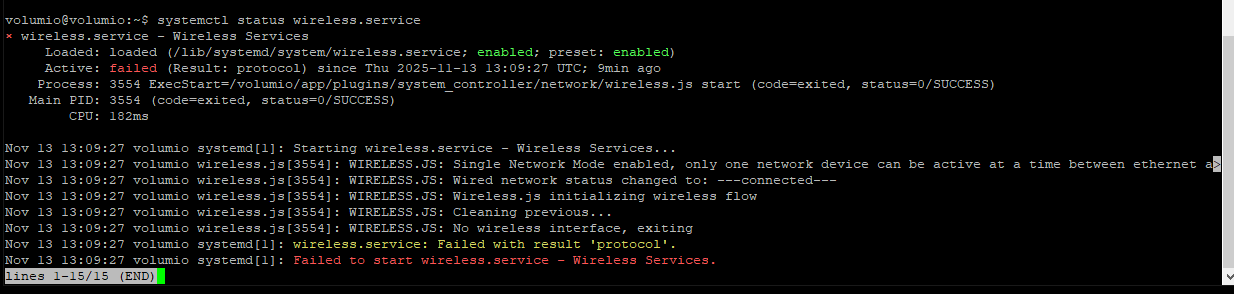
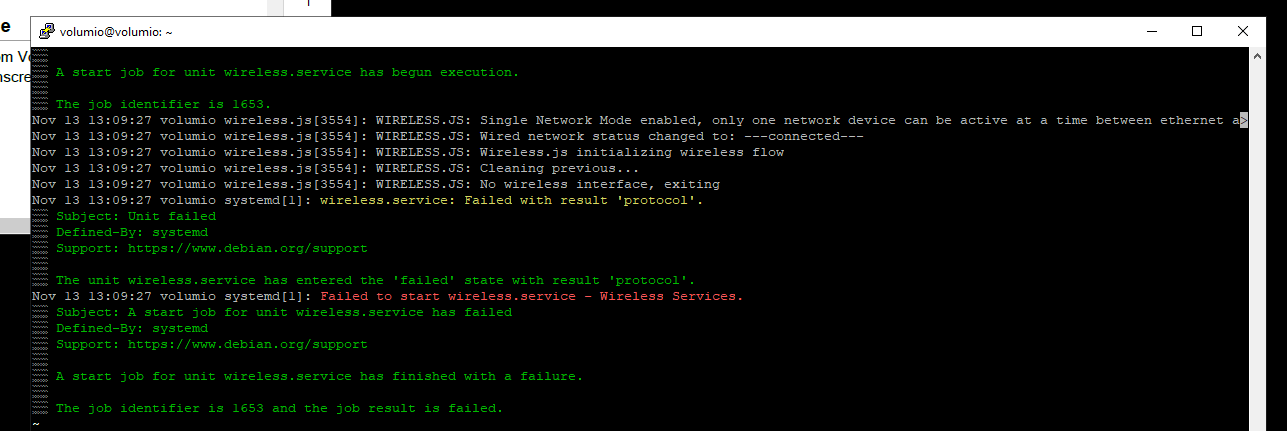
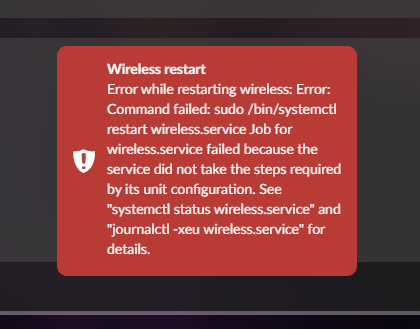
TP-Link Archer T3U unable to start on V4 x86 - I get this error when enabling wireless networking…
http://logs.volumio.org/volumio/LuSq8KR.html
systemctl output:
journalctl output:
Well, I am currenytly running V3 on my PI5-NVME /usb dac system. I just want to update to V4. I don’t think I need to play around with eproms etc. I am just looking for the steps i need to do, to get V4 in there. Maybe it more complicated than i think…
Txs
Yes, they’re aware of the issue, I’ve already shared the logs and relevant details.
Do you happen to recall up to which V4 version it was working? I believe it functioned correctly in the very first V4 build, right after the initial betas (0.0xx). It would be great to get a confirmation on that
actually I think this is what I need to do:
Thanks @Wheaten.
No, sorry, this is the first time ive installed V4 - ive only ever used (the most recent version of) v3 to date…
thanks
Alastair
I was using this dongle right after we got it going in V.013.
Since that time I did OTA updates without problem.
It is only when I upgraded to 4.067 that things went south. It actually did the update and ran on that adapter for a while and then after I updated a plugin I lost the music but the UI still worked. I tried to reboot the system and it didn’t work. so that is when I went to do a new install of V4.067 and discovered that It would not work with my dongle.Then I spend a whole day tyring to make it work as I thought I was doing something wrong.
Pi5 w/ NVME & rotated DSI touchscreen, OTA updated from 4.067 to 4.069. Music playback and plugin stack work as expected.
In case I need to do fresh flash, where can I find the updated download links?
OTA 4.068 to 4.069.
Pi5, NVMe boot. USB
Tidal issue fixed for me.