Volumio 4 Feedback Thread

Hi @jocoman ,
Is it possible for you to try full setup using wifi on your raspberry, that is to say:

  • Burn the image on SD
  • Boot on SD
  • Connect to RPi (with your phone for exemple): connect to wifi network called VolumioXXXX
  • As soon as you will be connected, you will be redirected to a browser page
  • Setup quickly your Volumio including network connection password

As soon as quick setup will finished, you will be able to connect to your device with wifi as usual.

Regards

Ben

Thanks Ben I tried using the hotspot as you described but will not connect to wifi on this version of v4. used to work. I was using wifi on the previous version. anyone have a previous v4 version ? txs i am, continuing to debug

Good evening.
Maybe this is a stupid question but I’m currently confused.
As I just read in closed beta thread Volumio V4.067 now is production release.

First of all: Congratulations and many thanks to all of the developers and especially to @nerd who is “just a nerd” but foremost a volunteer in this topic and has invested huge amount of time and endless effort. THANKS !

Now for my question.
I’m currently still on V4.066 - on “test” channel.
V4.067 is offered.
What’s the right way to become “production”?
Install the offered version? or:
Switching to “stable” channel upfront and do the upgrade then?

Thanks for an advice!

Warmest regards,
Ralf

2 Likes

Hi there, congratulations for the v4 production release! Great job and the related forum thread is indeed a testimony of community & product owners working in partnership.
Here is my question. I tried to update from 4.062 (beta) to 4.067 (production), but for the first time it failed the system integrity check due to modified files. That makes perfect sense when migrating into a production release, but could you share which files specifically are checked? Thanks!

Excellent point. Plus, should we now set test plugin mode to off?

If you want test build leave it on test, if you only want to move forward on stable, set it to stable.
Same is for plugins.

Just a quick comments. I just downloaded Volumio 4.067 onto a Raspberry Pi 4b and will share that it was the easiest most seamless discovery and set up process that I have ever experienced. I did it using the new test version of the Mobile app.

Has anyone had success getting it going on 5G wireless?

Yes.

  1. Flash and Insert SD Card
    • Use a clean, freshly flashed SD card with Volumio.
    • Insert it into your device and power it on.
  2. Connect to Volumio Hotspot
    • On your PC or phone, search for a Wi-Fi network named Volumio-xxxxxx.
    • Connect to it — no password required.
  3. Access Setup Interface
    • Open a browser and go to http://volumio.local or use the IP address shown.
    • Follow the on-screen setup steps
  4. Connect to Your Wi-Fi
    • During setup, select your home Wi-Fi network and enter the password.
    • Volumio will reconnect to your network.

Thank-you for those instructions.
step 1 done
step 2, I connect to the hot spot by my phone. in my PC browser it says “site cannot be reached” when i go to http://volumio.local.
However, the hot spot that I connected to presents the welcome let’s get started screen.
i select my 5g network and give the password, then connect.
I restart volumio , but i am just back to the hotspot.
so i guess the problem is step 3. as i never get the on-screen setup steps.
txs. this all used to work. so I can’t figure it out.

also in step 2 when connected to hotspot, no ip address is shown. the setu wants to take place on the phone.

I would do this on the device that connected to the hotspot. So not your PC but your phone. Perform the initial setup on your phone first. And please provide the info as requested in the next post.

Hey @jocoman,

You are providing information in small pieces, which makes it difficult to help effectively. I need to establish the basics first before we can diagnose anything.

Required information:

What device are you running Volumio on?

  • Raspberry Pi (which model: Pi 3, Pi 4, Pi 5, Zero W, etc.)?
  • x86/amd64 system?
  • Other?

What WiFi hardware are you using?

  • Built-in WiFi (if Raspberry Pi 3/4/5/Zero W)?
  • USB WiFi adapter (which model)?
  • Other?

Exact Volumio 4 version?

Not “latest V4” - need the specific version number like 4.xxx. Even if this is first stable release,

Diagnostic logs

Since you have no network access when WiFi fails, you need to collect logs either:

  • Via SSH when ethernet cable is connected
  • With connected keyboard

Run these commands and share the output files:

dmesg > /data/dmesg.txt
journalctl > /data/journalctl.txt
cat /proc/cmdline > /data/config.txt
cat /boot/config.txt >> /data/config.txt
cat /boot/volumioconfig.txt >> /data/config.txt
cat /boot/userconfig.txt >> /data/config.txt

Share the content of these files (paste here or upload).

  • By removing the SD card and accessing files from another system

Without this information, I cannot help you - I would just be guessing in the dark.

Kind Regards,

Hi @nerd @volumio

Will there be som changes in plugin store? At least show available updates under installed plugin tab? It´s kind of frustrating as it is right now

Best Reagards / C

1 Like

Would like to see that, +1

1 Like

I am using a wifi dongle. It is a tp-link archer T3U AC1300. We got it working on V.013.
I am running a RPI 4
system is V4.067
I was trying my own debugging and it seems there is no carrier.
I live in Canada so country code should be CA and not US . I remember having a problem with this setting on something unrelated. just a thought.

i just connected my wired lan and i can access the wired network, without rebooting. YEAH!
here are the files you requested.

output of files:
1 GNU nano 7.2 /data/dmesg.txt
[ 0.000000] Booting Linux on physical CPU 0x0
[ 0.000000] Linux version 6.12.47-v7l+ (dom@buildbot) (arm-linux-gnueabihf-g>
[ 0.000000] CPU: ARMv7 Processor [410fd083] revision 3 (ARMv7), cr=30c5383d
[ 0.000000] CPU: div instructions available: patching division code
[ 0.000000] CPU: PIPT / VIPT nonaliasing data cache, PIPT instruction cache
[ 0.000000] OF: fdt: Machine model: Raspberry Pi 4 Model B Rev 1.1
[ 0.000000] random: crng init done
[ 0.000000] Memory policy: Data cache writealloc
[ 0.000000] Reserved memory: created CMA memory pool at 0x0000000028c00000, >
[ 0.000000] OF: reserved mem: initialized node linux,cma, compatible id shar>
[ 0.000000] OF: reserved mem: 0x0000000028c00000…0x000000002cbfffff (65536 >
[ 0.000000] Zone ranges:
[ 0.000000] DMA [mem 0x0000000000000000-0x000000002fffffff]
[ 0.000000] Normal empty
[ 0.000000] HighMem [mem 0x0000000030000000-0x000000007fffffff]
[ 0.000000] Movable zone start for each node
[ 0.000000] Early memory node ranges
[ 0.000000] node 0: [mem 0x0000000000000000-0x0000000037ffffff]
[ 0.000000] node 0: [mem 0x0000000040000000-0x000000007fffffff]
[ 0.000000] Initmem setup node 0 [mem 0x0000000000000000-0x000000007fffffff]

2: journalctl.txt 08 01:15:56 volumio55 dhcpcd[828]: wlan1: removing interface
Nov 08 01:15:56 volumio55 dhcpcd[828]: wlan1: waiting for carrier
Nov 08 01:15:56 volumio55 dhcpcd[828]: wlan1: removing interface
Nov 08 01:15:56 volumio55 dhcpcd[828]: wlan1: waiting for carrier
Nov 08 01:15:56 volumio55 dhcpcd[828]: wlan1: removing interface
Nov 08 01:15:56 volumio55 dhcpcd[828]: wlan1: waiting for carrier
Nov 08 01:15:56 volumio55 dhcpcd[828]: wlan1: removing interface
Nov 08 01:15:56 volumio55 dhcpcd[828]: wlan1: waiting for carrier
Nov 08 01:15:56 volumio55 dhcpcd[828]: wlan1: removing interface
Nov 08 01:15:56 volumio55 dhcpcd[828]: wlan1: waiting for carrier
Nov 08 01:15:56 volumio55 dhcpcd[828]: wlan1: removing interface
Nov 08 01:15:56 volumio55 dhcpcd[828]: wlan1: waiting for carrier
Nov 08 01:15:56 volumio55 dhcpcd[828]: wlan1: removing interface
Nov 08 01:15:56 volumio55 dhcpcd[828]: wlan1: waiting for carrier
Nov 08 01:15:56 volumio55 dhcpcd[828]: wlan1: removing interface
Nov 08 01:15:56 volumio55 dhcpcd[828]: wlan1: waiting for carrier
Nov 08 01:15:56 volumio55 dhcpcd[828]: wlan1: removing interface
Nov 08 01:15:56 volumio55 dhcpcd[828]: wlan1: waiting for carrier
Nov 08 01:15:56 volumio55 dhcpcd[828]: wlan1: removing interface

3:cat /proc/cmdline > /data/config.txt
isable>coherent_pool=1M 8250.nr_uarts=0 snd_bcm2835.enable_headphones=0 cgroup>

4: GNU nano 7.2 /data/config.txt
coherent_pool=1M 8250.nr_uarts=0 snd_bcm2835.enable_headphones=0 cgroup_disable>

DO NOT EDIT THIS FILE

APPLY CUSTOM PARAMETERS TO userconfig.txt

initramfs volumio.initrd
gpu_mem=128
gpu_mem_256=32
gpu_mem_512=32
gpu_mem_1024=128
max_usb_current=1
[pi5]
usb_max_current_enable=1
[all]
include volumioconfig.txt
include userconfig.txt

Volumio i2s setting below: do not alter

dtoverlay=hifiberry-dacplus
5: coherent_pool=1M 8250.nr_uarts=0 snd_bcm2835.enable_headphones=0 cgroup_disable>

DO NOT EDIT THIS FILE

APPLY CUSTOM PARAMETERS TO userconfig.txt

initramfs volumio.initrd
gpu_mem=128
gpu_mem_256=32
gpu_mem_512=32
gpu_mem_1024=128
max_usb_current=1
[pi5]
usb_max_current_enable=1
[all]
include volumioconfig.txt
include userconfig.txt

Volumio i2s setting below: do not alter

dtoverlay=hifiberry-dacplus

DO NOT EDIT THIS FILE

APPLY CUSTOM PARAMETERS TO userconfig.txt

6: usb_max_current_enable=1
[all]
include volumioconfig.txt
include userconfig.txt

Volumio i2s setting below: do not alter

dtoverlay=hifiberry-dacplus

DO NOT EDIT THIS FILE

APPLY CUSTOM PARAMETERS TO userconfig.txt

coherent_pool=1M 8250.nr_uarts=0 snd_bcm2835.enable_headphones=0 cgroup_disable>

DO NOT EDIT THIS FILE

APPLY CUSTOM PARAMETERS TO userconfig.txt

initramfs volumio.initrd
gpu_mem=128
gpu_mem_256=32
gpu_mem_512=32
gpu_mem_1024=128
max_usb_current=1
[pi5]

let me know of anything else. Thanks so much…

Hey @jocoman,

Now I can see the problem clearly.

Hardware detected:

  • Raspberry Pi 4 Model B Rev 1.1
  • TP-Link Archer T3U AC1300 USB WiFi adapter
  • Interface name: wlan1 (USB adapter)
  • Volumio 4.067

Problem identified in journalctl.txt:

wlan1: waiting for carrier
wlan1: removing interface
wlan1: waiting for carrier

This loops endlessly - the USB WiFi adapter cannot establish carrier.

Root cause:

Your Raspberry Pi 4 has built-in WiFi (wlan0). When you add a USB WiFi adapter, it becomes wlan1. Volumio 4 on Bookworm has a restriction for USB WiFi adapters on Pi models with built-in WiFi - the internal WiFi must be disabled for the USB adapter to work properly.

Solution:

  1. Edit /boot/userconfig.txt (via SSH, or edit on separate system):
sudo nano /boot/userconfig.txt
  1. Add this line at the end:
dtoverlay=disable-wifi
  1. Save and exit (Ctrl+X, Y, Enter)
  2. Reboot:
sudo reboot

After reboot, your USB WiFi adapter will become wlan0 and should work properly.

This has been discussed in Beta thread.

Kind Regards,

@nerd I think we lost something in the migration here. Volumio (AFAIK) will find when there is a USB wi-fi stick and use this as wlan0, rather than keeping the internal one.

Guess we just have to find this regression and fix it.

Let’s not recommend to edit files manually from now on, we strive to do things simple for people also without knowledge :wink:

Hey @volumio,

Fair point - if it worked in V3, it should work in V4.

Looks like the USB WiFi detection logic got shuffled somewhere. I will poke around and see where it went sideways.

Time for the usual odd scribble here and there…

Kind Regards,

It seems it got lost during Beta build, as I am sure this was tested. Somewhere around May 17th… (V0.069 and V4.0xx)

First of all thanks to the developers for this great effort and your work on V4 during the last months.

I just tried out the V4.067 on a Raspberry Pi 3B+ with a HiFiBerry DAC Plus.
Besides the already discussed issue with not working WiFi connection, I’m not able to start playback at all.
After setting up the HiFiBerry DAC Plus within playback options and doing the necessary reboot, the mixer turns to “undefined” instead of “Hardware”.
Only “Software” or “none” are present within the selection field.
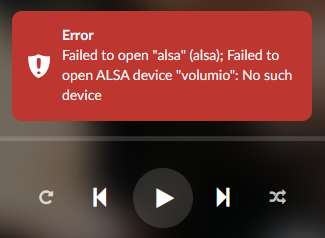
When trying to start playback, the following error message appears:

grafik

Already tried to reset the I2C device and set it back to HiFiBerry DAC Plus afterwards, but with no luck at all.

Link to log files: http://logs.volumio.org/volumio/Yl5OC3X.html