The rPi5 and 5G are working fine. Please check this post and share the requested details, so we can understand what’s happening and assist you further.
Thanks, I know how to send a log but would that help here? I have a router system where I can have several router types, i.e. , Guest, 5g and 2G. I have three instances of Volumio,
- The Rivo which is connected to 5g and is up to date on 3.xx, the latest. 2) an rPi4 which is I just flashed to Volumio 4 and is connected to 5g, no problems at all. and 3) an rPi5 which I downloaded, reflashed several times, but it simply will not connect to my 5 g network where everything else is connected. And then after i set up everything and try to get on 5G the entire thing starts over and I am on hotspot again with everything gone.
I am not a programmer here but have gone into Dev even Putty and made changes in the past but at what point would I create a log so it would be helpful.? If Volumio does not even show the 5G network how can the log help? Sorry for the ignorance and appreciate your help, but when do I go into Dev to create the log?
Secondly, I am going to try direct connection tomorrow when I get ethernet cable. Problem is, once i get it all worked out and i need to move my Pi to an area further away from the router, I will need the Wi
Keep in mind, Prior to upgrading to 4, the version as of today, I had no problems with this set up on any version of Volumio 3.
So it is a Pi5, running USB into the SMSL DAC, then analog into my Onkyo Amplifier. And it actually works on guest network and on 2g. But I cannot integrate on the new iphone app or even via the Windows network app.
Hey @backenst,
You are providing information in small pieces, which makes this very difficult to diagnose. Let me be direct about what is needed.
First, the basics you have not provided:
What exact Volumio 4 version number are you running on the Pi5? Not “latest V4” - the specific version like 4.xxx.
Second, the real problem:
Without diagnostic logs, I would need to examine the wireless chip’s beacon frame reception from your 5GHz access point, verify the regulatory domain configuration is not stuck in a restricted state, confirm the transmit power settings are compatible with your router’s configuration, check if the brcmfmac firmware is accepting or rejecting country code assignments, and determine whether channel selection is failing due to DFS requirements or regulatory constraints.
In other words, I would be guessing blindly about dozens of possible causes.
The simple solution:
As @Wheaten already suggested in the first reply, share your system logs that we can rule out what is not needed to help you further.
Since you cannot access http://volumio.local/dev when WiFi is not working, you need to either connect via ethernet cable.
Provide what has been requested and we can actually see what is happening instead of guessing.
Kind Regards,
I’m having trouble installing Volumio 4.0 on my Raspberry Pi 4B and the Waveshare 7.9" DSI touchscreen is not being recognized. Can anyone help me with this issue?
Please read the post above yours.
“Favorites” issue:
My unit is based on RPi 4 and Audiophonics Evo-Sabre DAC. Until now everything is OK, Thanks!! and very smooth for the upgrade from 4.067 to 4.071, too. But I found the internet radio stations could not be put into the Favorites though other music files or even YT link could be put into well. Should I better send the log file with this message? Thanks in advance for your efforts.
Hi @changheelee ,
It’s normal behaviour.
When you play a radio station and click the heart favourite icon, it adds the station to your ‘Favourite Radios’ instead if the main Volumio favourites selection where other favourited media (like YT or Spotify tracks) are kept.
Thanks for rapid reply. Yes, your indication is right, I understood. I got confused when I tried to set a alarm with an internet radio station. Thank you again.
@nerd Sorry not trying to be difficult. I did not know how the logs work. Anyway, I am on version 4.071 using a raspberry Pi5
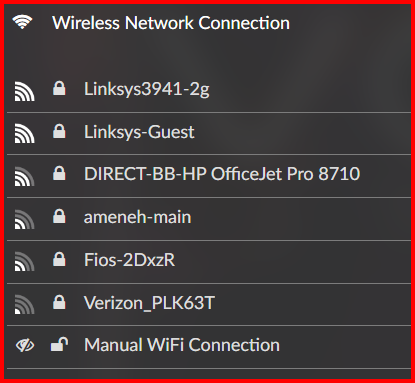
Here are the logs and screen shots that should show the problem.
http://logs.volumio.org/volumio/lgQCfhq.html
the screen shot shows the missing 5g network which is just Linksys3941 I am logged into the 2g but all other devices are on the 5g.
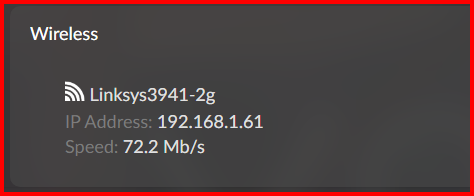
@nerd UPDATE
I connected via ethernet to the Pi5 and the set up process was flawless. I logged into Volumio, logged into Qobuz, and installed three plugins, System Info, Now playing, and Touch Screen all the latest versions. Then I restarted the device, and everything was gone. Volumio took me back to the Welcome screen to start the entire process all over. volumio not logged in, Quboz not logged in, and Plugins all missiing.
So this seems to be more than just a 5g issue.
[v4.071 Raspberry Pi4b 2GB 32GB SD USB DAC]
Intended or otherwise, this is a pain ‘Quirk’ for me. (I don’t think there’s a log for this)
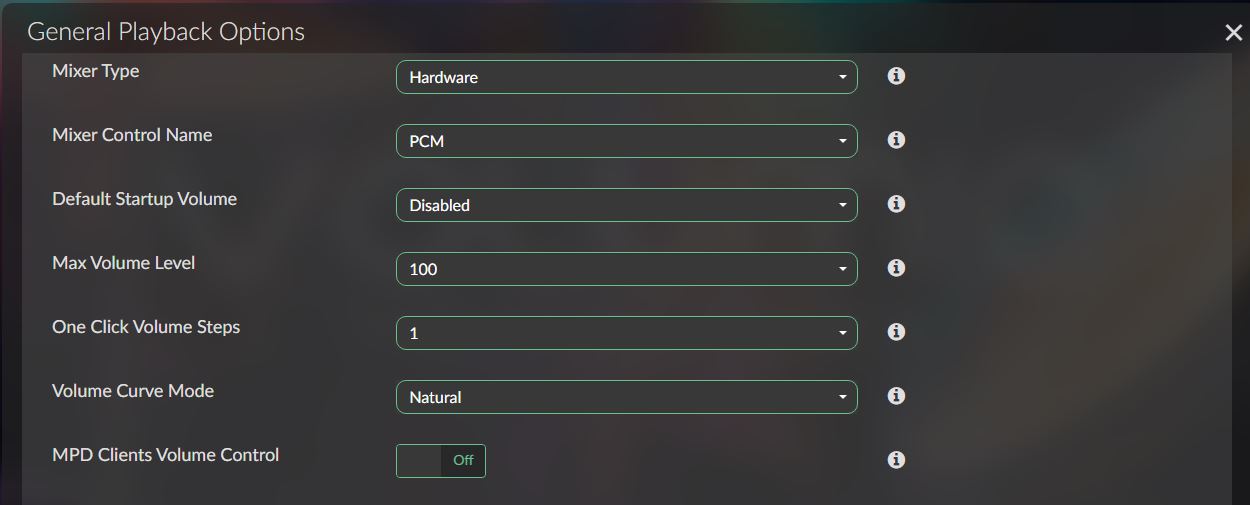
I run Volumio with Playback Options / Volume Options / Mixer Type set to ‘None’.
When my RPi boots and my USB DAC is not powered up, it loses this setting and resets Mixer Type to ‘Hardware’.
When I listen to music I always have to remember to go into Playback Options to change and save this setting. I usually also do a soft restart just because afterwards.

Google Gemini answer:
"This sounds exactly like a defective SD card that has failed and gone into ‘Read-Only’ mode.
When this happens, the system writes your changes (plugins, logins) to the temporary RAM cache. It looks like it’s working, but the moment you reboot, the RAM is cleared. Since the card refused to physically write the data, you are back to the ‘Welcome’ screen every time.
Here is what you should check:
- Try a different SD Card: This is the most likely culprit. Even new cards can be defective. Try a high-quality card (like SanDisk Extreme or Samsung Evo).
- Check your Power Supply: The Pi 5 is power-hungry. If you aren’t using the official 27W PSU, a voltage drop during the initial setup write-process could corrupt the filesystem.
- Give it time: After flashing a fresh image and booting for the first time, wait about 5–10 minutes before doing anything. Volumio needs this time to resize the partition to fit your data. If you restart too soon, the user-data partition might not be created correctly."
I had this recently and it took me quiet a while to figure it out.
@axel I am going true that. Thank you for the response.
1 Like
Hey @backenst,
Thank you for the log. I can see the issue clearly now.
Your Pi5 WiFi is stuck in “WORLD” regulatory domain mode, which is an extremely restrictive fallback state that blocks most 5GHz channels. This happens when there is a conflict in the regulatory domain configuration.
The log shows Volumio attempting to set the regulatory domain every few seconds, but it keeps falling back to WORLD mode instead of staying in the configured domain. This is preventing your Pi5 from seeing or connecting to 5GHz networks.
wireless.js: SUCCESSFULLY SET NEW REGDOMAIN: US
wpa_supplicant: wlan0: CTRL-EVENT-REGDOM-CHANGE init=CORE type=WORLD
To identify the source of this conflict, I need to see your actual configuration files. Please provide the output of these commands:
cat /boot/cmdline.txt
cat /etc/wpa_supplicant/wpa_supplicant.conf
For the wpa_supplicant.conf file, please remove or redact your WiFi password (the psk= line) before posting.
Once I see these files, I can identify exactly where the conflicting regulatory settings are coming from and guide you further.
Kind Regards,
Hey @B505,
This is a known issue that’s been reported multiple times since 2021 and affects both Volumio 3 and now 4.
When your USB DAC loses power and reconnects, Volumio’s ALSA controller assumes it’s detecting the device for the first time and automatically selects what it considers the “best” mixer configuration - defaulting to Hardware. This happens because USB DAC disconnect/reconnect cycles are treated as new device detection rather than device state restoration.
The mixer preference you set is not being persisted for the specific USB DAC across power cycles.
Similar pattern reported
Multiple users have reported identical behavior:
- Topping E30 (2021)
- SMSL Sanskrit 10Mk II (2021)
- Pro-ject Pre Box S2 Digital (2022)
- Denafrips Ares II / Pontus II (2022-2024)
- Parasound HINT 6 (2024)
- Cambridge Audio CXA80 (2021)
In 2022, Volumio developers acknowledged this as a bug but classified it as “very very low priority” with no timeline for resolution.
Current Situation
Volumio 3 and 4 share the same backend (volumio3-backend repository). This architectural constraint means bug fixes must maintain compatibility with both versions, and this specific issue won’t be addressed until V3 ecosystem deprecation is complete.
A community workaround involving backend file modifications has been discussed in older forum threads, but such modifications are lost on system updates and are not officially supported.
Your Options
- Keep USB DAC powered before start/restart
- Manually reset Mixer Type to None after each DAC power cycle
- Wait for V3 deprecation and eventual backend refactoring
The first option is realistically the most practical if your DAC’s power consumption is acceptable.
Kind Regards,
1 Like
Raspberry Pi 4 Model B Rev 1.4
Firmware Version: 2025/08/27 19:57:12 (000d3ca289ae790a2e46225eb11b319c67642b1a)
SD card - v 4.071
Internal WiFi
http://logs.volumio.org/volumio/ndIt5DG.html
I can do a clean install of 4.017 using a wired network connection, then I can successfully setup a wireless link which works.
However, if I subsequently login via a wired connection (which is also successful) I find that subsequent attempts to use a wireless login fail. The attached log report was made after a wired login
Any suggestions would be helpful
Hi @nerd,
Thanks for the complete and thorough reply. At least knowing the ‘why’, it’s a little less frustrating but still a shame. Looks like it’ll be options 2. and 3. for me.
Thanks again.
@nerd @Axel You both helped me tremendously and ultimately solved my problem and all is good now.
@nerd, when you mentioned “World Regulatory Domain Mode”, it triggered a thought in about when in the RPI Imager it asked about “LAN Country” and I left it at something other than USA.
@axel you provided analysis of corrupted cards and how they drain your settings.
So, I bought a new SD card, reflashed, made sure the LAN settings in the imager said US and reinstalled and Voila! All is good with the world. Everything is fixed and working flawlessly.
Now I am enjoying Volumio 4 and do think it sounds better in that the sound stage seems airier and broader – could be bias - but all is good.
Truly appreciate for all your help
with Volumio you must NOT apply any setting via RPI-imager