Tidal Connect Failures

Did the latest update too but I am still getting dropouts from Tidal Connect and Spotify Connect.

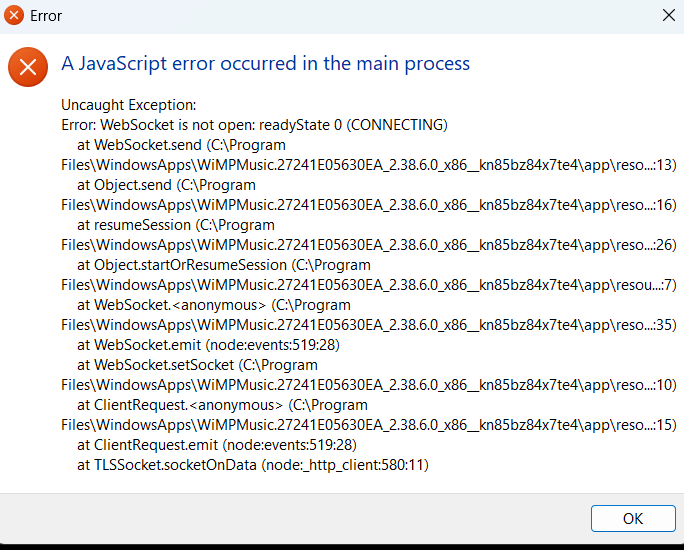
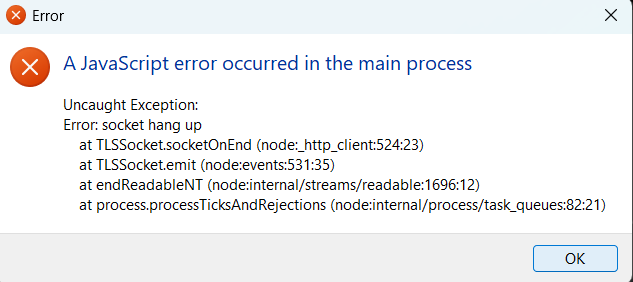
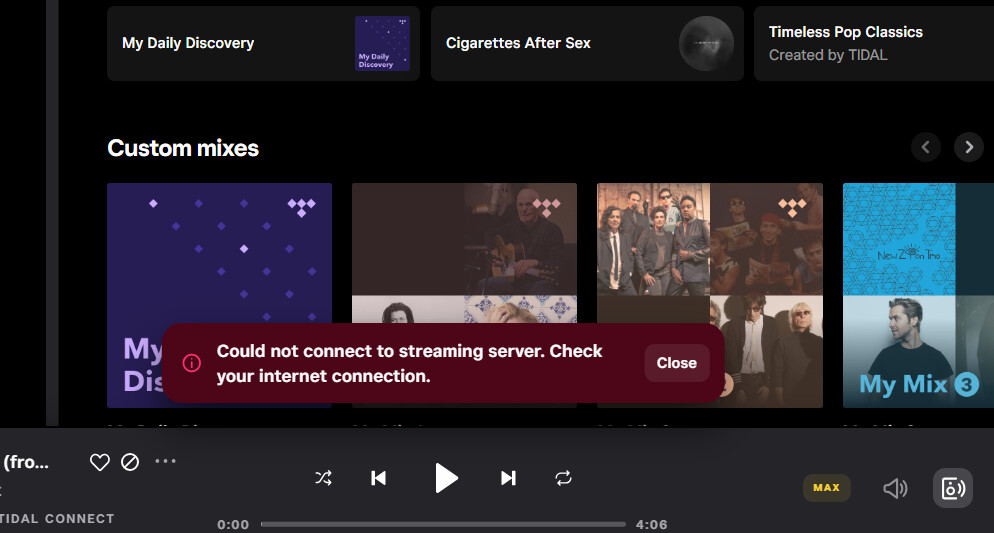
Sometimes, Tidal Connect or Spotify Connect does not even “see” the Rivoplus in the list of devices that it can connect to. Sometimes, it sees but but refused to connect and throws up a “server error” or “javascript error”
image

Any ideas what might be wrong?

This happens in the middle of playback for me and not when it is on idle…

I basically have to shut down the Rivoplus for 10 to 15 seconds and restart it to work again but the problem will keep coming back on a daily basis. Sometimes a few times a day.

Edit: It is now happening after maybe 2 to 3 tracks or so. I just lose connection to the Rivoplus and the only way to reconnect is to unplug and power back up the Rivo+.

Edit 2: Just realised that it was happening when i had a VPN operating in the background (forgot to turn it off in my laptop after I returned from China). I will monitor to see if it still causes issues after turning off the VPN.

Ok i am almost completely sure the culprit had been the VPN during my last issue.

With VPN off, whilst not completely perfect, stability of connection is improved significantly. Though I am having issues (on my laptop) where the volumio page (connected via IP address) refuses to connect after a while’s usage. It required a reboot of the RivoPlus to get things going there again.

Still getting droputs from Tidal Connect (strangely happens more often in the evenings). Dropouts occur within the time for 1 track to play… the error shown is as follows:

On 4.071 and Pi4+ Ian Canada it doesnt play AAC files with Tidal connect. From Tidal app on volumio it works.

@marcinmarcin - This is the ‘Tidal Connect’ failure when attempting to playback ‘LOW’ res titles. (playback hangs and requires a reboot.) They, @Volumio , are aware of the problem are looking into a resolution with Tidal.

1 Like

We received a response and we are implementing it. Thanks for your patience

1 Like

Hey everyone,

Version 4.072 is available in the test channel with a fix for TIDAL AAC playback. Please let us know if the issue is solved on your end.

2 Likes

[v4.072 Raspberry Pi4b 2GB 32GB SD USB DAC]

LOW’ and behold, success in all their glorious ‘LOW’ ness !!!

Thank you. All seems good so far!

Von Iva / LALA
Touchstone / Solarstone

and

@Axel 's “When Darkness Takes Flight” / Ray Montford

@PoisonDwarf 's Fragile Dreams / Anathema

1 Like

Confirmed from my side :grinning: Great!

Thanks to everyone who was involved and helped resolve the issue.

I’ve come here to ask if that is only me having difficulties of using Tidal with Volumio. I am on the latest version of everything, but this is soooooo annoying lately, so I’d like to get rid of Volumio forever. All the sudden the Tidal app shows connection errors and nothing helps other than restarting Volumio. Sometimes just restarting the Tidal app helps.

Not related to Tidal, but around 2 weeks ago another Volumio update wasn’t installed correctly for some reason and I had to nuke the whole system and start from scratch. The overall experience is questionable. When I just started using Volumio a few years ago, there were much less issues…

All Tidal issues are fixed for me. V4.072.

When you did your reinstall did you give enough time for the filesystem to expand? If it was me, I’d try a fresh install.

Maybe provide your full hardware setup and system logs so others can do more than guess.

1 Like

The same for me. Installed today, AAC files plays, also WiFi is working.

You mean waiting until Pi stops blinking disk green light? Should we go to the config page after it stops, or no restart before it ends is enough? (I wait for it, then restart to see Ian canada hat)

Not sure about the LED. I give it a few minutes after first start before I configure anything. But, indeed don’t restart too soon.

1 Like

Unfortunately I still have the problem that the playback of tracks from Tidal sometimes stutters. The problem occurs when I start a track in Volumio (i.e. not in the Tidal Connect app), not when jumping to the next track, but right at the start. Example: Bob Dylan, Black Rider from the album Rough and Rowdy Ways, 96 kHz/24 bit (but also this happens for 44.1 kHz/16 bit tracks). I had Fusion DSP installed and activated. After I deactivated Fusion DSP, the problem disappeared, but only for 4 to 5 tracks. Then I restarted Volumio and the problem was back again from the start (i.e. without Fusion DSP). It should be noted that the stuttering occurs rather sporadically. When it does occur, however, it is persistent. If I don’t play any tracks for 5 minutes, it usually works again without stuttering.

Here my log (which I have created right after the song startet to stutter):
http://logs.volumio.org/volumio/FMymkvq.html

My network connection delivers a measured 270 Mbit/sec and my Raspberry PI 5 is connected via an Ethernet cable. I use Volumio 4.073 and an external DAC connected via USB (Topping D70 Pro Octo).

Installed plugins:

  • Mother Earth Radio
  • Radio Paradise
  • Raspberry Pi EEPROM Config
  • Raspberry Pi EEPROM Firmware Updater
  • System Information

OS info

Version of Volumio: 4.073
Hostname: volumio-4
Kernel: 6.12.47-v8+
Governor: conservative
Uptime: 0 days, 0 Hrs, 48 Minutes, 15 Seconds

Network info

Interface: eth0
IP Address: 192.168.0.68
MAC Address: d8:3a:dd:c2:49:40
Type: wired
Speed: 1Gb/s

Audio info

Hw audio configured: D70 Pro OCTO
Mixer type: Hardware
Number of channels: 2
Supported sample rate: 44100 48000 88200 96000 176400 192000 384000 768000

Board info

Manufacturer: Raspberry Pi Foundation
Model: Raspberry Pi 5 Model B Rev 1.0
Firmware Version: 2025/11/05 17:37:18 (57db150d63864d47e6c9071f6b086a5401eb4e92)

CPU info

Brand: BCM2712
Model name: Cortex-A76
Speed: 1.5 GHz
Family: Cortex-A76
Model: 1
Number of cores: 4
Physical cores: 4
BogoMIPS: 108.00
Average load: 4%
Temperature: 61°C

Memory info

Memory: 4088660 Ko
Free: 2207068 Ko
Used: 1881592 Ko

Software info

MPD version: Music Player Daemon 0.24.6 (b6f106b+)
Bluetooth capabilities version: 5.0
AirPlay version: AirPlay 2
UPnP renderer: upmpdcli 1.9.7-1~ppa1~bookworm

Storage info

INTERNAL storage - Size: 891049MB
Used: 273MB
Available: 843304MB (95%)
image
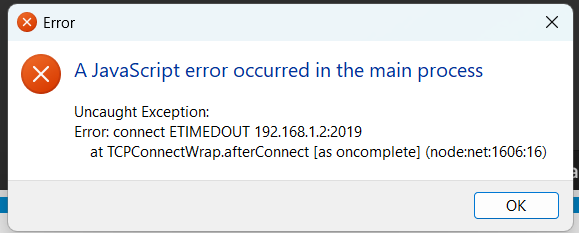
Still getting dropouts with this error.

Can someone tell me if there is a fix? I am on the latest update.


It keeps happening. I hope someone can help me with this?


It keeps happening. I hope someone can help me with this?

is it that this only happens if you select Volumio as output ?

Yes. Only when I connect to the Volumio Rivo Plus.

@GSiguy Can you share a log from Volumio after the error you posted?