This is a network issue. Your device must be connected to internet. Check your connection or retry later.
The plugin needs to download some files during installation.
I’m going to have to disagree that this is a network issue. I successfully installed the GPIO buttons controller and touchscreen plugins that pull down content from the internet. I can also browse Spotify from the Spotify plugin within Volumio. In fact, within my post, the details of the installation show that some files are fetched and unpackaged before the install errors after detecting an arm7 cpu and then failing to download specific packages supporting it. Is there a chance that the path referenced for the arm7 specific packages is incorrect or has changed?
Humm I can’t check now. But I made no changes for weeks… And other users never reported this… I’ll have a look tonight. Sorry
Does the problem persist after a reboot? I’ve seen that multiple subsequent connections to github result in different endpoints and some endpoints timeout on my Pi, while others don’t. This obviously has nothing to do with the/a plugin, but with how github handles their requests.
I made a test on a Sparky (armv7l) with volspotconnect2 and install is fine. So I confirm the previous issue is a network issue and probably from server side (github) as wrote Salyato. I already saw it in the past…
The problem does persist after a reboot for me unfortunately. I can try wiping out my install and rebuilding when I get home tonight. I appreciate all the feedback so far.
If you SSH into the Pi, can you download the package manually? This does not change the installation script, but you can check if that is working 
wget https://github.com/balbuze/volumio-plugins/raw/master/plugins/music_service/volspotconnect2/arch/armhf/librespot-armhf.tar.xzA clean install took care of the issue. Apparently I had some other underlying issues, as like I said, previously I could not even ssh into the volumio, even though all music playback and web interface services were working. I appreciate all of the support! Now I just need to test it out when I get home.
Hi
I installed Spotify connect on my RPi and it works well.
I need an explanation on something that i don’t understand. While a song was playing on my RPi i played a song with Spotify connect and i got simultanously the sound of the 2 songs (i use hdmi output). Could someone can explain to me how the 2 songs can be played simultanously ??
Thanks for your support.
Regards
Bertrand
Do you use one of the plugin volspotconnect or volspotconnect2 ? Or you made your own install?
I use volspotconnect
Hi,
I don’t really understand what happen.
When you play a track from Spotfiy official app connected to your device, what happen exactly?
Do you use Spotify from a computer (win, ios, linux) or a smartphone tablet ? What os ?
Hi
Thanks for your help Balbuze.
I use a Rpi B with Volumio 2 and volspotconnect. I launch the music from my mpad either with mpad or volumio UI or Volumio app on my Iphone. My Rpi is connected to my amplifier with the hdmi output. It works very well.
For spotify i use the Spotify app on my Ipad. Before installing volspotconnect i sent the sound to volumio by airplay. Now i use spotify connect and it works.
The problem is when i play a song for instance with the volumio app and in the same time on the spotify app i play a song and i send it to volumio (with spotify connect and not airplay) i have the 2 sounds simultanously of the 2 songs in my amplifier. It’s a mix of the 2 songs.
I’m sorry i’m not sure if i’m very clear.
I thought that if I played a song with the spotify app sent to volumio it would replace the song played by the volumio app. Why it’s not the case ? Do i have to stop my song before launching the song in spotify ?
Thanks a lot for your support
Bertrand
I see
There is no link between Volumio Spotify plugin and Volspotconnect …
So you can play a track using volumio, and send a other from your official Spotify app.
Some version ago, in volspotconnect2, volumio playback was stop when Spotify connect was used. But, for now I removed this because it caused plenty of other problem such as very long time before to stop volumio and starting to play.
Volspotconnect use “plughw” as output, and volumio hw, it’s because both output is possible in the same time.
Maybe I’ll have a look to re-implement this in volspotocnnect2, but only if perfomance are ok. The only thing you can do is using one of the plugin at the same time ( Volumio Spotify or volspotconnect(2)///
Ok thanks for your answer i understand.
In the same idea it’s not possible to visualize in the volumio UI the name of the song played by the Spotify app ?
I mean that if with Spotify app i play a song sent to volspotconnect, is it possible, if i open a volumio app or volumio UI, to see in the interface the information of the song ? It doesn’t seem to work for me.
My idea is to have a small screen connected to my RPi in order to know which song is played, wether the song is launched with my iPad with volumio app or with spotify official app. Is it possible ?
Thanks again i really appreciate your support and all your work.
Hello
To complete my previous message, i would like to know if there is a way to tell Volumio that Spotify connect is playing ?
Thus, the player lib would be replaced by the data provided by the Spotify client.
Now, if i want to play a song with spotify connect, I need first to stop the song playing in volumio local librairy. I would like to know if there is a way to do it automatically.
Thanks a lot
Bertrand
Yes, but as it don’t work very well, I remove it. But if you want to test :
edit /data/plugins/music_service/volspotconnect2/onstart1.sh and uncomment (remove #) from line 2
and edit /data/plugins/music_service/volspotconnect2/volspotconnect2.tmpl and uncomment (remove #) from line 4
disable and re-enable the plugin…
Ok thanks for your help.
I did it and indeed it doesn’t work very well. Maybe for the next version.
Thanks again for all your work.
Hello balbuze,
By me the volspotconnect doesn’t work. When I save my username/password it says “config ok” but it’s still inactive:
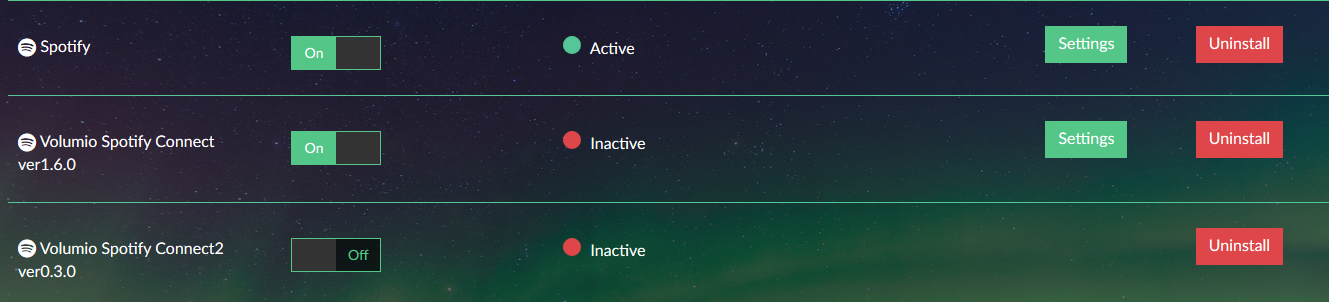
Any tips? (Config = rpi3, allo boss, latest volumio)
volspotconnect2 works like a charm so it’s only for the record. 
And actually the same song from the spotify plugin and from volspotconnect2 sounds slightly different. Maybe it’s only a little volume difference between them but I’ve checked twice it and based on my knowlegde it shouldn’t be any differences. Does volspotconnect2 alter anything on stream?
Hi
You say it stay inactive but can you use it (guess no). Try to disable shared device. Disable and enable the plugin…
Volspotconnect 2 does not alter the stream. But it is set to 320 kbps when volspotconnect is limited to 160 (even if I never really checked it…