Haha! Noob error #2!
Rebooted and it came up just fine without the screen/keyboard plugged in. Sweet!
Thanks balbuze – this is a really great plugin!
Tim
Haha! Noob error #2!
Rebooted and it came up just fine without the screen/keyboard plugged in. Sweet!
Thanks balbuze – this is a really great plugin!
Tim
Thank you for creating this plugin, Balbuze! I have a question regarding the quality of the Spotify streaming. you appear to be using a similar protocol (spotify-connect-web) to establish a Spotify Connect session as used elsewhere (e.g.: github.com/Fornoth/spotify-connect-web). I tested the Fornoth solution a while ago, and actually the 320 kbps option did nothing, as in it actually gave the exact same audio quality as a 160 kbps stream (tested this extensively with a proper setup). In Fornoth’s readme is actually says that setting the bitrate “may not actually work”.
Additionally, since this uses part of the Spotify web player interface (right?), Spotify themselves actually limit streams to 160 kbps according to their own documentation (support.spotify.com/us/using_sp … streaming/).
So now my question: when I select the 320 kbps option in your plugin, will it actually give me 320 kbps? Thanks for your reply in advance!
hi,
The plugin use the work of fornoth, as it is written in readme. I added the option because it exists but I’m not sure of the effect. Maybe if we can prove it has no effect, this option may be removed from the plugin settings. I have to make some network traffic control to see what happens. But I can’t see where it is limited for premuim account.
Thanks, somehow I couldn’t get it to work. However I have reinstalled the plugin and now it does. One sidenote is that the plugin is marked as inactive in the UI, even when used.
Yeah. Previous problem has been solved in ver1.5.6.
Try to disable the plugin, wait few seconds and renable it. It should appears green after few seconds. Sometime you have to do it two times.
Not yet, have been trying a few times. The whole thing is not very stable unfortunately. But that seems to be a Volumio thing as well… Basically have to restart the device after every use in order to have it reachable later or for other users wanting to connect to your Spotify connect plugin. Will have to research.
hi!
that weird… What do you mean by
Could you give more details ?
Can you use your device to play local file ?
Hi Balbuze, thanks for your help this thread has been very useful. I ended up not using Volumio in the end, just the script and the app key from your github site. I hope you do not mind? It’s just that Spotify are no longer handing these out.
Sometimes I’m not able to reach the device over IP or anything after having used the plugin and stopped playing with the iPhone Spotify app. I don’t have any local files, but I wouldn’t be able to reach Volumio to play them anayway.
Plus it is unreachable after a while, might that be the wifi shutting down? I didn’t know this was an issue on the 1B(have used OSMC for a while) but I’ll be trying to connect a fixed wire later, this might do the trick.
Edit: Since using a cable the plugin is working well! I came across a different thread on the forum about Wifi not reconnecting after an error. I suppose I had the same issue, which could be solved by your plugin.
Hi balbuze,
Having some difficulties on a brand new install with Dec 27th release (v.1.5.6) on fresh Volumio 2.041 on rpi0 (armv6) with pHat DAC (similar to Hiffiberry).
Tried twice from scratch. spop working fine.
Some older install on same HW was ok.
Setting credentials fails (actually UI panel is a bit awkward with undetermined initial buttons status): I enclose journalctl log following save of credentials.
I incidentally noticed that /data/configuration/music_service/volspotconnect/config.json did not have standard permissions (-rw-r–r-- instead of -rwxr-xr-x). Even fixing them did not fix the issue.
Log seems to complain about missing ‘/etc/asound.conf’ ?
Also what is “toto”? 
Some messages seem truncated
remote name: aine-marion
account req: MIUM
device type: NOWN
Thanks for any suggestion / fix.
Log below:
Jan 12 09:57:30 chaine-marion systemd[1]: Starting Volspotconnect Daemon...
Jan 12 09:57:30 chaine-marion systemd[1]: Started Volspotconnect Daemon.
Jan 12 09:57:30 chaine-marion sudo[2171]: pam_unix(sudo:session): session closed for user root
Jan 12 09:57:31 chaine-marion sudo[2197]: volumio : TTY=unknown ; PWD=/ ; USER=root ; COMMAND=/bin/systemctl start volspotconnect.service
Jan 12 09:57:31 chaine-marion sudo[2197]: pam_unix(sudo:session): session opened for user root by (uid=0)
Jan 12 09:57:31 chaine-marion systemd[1]: Started Volspotconnect Daemon.
Jan 12 09:57:31 chaine-marion sudo[2197]: pam_unix(sudo:session): session closed for user root
Jan 12 09:57:31 chaine-marion volumio[791]: info: Volspotconnect Daemon Started
Jan 12 09:58:16 chaine-marion sudo[2219]: volumio : TTY=pts/0 ; PWD=/data/configuration/music_service/volspotconnect ; USER=root ; COMMAND=/bin/journalctl -f
Jan 12 09:58:16 chaine-marion sudo[2219]: pam_unix(sudo:session): session opened for user root by volumio(uid=0)
Jan 12 09:58:19 chaine-marion volumio[791]: info: CALLMETHOD: music_service volspotconnect saveVolspotconnectAccount [object Object]
Jan 12 09:58:19 chaine-marion volumio[791]: info: CoreCommandRouter::executeOnPlugin: volspotconnect , saveVolspotconnectAccount
Jan 12 09:58:19 chaine-marion volumio[791]: softvolume
Jan 12 09:58:19 chaine-marion volumio[791]: toto
Jan 12 09:58:19 chaine-marion volumio[791]: { Error: ENOENT: no such file or directory, lstat '/etc/asound.conf'
Jan 12 09:58:19 chaine-marion volumio[791]: at Error (native)
Jan 12 09:58:19 chaine-marion volumio[791]: errno: -2,
Jan 12 09:58:19 chaine-marion volumio[791]: code: '	',
Jan 12 09:58:19 chaine-marion volumio[791]: syscall: 'lstat',
Jan 12 09:58:19 chaine-marion volumio[791]: path: '/etc/asound.conf' }
Jan 12 09:58:20 chaine-marion sudo[2225]: volumio : TTY=unknown ; PWD=/ ; USER=root ; COMMAND=/bin/systemctl restart volspotconnect.service
Jan 12 09:58:20 chaine-marion sudo[2225]: pam_unix(sudo:session): session opened for user root by (uid=0)
Jan 12 09:58:20 chaine-marion systemd[1]: Stopping Volspotconnect Daemon...
Jan 12 09:58:20 chaine-marion volumio[2189]: ./spotify-connect-web: line 1:  2199 Terminated              chroot $DIR /bin/bash -c "cd /usr/src/app && python main.py $*"
Jan 12 09:58:20 chaine-marion volumio[2189]: ./spotify-connect-web: line 1:  2234 Terminated              chroot $DIR /bin/bash -c "cd /usr/src/app && python main.py $*"
Jan 12 09:58:20 chaine-marion volumio[2189]: Loading Spotify library...
Jan 12 09:58:20 chaine-marion volumio[2189]: min_volume_range: 57.7027916158
Jan 12 09:58:20 chaine-marion volumio[2189]: Using libspotify_embedded version: master-v1.5.0-gfba69d71
Jan 12 09:58:21 chaine-marion volumio[2189]: SpInit: 0
Jan 12 09:58:21 chaine-marion volumio[2189]: public key: <removed>
Jan 12 09:58:21 chaine-marion volumio[2189]: device id: <removed>
Jan 12 09:58:21 chaine-marion volumio[2189]: remote name: aine-marion
Jan 12 09:58:21 chaine-marion volumio[2189]: account req: MIUM
Jan 12 09:58:21 chaine-marion volumio[2189]: device type: NOWN
Jan 12 09:58:21 chaine-marion systemd[1]: Starting Volspotconnect Daemon...
Jan 12 09:58:21 chaine-marion systemd[1]: Started Volspotconnect Daemon.
Jan 12 09:58:21 chaine-marion sudo[2225]: pam_unix(sudo:session): session closed for user root
Jan 12 09:58:21 chaine-marion sudo[2244]: volumio : TTY=unknown ; PWD=/ ; USER=root ; COMMAND=/bin/systemctl start volspotconnect.service
Jan 12 09:58:21 chaine-marion sudo[2244]: pam_unix(sudo:session): session opened for user root by (uid=0)
Jan 12 09:58:21 chaine-marion systemd[1]: Started Volspotconnect Daemon.
Jan 12 09:58:21 chaine-marion sudo[2244]: pam_unix(sudo:session): session closed for user root
Jan 12 09:58:21 chaine-marion volumio[791]: info: Volspotconnect Daemon Started
@macmpi
Could please paste what is returned by
cat /data/plugins/music_service/volspotconnect/spotify-connect-web/startconnect.shplease remove credentials
try to launch the service :
systemctl start volspotconnect
and see what is returned
You can also try
sudo sh /data/plugins/music_service/volspotconnect/spotify-connect-web/startconnect.shIt complains about asound.conf, but if you don’t use software mixer, it doesn’t matter. But it seems you use a softvolume ? Does it work for local file ?
In some case, volumio returns a wrong value for settings. You can try the following :
Choose audio-jack as output and save
choose hardware mixer and save
reboot
choose hifiberry (or the dac you need) and save
choose softvol and save…
test with local file or spotify if it appears in devices.
Don’ forget, volume may be set to 0 after boot.
I never noticed that permission are different, and it never avoid the plugin to work…
To debug I added some console.log in index.js .Toto was just here to see if the script was read near this line and I forgot to remove it…
let me know
@Linkeloutje
I don’ think plugin have something to do with your network drop.
Nope it doesn’t  But at first it wasn’t clear what the issue was. Some problems like having to restart to connect another user to your plugin should not be related. However it does work now. The plugin is still listed as inactive though, but as long as it works…
you can try this to make it appears as active :
disable it, wait about 7sec ( it may reactivate itself… in this case disable it once again)
And reactive it. (this fantastic trick works for me :mrgreen: )
@balbuze
Yes, Volumio plays sound with Webradios, tracks, etc.
Seems similar to this.
Meanwhile:
[code]cat /data/plugins/music_service/volspotconnect/spotify-connect-web/startconnect.sh
#this file is generated by the plugin. You should not edit it unless you know what you do. It will be overwrtie by the plugin each time a change in config is detected
cd /data/plugins/music_service/volspotconnect/spotify-connect-web
./spotify-connect-web --username ‘undefined’ --password ‘undefined’ --bitrate 90 --name ‘chaine-marion’ --playback_device plughw:1 --dbrange 45 # &
avahi-publish-service -s ‘chaine-marion’ _spotify-connect._tcp 4000 VERSION=1.0 CPath=/login/_zeroconf[/code]Correct? No too many spaces before --dbrange?
No missing “&” at the end of avahi command?
An error I found in the log (may not be related):
Jan 13 07:05:30 chaine-marion volumio[767]: info: Volspotcoonect status error:
Jan 13 07:05:30 chaine-marion volumio[767]: info:  Error: connect ECONNREFUSED 127.0.0.1:4000
Jan 13 07:05:30 chaine-marion volumio[767]: at Object.exports._errnoException (util.js:1026:11)
Jan 13 07:05:30 chaine-marion volumio[767]: at exports._exceptionWithHostPort (util.js:1049:20)
Jan 13 07:05:30 chaine-marion volumio[767]: at TCPConnectWrap.afterConnect [as oncomplete] (net.js:1085:14)
typo in “coonect” helps to find location.
I add also the UI issue which did not happen in previous releases (ill-defined button status): 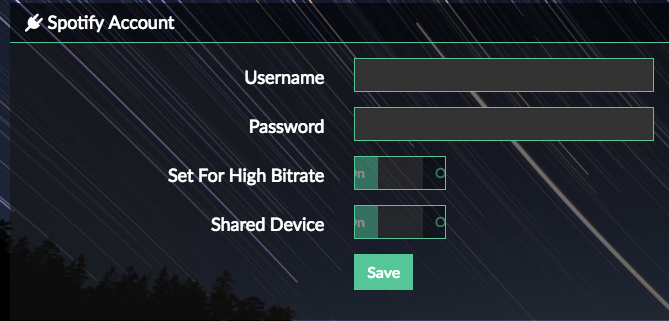 . Whatever credential I put in, they are not retained.
Since i have the same h/w as macmpi, i’ll post some info from my setup that works at this moment, so we can compare.
In playback options i have output device as “hifiberry dac” and mixer type as “none”.
Here is how the plugin is displayed.
http://imgur.com/dM8ZyNm
http://imgur.com/sB9pEqU
My /etc/asound.conf exists, but it is empty. Maybe that’s because i tested “soft vol” a while back, so it created it, and then when i switched to no mixer it erased the contents.
My /data/plugins/music_service/volspotconnect/spotify-connect-web/startconnect.sh:
Lastly, when i open the settings, change “shared device” to off, and save, this is the output of journalctl:
Jan 13 11:32:45 volumio sudo[12013]: volumio : TTY=unknown ; PWD=/ ; USER=root ; COMMAND=/bin/systemctl start volspotconnect.service
Jan 13 11:32:45 volumio sudo[12013]: pam_unix(sudo:session): session opened for user root by (uid=0)
Jan 13 11:32:45 volumio systemd[1]: Started Volspotconnect Daemon.
Jan 13 11:32:45 volumio sudo[12013]: pam_unix(sudo:session): session closed for user root
Jan 13 11:32:45 volumio volumio[773]: info: Volspotconnect Daemon Started
Jan 13 11:32:46 volumio sudo[12024]: volumio : TTY=pts/0 ; PWD=/home/volumio ; USER=root ; COMMAND=/bin/journalctl -f
Jan 13 11:32:46 volumio sudo[12024]: pam_unix(sudo:session): session opened for user root by volumio(uid=0)
Jan 13 11:32:56 volumio sudo[12024]: pam_unix(sudo:session): session closed for user root
Jan 13 11:33:01 volumio sudo[12040]: volumio : TTY=pts/0 ; PWD=/home/volumio ; USER=root ; COMMAND=/bin/journalctl -f
Jan 13 11:33:01 volumio sudo[12040]: pam_unix(sudo:session): session opened for user root by volumio(uid=0)
Jan 13 11:33:06 volumio volumio[773]: info: CALLMETHOD: music_service volspotconnect saveVolspotconnectAccount [object Object]
Jan 13 11:33:06 volumio volumio[773]: info: CoreCommandRouter::executeOnPlugin: volspotconnect , saveVolspotconnectAccount
Jan 13 11:33:06 volumio volumio[773]: softvolume
Jan 13 11:33:06 volumio volumio[773]: toto
Jan 13 11:33:06 volumio volumio[773]: copied with success
Jan 13 11:33:06 volumio sudo[12047]: volumio : TTY=unknown ; PWD=/ ; USER=root ; COMMAND=/bin/systemctl restart volspotconnect.service
Jan 13 11:33:06 volumio sudo[12047]: pam_unix(sudo:session): session opened for user root by (uid=0)
Jan 13 11:33:06 volumio systemd[1]: Stopping Volspotconnect Daemon...
Jan 13 11:33:06 volumio volumio[12005]: ./spotify-connect-web: line 1: 12015 Terminated              chroot $DIR /bin/bash -c "cd /usr/src/app && python main.py $*"
Jan 13 11:33:06 volumio volumio[12005]: ./spotify-connect-web: line 1: 12056 Terminated              chroot $DIR /bin/bash -c "cd /usr/src/app && python main.py $*"
Jan 13 11:33:06 volumio volumio[12005]: Loading Spotify library...
Jan 13 11:33:06 volumio volumio[12005]: min_volume_range: 57.7027916158
Jan 13 11:33:06 volumio volumio[12005]: Using libspotify_embedded version: master-v1.5.0-gfba69d71
Jan 13 11:33:06 volumio volumio[12005]: SpInit: 0
Jan 13 11:33:06 volumio volumio[12005]: playback_volume: 64879
Jan 13 11:33:06 volumio volumio[12005]: corected_playback_volume: 99
Jan 13 11:33:06 volumio volumio[12005]: public key: <removed>
Jan 13 11:33:06 volumio volumio[12005]: device id: <removed>
Jan 13 11:33:06 volumio volumio[12005]: remote name: lumio
Jan 13 11:33:06 volumio volumio[12005]: account req: MIUM
Jan 13 11:33:06 volumio volumio[12005]: device type: NOWN
Jan 13 11:33:06 volumio systemd[1]: Starting Volspotconnect Daemon...
Jan 13 11:33:06 volumio systemd[1]: Started Volspotconnect Daemon.
Jan 13 11:33:06 volumio sudo[12047]: pam_unix(sudo:session): session closed for user root
Jan 13 11:33:07 volumio sudo[12066]: volumio : TTY=unknown ; PWD=/ ; USER=root ; COMMAND=/bin/systemctl start volspotconnect.service
Jan 13 11:33:07 volumio sudo[12066]: pam_unix(sudo:session): session opened for user root by (uid=0)
Jan 13 11:33:07 volumio systemd[1]: Started Volspotconnect Daemon.
Jan 13 11:33:07 volumio sudo[12066]: pam_unix(sudo:session): session closed for user root
Jan 13 11:33:07 volumio volumio[773]: info: Volspotconnect Daemon Started
Jan 13 11:33:08 volumio volumio[12058]: Established under name 'Volumio'
To test I made a fresh install on my rpi b (armv6l)
Volumio 2.041
Setting a usb dac
Setting softvol
Volspotconnect ver1.5.6 (from github, not my local repo)
Install ok even if it start twice…
Refresh the page and access to plugin setting ok (no interface problem)
Config, save and … It works…
Test with mixer as “none” : no problem
I’m going to test with a Hifiberry like dac…
I really wonder what happens with your setting…
edit : with hifiberry with mixer set as “none” or “softvol” : it works ! 
Have have 2 simultaneous save widget when I try to save settings: strange no? (note the 2 different names for the plugin)
And setting are not even saved in the end…
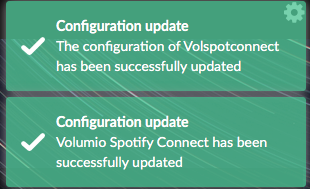
Yes, this is a Volumio problem for all drag&drop installation: upload happens twice, which triggers 2 installs.
I agree, I should remove one of this message…
But when you say that settings are not saved, how do you know that ?
If startconnect.sh is filled it’s ok.
And the value that appears in webUi are stored in /data/configuration/music_service/volspotconnect/config.json
Check it.
Is it a fresh install or a update volumio?
Yes, as described, fresh install.
Did it 3 times, restarting fresh each time.
I know settings are not saved because /data/configuration/music_service/volspotconnect/config.json remains empty !
/data/plugins/music_service/volspotconnect/spotify-connect-web/startconnect.sh remains with undefined credentials.
only “not so standard” setup: my pizero has no ethernet interface (only wifi).
Don’t think this may have an influence, but just in case… (noted some bug in Volumio due to this, as MAC address detection assumes eth0).
Very weird,
Even if some user reports to have it working, I could undesrtand something may be wrong to start the plugin, due to alsa or similar problem but I can’t undesrtand why the same code, same UI behaves this way in your case…
Can you open a ssh console and typing :
sudo systemctl -fthen in the plugin settings, save and see what happens, if there is a error message