I’m hesitant to share this observation as it’s overall inconsequential and maybe isolated to my own environment. I’m a Windows user primarily, so all my NAS shares are SMB but I also use NFS for other media management between Linux systems. For Volumio, I started off with SMB as it was the default option, but after setting up my other media management services, I’ve now migrated Volumio to the NFS shares, and so far, it SEEMS like when I manual change songs, esp between formats, there seems to be less instances of clicks and pops.
Hi @RedEyeNinja
If NFS improves the experience, please stick with it. I only use NFS (besides running test for BW also SMB) for my streamers. But in your case the lower overhead (NFS) improves playback responsiveness, speed and most likely more reliable.
1 Like
It seems the jmicron 56x chipsed in the RAID0 enclosure is problematic with raspberries.
So I went back to Volumio 4 and tried a RaidSonic GT1670-BA31 enclosure with one 20TB disk (ASM235CM chipset). This enclosure is not detected by Volumio 4 with lsblk.
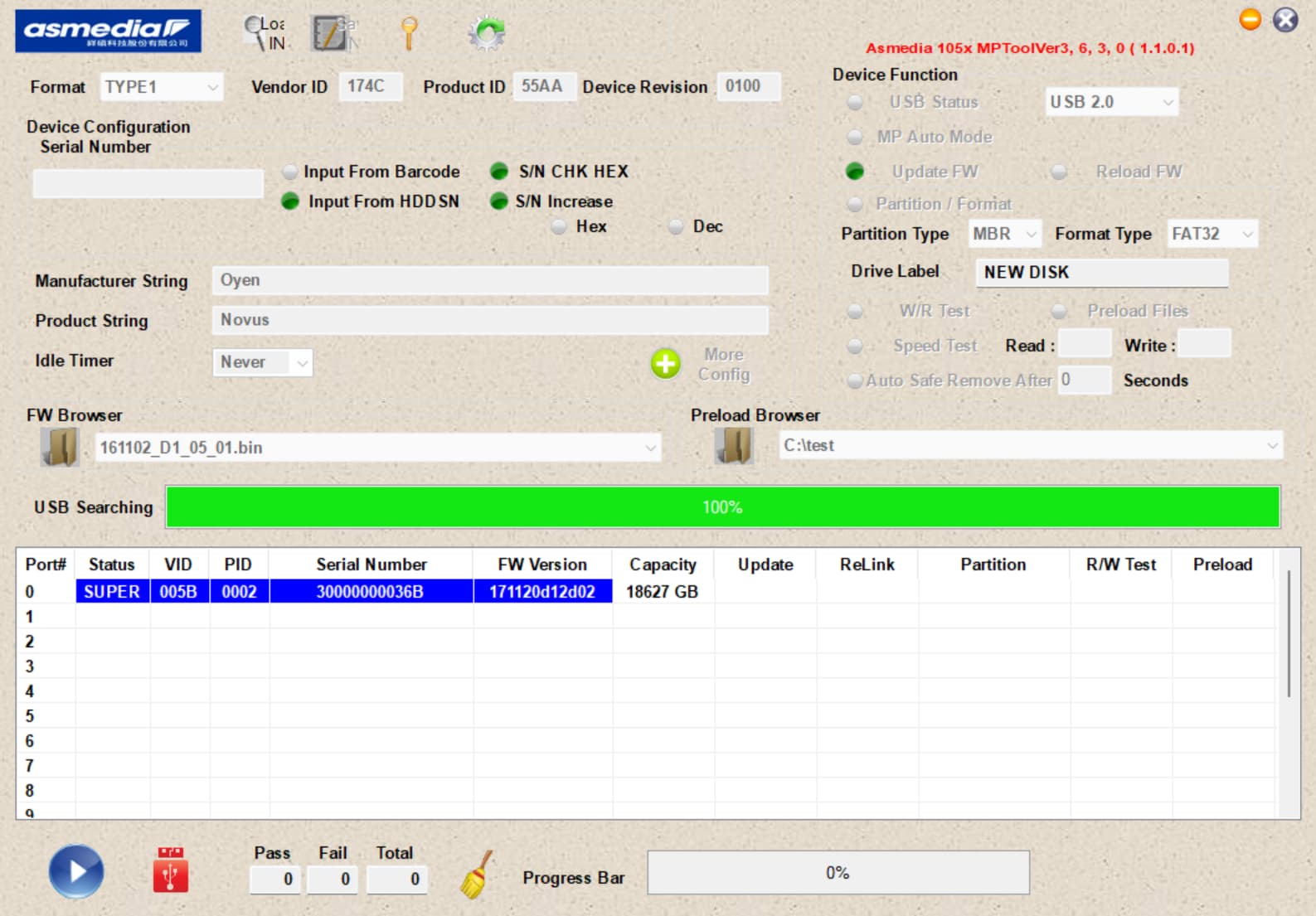
A asm1153e based enclosure with a 4TB exfat SSD is being detected and it has read past 50k tracks as I write this.
Hey @jacobacci,
Thanks again for your outstanding contribution. Your detailed testing and documentation across multiple USB storage enclosures, chipsets, and Volumio versions has uncovered critical compatibility insights. This kind of deep, methodical feedback is highly valued and directly informs how we improve platform stability. Here’s a full summary of the findings:
1. USB Storage compatibility: Volumio 4 vs Volumio 3
-
Testing with a 28TB RAID0 NTFS volume using a JMicron JMS56x (VID:PID = 152d:9561) USB-SATA bridge:
- Volumio 4.0.17: Scan consistently halts at 3292 tracks, with repeated
ntfs_attr_preadI/O errors. - Volumio 3.819: The exact same drive scans successfully. After factory reset, scan progressed to 141,084 tracks without issues or powered USB hub.
- Volumio 4.0.17: Scan consistently halts at 3292 tracks, with repeated
-
Errors in Volumio 4:
ntfs_attr_pread failed: Input/output error ntfs_attr_pread error reading '/music/...flac' at offset ... -
This confirms a functional regression in how Volumio 4 interacts with large NTFS volumes and FUSE I/O error handling.
2. Controller-specific behavior across multiple enclosures
-
JMicron JMS56x (152d:9561) - Partially working:
- Detected but fails under Volumio 4 without quirks.
- Known to misbehave with UAS on RPi unless
usb-storage.quirks=152d:9561:uis applied.
-
ASM235CM (RaidSonic GT1670-BA31) - Not detected:
- Entire enclosure fails enumeration in Volumio 4 (
lsblkempty), despite being known-good.
- Entire enclosure fails enumeration in Volumio 4 (
-
ASM1153E - Fully working:
- 4TB SSD in exFAT format is detected and scanable under Volumio 4.
-
These differences strongly suggest that Volumio 4’s USB stack, UAS support, or kernel timing has changed and is less tolerant of chipset-specific quirks.
3. Background: Known USB controller Issues on Raspberry Pi
Your observation aligns with a known, documented class of issues covered in the Volumio community:
Reference:
https://community.volumio.com/t/guide-prepare-raspberry-pi-for-boot-from-usb-nvme/65700/46
Summary of Problematic Chipsets:
-
JMicron JMS578/JMS583
- Require
usb-storage.quirks=152d:0578:uor152d:0583:u
- Require
-
ASMedia ASM1153/ASM235CM
- Quirks:
174c:1153:u,174c:235c:u
- Quirks:
-
Realtek RTL9210 (early firmware versions)
-
VIA VL716/715
These chipsets may fail detection after soft reboots or cause instability during enumeration and are documented to affect not just boot devices but runtime-attached storage as well.
4. Quirk application barrier: Volatile cmdline.txt
- Workarounds involving UAS quirks rely on modifying
/boot/cmdline.txt - However, Volumio overwrites this file on every OTA update and discards it during fresh installs.
- This makes it impossible for users to persist USB controller fixes long-term.
5. Request: Persistent kernel parameter override support
To resolve this sustainably, I will internally propose that Volumio support a user-editable kernel parameter override file such as:
/boot/usercmdline.txt
This would:
- Be ignored by default
- If present, its contents would be appended to the bootloader command line
- Provide a safe and persistent path for users to declare USB quirks or other device-specific workarounds
This is low-priority, but technically feasible, and would improve robustness across all SBC platforms Volumio supports. However, no promises that this will be implemented at all.
Thanks again for taking the time to run these tests and provide controller-specific diagnostics. This kind of high-effort input directly supports real-world usability improvements.
Kind Regards,
1 Like
Hey @VictorDUA,
You’re right to ask, and here’s the current state of things:
Bluetooth HID remotes (input-class devices) are not officially supported in Volumio. However, thanks to recent fixes in the Bluetooth stack and Triggerhappy service, it is now possible to get simple Bluetooth input devices (like media remotes or basic HID keyboards) working with a little manual setup.
There is no UI support for pairing or managing such devices. A plugin would be required for full integration, but that is out of scope for the Bookworm Beta. If this feature is important to you, please consider submitting a request in the Plugins Development or Feature Request sections. Perhaps our guru @balbuze or others might help when time allows.
Here is a short guide for SSH-based pairing and setup:
SSH-Based Setup Instructions for Bluetooth HID Remote
-
SSH into your Volumio device
ssh volumio@<your_volumio_ip> -
Enable pairing mode on your Bluetooth remote
-
Use bluetoothctl to scan and pair
bluetoothctlThen inside the prompt:
power on scan on-
Wait for your device to appear. Note the MAC address (format: XX:XX:XX:XX:XX:XX).
-
Then:
pair XX:XX:XX:XX:XX:XX trust XX:XX:XX:XX:XX:XX connect XX:XX:XX:XX:XX:XX -
Do not run
agent onordefault-agent- the active agent is already managed by Volumio’s A2DP stack.
Once paired and connected, exit:
exit -
-
(Optional) Install
evtestto debug inputsudo apt-get update sudo apt-get install evtestThen run:
sudo evtest- Select your Bluetooth input device and press buttons to observe recognized key events.
-
(Optional) Update key mappings to Triggerhappy
Create or edit the file:sudo nano /etc/triggerhappy/triggers.d/audio.confExample contents:
KEY_PLAYPAUSE 1 /usr/bin/mpc toggle KEY_NEXT 1 /usr/bin/mpc next KEY_PREVIOUS 1 /usr/bin/mpc prev -
Restart the Triggerhappy service
sudo systemctl restart triggerhappy.service
This will allow many basic Bluetooth HID remotes to work for media control under Volumio. Keep in mind this is an unofficial method and may vary depending on your remote.
Kind Regards,
1 Like
Hey @RedEyeNinja,
Your observation about improved playback behavior when using NFS instead of SMB is more than just anecdotal - it’s technically sound and supported by known performance characteristics of both protocols on Linux-based systems like Volumio.
Expanding on @Wheaten explanation for the benefit of this community.
Technical context
Volumio, through MPD, reads media files directly from mounted shares. These shares are typically mounted via either:
- SMB/CIFS (Common Internet File System)
- NFS (Network File System)
While both provide network access to media files, they differ significantly under the hood.
SMB vs NFS on Linux
-
NFS is native to Linux and tightly integrated with the kernel’s VFS (Virtual File System). It uses a stateless protocol model and minimal overhead during file access.
-
SMB, implemented in Linux via the
cifs.kokernel module, is more complex:- Includes user session handling, file locking, and access control semantics.
- Can introduce higher latency, especially with SMB3’s default signing and encryption.
- Read operations are more expensive in terms of round trips and metadata negotiation.
-
Performance Benchmarks & References:
- Samba’s own documentation acknowledges overhead and performance differences depending on tuning:
Samba Troubleshooting
- Samba’s own documentation acknowledges overhead and performance differences depending on tuning:
Why this affects playback
When switching tracks - especially across formats like DSD to FLAC - MPD performs:
- A new file open
- Metadata parsing
- Buffer fill initiation
- Stream reinitialization (including ALSA and DAC handshake)
If SMB causes even slight delays at file open or read, MPD may begin stream output before the DAC is fully ready, leading to:
- Audible clicks or pops
- Lost first frames
- ALSA underruns
NFS, by contrast, responds faster and more predictably, reducing the risk of timing mismatch between the filesystem layer and the audio subsystem.
Conclusion
What you’re observing with fewer artifacts when using NFS is a valid, reproducible outcome. While not affecting sound quality, the protocol absolutely affects system behavior in format transition scenarios.
So yes - if NFS is available in your environment, it’s the better choice for Volumio in both responsiveness and reliability.
Kind Regards,
1 Like
Thanks @nerd
The list of known good enclosures in your link is very helpful. Will help avoid issues.
I will continue with some more testing on other enclosures I have.
Your suggestion for Persistent kernel parameter override support is a very good one.
There is no boot logo, just IP address and QR Code information.
Hey @jacobacci,
Thanks for the follow-up, and much appreciated for continuing the enclosure testing.
Glad the list of known-good adapters was helpful. It’s exactly this kind of detailed testing and feedback that strengthens the BETA effort.
On the persistent kernel parameter override: I’m proposing a simple enhancement to support two optional files in /boot/:
usercmdline.pre- prepended before Volumio’s kernel parametersusercmdline.appnd- appended after them
This would make it possible to set things like usb-storage.quirks=... safely and persistently, without needing to re-edit cmdline.txt after each OTA or reinstall.
No timeline yet, but it’s under review for feasibility across all supported boards. Thanks again for validating the use case.
Kind Regards,
I have the same issue, except my userconfig.txt is empty. Screen rotation 90 degrees - in the TouchDisplay plugin
QR code and IP will disappear after installing the Touch plugin
Oh, it looks like my issue is exactly the same as yours. The screen is also rotated 90 degrees.
After installing the Touch Plugin, is there any configuration in this plugin?
Can you share the config.txt, userconfig.txt and even volumioconfig.txt files? I can refer to them for troubleshooting.
Thank you very much.
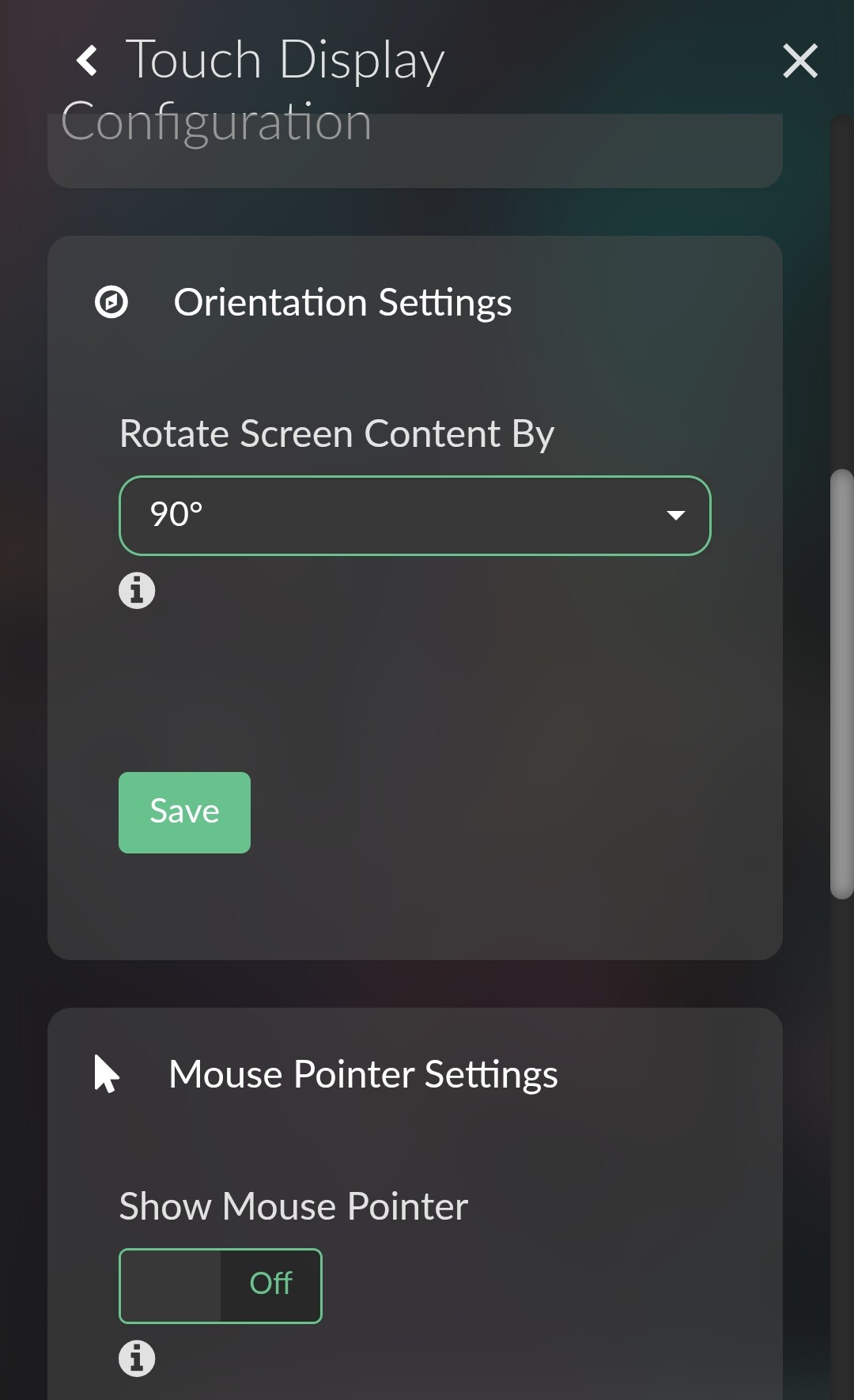
I will try this tonight (local time where I live). If possible, please share the config files so I can hopefully trace their structure to fix it.
Thanks.
Thank you very very much. It is working. Use sudo thd --dump /dev/input/event1 to examine all my key edit audio.conf and everything working excellent. I’m happy.
First enclosure that works out of the box (at least seems to so far):
RaidSonic IB-377-C31 ASM235CM
Ven=174c, PID=55aa
This is the dsmeg result:
volumio@volumio:~$ dmesg | grep -i usb
[    0.062273] usbcore: registered new interface driver usbfs
[    0.062302] usbcore: registered new interface driver hub
[    0.062327] usbcore: registered new device driver usb
[    1.854179] usbcore: registered new interface driver lan78xx
[    1.854214] usbcore: registered new interface driver smsc95xx
[    1.855534] xhci_hcd 0000:01:00.0: new USB bus registered, assigned bus number 1
[    1.857741] xhci_hcd 0000:01:00.0: new USB bus registered, assigned bus number 2
[    1.857751] xhci_hcd 0000:01:00.0: Host supports USB 3.0 SuperSpeed
[    1.857885] usb usb1: New USB device found, idVendor=1d6b, idProduct=0002, bcdDevice= 6.12
[    1.857892] usb usb1: New USB device strings: Mfr=3, Product=2, SerialNumber=1
[    1.857898] usb usb1: Product: xHCI Host Controller
[    1.857902] usb usb1: Manufacturer: Linux 6.12.34-v7l+ xhci-hcd
[    1.857907] usb usb1: SerialNumber: 0000:01:00.0
[    1.858164] hub 1-0:1.0: USB hub found
[    1.858511] usb usb2: New USB device found, idVendor=1d6b, idProduct=0003, bcdDevice= 6.12
[    1.858518] usb usb2: New USB device strings: Mfr=3, Product=2, SerialNumber=1
[    1.858523] usb usb2: Product: xHCI Host Controller
[    1.858528] usb usb2: Manufacturer: Linux 6.12.34-v7l+ xhci-hcd
[    1.858532] usb usb2: SerialNumber: 0000:01:00.0
[    1.858737] hub 2-0:1.0: USB hub found
[    1.859466] usbcore: registered new interface driver uas
[    1.859500] usbcore: registered new interface driver usb-storage
[    1.861093] usbcore: registered new interface driver usbhid
[    1.861097] usbhid: USB HID core driver
[    2.123775] usb 1-1: new high-speed USB device number 2 using xhci_hcd
[    2.279032] usb 1-1: New USB device found, idVendor=2109, idProduct=3431, bcdDevice= 4.21
[    2.279053] usb 1-1: New USB device strings: Mfr=0, Product=1, SerialNumber=0
[    2.279064] usb 1-1: Product: USB2.0 Hub
[    2.300150] hub 1-1:1.0: USB hub found
[    2.404212] usb 2-1: new SuperSpeed USB device number 2 using xhci_hcd
[    2.425159] usb 2-1: New USB device found, idVendor=174c, idProduct=55aa, bcdDevice= 1.00
[    2.425172] usb 2-1: New USB device strings: Mfr=2, Product=3, SerialNumber=1
[    2.425179] usb 2-1: Product: USB 3.1 Storage Device
[    2.425184] usb 2-1: Manufacturer: ASMedia
[    2.425188] usb 2-1: SerialNumber: WD-WMAV2U339367
[    2.443018] scsi 0:0:0:0: Direct-Access     ASMedia  USB 3.1 Storage  0    PQ: 0 ANSI: 6
[   16.315814] usbcore: registered new interface driver brcmfmac
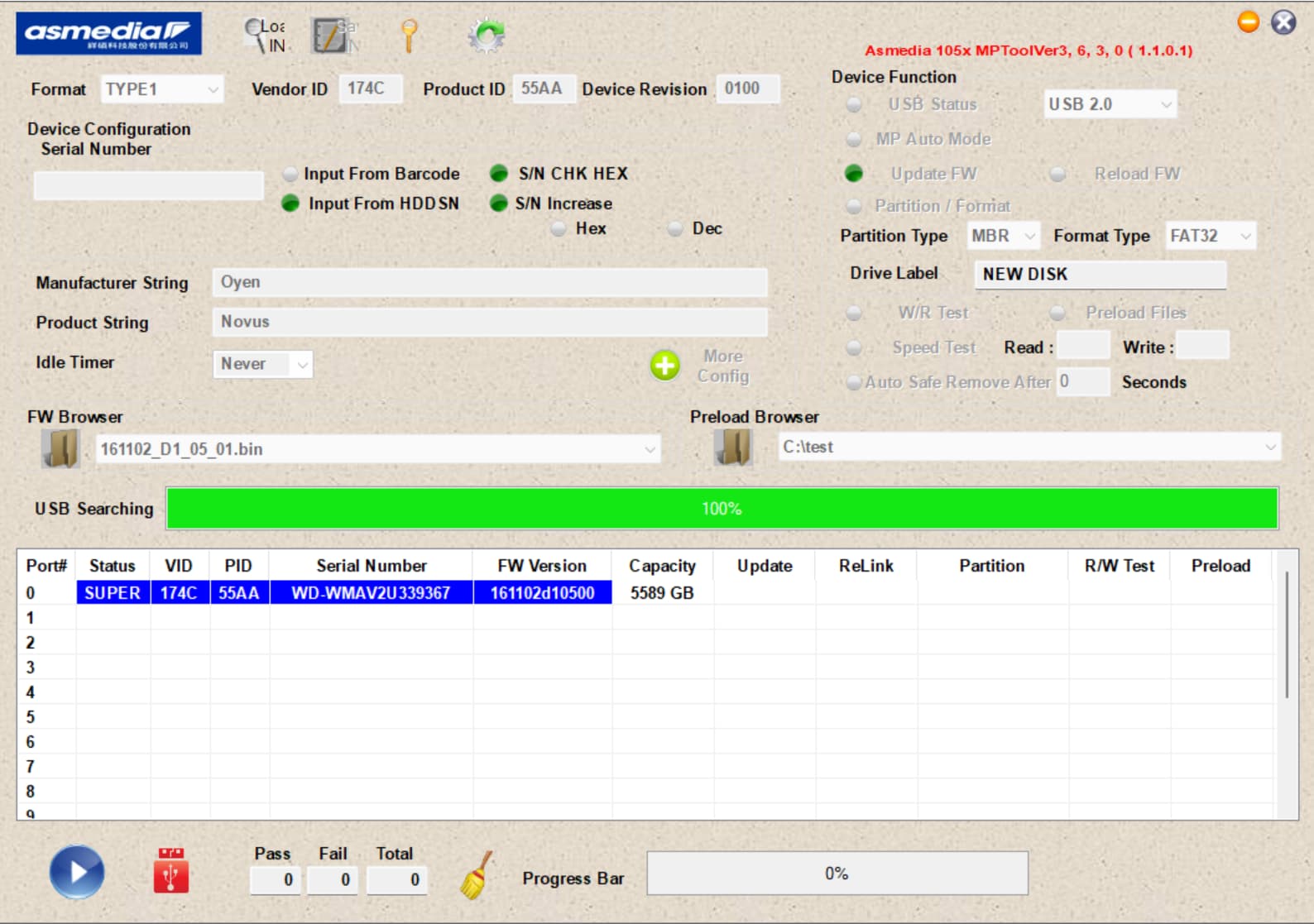
This concludes my testing of USB enclosures for the time being. I will resume when the UAS disable option is available. Here’s a table with the summary of the testing results:
| Brand | Type | Chipset | FW | Windows | Debian/ Volumio |
|---|---|---|---|---|---|
| RaidSonic | GR3660-B3 | JMS56x | 103.02.00.03 | ok | read errors |
| RaidSonic | GT1670-SB3 | JMS56x | 103.01.00.01 | ok | read errors |
| RaidSonic | GT1670-BA31 | ASM235CM | 171120_D1_2D_02 | ok | not detected |
| RaidSonic | IB-377-C31 | ASM235CM | 161102_D1_05_00 | ok | ok |
| Fantec | ALU7MMU3 | ASM1153e | 130926_A1_00_00 | ok | ok |
Dear @nerd
in reply to your message and your highly appreciated effort:
GPIO
CLICK (GPIO 17) works! Rotary (22/27) doesn’t work.
Because this was true three or four releases ago and disappeared in between I cannot imagine that this is caused by my personal device but I have performed the suggested actions, anyway.
sudo cat /sys/kernel/debug/gpio
gpiochip11: GPIOs 512-528, parent: platform/107d517c00.gpio, gpio-brcmstb@107d517c00:
 gpio-512 (RP1_SDA             )
 gpio-513 (RP1_SCL             )
 gpio-514 (RP1_RUN             |RP1 RUN pin         ) out hi
 gpio-515 (SD_IOVDD_SEL        |vdd-sd-io           ) out hi
 gpio-516 (SD_PWR_ON           |sd-vcc-reg          ) out hi
 gpio-517 (SD_CDET_N           |cd                  ) in  lo ACTIVE LOW
 gpio-518 (SD_FLG_N            )
 gpio-519 (-                   )
 gpio-520 (2712_WAKE           )
 gpio-521 (2712_STAT_LED       |ACT                 ) out lo
 gpio-522 (-                   )
 gpio-523 (-                   )
 gpio-524 (PMIC_INT            )
 gpio-525 (UART_TX_FS          )
 gpio-526 (UART_RX_FS          )
 gpio-527 (-                   )
 gpio-528 (-                   )

gpiochip12: GPIOs 529-534, parent: platform/107d517c00.gpio, gpio-brcmstb@107d517c20:
 gpio-529 (HDMI0_SCL           )
 gpio-530 (HDMI0_SDA           )
 gpio-531 (HDMI1_SCL           )
 gpio-532 (HDMI1_SDA           )
 gpio-533 (PMIC_SCL            )
 gpio-534 (PMIC_SDA            )

gpiochip10: GPIOs 535-566, parent: platform/107d508500.gpio, gpio-brcmstb@107d508500:
 gpio-535 (-                   )
 gpio-536 (2712_BOOT_CS_N      |spi10 CS0           ) out hi ACTIVE LOW
 gpio-537 (2712_BOOT_MISO      )
 gpio-538 (2712_BOOT_MOSI      )
 gpio-539 (2712_BOOT_SCLK      )
 gpio-540 (-                   )
 gpio-541 (-                   )
 gpio-542 (-                   )
 gpio-543 (-                   )
 gpio-544 (-                   )
 gpio-545 (-                   )
 gpio-546 (-                   )
 gpio-547 (-                   )
 gpio-548 (-                   )
 gpio-549 (PCIE_SDA            )
 gpio-550 (PCIE_SCL            )
 gpio-551 (-                   )
 gpio-552 (-                   )
 gpio-553 (-                   )
 gpio-554 (-                   )
 gpio-555 (PWR_GPIO            |pwr_button          ) in  hi ACTIVE LOW
 gpio-556 (2712_G21_FS         )
 gpio-557 (-                   )
 gpio-558 (-                   )
 gpio-559 (BT_RTS              )
 gpio-560 (BT_CTS              )
 gpio-561 (BT_TXD              )
 gpio-562 (BT_RXD              )
 gpio-563 (WL_ON               |wl-on-reg           ) out hi
 gpio-564 (BT_ON               |shutdown            ) out hi
 gpio-565 (WIFI_SDIO_CLK       )
 gpio-566 (WIFI_SDIO_CMD       )

gpiochip13: GPIOs 567-570, parent: platform/107d508500.gpio, gpio-brcmstb@107d508520:
 gpio-567 (WIFI_SDIO_D0        )
 gpio-568 (WIFI_SDIO_D1        )
 gpio-569 (WIFI_SDIO_D2        )
 gpio-570 (WIFI_SDIO_D3        )

gpiochip0: GPIOs 571-624, parent: platform/1f000d0000.gpio, pinctrl-rp1:
 gpio-571 (ID_SDA              )
 gpio-572 (ID_SCL              )
 gpio-573 (GPIO2               )
 gpio-574 (GPIO3               )
 gpio-575 (GPIO4               )
 gpio-576 (GPIO5               |KEY_POWER           ) in  hi ACTIVE LOW
 gpio-577 (GPIO6               |rotary@d            ) in  hi
 gpio-578 (GPIO7               )
 gpio-579 (GPIO8               )
 gpio-580 (GPIO9               )
 gpio-581 (GPIO10              )
 gpio-582 (GPIO11              )
 gpio-583 (GPIO12              )
 gpio-584 (GPIO13              |rotary@d            ) in  hi
 gpio-585 (GPIO14              )
 gpio-586 (GPIO15              )
 gpio-587 (GPIO16              )
 gpio-588 (GPIO17              |KEY_POWER           ) in  hi ACTIVE LOW
 gpio-589 (GPIO18              )
 gpio-590 (GPIO19              )
 gpio-591 (GPIO20              )
 gpio-592 (GPIO21              )
 gpio-593 (GPIO22              |rotary@16           ) in  hi
 gpio-594 (GPIO23              )
 gpio-595 (GPIO24              )
 gpio-596 (GPIO25              )
 gpio-597 (GPIO26              )
 gpio-598 (GPIO27              |rotary@16           ) in  hi
 gpio-599 (PCIE_RP1_WAKE       )
 gpio-600 (FAN_TACH            )
 gpio-601 (HOST_SDA            )
 gpio-602 (HOST_SCL            )
 gpio-603 (ETH_RST_N           |phy-reset           ) out hi ACTIVE LOW
 gpio-604 (-                   )
 gpio-605 (CD0_IO0_MICCLK      |cam0_reg            ) out lo
 gpio-606 (CD0_IO0_MICDAT0     )
 gpio-607 (RP1_PCIE_CLKREQ_N   )
 gpio-608 (-                   )
 gpio-609 (CD0_SDA             )
 gpio-610 (CD0_SCL             )
 gpio-611 (CD1_SDA             )
 gpio-612 (CD1_SCL             )
 gpio-613 (USB_VBUS_EN         )
 gpio-614 (USB_OC_N            )
 gpio-615 (RP1_STAT_LED        |PWR                 ) out hi
 gpio-616 (FAN_PWM             )
 gpio-617 (CD1_IO0_MICCLK      |cam1_reg            ) out lo
 gpio-618 (2712_WAKE           )
 gpio-619 (CD1_IO1_MICDAT1     )
 gpio-620 (EN_MAX_USB_CUR      )
 gpio-621 (-                   )
 gpio-622 (-                   )
 gpio-623 (-                   )
 gpio-624 (-                   )

gpiochip14: GPIOs 625-626, parent: i2c/10-0045, v2-touchscreen-pane, can sleep:
 gpio-625 (                    |reset               ) out ?   ACTIVE LOW
 gpio-626 (                    |2.touch_reg         ) out ?
At least rotaries are recognized correct…
dmesg | grep rotary
[   32.524950] rotary-encoder rotary@16: gray
[   32.525332] input: rotary@16 as /devices/platform/rotary@16/input/input11
[   34.590791] rotary-encoder rotary@d: gray
[   34.591063] input: rotary@d as /devices/platform/rotary@d/input/input13
cat /boot/userconfig.txt
# Add your custom config.txt options to this file, which will be preserved during updates
# Power-LED und Status LED  vom Raspberry Pi abschalten
dtparam=pwr_led_trigger=default-on
dtparam=pwr_led_activelow=off
dtparam=act_led_trigger=none
dtparam=act_led_activelow=off
dtparam=eth_led0=4
dtparam=eth_led1=4

[all]
display_auto_detect=1

#display 7Zoll
# raspi 4

#dtoverlay=vc4-kms-v3d-pi4,nohdmi
#dtoverlay=vc4-kms-dsi-ili9881-7inch

#Raspi 5:

dtoverlay=vc4-kms-dsi-ili9881-7inch


#### Touch Display rotation setting below: do not alter ####
display_lcd_rotate=1
display_hdmi_rotate=1
cat /boot/config.txt
### DO NOT EDIT THIS FILE ###
### APPLY CUSTOM PARAMETERS TO userconfig.txt ###
initramfs volumio.initrd
gpu_mem=128
gpu_mem_256=32
gpu_mem_512=32
gpu_mem_1024=128
max_usb_current=1
[pi5]
usb_max_current_enable=1
[all]
include volumioconfig.txt
include userconfig.txt

#### Volumio i2s setting below: do not alter ####
dtoverlay=hifiberry-dacplus-pro
I do not hav any custom service or encoder plugin in use
Reboot
systemctl status reboot.target
○ reboot.target - System Reboot
     Loaded: loaded (/lib/systemd/system/reboot.target; disabled; preset: enabled)
     Active: inactive (dead)
       Docs: man:systemd.special(7)
cat /etc/os-release
PRETTY_NAME="Raspbian GNU/Linux 12 (bookworm)"
NAME="Raspbian GNU/Linux"
VERSION_ID="12"
VERSION="12 (bookworm)"
VERSION_CODENAME=bookworm
ID=raspbian
ID_LIKE=debian
HOME_URL="http://www.raspbian.org/"
SUPPORT_URL="http://www.raspbian.org/RaspbianForums"
BUG_REPORT_URL="http://www.raspbian.org/RaspbianBugs"
VOLUMIO_BUILD_VERSION="b6b8ef5f8c33005d951d1c00bbb3b0cc2de6a7bc"
VOLUMIO_FE_VERSION="e7cae168f9927391640a091813b8a9656b6909b6"
VOLUMIO_FE3_VERSION="df82a8f23c90a3617c15c55572c8aaea90d8b32a"
VOLUMIO_BE_VERSION="fc4c820ddd3b5fc1a7a6b54ef112273ebd122010"
VOLUMIO_ARCH="arm"
VOLUMIO_VARIANT="volumio"
VOLUMIO_TEST="FALSE"
VOLUMIO_BUILD_DATE="Sat Jul 19 09:09:46 UTC 2025"
VOLUMIO_VERSION="4.017"
VOLUMIO_HARDWARE="pi"
VOLUMIO_DEVICENAME="Raspberry Pi"
VOLUMIO_HASH="5a9037e7432a4740a4d09b1a6d039cf3"
sudo find /etc/systemd/ -name '*reboot*'
/etc/systemd/system/reboot.service
/etc/systemd/system/reboot.target.wants
sudo find /etc/ -type f -name '*rc.local*'
/etc/init.d/rc.local
/etc/rc.local
Bluetooth
Thanks, dear @nerd for your explanations.
Highly appreciated, as well.
I’ve copied your advices to my notes and will use this in future attempts - good to know.
Do you or your team need some additional input from my side?
Currently for me it’s all fine because it simply works 
Warmest regards,
Ralf
Now that I have found a USB enclosure that works out of the box, I can look at some usability aspects of Volumio 4.
When I click “rescan” in the sources / my music menu, the counter for the different items stays at the value of the last scan, instead of jumping to zero and then increasing as the scan proceeds (or maybe I did not understand the meaning of “rescan” correctly?).

The library on my disc has 65k Tracks, around 2k Artists and close to 4k Albums. In a linear list it is very cumbersome to navigate through these categories. The scrollbar at the right is not a lot of help, as it is very small. A good solution would be an alpha index that allows to jump directly to a letter. I don’t know if MPD provides this functionality.
Albums are sorted by Albumartist, not by album name. Not sure if that is intentional.
Dear @nerd ,
quick question: in post 349
you stated
KEY_PLAYPAUSE 1 /usr/bin/mpc toggle
KEY_NEXT 1 /usr/bin/mpc next
KEY_PREVIOUS 1 /usr/bin/mpc prev
For /etc/triggerhappy/triggers.d/audio.conf.
Earlier you stated - and so to found in my current configuration another content for this file - so there are moderate but may essential differences …
Example:
KEY_PREVIOUSSONG 1 /usr/local/bin/volumio previous
so the event name as well (especially) the called binary is different!
What is the correct version or are both - mainly - equivalent?
Thanks for clarification.
Warmest regards,
Ralf
For Volumio the commands below can be used:
like:
volumio play
volumio toggle
[[PLAYBACK STATUS]]

status                             Gives Playback status information
volume                             Gives Current Volume Information
volume <desired volume>            Sets Volume at desired level 0-100
volume mute                        Mutes
volume unmute                      Unmutes
volume toggle                      Mutes/Unmutes
volume plus                        Increases Volume of one step
volume minus                       Decreases Volume of one step
seek plus                          Forwards 10 seconds in the song
seek minus                         Backwards 10 seconds in the song
seek <seconds>                     Plays song from selected time
repeat                             Toggles repetition of queue
random                             Toggles randomization of queue


[[PLAYBACK CONTROL]]

play
pause
toggle                             Toggles between play/pause
next
previous
stop
clear
Thanks.
With volumio the commands are working obviously.
But what is /usr/bin/mpc ?
EDIT: (Google is my friend ):
In the context of Volumio, /usr/bin/mpc refers to the command-line interface for controlling the Music Player Daemon (MPD). mpc is the client application that allows users to interact with MPD, a background process that handles music playback. Essentially, it’s the tool used to send commands to Volumio’s music player engine.
so it remains open:
what are the correct event-names?