Public Alpha Test: Audio Without Compromise - Volumio on Bookworm Begins

volumio@work-volumio:~$ ls -la /home/volumio/
total 26
drwxr-xr-x 1 volumio volumio 4096 May 22 10:20 .
drwxr-xr-x 1 root    root    4096 May 21 09:44 ..
-rw------- 1 volumio volumio    0 May 22 09:25 .Xauthority
-rw------- 1 volumio volumio  133 May 22 09:22 .bash_history
-rw-r--r-- 1 volumio volumio  220 Jan  2  2023 .bash_logout
-rw-r--r-- 1 volumio volumio 3526 Jan  2  2023 .bashrc
-rw-r--r-- 1 volumio volumio   49 May 21 09:49 .cdcdrc
-rw-r--r-- 1 volumio volumio  171 May 21 09:49 .cdserverrc
-rw------- 1 volumio volumio   20 May 22 10:20 .lesshst
-rw-r--r-- 1 volumio volumio  807 Jan  2  2023 .profile

Full copy of /var/log/Xorg.0.log

[    97.568]
X.Org X Server 1.21.1.7
X Protocol Version 11, Revision 0
[    97.568] Current Operating System: Linux work-volumio 6.12.27-v7+ #1876 SMP Tue May  6 15:08:23 BST 2025 armv7l
[    97.568] Kernel command line: coherent_pool=1M 8250.nr_uarts=0 snd_bcm2835.enable_headphones=0 cgroup_disable=memory snd_bcm2835.enable_headphones=1 snd_bcm2835.enable_hdmi=1 bcm2708_fb.fbwidth=1600 bcm2708_fb.fbheight=480 bcm2708_fb.fbswap=1 vc_mem.mem_base=0x3ec00000 vc_mem.mem_size=0x40000000  splash plymouth.ignore-serial-consoles dwc_otg.fiq_enable=1 dwc_otg.fiq_fsm_enable=1 dwc_otg.fiq_fsm_mask=0xF dwc_otg.nak_holdoff=1 quiet console=ttyS0,115200 console=tty1 imgpart=UUID=68b923ad-5431-41eb-9208-ae82d0557a20 imgfile=/volumio_current.sqsh bootpart=UUID=99C0-8768 datapart=UUID=b4a26cab-a3f9-4167-a15b-0ed64a336208 uuidconfig=cmdline.txt pcie_aspm=off pci=pcie_bus_safe rootwait bootdelay=7 logo.nologo vt.global_cursor_default=0 net.ifnames=0 snd-bcm2835.enable_compat_alsa= snd_bcm2835.enable_hdmi=1 snd_bcm2835.enable_headphones=1 loglevel=0 nodebug use_kmsg=no
[    97.568] xorg-server 2:21.1.7-3+rpt3+deb12u9 (https://www.debian.org/support)
[    97.568] Current version of pixman: 0.44.0
[    97.568]    Before reporting problems, check http://wiki.x.org
        to make sure that you have the latest version.
[    97.568] Markers: (--) probed, (**) from config file, (==) default setting,
        (++) from command line, (!!) notice, (II) informational,
        (WW) warning, (EE) error, (NI) not implemented, (??) unknown.
[    97.569] (==) Log file: "/var/log/Xorg.0.log", Time: Thu May 22 09:24:53 2025
[    97.628] (==) Using config directory: "/etc/X11/xorg.conf.d"
[    97.628] (==) Using system config directory "/usr/share/X11/xorg.conf.d"
[    97.651] (==) No Layout section.  Using the first Screen section.
[    97.651] (==) No screen section available. Using defaults.
[    97.651] (**) |-->Screen "Default Screen Section" (0)
[    97.651] (**) |   |-->Monitor "<default monitor>"
[    97.652] (==) No device specified for screen "Default Screen Section".
        Using the first device section listed.
[    97.652] (**) |   |-->Device "kms"
[    97.652] (==) No monitor specified for screen "Default Screen Section".
        Using a default monitor configuration.
[    97.652] (**) Option "Debug" "dmabuf_capable"
[    97.652] (==) Automatically adding devices
[    97.652] (==) Automatically enabling devices
[    97.652] (==) Automatically adding GPU devices
[    97.652] (==) Automatically binding GPU devices
[    97.665] (==) Max clients allowed: 256, resource mask: 0x1fffff
[    97.670] (WW) The directory "/usr/share/fonts/X11/cyrillic" does not exist.
[    97.670]    Entry deleted from font path.
[    97.697] (==) FontPath set to:
        /usr/share/fonts/X11/misc,
        /usr/share/fonts/X11/100dpi/:unscaled,
        /usr/share/fonts/X11/75dpi/:unscaled,
        /usr/share/fonts/X11/Type1,
        /usr/share/fonts/X11/100dpi,
        /usr/share/fonts/X11/75dpi,
        built-ins
[    97.697] (==) ModulePath set to "/usr/lib/xorg/modules"
[    97.697] (II) The server relies on udev to provide the list of input devices.
        If no devices become available, reconfigure udev or disable AutoAddDevices.
[    97.697] (II) Loader magic: 0x215080
[    97.697] (II) Module ABI versions:
[    97.697]    X.Org ANSI C Emulation: 0.4
[    97.697]    X.Org Video Driver: 25.2
[    97.697]    X.Org XInput driver : 24.4
[    97.697]    X.Org Server Extension : 10.0
[    97.702] (--) using VT number 2

[    97.702] (II) systemd-logind: logind integration requires -keeptty and -keeptty was not provided, disabling logind integration
[    97.702] (II) no primary bus or device found
[    97.702] (II) LoadModule: "glx"
[    97.706] (II) Loading /usr/lib/xorg/modules/extensions/libglx.so
[    97.848] (II) Module glx: vendor="X.Org Foundation"
[    97.848]    compiled for 1.21.1.7, module version = 1.0.0
[    97.848]    ABI class: X.Org Server Extension, version 10.0
[    97.848] (II) LoadModule: "modesetting"
[    97.852] (II) Loading /usr/lib/xorg/modules/drivers/modesetting_drv.so
[   100.790] (II) Module modesetting: vendor="X.Org Foundation"
[   100.790]    compiled for 1.21.1.7, module version = 1.21.1
[   100.790]    Module class: X.Org Video Driver
[   100.790]    ABI class: X.Org Video Driver, version 25.2
[   100.790] (II) modesetting: Driver for Modesetting Kernel Drivers: kms
[   100.805] (WW) Falling back to old probe method for modesetting
[   100.806] (EE) open /dev/dri/card0: No such file or directory
[   100.806] (WW) Falling back to old probe method for modesetting
[   100.806] (EE) open /dev/dri/card0: No such file or directory
[   100.806] (EE) No devices detected.
[   100.806] (EE)
Fatal server error:
[   100.806] (EE) no screens found(EE)
[   100.806] (EE)
Please consult the The X.Org Foundation support
         at http://wiki.x.org
 for help.
[   100.806] (EE) Please also check the log file at "/var/log/Xorg.0.log" for additional information.
[   100.806] (EE)
[   100.817] (EE) Server terminated with error (1). Closing log file.

Hey @Nathan_Centofanti,

Thanks for sharing the X log - that makes things clear. X is currently trying to use the modesetting driver:

(EE) open /dev/dri/card0: No such file or directory  
(EE) No devices detected.  
(EE) no screens found

This shows that no DRM/KMS device is available, which is expected on your Pi 3 B+ unless vc4 is explicitly enabled (which it is not). However, instead of falling back to the correct legacy driver (fbdev), X terminates because it has no valid configuration for that path.

Before we apply a manual override, let’s first check if the Touch Display plugin has already dropped a config that’s forcing modesetting or suppressing fallback.

Please run the following and paste the output:

ls -la /etc/X11/xorg.conf.d/
cat /etc/X11/xorg.conf.d/*.conf

This will help us confirm what X is being told to do and whether a plugin-provided file needs to be adjusted or replaced.

Kind Regards,

bash-5.2# ls -la /etc/X11/xorg.conf.d/
total 24
drwxr-xr-x 1 root root 4096 May 22 09:22 .
drwxr-xr-x 1 root root 4096 May 21 18:13 ..
-rw-rw-rw- 1 root root  300 May 21 18:05 95-touch_display-plugin.conf
-rw-r--r-- 1 root root  124 May 22 09:22 99-v3d.conf
-rw-rw-rw- 1 root root  132 May 21 18:05 99-vc4.conf
# This file is managed by the Touch Display plugin: Do not alter!
# It will be deleted when the Touch Display plugin gets uninstalled.
Section "InputClass"
    Identifier "Touch rotation"
    MatchIsTouchscreen "on"
    MatchDevicePath "/dev/input/event*"
    MatchDriver "libinput|evdev"
EndSection
Section "OutputClass"
  Identifier "vc4"
  MatchDriver "vc4"
  Driver "modesetting"
  Option "PrimaryGPU" "true"
EndSection
Section "OutputClass"
    Identifier "vc4"
    MatchDriver "vc4"
    Driver "modesetting"
    Option "PrimaryGPU" "true"
EndSection

Hey @Nathan_Centofanti,

Thanks for providing the current Xorg configuration. Based on the files present, it appears the Touch Display plugin is instructing X to use the modesetting driver with this section:

Section "OutputClass"
    Identifier "vc4"
    MatchDriver "vc4"
    Driver "modesetting"
    Option "PrimaryGPU" "true"
EndSection

This is the root cause of the error:

(EE) open /dev/dri/card0: No such file or directory
(EE) no screens found

Your Pi 3 B+ does not expose a DRM device like /dev/dri/card0 unless the VC4 overlay is enabled, which it isn’t. Under these conditions, X should be using the legacy fbdev driver instead.

What I suspect

It’s possible that a different HDMI display was connected during plugin installation, and the plugin’s initial detection logic created persistent OutputClass entries based on that environment. The Touch Display plugin generates these configs at install time using a series of detection checks, and it’s likely those results are now out of sync with the current hardware.

I’m confirming with the plugin developer whether fbdev fallback is intentionally supported by the plugin on legacy platforms like Pi 3 B+.

Recommended workaround (safe and persistent)

To resolve the current issue without uninstalling the plugin or losing dependencies, add a higher-priority override for X:

  1. Create this file:

    sudo nano /etc/X11/xorg.conf.d/00-fbdev.conf
    
  2. Insert:

    Section "Device"
      Identifier "ForceFB"
      Driver "fbdev"
      Option "fbdev" "/dev/fb0"
    EndSection
    
  3. Save, fully power off, then boot.

This forces X to use the framebuffer device explicitly and avoids all KMS-based probe failures.

Let us know if the display starts working after this. We’ll follow up with confirmation about plugin behavior once we hear back.

Kind Regards,

Retested with v0.068 and the problem has gone!
Means this one is now fully compatible.

1 Like

Unfortunately still a blank screen and the web-app is still showing errors. I’ve attached the latest /var/log/Xorg.0.log:

[    92.493]
X.Org X Server 1.21.1.7
X Protocol Version 11, Revision 0
[    92.493] Current Operating System: Linux work-volumio 6.12.27-v7+ #1876 SMP Tue May  6 15:08:23 BST 2025 armv7l
[    92.493] Kernel command line: coherent_pool=1M 8250.nr_uarts=0 snd_bcm2835.enable_headphones=0 cgroup_disable=memory snd_bcm2835.enable_headphones=1 snd_bcm2835.enable_hdmi=1 bcm2708_fb.fbwidth=1600 bcm2708_fb.fbheight=480 bcm2708_fb.fbswap=1 vc_mem.mem_base=0x3ec00000 vc_mem.mem_size=0x40000000  splash plymouth.ignore-serial-consoles dwc_otg.fiq_enable=1 dwc_otg.fiq_fsm_enable=1 dwc_otg.fiq_fsm_mask=0xF dwc_otg.nak_holdoff=1 quiet console=ttyS0,115200 console=tty1 imgpart=UUID=68b923ad-5431-41eb-9208-ae82d0557a20 imgfile=/volumio_current.sqsh bootpart=UUID=99C0-8768 datapart=UUID=b4a26cab-a3f9-4167-a15b-0ed64a336208 uuidconfig=cmdline.txt pcie_aspm=off pci=pcie_bus_safe rootwait bootdelay=7 logo.nologo vt.global_cursor_default=0 net.ifnames=0 snd-bcm2835.enable_compat_alsa= snd_bcm2835.enable_hdmi=1 snd_bcm2835.enable_headphones=1 loglevel=0 nodebug use_kmsg=no
[    92.494] xorg-server 2:21.1.7-3+rpt3+deb12u9 (https://www.debian.org/support)
[    92.494] Current version of pixman: 0.44.0
[    92.494]    Before reporting problems, check http://wiki.x.org
        to make sure that you have the latest version.
[    92.494] Markers: (--) probed, (**) from config file, (==) default setting,
        (++) from command line, (!!) notice, (II) informational,
        (WW) warning, (EE) error, (NI) not implemented, (??) unknown.
[    92.494] (==) Log file: "/var/log/Xorg.0.log", Time: Thu May 22 10:58:58 2025
[    92.525] (==) Using config directory: "/etc/X11/xorg.conf.d"
[    92.525] (==) Using system config directory "/usr/share/X11/xorg.conf.d"
[    92.554] (==) No Layout section.  Using the first Screen section.
[    92.555] (==) No screen section available. Using defaults.
[    92.555] (**) |-->Screen "Default Screen Section" (0)
[    92.555] (**) |   |-->Monitor "<default monitor>"
[    92.555] (==) No device specified for screen "Default Screen Section".
        Using the first device section listed.
[    92.555] (**) |   |-->Device "kms"
[    92.555] (**) |   |-->GPUDevice "ForceFB"
[    92.555] (==) No monitor specified for screen "Default Screen Section".
        Using a default monitor configuration.
[    92.558] (**) Option "Debug" "dmabuf_capable"
[    92.558] (==) Automatically adding devices
[    92.558] (==) Automatically enabling devices
[    92.558] (==) Automatically adding GPU devices
[    92.558] (==) Automatically binding GPU devices
[    92.574] (==) Max clients allowed: 256, resource mask: 0x1fffff
[    92.585] (WW) The directory "/usr/share/fonts/X11/cyrillic" does not exist.
[    92.585]    Entry deleted from font path.
[    92.590] (==) FontPath set to:
        /usr/share/fonts/X11/misc,
        /usr/share/fonts/X11/100dpi/:unscaled,
        /usr/share/fonts/X11/75dpi/:unscaled,
        /usr/share/fonts/X11/Type1,
        /usr/share/fonts/X11/100dpi,
        /usr/share/fonts/X11/75dpi,
        built-ins
[    92.590] (==) ModulePath set to "/usr/lib/xorg/modules"
[    92.590] (II) The server relies on udev to provide the list of input devices.
        If no devices become available, reconfigure udev or disable AutoAddDevices.
[    92.590] (II) Loader magic: 0x215080
[    92.590] (II) Module ABI versions:
[    92.590]    X.Org ANSI C Emulation: 0.4
[    92.590]    X.Org Video Driver: 25.2
[    92.590]    X.Org XInput driver : 24.4
[    92.590]    X.Org Server Extension : 10.0
[    92.606] (--) using VT number 2

[    92.606] (II) systemd-logind: logind integration requires -keeptty and -keeptty was not provided, disabling logind integration
[    92.606] (II) no primary bus or device found
[    92.606] (II) LoadModule: "glx"
[    92.624] (II) Loading /usr/lib/xorg/modules/extensions/libglx.so
[    92.775] (II) Module glx: vendor="X.Org Foundation"
[    92.775]    compiled for 1.21.1.7, module version = 1.0.0
[    92.775]    ABI class: X.Org Server Extension, version 10.0
[    92.775] (II) LoadModule: "modesetting"
[    92.778] (II) Loading /usr/lib/xorg/modules/drivers/modesetting_drv.so
[    98.893] (II) Module modesetting: vendor="X.Org Foundation"
[    98.893]    compiled for 1.21.1.7, module version = 1.21.1
[    98.893]    Module class: X.Org Video Driver
[    98.893]    ABI class: X.Org Video Driver, version 25.2
[    98.893] (II) LoadModule: "fbdev"
[    98.894] (II) Loading /usr/lib/xorg/modules/drivers/fbdev_drv.so
[    98.905] (II) Module fbdev: vendor="X.Org Foundation"
[    98.905]    compiled for 1.21.1.3, module version = 0.5.0
[    98.905]    Module class: X.Org Video Driver
[    98.905]    ABI class: X.Org Video Driver, version 25.2
[    98.905] (II) modesetting: Driver for Modesetting Kernel Drivers: kms
[    98.905] (II) FBDEV: driver for framebuffer: fbdev
[    98.914] (WW) Falling back to old probe method for modesetting
[    98.914] (EE) open /dev/dri/card0: No such file or directory
[    98.914] (WW) Falling back to old probe method for fbdev
[    98.914] (II) Loading sub module "fbdevhw"
[    98.914] (II) LoadModule: "fbdevhw"
[    98.915] (II) Loading /usr/lib/xorg/modules/libfbdevhw.so
[    98.924] (II) Module fbdevhw: vendor="X.Org Foundation"
[    98.924]    compiled for 1.21.1.7, module version = 0.0.2
[    98.924]    ABI class: X.Org Video Driver, version 25.2
[    98.924] (II) FBDEV(0): using /dev/fb0
[    98.924] (WW) VGA arbiter: cannot open kernel arbiter, no multi-card support
[    98.924] (EE) Screen 0 deleted because of no matching config section.
[    98.924] (II) UnloadModule: "fbdev"
[    98.925] (II) UnloadSubModule: "fbdevhw"
[    98.925] (EE) Device(s) detected, but none match those in the config file.
[    98.925] (EE)
Fatal server error:
[    98.925] (EE) no screens found(EE)
[    98.925] (EE)
Please consult the The X.Org Foundation support
         at http://wiki.x.org
 for help.
[    98.925] (EE) Please also check the log file at "/var/log/Xorg.0.log" for additional information.
[    98.925] (EE)
[    98.955] (EE) Server terminated with error (1). Closing log file.
volumio@work-volumio:~$ ls -la /etc/X11/xorg.conf.d/
total 28
drwxr-xr-x 1 root root 4096 May 22 10:56 .
drwxr-xr-x 1 root root 4096 May 21 18:13 ..
-rw-r--r-- 1 root root   97 May 22 10:56 00-fbdev.conf
-rw-rw-rw- 1 root root  300 May 21 18:05 95-touch_display-plugin.conf
-rw-r--r-- 1 root root  124 May 22 10:56 99-v3d.conf
-rw-rw-rw- 1 root root  132 May 21 18:05 99-vc4.conf
volumio@work-volumio:~$ cat /etc/X11/xorg.conf.d/*.conf
Section "Device"
  Identifier "ForceFB"
  Driver "fbdev"
  Option "fbdev" "/dev/fb0"
EndSection

# This file is managed by the Touch Display plugin: Do not alter!
# It will be deleted when the Touch Display plugin gets uninstalled.
Section "InputClass"
    Identifier "Touch rotation"
    MatchIsTouchscreen "on"
    MatchDevicePath "/dev/input/event*"
    MatchDriver "libinput|evdev"
EndSection
Section "OutputClass"
  Identifier "vc4"
  MatchDriver "vc4"
  Driver "modesetting"
  Option "PrimaryGPU" "true"
EndSection
Section "OutputClass"
    Identifier "vc4"
    MatchDriver "vc4"
    Driver "modesetting"
    Option "PrimaryGPU" "true"
EndSection

I believe I have a couple of Pi 4s I can swap out if that makes life easier.

Hey @Nathan_Centofanti,

Please try the following changes to address the blank screen issue:

  1. Edit /boot/userconfig.txt
    Add the following at the very top of the file:

    dtoverlay=vc4-kms-v3d
    max_framebuffers=2
    
  2. Remove the forced fbdev configuration
    Run this command:

    sudo rm /etc/X11/xorg.conf.d/00-fbdev.conf
    
  3. Reboot the device:

    sudo reboot
    

After rebooting, check if the screen displays correctly. If not, please provide:

  • Output of ls -l /dev/dri/
  • Any fatal errors from cat /var/log/Xorg.0.log | grep EE

Let me know the results so we can proceed.

Kind Regards,

volumio@work-volumio:~$ ls -l /dev/dri/
total 0
drwxr-xr-x 2 root root         80 May 22 11:25 by-path
crw-rw---- 1 root video  226,   0 May 22 11:25 card0
crw-rw---- 1 root render 226, 128 May 22 11:25 renderD128
volumio@work-volumio:~$ cat /var/log/Xorg.0.log | grep EE
        (WW) warning, (EE) error, (NI) not implemented, (??) unknown.
[   101.894] (II) Initializing extension MIT-SCREEN-SAVER
[   103.302] (II) XINPUT: Adding extended input device "HQEmbed Multi-Touch" (type: TOUCHSCREEN, id 7)

Hey @Nathan_Centofanti,

We’ve confirmed that the DRM subsystem is active and Xorg has started cleanly with no fatal errors. However, the display remains blank. At this point, without direct access to the hardware, I’m out of ideas on how to proceed further remotely.

Perhaps factory reset without any other screen attached, would yield different results.

If anyone in the community is using the same screen and setup, it would be really helpful to hear about your experience - especially if you’ve managed to get it working under similar conditions. Any working config snippets, overlay settings, or required adjustments would be appreciated.

Kind Regards,

Thanks for all of the assistance. One thing that actually is different is after a while the screen completely shut off with a No Signal message (it took a while for that to happen, and its the first time I’ve noticed that behavior).

I did do a factory reset with just the touchscreen attached yesterday with no luck.

95% of the time I control the app through the web browser so not having the screen isn’t a deal breaker. I may just swap out the Pi with a 4 to see if that works.

Thanks again for all the help.

EDIT: Now have an .xsession-errors file in the home directory:

Xsession: X session started for volumio at Thu May 22 11:27:00 EDT 2025
dbus-update-activation-environment: error: unable to connect to D-Bus: /usr/bin/dbus-launch terminated abnormally without any error message
Xsession: X session started for volumio at Thu May 22 11:27:06 EDT 2025
dbus-update-activation-environment: error: unable to connect to D-Bus: /usr/bin/dbus-launch terminated abnormally without any error message
localuser:volumio being added to access control list
dbus-update-activation-environment: error: unable to connect to D-Bus: /usr/bin/dbus-launch terminated abnormally without any error message
sed: can't read /data/volumiokiosk/Default/Preferences: No such file or directory
Openbox-Message: Unable to find a valid menu file "/var/lib/openbox/debian-menu.xml"
/usr/lib/arm-linux-gnueabihf/openbox-autostart: 39: exec: /usr/lib/arm-linux-gnueabihf/openbox-xdg-autostart: not found
[1722:1792:0522/112725.766911:ERROR:dbus/bus.cc:408] Failed to connect to the bus: Could not parse server address: Unknown address type (examples of valid types are "tcp" and on UNIX "unix")
[1722:1792:0522/112725.805177:ERROR:dbus/bus.cc:408] Failed to connect to the bus: Could not parse server address: Unknown address type (examples of valid types are "tcp" and on UNIX "unix")
[1722:1792:0522/112725.805354:ERROR:dbus/bus.cc:408] Failed to connect to the bus: Could not parse server address: Unknown address type (examples of valid types are "tcp" and on UNIX "unix")
[1722:1792:0522/112725.805594:ERROR:dbus/bus.cc:408] Failed to connect to the bus: Could not parse server address: Unknown address type (examples of valid types are "tcp" and on UNIX "unix")
[1722:1792:0522/112726.426975:ERROR:dbus/bus.cc:408] Failed to connect to the bus: Could not parse server address: Unknown address type (examples of valid types are "tcp" and on UNIX "unix")
[1722:1792:0522/112727.406209:ERROR:dbus/bus.cc:408] Failed to connect to the bus: Could not parse server address: Unknown address type (examples of valid types are "tcp" and on UNIX "unix")
[1722:1788:0522/112728.439035:ERROR:dbus/bus.cc:408] Failed to connect to the bus: Could not parse server address: Unknown address type (examples of valid types are "tcp" and on UNIX "unix")
[1722:1792:0522/112729.329223:ERROR:dbus/bus.cc:408] Failed to connect to the bus: Could not parse server address: Unknown address type (examples of valid types are "tcp" and on UNIX "unix")
[1722:1792:0522/112729.329570:ERROR:dbus/bus.cc:408] Failed to connect to the bus: Could not parse server address: Unknown address type (examples of valid types are "tcp" and on UNIX "unix")
[1722:1722:0522/112731.019763:ERROR:dbus/object_proxy.cc:590] Failed to call method: org.freedesktop.DBus.NameHasOwner: object_path= /org/freedesktop/DBus: unknown error type:
[1722:1722:0522/112731.090085:ERROR:dbus/object_proxy.cc:590] Failed to call method: org.freedesktop.DBus.NameHasOwner: object_path= /org/freedesktop/DBus: unknown error type:
[1722:1792:0522/112731.090730:ERROR:dbus/bus.cc:408] Failed to connect to the bus: Could not parse server address: Unknown address type (examples of valid types are "tcp" and on UNIX "unix")
[1722:1722:0522/112731.097623:ERROR:dbus/object_proxy.cc:590] Failed to call method: org.freedesktop.DBus.NameHasOwner: object_path= /org/freedesktop/DBus: unknown error type:
[1722:1722:0522/112731.186606:ERROR:dbus/object_proxy.cc:590] Failed to call method: org.freedesktop.DBus.NameHasOwner: object_path= /org/freedesktop/DBus: unknown error type:
[1722:1790:0522/112731.188490:ERROR:dbus/bus.cc:408] Failed to connect to the bus: Could not parse server address: Unknown address type (examples of valid types are "tcp" and on UNIX "unix")
[1722:1722:0522/112731.390585:ERROR:dbus/object_proxy.cc:590] Failed to call method: org.freedesktop.DBus.NameHasOwner: object_path= /org/freedesktop/DBus: unknown error type:
[1722:1722:0522/112731.493257:ERROR:dbus/object_proxy.cc:590] Failed to call method: org.freedesktop.DBus.NameHasOwner: object_path= /org/freedesktop/DBus: unknown error type:
[1722:1802:0522/112731.542155:ERROR:dbus/bus.cc:408] Failed to connect to the bus: Could not parse server address: Unknown address type (examples of valid types are "tcp" and on UNIX "unix")
[1722:1722:0522/112731.626078:ERROR:dbus/object_proxy.cc:590] Failed to call method: org.freedesktop.DBus.NameHasOwner: object_path= /org/freedesktop/DBus: unknown error type:
[1722:1789:0522/112731.626793:ERROR:dbus/bus.cc:408] Failed to connect to the bus: Could not parse server address: Unknown address type (examples of valid types are "tcp" and on UNIX "unix")
[1722:1722:0522/112731.762564:ERROR:dbus/object_proxy.cc:590] Failed to call method: org.freedesktop.DBus.NameHasOwner: object_path= /org/freedesktop/DBus: unknown error type:
[1722:1790:0522/112731.763106:ERROR:dbus/bus.cc:408] Failed to connect to the bus: Could not parse server address: Unknown address type (examples of valid types are "tcp" and on UNIX "unix")
[1722:1722:0522/112731.869000:ERROR:dbus/object_proxy.cc:590] Failed to call method: org.freedesktop.DBus.NameHasOwner: object_path= /org/freedesktop/DBus: unknown error type:
Warning: vkCreateInstance: Found no drivers!
Warning: vkCreateInstance failed with VK_ERROR_INCOMPATIBLE_DRIVER
    at CheckVkSuccessImpl (../../third_party/dawn/src/dawn/native/vulkan/VulkanError.cpp:106)

[2434:2434:0522/113027.590809:ERROR:services/on_device_model/ml/gpu_blocklist.cc:120] Unable to get gpu adapter
[1722:1722:0522/113027.644416:ERROR:services/on_device_model/public/cpp/service_client.cc:36] Unexpected on_device_model service disconnect: The device's GPU is not supported.

Many thanks to all the hard work everybody is putting in into maintaining all this. Joined the community simply to get my Youtube2 plugin running and noticed the announcement by @patrickkfkan that he will no longer be able to update on legacy OS’s.

That pushed me into using 0.068 alpha and here are my actions and results so far:

  • Flashing using raspberry pi imager works flawlessly. I made some adjustments and applied these successfully
  • Installing the Youtube2 plugin works just fine. It plays music alright
  • The same goes for Spotify
  • Installing the backup&restore plugin works. I restored settings from an earlier version successfully

If I run into things, I’ll post them here. But so far so good.

Another weird update. On a whim I ran startx from the ssh shell (logged in as user volumio) and the screen started back up, with a black background, and a mouse pointer smack dab in the middle. So it appears that X can start and render.

A step in the right direction. I’ll keep futzing around and see if it can get it to progress some.

Update: If you CTRL-C out of the X session it kills that session and then drops you into the correct screen! Touchscreen works and everything.

UNFORTUNATLY after about 2 minutes X crashes and the screen show “No Input”

Hey @Nathan_Centofanti,

Thanks for the continued testing.

We now know the display stack is functional and X can render when launched manually. This suggests the issue is with how the initial X session is being started by the plugin. Based on your .xsession-errors, there are repeated D-Bus and Chromium initialization failures, likely due to early execution or missing session environment at the time of launch.

At this point, without physical access to the device, there’s no further diagnostic action I can suggest with confidence. Trying a Pi 4, as you mentioned earlier, may avoid this class of problem due to better hardware support.

If anyone in the community has this ElecLab screen running successfully on Pi 3 or Pi 4 with Volumio Bookworm ALPHA, please share your working config, overlays, and startup results.

When convenient, please also send a log covering the events discussed so far. It might reveal something systematic now that X has partially launched.

Kind Regards,

The Legend of TFT the Stubborn Screen

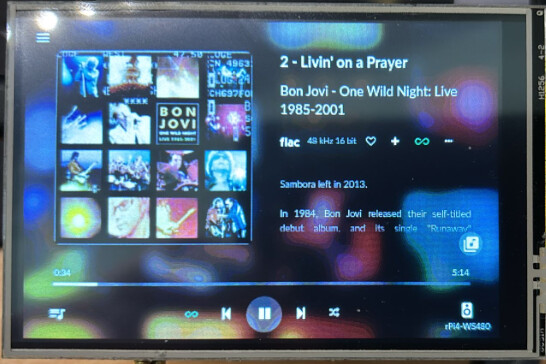
Deep in the heart of the Developer’s Lab, there existed a screen unlike any other. It was TFT35A, a rebellious 3.5-inch trickster with a resolution of 480x320 pixels—small in size but monumental in attitude. TFT had one mission in life: to frustrate, baffle, and occasionally humor those who dared to configure it.

It had watched other screens boot up smoothly, flaunting their splash logos and crisp animations. But not TFT. No, TFT had higher standards for chaos. It thrived on mischief, like a gremlin of the tech world.

One day, Nerd, the revered leader of the LCD testing guild, declared, “We must explore every inch of the LCD world—TFT included!” The developers sighed, knowing they were about to embark on an exhausting journey into madness.

They started their rituals—pouring over dmesg logs, muttering sed incantations, and wielding awk scripts in desperate attempts to bend TFT to their will. But TFT just laughed. “You think you can tame me?” it taunted, flashing only static snow instead of the promised visuals.

Days passed, new overlays were forged, and dubious configurations were sacrificed to the depths of /boot/cmdline.txt. Finally—light flickered across TFT’s mischievous display! Victory seemed near.

But then, TFT, ever the dramatic diva, decided it had delusions of grandeur. “Why settle for 3.5 inches?” it mused. “I shall pretend to be a magnificent 58-inch display instead!” And so, the boot logo stretched across imaginary dimensions, towering over reality like a digital god.

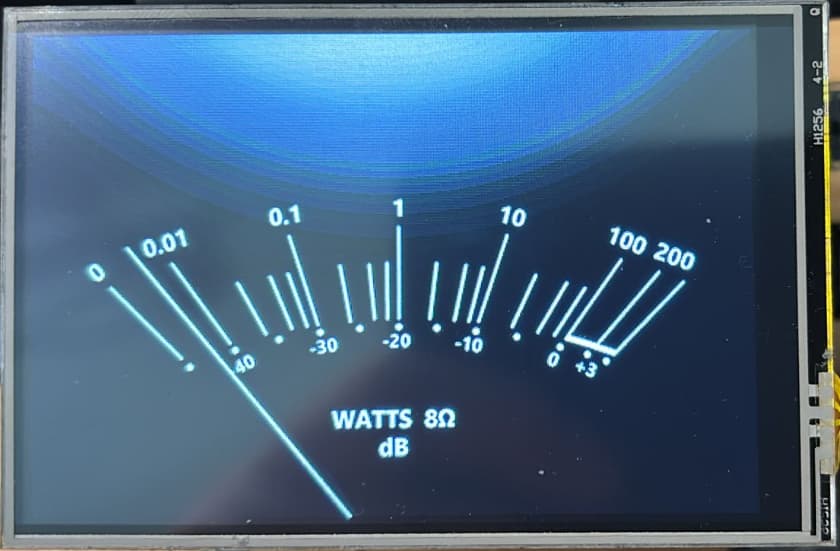
The frame rate, however, was comically low. The peppy_meter, once a proud indicator of performance, was reduced to nothing more than sad, sluggish arcs. The album covers? Pixelated relics from an EGA16 nightmare.

The developers fought back, tweaking and adjusting, trying to break TFT’s stubborn streak. At last, they discovered its one weakness—a new overlay named waveshare35a.

TFT shuddered. It felt itself being optimized against its will.

With the final stroke of code, the developers locked in their victory:

dtoverlay=waveshare35a:rotate=90,speed=41000000,fps=50

TFT growled, resisting the change. But slowly… its wild, chaotic nature settled. The frame rate improved, the needles of peppy_meter stood sharp and proud, and the covers finally resembled actual images rather than pixelated fossils.

Defeated yet secretly impressed, TFT sighed, “Fine… I suppose I shall cooperate.”

And thus, the legend of TFT the Stubborn Screen was born. It had tested the patience of the developers, mocked their efforts, and resisted their commands—but in the end, even the most rebellious pixels can be persuaded.

For now, the lab was at peace. But TFT knew… one day, it would strike again.

And the battle would begin anew. :floppy_disk::fire:

image

5 Likes

Does this alpha support the qobuz connect protocol?

no it doesn’t in Aplha. First other platforms needs the focus from Volumio.

Hi there,

youre doiing a good job, for so far.

And iam very happy because he youtube plugins became also working. praises for patrick. But one complain in the rpi versie 0.68. Could you solve the webradio searching crash. When Iam searching for an webradio by searchingbar, the whole Gui is crashing. and also no results. Iam very frustrated, because my favorite the RCO live channel is unfoundable by scrolling and clicking in the menu, so i need the searchingbar really bad.

here is the log: http://logs.volumio.org/volumio/AK9FAPZ.html

thank you by advance

the issue that ota was not working on my rpi. Now it is working perfectly.

@nerd
Didn’t we fix this already?

Hi @Wheaten , hi @nerd , hi @Dick_van_der_Wal ,

I can confirm that searching in the webradio screen does not work here (AMD64) as well. I see the rotating Volumio Icon for about 2-3 seconds and then the player is restarted “Configuration update - player successfully restarted”. That’s surely not the intended behavior.

Cheers,
Robert