Did you try disabling HDMI as I wrote? That did the trick for me… Calibrating won’t help if the system is “thinking” you are using an HDMI display beside the DSI one.
Regards.
Did you try disabling HDMI as I wrote? That did the trick for me… Calibrating won’t help if the system is “thinking” you are using an HDMI display beside the DSI one.
Regards.
@aluisperezh
thanks for that I added ‘disable_hdmi=1’ to the userconfig.txt but its made no difference
is that the way you did it or something else?
many thanks
I have this line too:
dtoverlay=vc4-kms-v3d,nohdmi
All I can say is just test.
Regards.
Angel
The display is bit sluggish but, use the below to make the touch work:
Say, you have rotated the display by 90 Degree, add the below line in /boot/config.txt
dtoverlay=waveshare35a:rotate=90
To rotate the touch input:
Navigate to cd /etc/X11/xorg.conf.d/ and update the 99-calibration.conf file
$ sudo nano 99-calibration.conf
add the below lines in the file:
Section “InputClass”
Identifier “calibration”
MatchProduct “ADS7846 Touchscreen”
Option “Calibration” “240 3800 240 3800”
Option “SwapAxes” “1”
Option “InvertX” “false”
Option “InvertY” “true”
EndSection
Reboot Rpi
Of course not  . I just found the “nohdmi” solution that someone else discovered somewhere. I’m sorry I don’t remember who did it, but it’s great if it helps somebody else.
I found it: Waveshare DSI LCD displays - #411 by Felix-Dan_Bejan
Thanks Felix-Dan_Bejan.
Regards.
While trying to update the Touch Display plugin I get this error return. It appears that the plugin cannot find the python file as the stated IP address. Any suggestions?
Henry
A crazy idea, stay with me here.
You might consider sharing a tiny bit of information.
You know… exotic, hard‑to‑find details like:
That sort of wild, cutting‑edge stuff. I know it’s crazy…
It dramatically increases the chances that anyone can actually help.
Sorry Wheaten. I thought… never mind what I thought. The Volumio version I am running is 3.874. The hardware is Raspberry Pi 4 Model B Rev 1.4 Raspberry Pi / 4B - 1.4 / Version: d03114 / 4B - 1.4 / Firmware Version: Nov 11 2024 15:48:13.
The log file of the error is http://logs.volumio.org/volumio/2J8McHI.html
Any advice would be helpful.
Thanks.
Henry
You see, now we finally have enough information to help you, the stars have aligned, the logs have spoken, and the tech gods have granted us clarity.
Time for the big move: upgrade to V3.886.
Enable test mode at <your-devices-ip-address>/dev
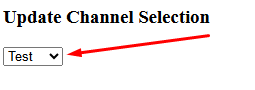
(Yes, that secret developer portal you always forget exists.)
Raspbian has officially sent the Buster repository into early retirement, gold watch, farewell cake, the whole thing.
Unfortunately, this means updates and installs now fail because Buster is somewhere on a beach sipping binary cocktails.
Dec 11 20:15:58 raspberry-pi-hflg volumio[987]: info: Install script return the error Error: Command failed: echo volumio | sudo -S sh /data/plugins/user_interface/touch_display/install.sh > /tmp/installog
Dec 11 20:15:58 raspberry-pi-hflg volumio[987]: [sudo] password for volumio: E: The repository 'http://raspbian.raspberrypi.org/raspbian buster Release' no longer has a Release file.
V3.886 includes the fix that drags everything back into the land of the living
Hi Wheaten,
Please pass on to the tech gods my many thanks. However updating to the latest version has not solved the problem. See the log file http://logs.volumio.org/volumio/v7s81HR.html
Any ideas are welcome.
Kind regards,
It seems you did something while the plugin was installing:
Dec 12 20:13:56 raspberry-pi-hflg volumio[996]: info: Install script return the error Error: Command failed: echo volumio | sudo -S sh /data/plugins/user_interface/touch_display/install.sh > /tmp/installog
Dec 12 20:13:56 raspberry-pi-hflg volumio[996]: [sudo] password for volumio: E: dpkg was interrupted, you must manually run 'sudo dpkg --configure -a' to correct the problem.
Dec 12 20:13:56 raspberry-pi-hflg volumio[996]: E: dpkg was interrupted, you must manually run 'sudo dpkg --configure -a' to correct the problem.
open a shell (putty) and run:
sudo dpkg --configure -a
sudo apt update
Reinstall the plugin again and don’t touch anything.
Hi Wheaten,
Thanks. I will give it a try. Do I log in with my own name and password?
Henry
user: volumio
password: volumio
Now i do wander, did you modify the OS settings via the raspberry Pi Imager?
If yes then reflash your SD or USB and keep your hands of OS Customizations.
As that will break everything.
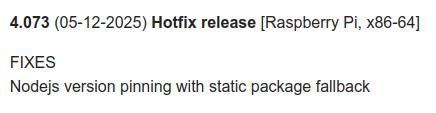
@Wheaten I just installed a fresh v4.072 on my RPi5/NVMe, getting ready for the updated PeppyMeter (@Wheaten & @nerd) to replace the 2aCD version.
However, I couldn’t install the Touch Display Plugin. Here is the error log: http://logs.volumio.org/volumio/gx2SMFQ.html
I will do some tinkering after dinner. I promise I won’t give up like I did on the other approach! 
Kind Regards,
Hi Wheaten,
I have accessed the shell but before I can run:
sudo dpkg --configure -a
sudo apt update
the application requires me to state the “[sudo] password for volumio:” Do you have this password?
Kind regards,
Henry
Hi @timmmm
i don’t know if you are still struggeling with the touch offset.
I was busy and had no time to test things until now.
The volumio update to 4.073 fixed my touch rotation problems.
Adding these lines to userconfig fixed the touch offset.
disable_hdmi=1
dtoverlay=vc4-kms-v3d,nohdmi
I use the 7" pi display (V1)
Kind regards
Thanks for your reply. Very kind of you.
The issue has been resloved.
Henry
