That depends fully on Spotify.
Soloist only comes with a connect function.
Thanks, understood. In that case Soloist is not an option for me yet. I really like the unique Volumio functionality of creating mixed playlists with Spotify and local tracks. Hopefully this will become possible in the future. Thanks anyway for the great work on this!
Hello. I’m having a problem with music playback. I can select Volumio as the device in my Spotify app on my smartphone and connect to it, but the music doesn’t play. The dac displays noch so solignal. Volumio soloist is fully set up, and the API key is correct.
If you read them you might find some common ground in them.
All you give us:
- a Volumio device
- a smartphone
- a DAC
no details, info, logs. no support!
I found the problem. Spotify Connect had to be enabled on Volumio. Everything is running great now. Many thanks.
Hey@MEPHISTO1111,
I think you are mistaken. The “Spotify Connect” plugin enabled will result in hard conflict with our “Spotify Soloist Connect” when enabled. You will need to choose one or the other. Problems with the “Spotify Connect” plugin should be reported in New 2023 Spotify Plugin thread, not here.
Kind Regards,
No, I didn’t give myself away. I activated the Spotify Connect plugin, and now I can listen to music on my Volumio setup via Spotify on my smartphone. If I deactivate Spotify Connect again, it stops working. It is reproducible. Samsung S24 Volumio 4 No Fusion DSP RPi 4 Ian Canada DAC
Everything works fine!
Again Spotify Connect (older plugin) has nothing to do with Spotify Soloist Connect.
So in your case Spotify Connect is working and your posting in the wrong topic.
It seems I didn’t express myself clearly. For me, Spotify Soloist Connect only works if I activate the old Spotify Connect plugin. But never mind—I found a way.
Many thanks!!
Again that means you’re not using Spotify Soloist Connect
I experimented a bit and got playing Spotify tracks from a playlist through Soloist working as a first prototype.
I changed the Spotify entries in my Volumio playlist from service:"spop" to service:"soloist_connect" and added a simple clearAddPlayTrack() to index.js that forwards the existing spotify:track: URI to Soloist. I also had to handle is_active=false while Soloist reports status=playing.
I can now select a Spotify track from a mixed playlist and it plays through Soloist. Still early testing, but promising!
Well done.
Always like when people try to beat the odds.
Please keep us updated.
Thanks for reporting your results.
1 Like
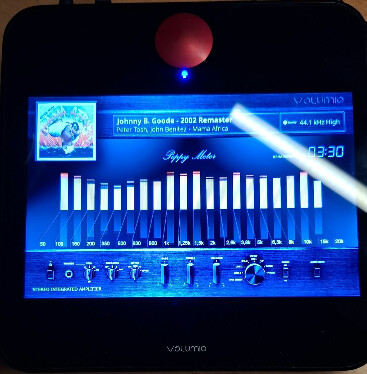
Motivo running Spotify Solist + Peppy/Spectrum:
2 Likes
Hi all, I’ve been following the discussion with interest and have tested a number of the Alpha releases, including 0.6.19. Unfortunately, I’m still unable to get Spotify Connect working. It shows up on both my phone and PC, and when I select Volumio it briefly says “playing on Volumio,” but there’s no audio and it disconnects shortly after.
Hardware:
- Raspberry Pi 5
- Fiio K13 DAC
Log attached for reference.
nerd:
Log deleted, exposed api key:
version: ‘0.6.0’,
Hey @Steve1,
You will need to install 0.6.19 version.
Uninstall plugin from UI first.
ssh volumio@ip_address
cd ~
sudo rm -rf alsa_soloist_connect
Reboot to release any cashed assets.
ssh volumio@ip_address
git clone --depth 1 --filter=blob:none --sparse https://github.com/foonerd/alsa_soloist_connect.git
cd alsa_soloist_connect
git sparse-checkout set soloist_connect
cd soloist_connect
volumio plugin install
Setup, API, etc, save, reboot and test.
Kind Regards,
Success! 
I thought I had completely uninstalled the earlier versions, but clearly something was still lingering. After properly clearing them out, everything is working smoothly now.
Thanks again, Nerd — appreciate the help.
Dear Volumionauts,
0.7.0 - mixed playlists (prototype)
Soloist Connect is still a Spotify Connect speaker. 0.7.0 adds an optional way for a Spotify track already in a Volumio playlist or queue to play here, so one list can mix Spotify with local files, UPnP and web radio.
It is off by default. There is no Spotify browser and no search. You are not replacing the stock Spotify plugin’s library.
How to try it
- Pair once from the Spotify app (same as today). The app does not have to stay open.
- Plugin settings → Volumio queue.
- Turn on Play Spotify tracks from the Volumio queue.
- Press Save (this section does not restart Soloist).
Add to a playlist
Play a track on this device from the Spotify app so Volumio shows it. Use Volumio’s add to playlist / add to queue on that now-playing item. The saved row should be this plugin (soloist_connect) and a spotify:track:… URI.
Then add local / NAS / UPnP / web radio rows to the same playlist as usual, and play the list from Volumio.
The two toggles
Play Spotify tracks from the Volumio queue - off: a Spotify row still appears, is skipped, and the list continues. On: that row plays through Soloist if there is a paired session and this box is the active Connect device.
Let a queued track play on the active Spotify device - only applies when the first switch is on. Off (default): if the session is on your phone or another speaker, the row is skipped and the list moves on. On: the row plays on whatever device holds the session. Volumio may not see it finish, so the list can wait; Next still works. Leave this off unless you want that.
What to expect
- Next / previous follow the Volumio list, not Spotify’s album or radio.
- When the Spotify row ends, Soloist pauses and the next source (local, UPnP, …) can take the DAC.
- Title and artwork come from tracks Soloist has already seen this session. A new URI shows a placeholder until it starts.
- No session, or another device holding the session (and remote play off) → that row is skipped.
Old playlists
Lists saved with the stock Spotify plugin still say spop. Those rows are not rewritten and are not played by this plugin. Re-add the tracks as above, or they will be skipped.
Still alpha. If something sticks or skips wrong, say what the list was (Spotify → local, local → Spotify, …) and whether the session was on this device.
Kind Regards,
Dear Volumionauts,
Spotify Queue tile
Browse shows a Spotify Queue tile when Soloist is connected and tracks are added in your Spotify app queue. It is this speaker’s Connect list (get_queue / queue_changed): now playing, play next, up next, autoplay, recently played.
That is not Volumio’s mixed playlist. Nothing from it is written into the Volumio queue. Tapping a track is the same path as adding a mixed-list row (spotify:track: only). There is still no Spotify library browse and no search.
How long the tile waits for a fresh list is Spotify Queue wait under Plugin settings → Timing → Save (default 2500 ms, 0–10000; 0 shows the last event immediately). Does not restart Soloist.
Mixed playlists (prototype)
Off by default. This is still a Connect speaker.
Plugin settings → Volumio queue → Save (does not restart Soloist).
| Setting | Default | What it does |
|---|---|---|
| Play Spotify tracks from the Volumio queue | off | A soloist_connect row in a Volumio playlist or queue plays here. Off: the row stays in the list, is skipped, and playback continues. Needs a paired session; the Spotify app does not have to be open. |
| Let a queued track play on the active Spotify device | off | Only with the setting above. Off: if the session is on a phone or another speaker, that row is skipped. On: it plays on whichever device holds the session; Volumio may not see it finish, so the list can wait. Next still works. Leave off unless you want that. |
Add to a playlist. Play a track on this device from the Spotify app, then use Volumio’s add to playlist / add to queue. Mix with local, NAS, UPnP or web radio as usual. Or tap a track in the Spotify Queue tile.
Next and previous follow the Volumio list. When the Spotify row ends, Soloist pauses and the next source can take the DAC. Title and artwork come from tracks Soloist has already seen this session; a new URI shows a placeholder until it starts.
Rows saved with the stock Spotify plugin still say spop. They are not rewritten and are not played. Re-add those tracks as above.
Kind Regards,
1 Like
v0.7.1
INTEGRO
Nice improvement!
Clicking a track in Volumio UI stop playing.
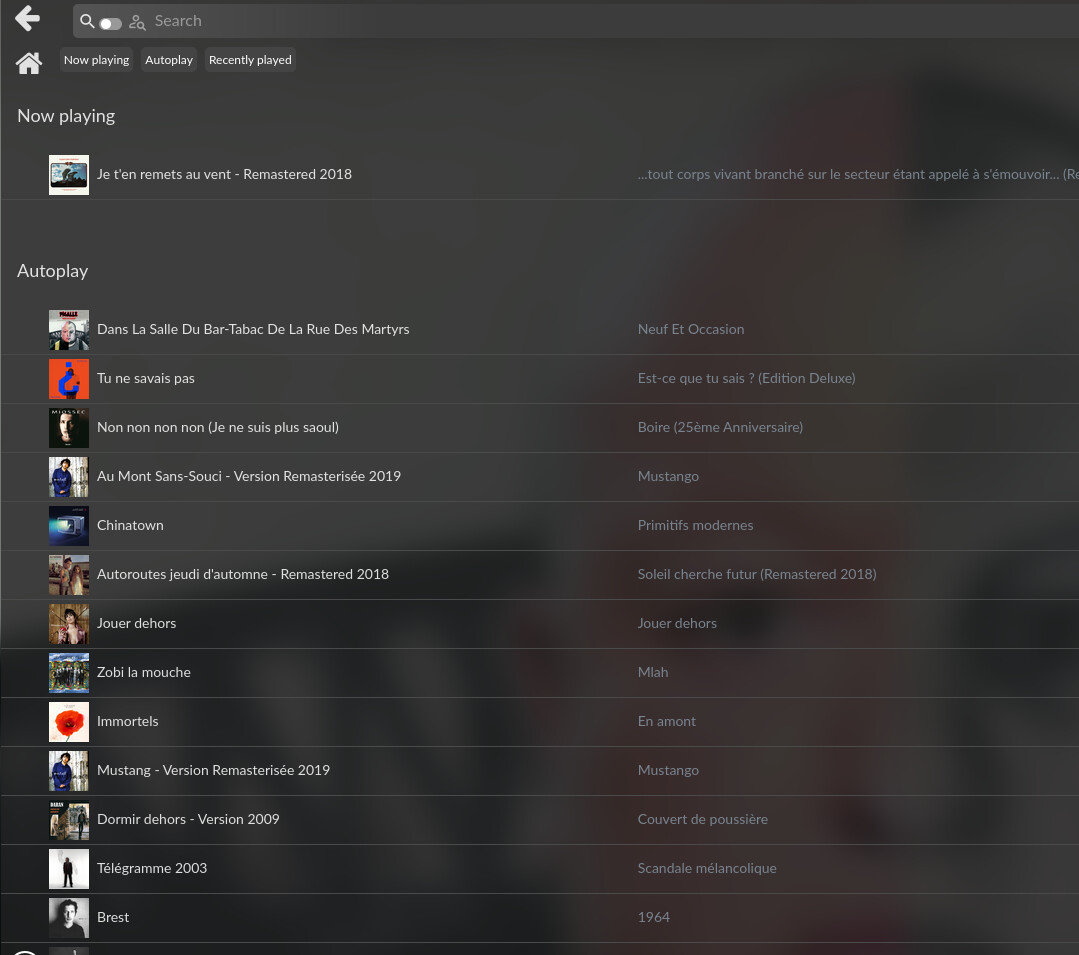
Even if it known , it weird to have a different when clicking “browse” in UI

http://logs.volumio.org/integro/dlPucVz.html
Edit : my bad queue playback was off in the plugin settings. It works now!
Edit 2 : tracks are not played in the list order
Dear Volumionauts,
Spotify Soloist Connect
0.7.5 adds Convert playlist. I do not have a stock Spotify (spop) list here to try it on, so this one needs community testing.
A mixed list that is already soloist_connect will not appear. On my test system, /data/playlist/Test is that case: ten Soloist tracks and ten local mpd rows. The converter is looking for lists still saved by the stock Spotify plugin.
What it does
Playback only accepts service: "soloist_connect". Lists saved under the old plugin still say spop and are skipped when reached. Convert playlist rewrites that field on track rows and nothing else.
| Where | Plugin settings → Convert playlist (under the Volumio queue switches) |
| Default | Clone. Original file is left alone. Empty name becomes {source} (Soloist). |
| Overwrite | Optional. Replaces the selected file. The new-name field is ignored. |
| Converted | service === "spop" and uri starts with spotify:track: |
| Left alone | Local / MPD / UPnP / radio, rows already soloist_connect, and spop album / playlist / artist URIs |
| Not done | Favourites, the live queue, fetching a spotify:playlist: from Spotify, turning queue playback on, restarting Soloist |
After convert you still need Play Spotify tracks from the Volumio queue on, plus a paired session, or the rows skip.
Please test this, in detail
If you still have playlists from the stock Spotify plugin, this is the build that needs you.
Before you start
- Install 0.7.5.
- Keep a copy of
/data/playlist/<name>for every list you convert (URIs and titles, not an API key). If something looks wrong, that file is the report. - Open plugin settings. Under Convert playlist, the selector should list only playlists that still have
spoptrack rows, labelled likeMixed nights (12 Spotify rows). - A list already saved as
soloist_connectmust not appear. Empty state is No Spotify Connect playlists found.
Clone (default)
- Pick a mixed list (
spop+ local). Leave overwrite off. Leave the name empty, Convert. - Confirm a new playlist
{name} (Soloist)appears under Playlists. Confirm the original is unchanged (cat /data/playlist/<name>still says"service":"spop"on the Spotify rows). - Open the clone. Spotify tracks should say they will play through this plugin. Local rows must still be
mpd(or whatever they were). Titles, artists, artwork, URIs must be the same. - Repeat with a custom new name. Repeat with a name that already exists: that must be refused, original untouched.
Overwrite
- On a copy you can afford to lose, turn Overwrite in place on and convert.
- Same file,
spoptracks nowsoloist_connect. Non-track Spotify rows stillspop.
Play the result
- Queue playback off: converted rows still appear and are skipped.
- Queue playback on, paired session, session on this device: a Spotify row in the converted list plays through Soloist; next/prev walk the Volumio list; a local row after it still plays.
- Album or playlist URIs that were
spopmust still skip. They are not rewritten and they cannot play.
UI / device notes we cannot see from here
- Integro / metavolumio: does the playlist select actually post the chosen name, or does Convert do nothing / hit the empty option?
- After clone, does Playlists refresh without a reboot?
- Re-open settings after creating a new
spoplist: does it appear? (getUIConfigis a snapshot.)
Please report
- Device and UI (Volumio web / Integro / app).
- Clone or overwrite, and the toast text.
- Whether Playlists updated.
- One converted row vs the original (service / uri / title).
- The playlist file if anything is wrong:
/data/playlist/<name>.
Kind Regards,