[PLUGIN] Glass - Phoenix risen from the PeppyMeter Screensaver ashes

Hey @SimonE,

Tenacity is mutual - you are a model patient. Your output, next to a working Pi 5 of mine, narrows it down nicely:

  • The volumio user is in the video, input and render groups, and the Touch Display plugin’s rule is in place: as it should be.
  • The touch device and the graphics device carry the right permissions: as it should be.
  • But your player shows a single graphics device, card0, and no renderD128. The working Pi 5 has card0, card1, card2 and renderD128. No render device means the GPU driver is not up, and that alone explains the kiosk drawing in software.
  • The EGL library still asks for the rpt4 libgallium. That one stays on the list; one thing at a time.

Two questions before any cure, both answered by one command. It changes nothing, only reads:

ls -l /dev/dri/by-path/; dmesg | grep -iE "v3d|vc4|drm|dsi|ili9881" | tail -40; grep Groups /proc/$(pgrep -o -f "volumio/index.js")/status
  • Which device your one card0 actually is, and what the kernel said when it brought up (or failed to bring up) the graphics and the Display 2.
  • Which groups the running Volumio backend holds right now. Group changes only reach a process when it starts, so if the backend started before the reinstall put the groups back, it is still running without them.

And one more question: did you reboot after the Touch Display plugin was installed?

Post the output as text, and we take it from there.

Kind Regards,

I’m pretty sure I did reboot. Just to be sure, I did so again - same error on the Screen tab. Here’s the requested output:

volumio@sibermusic:~$ ls -l /dev/dri/by-path/; dmesg | grep -iE “v3d|vc4|drm|dsi |ili9881” | tail -40; grep Groups /proc/$(pgrep -o -f “volumio/index.js”)/status
total 0
lrwxrwxrwx 1 root root 8 Oct 13 14:28 platform-1f00130000.dsi-card → …/card0
[ 0.029495] /axi/pcie@1000120000/rp1/dsi@128000: Fixed dependency cycle(s) wi th /axi/pcie@1000120000/rp1/dsi@128000/dsi_panel@0
[ 0.029504] /axi/pcie@1000120000/rp1/dsi@128000/dsi_panel@0: Fixed dependency cycle(s) with /axi/pcie@1000120000/rp1/dsi@128000
[ 0.029667] /axi/pcie@1000120000/rp1/dsi@128000: Fixed dependency cycle(s) wi th /axi/pcie@1000120000/rp1/dsi@128000/dsi_panel@0
[ 0.029676] /axi/pcie@1000120000/rp1/dsi@128000/dsi_panel@0: Fixed dependency cycle(s) with /axi/pcie@1000120000/rp1/dsi@128000
[ 0.787412] /axi/pcie@1000120000/rp1/dsi@128000: Fixed dependency cycle(s) wi th /axi/pcie@1000120000/rp1/dsi@128000/dsi_panel@0
[ 0.787435] /axi/pcie@1000120000/rp1/dsi@128000/dsi_panel@0: Fixed dependency cycle(s) with /axi/pcie@1000120000/rp1/dsi@128000
[ 1.132032] drm-rp1-dsi 1f00130000.dsi: bcm2712_iommu_of_xlate: MMU 100000528 0.iommu
[ 1.132041] drm-rp1-dsi 1f00130000.dsi: bcm2712_iommu_probe_device: MMU 10000 05280.iommu
[ 1.132048] drm-rp1-dsi 1f00130000.dsi: bcm2712_iommu_device_group: MMU 10000 05280.iommu
[ 1.132054] drm-rp1-dsi 1f00130000.dsi: Adding to iommu group 2
[ 1.132057] drm-rp1-dsi 1f00130000.dsi: bcm2712_iommu_attach_dev: MMU 1000005 280.iommu
[ 1.132228] /axi/pcie@1000120000/rp1/dsi@128000: Fixed dependency cycle(s) wi th /axi/pcie@1000120000/rp1/dsi@128000/dsi_panel@0
[ 1.138465] /axi/pcie@1000120000/rp1/dsi@128000/dsi_panel@0: Fixed dependency cycle(s) with /axi/pcie@1000120000/rp1/dsi@128000
[ 1.158843] ili9881c-dsi 1f00130000.dsi.0: supply power not found, using dumm y regulator
[ 1.159438] drm-rp1-dsi 1f00130000.dsi: rp1dsi_host_attach: Attach DSI device name=dsi-7inch channel=0 lanes=2 format=0 flags=0x801 hs_rate=0 lp_rate=0
[ 1.159917] [drm] Initialized drm-rp1-dsi 1.0.0 for 1f00130000.dsi on minor 0
[ 1.163015] drm-rp1-dsi 1f00130000.dsi: [drm] rp1dsi: Command time (outvact): 11
[ 1.163383] drm-rp1-dsi 1f00130000.dsi: [drm] rp1dsi: Nominal Byte clock 1250 00000 DPI clock 83333333 (parent rate 125000000)
[ 1.392179] drm-rp1-dsi 1f00130000.dsi: [drm] fb0: drm-rp1-dsidrmf frame buff er device

Hey @SimonE,

Thank you - and that output found it.

Your one graphics device, card0, is the Display 2’s own DSI driver (drm-rp1-dsi), and the kernel brought it up properly. But there is not a single line from v3d or vc4: the Pi 5’s GPU driver, and its HDMI driver, never started. That is why there is no renderD128, why the kiosk draws in software, and why glass-evo, which needs the GPU, cannot start. The screen works; the GPU behind it is switched off.

On a Pi 5 that driver comes from one line, dtoverlay=vc4-kms-v3d, which Volumio’s own boot configuration carries for every Pi 5. So the next question is why your player does not load it.

Also: the last part of the command (the groups) printed nothing, because the quotes in it arrived as curly quotes. Please copy commands from the code box, not from the text around it.

One command, please, as text:

cat /boot/volumioconfig.txt; lsmod | grep -E "v3d|vc4"; grep Groups /proc/$(pgrep -o -f "volumio/index.js")/status

It shows Volumio’s boot configuration on your player, whether the GPU driver is loaded at all, and the groups of the running backend.

Please do not edit any boot file in the meantime: one wrong line there and the player does not boot.

Kind Regards,

DO NOT EDIT THIS FILE

APPLY CUSTOM PARAMETERS TO userconfig.txt

Compute Module 4 USB configuration

[cm4]
dtoverlay=dwc2,dr_mode=host
otg_mode=1

Pi 5 NVMe/PCIe support

[pi5]

dtparam=uart0_console # Disabled by default

dtparam=nvme
dtparam=pciex1_gen=2

DRM/KMS graphics driver - per-board to avoid Pi Zero 2 W boot issues

Firmware auto-remaps overlay to board-specific variant

[pi2]
dtoverlay=vc4-kms-v3d

Pi 3A+ (0x9020e0): Before applying to [pi3], apply with lower 128MB contiguous memory setting

Pi 3A+ has only 512MB RAM and suffers boot issues otherwise

[0x9020e0]
dtoverlay=vc4-kms-v3d,cma-128
[0x9020e1]
dtoverlay=vc4-kms-v3d,cma-128
[pi3]
dtoverlay=vc4-kms-v3d
[pi4]
dtoverlay=vc4-kms-v3d
[pi5]
dtoverlay=vc4-kms-v3d

Pi Zero 2 W - KMS omitted due to boot failures and no DSI connector

HDMI works via firmware framebuffer without KMS

[pi02]

Common settings

[all]
arm_64bit=0
dtparam=audio=on
audio_pwm_mode=2
dtparam=i2c_arm=on
disable_splash=1
hdmi_force_hotplug=1
force_eeprom_read=0
display_auto_detect=1
vc4 389120 0
cec 53248 1 vc4
drm_display_helper 24576 1 vc4
snd_soc_core 290816 3 snd_soc_bcm2835_i2s,vc4,snd_soc_hdmi_codec
drm_dma_helper 24576 2 drm_rp1_dsi,vc4
drm_kms_helper 221184 4 drm_dma_helper,drm_rp1_dsi,vc4,drm_ttm_helper
drm 647168 14 panel_waveshare_dsi_v2,panel_waveshare_dsi,panel_ilitek_ili9881c,drm_kms_helper,drm_dma_helper,drm_rp1_dsi,vc4,drm_display_helper,panel_raspberrypi_touchscreen,drm_ttm_helper,ttm
Groups: 4 7 20 24 25 27 29 30 44 46 102 103 106 108 993 994 1000

Hey @SimonE,

Thank you - that closes the circle.

  • Volumio’s own boot file on your player asks for the GPU ([pi5] dtoverlay=vc4-kms-v3d), the same as on my bench.
  • The groups of the running backend are all there (44 video, 103 input, 106 render). Not a permissions problem in the groups, then.
  • But only vc4 is loaded, with nobody using it, and v3d - the Pi 5’s GPU driver - is not loaded at all. No GPU driver, no renderD128, no glass-evo.

My bench Pi 5, with the same Display 2 on DSI and glass-evo on it, gets its GPU from one explicit line, placed before the panel line:

dtoverlay=vc4-kms-v3d-pi5,cma-512
dtoverlay=vc4-kms-dsi-ili9881-7inch,rotation=270

Yours has the panel line and nothing explicit for the GPU. So the cure is to give your player the same line.

1. Keep a copy of the file first:

sudo cp /boot/userconfig.txt /boot/userconfig.txt.bak

2. Open it:

sudo nano /boot/userconfig.txt

Directly above the line dtoverlay=vc4-kms-dsi-ili9881-7inch,rotation=90 add this line, exactly as written:

dtoverlay=vc4-kms-v3d-pi5,cma-512

Change nothing else. Save with Ctrl+O, Enter, and leave with Ctrl+X.

3. Reboot, then check:

ls -l /dev/dri/; lsmod | grep v3d

renderD128 in the list and a v3d line: the GPU is up. Then Glass Manager > Screen tab > Use glass-evo on the screen, and post what the Screen tab says, as text.

If the player does not come back after the reboot, the copy from step 1 is the way back - but your system is on NVMe, so reaching the boot partition from another computer would mean taking the drive out. Say so here before you do anything else.

Kind Regards,

Player came back without problem and looks like the GPU is up. However the Screen tab displays the same error

total 0
drwxr-xr-x 2 root root 120 Oct 13 14:45 by-path
crw-rw---- 1 root video 226, 0 Oct 13 14:45 card0
crw-rw---- 1 root video 226, 1 Oct 13 14:45 card1
crw-rw---- 1 root video 226, 2 Oct 13 14:45 card2
crw-rw---- 1 root render 226, 128 Oct 13 14:45 renderD128
v3d 180224 4
gpu_sched 61440 1 v3d
drm_shmem_helper 28672 1 v3d
drm 647168 23 panel_waveshare_dsi_v2,gpu_sched,panel_waveshare_dsi,panel_ilitek_ili9881c,drm_kms_helper,drm_dma_helper,v3d,drm_rp1_dsi,vc4,drm_shmem_helper,drm_display_helper,panel_raspberrypi_touchscreen,drm_ttm_helper,ttm

Screen tab text:
The kiosk owns the screen: it is the player’s interface, Glass a screensaver over it.

glass-evo: installed 0.2.44

glass-evo took the screen on 13/10/2026, 14:50:00; it turned off: Now Playing, Touch Display, getty@tty1. Given back on 13/10/2026, 14:50:25.

glass-evo could not start, so the screen went back to the kiosk. (exit 1 glass: SDL error: Can’t load EGL/GL library on window creation.)

This player cannot draw on its screen without the kiosk as it is now, so glass-evo would not start: EGL gave no display for /dev/dri/card0 (EGL_SUCCESS); the EGL vendor library libEGL_mesa.so.0 would not load: libgallium-24.2.8-1~bpo12+rpt4.so: cannot open shared object file: No such file or directory

The graphics libraries are the system’s, not Glass’s; the kiosk shows without them where they fail. The wiki’s Troubleshooting page has what to look at. Where this was seen, a fresh Volumio image repaired it.

Hey @SimonE,

One down: the GPU is up (v3d loaded, renderD128 there), and the permission error has gone with it. What is left is the complaint we started with:

libEGL_mesa.so.0 would not load: libgallium-24.2.8-1~bpo12+rpt4.so: cannot open shared object file

Your Mesa packages are still the rpt4 ones from when the Touch Display plugin first brought its X server, while the libgallium on your player is rpt5. The plugin reinstall left them alone because they were already installed. Now that Python’s knot is untied, apt can bring them up to rpt5, the version the Raspberry Pi archive offers today.

One command:

sudo apt-get update && sudo apt-get install --only-upgrade libegl-mesa0 libgbm1 libgl1-mesa-dri libglapi-mesa libglx-mesa0 mesa-libgallium

Before you answer Y, read what apt says it will do. It should upgrade those six packages to 24.2.8-1~bpo12+rpt5, and nothing more. If it wants to remove anything, or install a long list of other packages, answer n and post its output here, as text.

Then:

  1. Reboot.
  2. Glass Manager > Screen tab > Use glass-evo on the screen.
  3. Post what the Screen tab says, together with this, as text:
dpkg -l | grep -E "mesa|libgallium|libegl|libgbm"

Kind Regards,

2 Likes

It didn’t ask, it just did. My system is so rude.
Reboot … progress!!

Screen text:
glass-evo owns the screen: it is the player’s interface; the kiosk and what runs it are off, recorded below.

glass-evo: installed 0.2.44

glass-evo took the screen on 13/10/2026, 15:15:54; it turned off: Now Playing, Touch Display, getty@tty1.

No error! The display is in portrait, but working.

dpkg result:
ii libegl-mesa0:armhf 24.2.8-1~bpo12+rpt5 a rmhf free implementation of the EGL API – Mesa vendor library
ii libegl1:armhf 1.6.0-1 a rmhf Vendor neutral GL dispatch library – EGL support
ii libgbm1:armhf 24.2.8-1~bpo12+rpt5 a rmhf generic buffer management API – runtime
ii libgl1-mesa-dri:armhf 24.2.8-1~bpo12+rpt5 a rmhf free implementation of the OpenGL API – DRI modules
ii libglapi-mesa:armhf 24.2.8-1~bpo12+rpt5 a rmhf free implementation of the GL API – shared library
ii libglu1-mesa:armhf 9.0.2-1.1 a rmhf Mesa OpenGL utility library (GLU)
ii libglx-mesa0:armhf 24.2.8-1~bpo12+rpt5 a rmhf free implementation of the OpenGL API – GLX vendor library
ii mesa-libgallium:armhf 24.2.8-1~bpo12+rpt5 a rmhf shared infrastructure for Mesa drivers

But the setting in Screen fixes this of course

CPU usage is now between 1 and 5% whilst playing. Was ~30%.

1 Like

Hey @SimonE,

Updated Troubleshooting section in wiki.

Thank you.

Kind Regards,

1 Like

image

2 Likes

@nerd
Now I get the full Glass experience - dancing meters AND a Now Playing screensaver with very low overhead. Another coffee on the way!


1 Like

Dear Volumionauts,

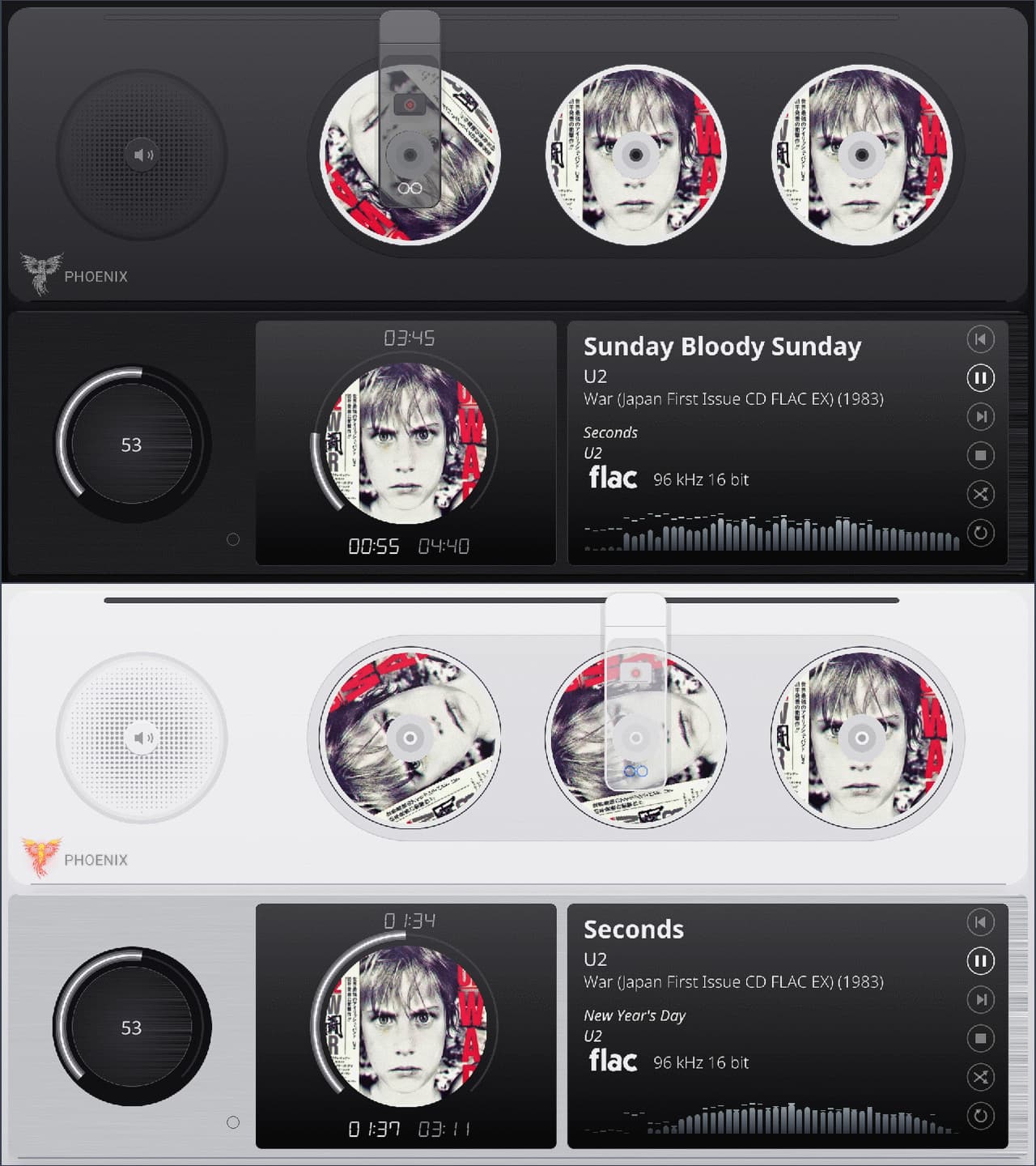
The patient from the back room has left the ward. Glass 0.10.0 and glass-evo 0.10.0 are out, and with them the CD changer - no longer a picture of one, but a theme kind of its own, beside the turntable and the reels.

The CD changer

Your queue stands in a row of slots, each disc wearing its album’s cover, and the mechanism behaves like the machine it pretends to be. Mostly better behaved, frankly - it has never once eaten a disc.

  • A start is a load. The arm sets out from its park, the sled carries the disc up and shows its reading picture while the table of contents is read, and the disc spins up to a scaled CD speed.
  • A track change is a change. The old disc spins down under the staying arm, dissolves in its slot, and the row slides the next one under the head. Each disc keeps its own angle through the shift, and an arm on its way turns nothing it passes over.
  • A pause rests the mechanism while the display persists, as the tonearm and the reels do; a stopped player’s arm goes back to its park.
  • The theme’s light casts the shadows. Each moving part throws its own, made from its own alpha. The engine draws nothing itself: it places the theme’s pictures and moves them.
  • Its own speed setting, CD changer rotation speed, separate from the vinyl’s and the spools’.

The showcase theme, two finishes behind one sheet of glass, dark and light:

image

Glass Manager > Catalog tab > Install, and it is on your player.

For the theme designers

The changer is a set of changer.* keys in meters.txt: slots, pitch, disc and label mask, rail, head, sled with its reading picture, the shadow, and the timings of every move. All of it in the wiki, with an example:

@Gelo5, the bar is open. Bring your own changer; the engine will move it.

Also in this release

  • The record and the reels keep turning across a meter switch. With a meter change on every new title, each switch used to start the motion anew: the record jumped back to its mark and the reels to their start at every track end. The turn now carries from the meter leaving to the meter arriving.
  • Glass and glass-evo carry one version from now on. 0.10.0 and 0.10.0: one number to quote in a report, and one less thing to get wrong.

Getting it

Glass Manager > System tab: the update brings Glass and glass-evo up together.

Full changelog: glass/CHANGELOG.md at main · foonerd/glass · GitHub

For the record: this patient was operated on around fifty cups of coffee, and the jar at reception is still in immaculate condition. It ships regardless - the clinic is stubborn like that.

Something not right? Post 2, as always: the report, the hardware block, text not pictures.

Kind Regards,

2 Likes

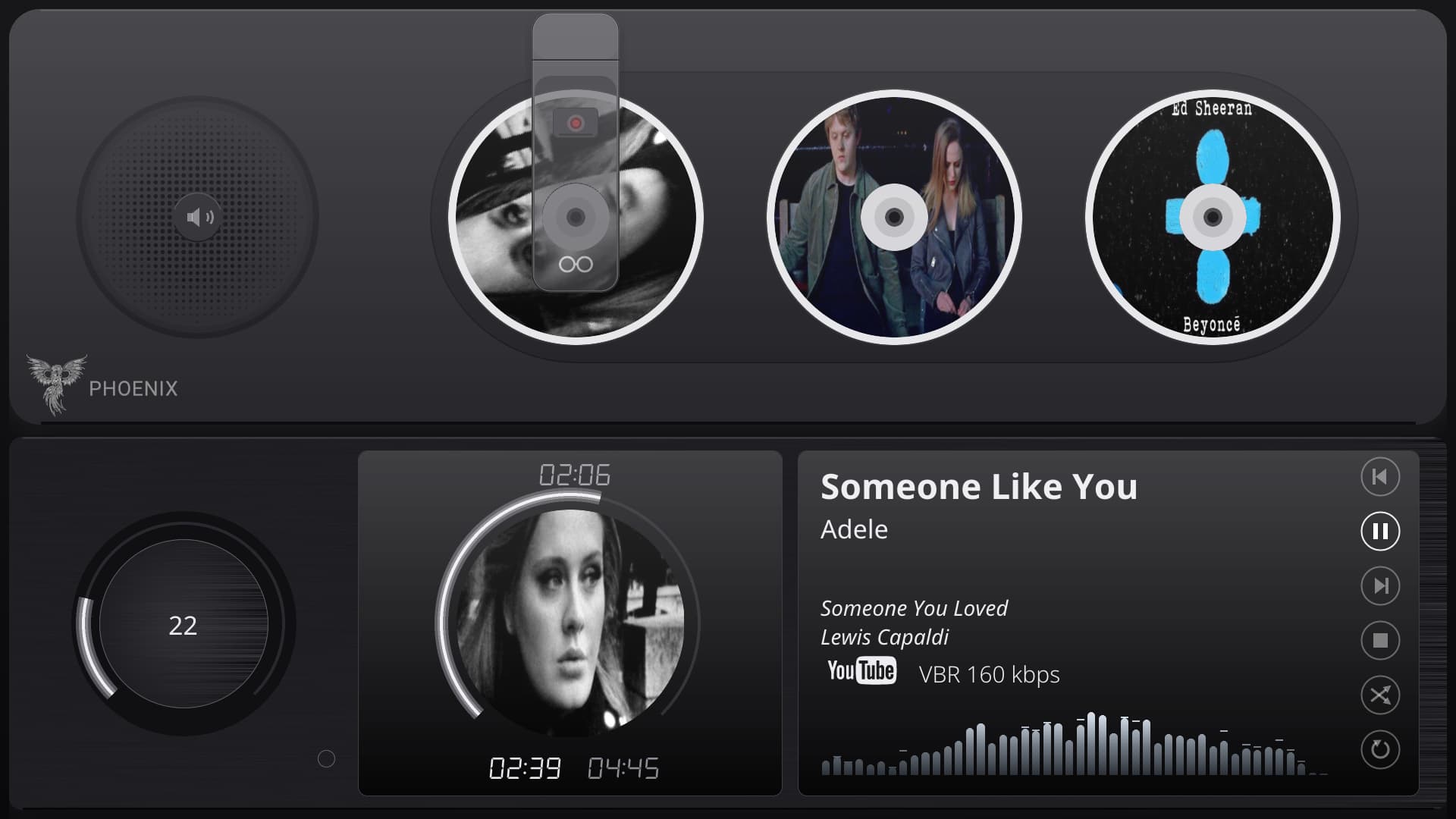
It works great with YouTube, for example. It displays the covers from the queue (each one different).


If only Volumio read TAGs…
The covers of successive albums would be displayed.

Hi @nerd and @SimonE

I booted back into the system with the error (SDL error: EGL not initialized) on my previous USB drive and tested the command:

sudo apt-get update && sudo apt-get install --only-upgrade libegl-mesa0 libgbm1 libgl1-mesa-dri libglapi-mesa libglx-mesa0 mesa-libgallium

After upgrading and rebooting, glass-evo launched perfectly without any errors!

This confirms the rpt4 Mesa vs. rpt5 libgallium version mismatch was indeed the root cause.

Thanks a lot @nerd for finding the exact fix!

Kind regards,

Dewen

1 Like

Hey @dewen,

Two patients, one diagnosis, one cure. A clinic could get used to this.

Thank you for going back to the old drive to prove it - a second case on different hardware turns “it worked once” into a finding. The credit is shared: @SimonE walked every step of it with the clinic yesterday, three faults deep, and his outputs are what pinned it down.

And the clinic has already written it into the chart. Glass 0.10.1 is out, and its Find a problem now tells the three system faults from that case apart and names each cure, instead of prescribing a fresh image:

  • Mesa out of step: mesa-libgallium out of step with the rest, so libEGL_mesa will not load. Cure: the package upgrade you just ran.
  • A Pi 5 whose GPU driver is not loaded: the screen is the panel’s own card and there is no render device. Cure: one line in userconfig.txt.
  • A display user without the render group, as a plugin install that failed halfway leaves it. Cure: the next install that completes.

All three, with what they look like, how to see them for yourself and the cure step by step, are on the wiki’s Troubleshooting page, under “glass-evo on the screen”:

The status sheet and the report now count mesa-libgallium among Mesa’s parts too, so the one left behind no longer hides behind five that agree.

Kind Regards,

2 Likes

Aha, community and you solved it, I was just going to say what was needed…

:rofl: :rofl: :rofl: :rofl: :rofl:

Hi @nerd ,

I have a standard samsung HDMI LCD connected to Rapsberry Pi5.

I had two issues as you might remember (or not :slight_smile: ):

  • this one of huge CPU usage even with standard vumeter templates (no rotations of cassette, etc);
  • Touch plugin timeout never “triggered”: screen saver never activated

Yesterday I installed “Pi Screen Setup” runned a configuration wizard. Pretty standard configuration (just added memory = 128MB)

After that:

  • Touch Display screensaver timeout: Started to work
  • CPU on standard vumeter templates: came down to around 5% max

I can only suspect that out-of-the-box hdmi output on Pi5 had some issues and the configuration applied via Pi Screen Setup solved them…

Don’t know if this helps you somehow.

I send you current log if you need it:
http://logs.volumio.org/volumio/JafgQe8.html

Hey @pjorgenunes,

It helps more than you think - and it made the surgeon (me) smile, because Pi Screen Setup came out of this same clinic. A lot of effort went into that one, the large screen settings database above all, so it is good to hear it earning its keep.

Your two symptoms fit one picture. Pi Screen Setup writes the display’s boot configuration in a file of its own, videoconfig.txt, the KMS graphics driver for the board included; your log shows config.txt now reading it. A player whose GPU driver is not properly up does its drawing in software: the CPU carries the whole picture, and the kiosk’s X server behaves oddly with it - a screensaver timeout that never fires is the kind of thing you see then. With the driver set up, the GPU takes its share back, and you went down to about 5%.

I cannot prove that was exactly your case: the log is from after the fix, and the “before” is gone. But it is the same fault the clinic chased with @SimonE yesterday and @dewen before; on a Pi 5 with a DSI panel: no GPU driver loaded, no render device, everything in software. Since Glass 0.10.1, Find a problem on the Status tab names it, with the cure, instead of leaving you to guess.

And the other half of your observation is worth writing down for the ward: on a Pi 5, out of the box, the screen may well show while the GPU behind it is idle. If your meters cost far more CPU than they should, look at the screen setup first.

As for rewriting Volumio OS: the thought has crossed my mind; this is where evo framework was conceived. However result is off-topic and via PM only.

Kind Regards,

1 Like