Thanks for the major update and detailed breakdown! Here is my feedback after testing version 1.4.0 beta:
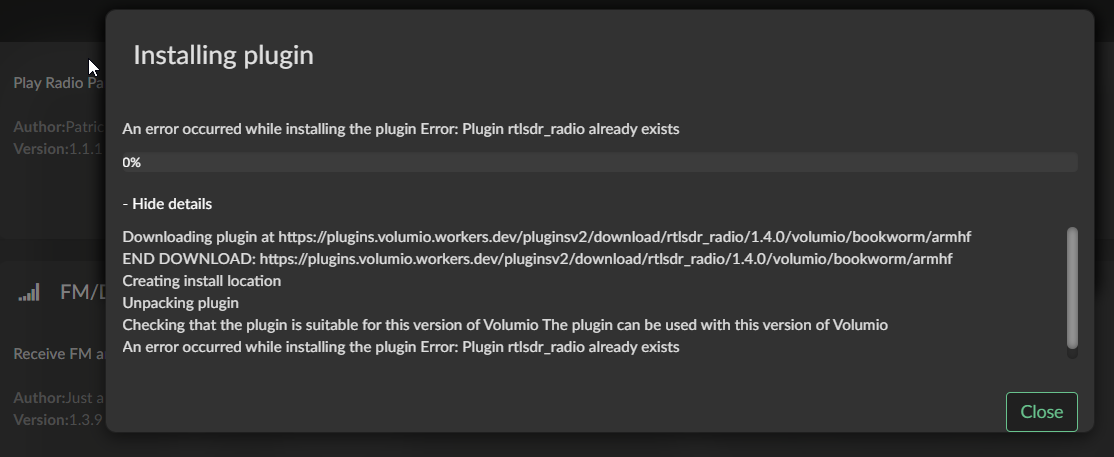
Upgrade Issue: Upgrading directly from v1.3.9 to v1.4.0 (beta) failed with the error Plugin rtlsdr_radio already exists. I had to manually uninstall v1.3.9 first before installing v1.4.0 beta successfully.
FM Scan Sensitivity: I found that the FM scan only picked up stations when FM Scan Sensitivity was set to Very Sensitive (+3 dB). However, the detected frequencies are still not entirely accurate.
Automatic FM Gain: While the automatic gain feature works well in concept, leaving it ON occasionally amplifies the audio too much, introducing noticeable noise/distortion. I found that switching it OFF and manually setting the gain to 20 yields cleaner, more normal audio.
FM Volume Level: The FM audio output feels significantly too loud compared to web radio streams playing the same station. Looking at the Glass volume meter, the levels are peaking into the red zone on the right most of the time. While I saw your note about boosting FM levels by 7–11 dB to match DAB, the original volume level actually sounded better in my setup.
Documentation: The new wiki page is extremely helpful and informative—thank you for putting together such thorough documentation!
Thank you for testing so quickly and for the detail, this is exactly the kind of report that moves things forward. One by one:
The upgrade error. The message comes from Volumio itself. The Install v1.4.0 (beta) button in the plugin’s Details dialog is meant for a first installation, and Volumio refuses it when the plugin is already installed. The way to go from one version to the next is the Update button on the plugin’s entry (in the plugin list, or under Installed Plugins). Nothing has to be uninstalled. I have added this to the wiki: Updating the Plugin · foonerd/rtlsdr-radio Wiki · GitHub
FM volume. You are right, and so is the meter. FM now plays at full level, which is where DAB sits here in the UK, and the reason I aligned the two. Web radio is usually quieter than that, and where there is no DAB to compare with, FM ends up as the loud one. A peak meter in the red is what full level looks like; it is not distortion by itself. Version 1.4.1 adds an FM Level setting (and one for DAB): 0 dB is today’s level, and you can take it down as far as -12 dB, which is more than the old level. 1.4.1 is out as a preview: in the Station Manager under Maintenance > Plugin Update, choose the Preview channel and install it from there. It reaches the store with the next submission.
Automatic gain, and the scan. This is the part I want to understand properly. On FM the tuner gain does not make the sound louder, so if a manual gain of 20 sounds cleaner than automatic, the gain my measurement chooses is probably too high for your location, and that would also explain why the scan only finds stations at +3 dB. I would rather fix the measurement than leave you on a manual value. Could you send me a log of this, with Automatic FM gain switched on:
Run an FM scan (sensitivity at +3 dB, as you have it).
Play one station that sounds noisy or distorted for about a minute, then stop it.
Send the log from http://<your player>/dev (the link it gives you, as you did last time).
If you take 1.4.1 first, even better: its log also says, for every station played, whether the sound was cut off at full level.
The log has the gain chosen for each part of the band and how far each station stood above the noise, which is what I need. And please name two or three examples of what is not accurate in the scan: a frequency it lists where there is no station, or a station you know that it misses.
Thanks for the fast reply and for releasing version 1.4.5 preview so quickly! Here are my complete test results and feedback:
1. Plugin Update & Scan Accuracy
Update Process: I downloaded 1.4.0 roughly two hours after your forum announcement. At that time, clicking “Update” refreshed the plugin but still displayed 1.3.9 (I might have jumped the gun before the server synced!). I suspect the initial scan issues happened because I was inadvertently running the older build.
Scan Results: Updating to the stable 1.4.0 (and now 1.4.5 preview) worked smoothly, and the FM scan is now very accurate!
Scan Details:
In fact, even when setting FM Scan Sensitivity to Conservative or Balanced, it reliably detects 32 correct stations.
When tested on Very Sensitive (+3 dB) with Automatic FM Gain ON, it found 33 stations in total (out of 36 actual broadcast stations in my region)—32 correct stations plus 1 false positive (FM 88.5 MHz, which is just noise).
4 missed stations: FM 91.1, FM 96.7, FM 104.3, and FM 106.9. These all have weaker signals in my area (signal strength ranking from strongest to weakest among these four: 106.9 > 91.1 > 96.7 ≈ 104.3), so missing them is completely understandable and acceptable.
2. Automatic FM Gain & Audio Quality
Comparison: Compared to v1.4.0, v1.4.5 preview shows a noticeable improvement when Automatic FM Gain is ON. The noise and interference issues have been substantially reduced.
Further Testing: I will conduct more listening tests across various stations to further evaluate the performance of Automatic FM Gain in daily use.
Test Track Played: As requested, I played FM 106.5 MHz for over a minute with Automatic FM Gain ON.
4. UI Bug Report: Station Counter (+1 / +2 Offset)
I noticed a minor UI count display bug in the station list header (e.g., FM Radio (X stations)):
It seems to be consistently off by +1 when stations are present: when there are 33 scanned stations in the list, the header displays FM Radio (34 stations).
When there are 0 stations (empty list), the header displays FM Radio (2 stations) (off by +2).
Thank you, that is a complete report and the log made it easy to follow. In order:
The scan. 32 correct stations at the normal settings is what I hoped to hear. Your log also explains the four that are missing: 91.1, 96.7, 104.3 and 106.9 each sit 200 kHz from a stronger station (90.9 and 91.3, 96.9, 104.1, 107.1). Up to 1.4.5 the scan did not listen to a channel right next to a stronger one, so on a 200 kHz raster such stations could not be found at all, whatever their strength. That is changed in 1.4.6, which is on the Preview channel now.
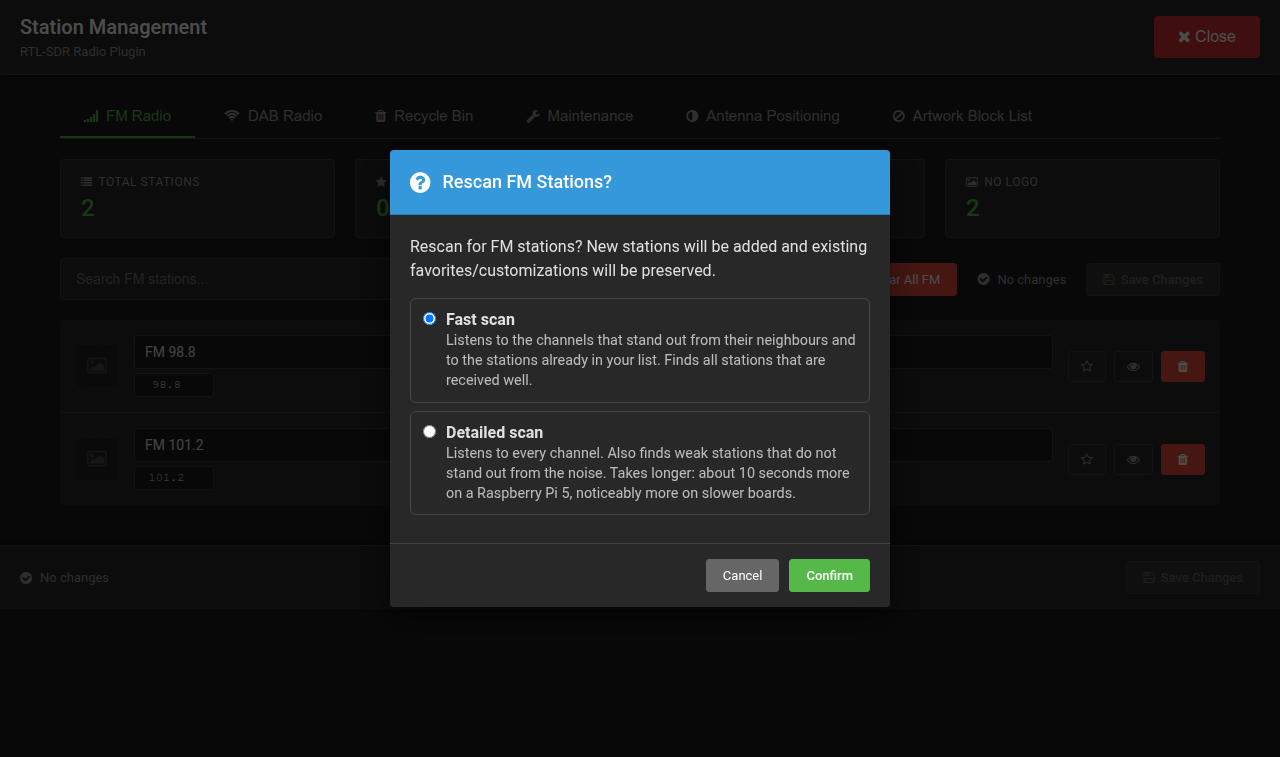
1.4.6 also lets you choose the kind of scan: Fast listens to the channels that stand out and to the stations already in your list, Detailed listens to every channel and finds weak stations too (about ten seconds longer on a Pi 5). You find the choice under FM Radio Settings > FM Scan and in the Station Manager when you press Rescan FM. Could you run a Detailed scan and tell me whether the four turn up, and whether 88.5 is still listed?
Automatic gain. Good to hear. In your log 106.5 played with nothing cut off, which is how it should be.
The station counter. Found it, thank you: the header counted the Rescan and the information line as stations. It will be right in the next version.
One thing to listen for in 1.4.6. Until now every region was received with the 75 µs de-emphasis of the Americas. From 1.4.6 each region gets its own, and the East Asia region is set to 50 µs. I could not confirm which of the two Taiwan broadcasts with. If FM sounds brighter and sharper than you are used to after the update, switch the region to Americas (it has the same band and raster as East Asia, with 75 µs; keep FM Scan Offset at 100 kHz) and tell me which of the two sounds right to you. I will then set the region accordingly.
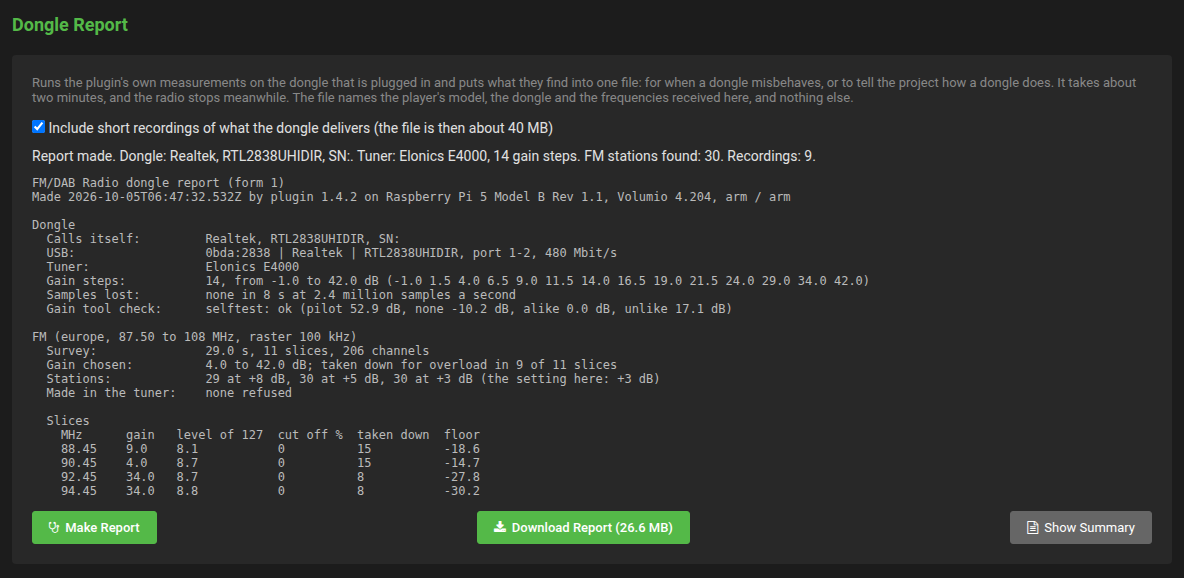
And if you have a minute: Station Manager > Maintenance > Dongle Report makes one file with everything the plugin measures on your dongle. It is too large for the forum; any file transfer service will do.
Eight small versions have followed 1.4.0, most of them from what was reported and measured in this thread. The newest is 1.4.8.
TL;DR
The FM scan finds more: weak stations, stations right beside strong ones, and mono stations.
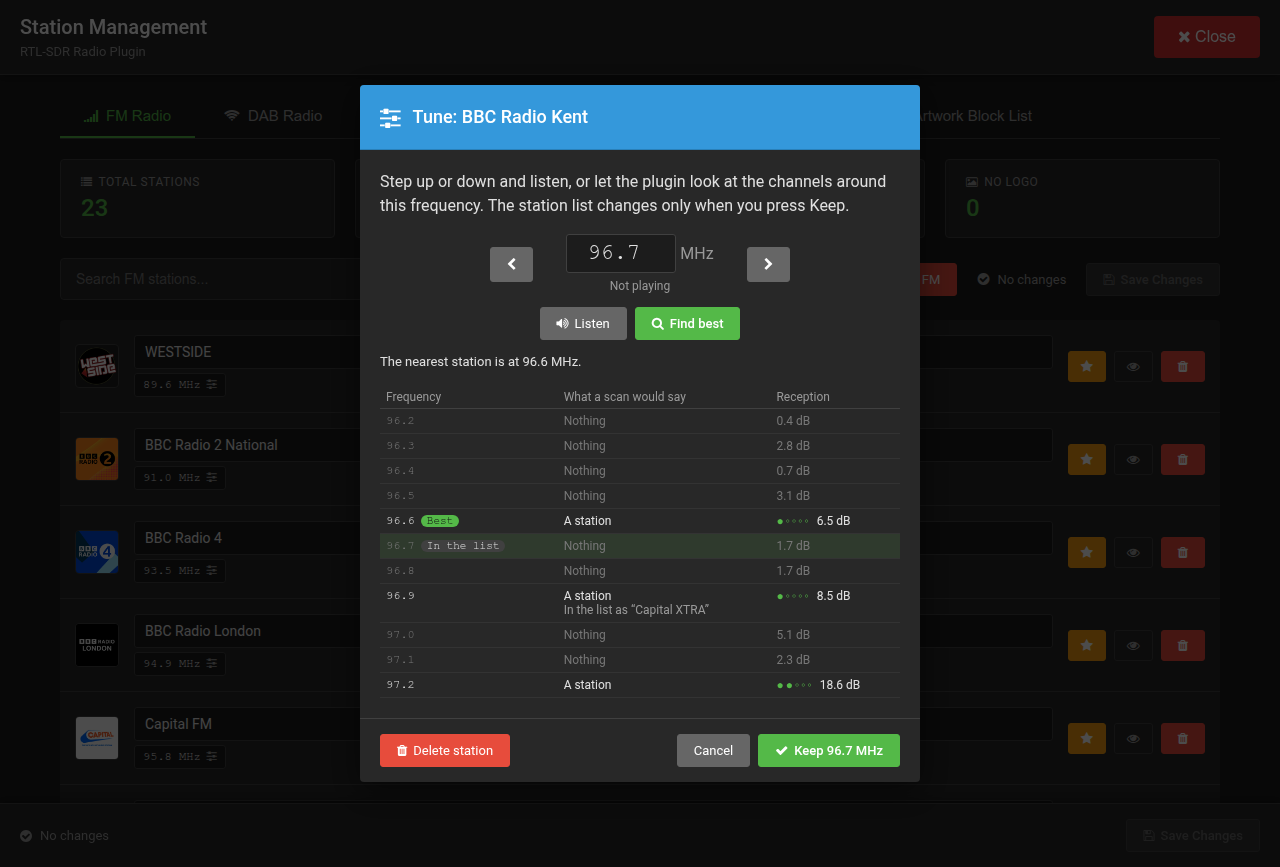
A tune dialog: press a station’s frequency in the Station Manager, step, listen, keep.
A dongle that tunes off frequency is corrected on FM by itself. Nothing to set.
FM has the treble your region broadcasts with. In Europe, Asia and Australia it sounds brighter than before.
Dongles with an E4000 tuner (the Nooelec “XTR” models) are handled properly.
FM scan
Fast or Detailed. Fast listens where the band shows a signal, and to the stations you already have. Detailed listens to every channel and finds weak stations too; about ten seconds longer on a Pi 5. You choose under FM Radio Settings > FM Scan, or when you press Rescan FM in the Station Manager.
Stations right beside a stronger one are found. On a 200 kHz raster such stations could not be found at all before.
Mono stations (no stereo pilot) are found and get a reception level. The player marks them MONO.
A weak station is listed on its own channel, not on the one next to it, and stations at the edge of reception stop coming and going from scan to scan.
Dongles that tune off (most low-cost ones, 1 to 6 kHz on FM): a scan measures the error, and the plugin corrects it from then on.
Near a very strong station, a weaker one could be played overdriven. Fixed; every station’s gain is measured afresh the next time it is played.
De-emphasis by region. Until 1.4.5 every region was received with the 75 µs of the Americas. Each region now gets its own, and FM Radio Region > FM De-emphasis lets you choose where a country differs from its region (South Korea: 75 µs).
FM Level and DAB Level, down to -12 dB, for a player on which the radio is louder than the other sources.
E4000 tuners: the gain was 6 to 15 dB too low, and the tuner’s mirror copy of a strong station could be listed as a station. Both fixed.
Dongle Report
Station Manager > Maintenance > Dongle Report puts everything the plugin measures on your dongle into one file. If your dongle is not on the wiki’s Dongles page, I would like to see its report. It is too large for the forum; any file transfer service will do.
These versions are on the Preview channel. Switch on Plugins Test Mode at http://<your player>/dev, then open Station Manager > Maintenance > Plugin Update, choose Preview and install. Your stations, settings and logos stay. The plugin store still carries 1.4.0 (beta); a store version follows when this round of testing is complete.
After updating, run one Detailed FM scan.
What I would like to hear
What a Detailed scan finds where you are, and what it misses.
Whether FM sounds right with your region’s de-emphasis, especially outside Europe and the Americas.
How the tune dialog does on a station you know to be off.
FM is still received in mono. Everything is described in the wiki, with a changelog for every version:
Thank you to everyone who is testing, and to @dewen in particular: several of these changes came straight from his reports.
Thank you for another impressive update! I have been thoroughly testing version 1.4.8 on my setup, and here are my findings:
1. Detailed FM Scan Results
Scan Setup: Detailed Scan, Balanced (+8 dB) sensitivity, and Automatic FM Gain enabled.
Stations Detected: A total of 48 stations were found!
Key Observations:
All 4 previously missed weak stations (FM 91.1, FM 96.7, FM 104.3, and FM 106.9) are now successfully detected!
FM 88.5 turns out to be a real local campus radio station from a neighboring city rather than noise. I get about 2 bars of signal—it’s playable, though with noticeable background noise.
The additional stations found are mostly weaker spillover signals from neighboring cities. Signal strengths range between 0 and 2 bars: some remain playable with slight background noise, while others are faint but identifiable as active carriers.
I noticed that each scan result can vary slightly by ±1 station. This usually affects those marginal signals from neighboring cities, which is very understandable given my modest indoor antenna setup.
Listening Comparison: Comparing the audio quality directly with web radio streams of the same stations confirms this:
With de-emphasis set to OFF, the sound is noticeably too bright/sharp.
Setting it to 50 µs improves it, but setting it to 75 µs makes the tonal balance virtually identical to the web radio streams!
Interestingly, within Asia, South Korea and Taiwan appear to be among the few regions adhering to the 75 µs standard instead of 50 µs.
3. Tune Dialog & FM Level
Tune Dialog: The new Tune Dialog is a fantastic addition! It makes inspecting real-time signal strength, fine-tuning frequencies, and deciding whether to keep or remove weak stations extremely convenient.
FM Level: Setting the FM Level to -6 or -7dB perfectly matches the volume output of web radio streams.
4. Dongle Report
Here is the Google Drive link to my generated Dongle Report file:
Thank you so much for your hard work and for continuing to refine this plugin. It has become a truly polished experience!
1.4.9 is on the Preview channel, and it brings more than one country’s setting.
East Asia receives with 75 µs. South Korea and Taiwan, the countries on that band and raster, both broadcast with it. If you had chosen 75 µs by hand, FM De-emphasis can go back to “The region’s own”.
Playlists and favourites follow a station. When the tune dialog’s Keep moves a station to another frequency, the entries in Volumio’s playlists and favourites that are that station move with it, as the queue’s items did already.
The scan lists stations, not skirts. Beside a strong signal the scan refuses (what a stronger station spills, a signal made in the tuner, an E4000’s mirror), the channels next to it are no longer listed as stations of their own at the sensitive settings. A weak station, however far away, is listed as before: the scan shows what is on the air, and what you do not want is yours to delete.
Tune dialog: the reception line shows the latest reading, not the one the player holds for a few seconds, and the dB when it is too weak for a level. A dialog left open in a browser that is gone is ended by the plugin after three minutes, and the player put back.
The log line about a station’s sound names the noise of a weak station reaching full scale for what it is, instead of “cut off”.
Update as before: Station Manager > Maintenance > Plugin Update on the Preview channel. Your stations, settings and logos stay.
What I would like to hear: whether a scan now lists something it should not, or misses a station it should find; and from East Asia, how FM sounds with the region’s own setting.
Thank you: a complete test, an official source for Taiwan’s de-emphasis, and a Dongle Report that reads as it should (an RTL-SDR Blog V4 at 1 ppm, no sample lost). The signals your scan refused as made in the tuner are refused rightly: each sits beside a station of 55 to 60 dB and loses its pilot as soon as the gain is lowered, which a station never does.
1.4.10 is on the Preview channel. One feature, and an optional one: the plugin can recognise the song that is playing from the sound itself.
Many stations send no text, or text that names the programme and not the song. With 1.4.10 the plugin can send twenty seconds of the sound to AudD, a service that identifies music the way the apps that listen to a song do, and show the artist, the title and the cover it names.
To be clear before anything else:
This project is not associated with AudD and endorses no paid service. AudD is the service the plugin can talk to because its interface takes a short piece of broadcast sound, which is what a radio has to offer.
It takes a key of your own from audd.io. The account and whatever it costs are yours. At the time of writing a new account starts with 300 free questions, no card asked. AudD has no plan for developers or open-source projects, so no key comes with the plugin.
Without a key nothing leaves the player, and the plugin does everything else as before.
How it works:
Set the token under Song Recognition on the plugin’s settings page, or in Station Manager > Maintenance > Song Recognition. Both set the same token.
By default it asks only where the station’s text names no song; set to Always it asks for every song. It asks fifteen seconds after a station starts, and shows a song only once a second question thirty seconds later gives the same answer, so a single odd answer is not shown. Nothing more is asked until that song is over: a music station takes a question or two a song, a station that names its songs in its text takes none.
The song’s artist and title are shown ahead of the station’s text, with the cover from Apple Music or Spotify. A song the broadcaster itself tags (RT+ on FM, DL Plus on DAB) comes first.
A refused token (wrong, or its plan used up) stops recognition, and the Maintenance section says so.
FM and DAB alike. The player’s log says what was recognised and why a question was not asked.
Update as before: Station Manager > Maintenance > Plugin Update on the Preview channel. Your stations, settings and logos stay. If nothing comes up in the next few days, 1.4.10 becomes the stable version on GitHub.
What I would like to hear: whether the song shown is the song that plays, on which stations it does well and where it does not, and how many questions an evening of listening takes from your account.
Thank you for the detailed technical explanation regarding the scan filtering and for pushing version 1.4.9! I have completed testing on v1.4.9 (Preview), and here are my observations:
1. Regional De-emphasis (75 µs)
Switching FM De-emphasis to “The region’s own” works perfectly! The tonal balance is identical to selecting 75 µs manually, rendering FM streams with the exact treble clarity expected in our region. Thank you so much for officially adding Taiwan to the regional 75 µs standard!
2. Enhanced Scan Sensitivity
The scanning engine in 1.4.9 is remarkably improved. It is much more sensitive to extremely weak/distant stations without creating any false duplicate stations or listing strong-signal skirts.
Example: FM 90.3 MHz was previously skipped in older builds. In 1.4.9, the Detailed scan picked it up reliably, and the audio playback quality is surprisingly good!
While listening to marginal signals, I stumbled upon an interesting finding regarding FM Sample Rate:
FM 106.9 MHz (weak signal) sits right next to FM 107.1 MHz (very strong local station).
When FM Sample Rate is set to 300 kHz (High), the strong signal from 107.1 MHz noticeably bleeds into and interferes with 106.9 MHz.
However, when switching FM Sample Rate back to 171 kHz (RDS Optimal), the adjacent-channel interference from 107.1 MHz disappears completely, leaving 106.9 MHz clear and clean!
4. Test Log Link
I generated a test log covering a fresh Detailed scan (1.4.9), followed by playing FM 106.9 MHz for one minute at 171 kHz, stopping, and then playing it for another minute at 300 kHz:
Thanks for introducing this fantastic new feature in version 1.4.10! The AudD song recognition integration is a game-changer for regions like ours.
Here are my test results so far:
FM 100.7 (ICRT - International Community Radio Taipei):
Local FM stations in Taiwan generally do not broadcast song metadata via RDS text.
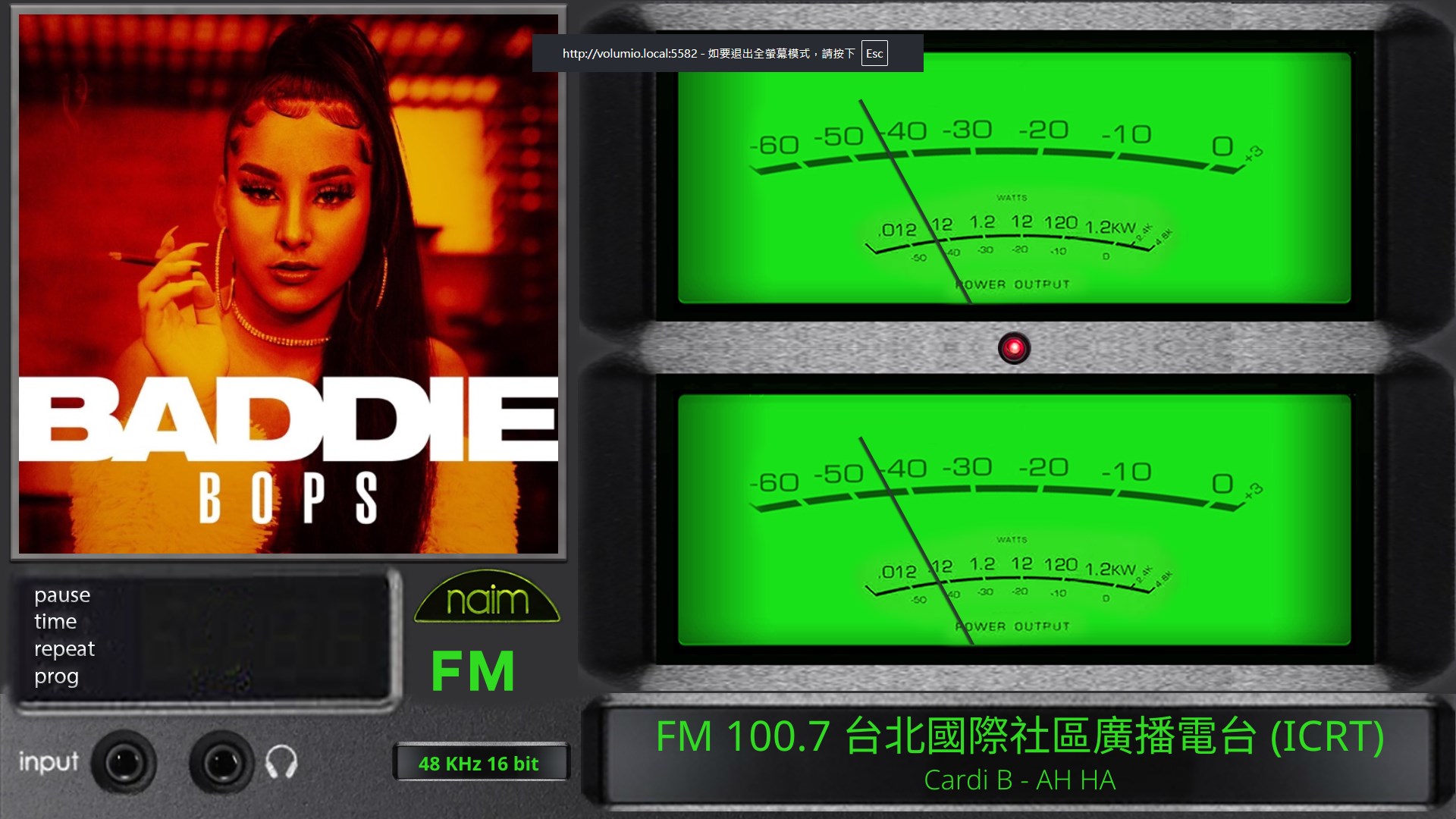
I configured the AudD API token, and the plugin successfully captured and recognized the currently playing song (Cardi B - AH HA) purely from the audio stream!
The artist name, track title, and album artwork were all correctly fetched and rendered on the player interface alongside PeppyMeter/FACE display.
Recognition Behavior:
The recognition delay and verification logic (asking twice to confirm) work very smoothly without any noticeable performance impact on playback.
For stations with zero text metadata, this feature fills the gap perfectly.
Thank you again for your constant innovations on this plugin!
Thank you for both reports, and for the first song recognised in Taiwan.
Your sample-rate finding is right, and your log shows it in numbers. FM 106.9 at 171 kHz: reception 18 to 22 dB, two to three dots. At 300 kHz: 16 dB, two dots, with 107.1 in the receiver’s passband. The rate is how wide the receiver listens, half of it either side of the station, so at 300 kHz a strong neighbour 200 kHz away is inside. 171 kHz keeps it out. The wiki says so under Gain, Frequency and Loudness; the setting’s own labels still call 300 kHz “Best Audio”, which invites exactly what you saw. They will be reworded.
The scan that lists one station more or less from run to run at the edge is the air, not the scan: those are the carriers that come and go with your antenna. Nothing to fix there.
1.4.11 is on the Preview channel, a small one that came out of my own testing of 1.4.10:
Song recognition has a switch of its own, on the settings page and in the Station Manager. Off keeps the token, so switching back on needs no pasting. In 1.4.10 the switch on the settings page only unfolded the fields.
The token can be seen: an eye beside the field in the Station Manager, and in clear on the settings page.
The player’s log says in words when recognition asks, instead of a setting’s value.
Here are my test results after using the AudD song recognition feature in v1.4.11 for a full session across several local FM stations:
1. Recognition Accuracy
English & Classical Music: Recognition accuracy is excellent! It reliably identifies tracks and fetches proper cover art.
Mandarin/Chinese Songs: It works well for popular/mainstream Taiwanese and Mandarin tracks, though lesser-known local songs are sometimes missed.
2. Request Consumption & Behavior
Per Song: Each successful song identification takes about 1 to 2 requests (as designed by the double-check verification logic).
Talk Shows / Speech: On talk shows or spoken-word segments with no background music, the plugin still submits requests to AudD, which consumes account credits without returning a result.
Usage Rate: In an hour of listening while switching through several stations, it used roughly 60 requests.
3. Workflow & Settings Adjustment
Song Recognition Toggle: Since the free tier offers 300 requests, I am keeping the new Song Recognition switch set to OFF by default to conserve credits. Thanks to the updated toggle in 1.4.11, I can easily flip it ON whenever I encounter an unfamiliar track I’d like to identify!
FM Sample Rate Observation: I noticed that for certain weaker stations sitting right next to strong local broadcast signals, even 200 kHz allows some adjacent-channel bleed-through. Dropping the FM Sample Rate down to 171 kHz is the only way to get a completely clean, noise-free signal on those critical marginal frequencies.
4. Technical Question: Automatic FM Gain & Oversampling (at 171 kHz)
I noticed an interesting behavior regarding how Automatic FM Gain interacts with Oversampling when set to 171 kHz:
When FM Sample Rate is 171 kHz and FM Oversampling is ON:
Automatic FM Gain ON causes a lot of noticeable background noise/distortion.
Automatic FM Gain OFF (with Manual FM Gain set to 20) completely removes the noise and makes the audio clean.
However, when FM Oversampling is turned OFF:
Automatic FM Gain ON works normally even at 171 kHz, without generating that heavy background noise.
Is the gain measurement algorithm calculating a much higher gain step than necessary specifically when Oversampling is enabled within the constrained 171 kHz bandwidth?
Thanks again for adding this great feature and making the toggle so convenient to use.
Talk shows. You are right, and it is the plugin’s doing: when nothing is recognised it asks again after a minute and a half, however long the talk goes on. That will back off: the second time after three minutes, then six, until a song is recognised or another station plays. Browsing stations costs one question each, two where a song plays; that part stays, it is how the song reaches you within half a minute.
Mandarin songs that are missed are missing from the service’s catalogue, not from the sound; nothing I can do there.
Oversampling at 171 kHz with automatic gain. The gain is measured on the very slice the receiver reads, which with oversampling is four times wider (2.7 million samples a second), so the step should fit the converter. What you hear says it does not, and I would rather measure than guess. If you can spare a few minutes: 171 kHz, oversampling on, automatic gain, one minute on the station that distorts; then the same with the gain set to 20 by hand; then oversampling off and automatic gain again. One log covering the three. The gain step, the level and the line about the station’s sound reaching full scale will say where the noise comes from.
200 kHz as the everyday rate is a sound choice where strong neighbours sit beside weak stations.
Thank you for the detailed breakdown! I have completed the three-step test as requested to help pinpoint the gain measurement behavior at 171 kHz with oversampling.
Oversampling on, automatic gain: the gain tool read 36.6 of 127 at 48 dB and went to the second-highest step. It noticed the tuner was overloaded and took off 1.6 dB, nowhere near enough. Reception 0 to 9 dB, no dots.
Oversampling on, gain 20 by hand: reception 27.8 dB, three dots.
Oversampling off, automatic gain: 33.8 dB chosen, 46.8 of 127 read, reception 44.9 dB, five dots.
With oversampling the receiver reads the dongle at 2.7 million samples a second with the tuner set 684 kHz above the station, four times the usual offset. At that rate and offset the station sits at the edge of what the tuner passes, so the tool sees less of it, raises the gain to the top, and your strong neighbours overload the tuner. Even at a sane gain by hand, oversampling leaves the station 17 dB worse than without it.
So: leave FM Oversampling off. It dates from before the gain was measured per station, which is what it was meant to help with. Whether the setting stays at all is being decided; what you measured says it should not.
1.4.12 is on the Preview channel, and it retires a setting.
FM Oversampling is gone. It dates from the plugin’s early days, as a remedy for distortion on strong signals. Since the gain is measured per station that job is done elsewhere, and a test by @dewen on an RTL-SDR Blog V4 showed what the setting actually did: it read the dongle at 2.7 million samples a second with the station at the edge of what the tuner passes. The station came in 17 dB weaker than without it, and with automatic gain the measurement was driven to the top step and the tuner overloaded by the strong neighbours. If you had it on, the update switches it off and your FM reception improves.
Also in 1.4.12:
Song recognition asks less and less on talk: a minute and a half, then three minutes, then six, until a song is recognised or another station plays. Talk shows no longer spend your questions.
The FM Sample Rate choices now say what the rate does: how wide the receiver listens. 171 kHz keeps a strong neighbour out, the higher rates give a little more treble and let it in.
Update as before: Station Manager > Maintenance > Plugin Update on the Preview channel.
Features are paused from here. Twelve versions have landed since 1.4.0, and the plugin now does what it was set out to do: FM and DAB that work on any dongle, scanned, named, with artwork, and a Station Manager to keep it in order. What follows is a stabilisation period. Only real bugs will be dealt with: a station that should play and does not, a scan that misses or lists what it should not, a crash, a wrong reading. Please keep reporting those, with a log where you can. Requests for new features are welcome as notes for later, but they will not be built in this period. When the Preview versions have run for a while without reports, the current one becomes the stable release, and the plugin store follows.
I’m glad the log helped pinpoint the root cause! It’s fantastic to see how much cleaner the overall architecture is now with the removal of FM Oversampling.
I have updated to v1.4.12 (Preview) and can confirm that everything runs smoothly. The new back-off logic for song recognition during talk shows works like a charm and will definitely save a lot of requests.
Thank you for your incredible effort and dedication throughout these 12 preview releases. The plugin has reached an amazingly polished state!
1.4.12 has been submitted to the plugin store for community testing, and it is the stable release on GitHub. A week on the Preview channel brought no reports. Everything since 1.4.0 is in it: the FM scan that finds weak and adjacent stations, the tune dialog, de-emphasis by region, the MONO mark, the Dongle Report, playlists that follow a moved station, and song recognition with a key of your own. The wiki’s changelog has every version.
Features stay paused. Bug reports, with a log where you can, remain welcome here.