No output on USB-C DisplayPort (HDMI is used for audio out only)

I have a PC with HDMI + USB-C Display Port and when I connect an external LCD monitor via USB-C I am not getting any video on the screen (no signal detected). The HDMI is feeding my AV Processor for audio.

On the same PC when I had Windows 10 installed, I did get video output, with the exact same setup. The only difference is Volumio OS instead of Windows 10.

I would like to use HDMI for audio only and use USB-C for display. Is this possible?

Hey @KCAudio,

Thanks for writing in.

Before anyone can investigate this, community members need some specific details. The fact that Windows 10 drove the USB-C display output on the same hardware is a good sign - it confirms the physical path works. But we need to understand exactly what hardware and software we are dealing with.

Please provide the following:

  1. Exact PC make and model (or motherboard model if it is a custom build).

  2. GPU - is this integrated graphics (Intel, AMD APU) or a discrete card? If discrete, which one?

  3. The USB-C port - is it built into the motherboard/GPU, or are you going through an adapter or docking station? This matters because USB-C can carry a video signal in two very different ways, and the driver requirements are completely different depending on which method your hardware uses.

  4. What monitor are you connecting via USB-C? Make and model.

  5. Exact Volumio version number - the actual number shown in the UI, not “latest”.

  6. A log link - go to http://volumio.local/dev (or use your device’s IP address instead of volumio.local), click “Send”, and paste the URL it gives you.

One important note: USB-C carrying a display signal can mean two entirely different things at the hardware level. If your PC’s GPU natively outputs DisplayPort through the USB-C connector (called DP Alt Mode), that is a standard GPU output and should be supportable. If instead the USB-C port uses a separate USB-to-display chipset (DisplayLink), that is a completely different situation requiring specialist drivers that Volumio does not ship. The PC model will tell us which one we are dealing with.

Without this information, any troubleshooting would be guesswork.

Kind Regards,

Thanks for your response.

It is the same device running Windows 10 before and now Volumio.

Specs
https://store.acer.com/en-us/chromebox-cxi3-desktop-cxi3-i38gkm
(Intel i3 with integrated GPU, everything on 1 motherboard, compact chassis)

Monitor:
https://www.corsair.com/us/en/p/monitors/cc-9011306-ww/xeneon-edge-14-5-lcd-touchscreen-cc-9011306-ww

Unfortunately I am sending away the monitor back because I want a different aspect ratio. If I find a cheaper USB-C display, I will get it otherwise I might get an HDMI display OR even just use my iPAD for my needs. My plugin has a different screen on a different http port negating the need to connect the monitor to the device.

But if you can tell whether the Acer box is good for linux USB-C display drivers, that would be great.

@nerd It also looks like HW (GPU) based acceleration is disabled for some reason even though I installed intel drivers via command line. The PC has Intel HD 620 which is more than capable of rendering canvas animations on Chromium but when I run spectrometer on the 1920X1080 resolution, it’s too slow. if I zoom in to make the Chrome view smaller, it starts moving fast. I can attach the Chrome GPU report if you can help.

Hey @KCAudio,

I have investigated this from the kernel side. Your Acer Chromebox CXI3 has an Intel i3-8130U (Kaby Lake Refresh) with Intel UHD 620 integrated graphics. The USB-C port on this device carries DisplayPort over USB-C (DP Alt Mode) - a native GPU output routed through the USB-C connector.

I have inspected the Volumio x86 kernel defconfig directly. Here is the definitive picture.

Present in the kernel (compiled as modules):

CONFIG_TYPEC=m
CONFIG_TYPEC_UCSI=m
CONFIG_UCSI_ACPI=m
CONFIG_TYPEC_DP_ALTMODE=m
CONFIG_USB_ROLES_INTEL_XHCI=m
CONFIG_DRM_I915=m

The generic USB Type-C stack including UCSI (USB Type-C Connector System Software Interface) and the DisplayPort Alt Mode driver are compiled in. The Intel i915 GPU driver is also present.

Missing from the kernel:

CONFIG_CHROME_PLATFORMS (entire subtree - no Chrome hardware support at all)
CONFIG_CROS_EC / CONFIG_CROS_EC_LPC / CONFIG_CROS_EC_TYPEC
CONFIG_TYPEC_MUX_INTEL_PMC
CONFIG_INTEL_SCU_IPC
CONFIG_USB_ROLE_SWITCH

The Chrome OS Embedded Controller driver chain is completely absent. This is expected - Volumio does not target Chromebook or Chromebox hardware.

More importantly, CONFIG_TYPEC_MUX_INTEL_PMC is missing. This is the driver that handles the physical multiplexer/demultiplexer switching on Intel platforms - it tells the hardware to route the USB-C connector pins to DisplayPort signals instead of USB data. Without it, even if UCSI negotiates DP Alt Mode successfully, the physical pin routing may never happen. Its dependency CONFIG_INTEL_SCU_IPC is also absent.

CONFIG_USB_ROLE_SWITCH is not explicitly enabled either. UCSI has a soft dependency on it (depends on USB_ROLE_SWITCH || !USB_ROLE_SWITCH), meaning it will compile without it, but role switching functionality will be limited.

What this means:

Your Chromebox originally ran Chrome OS, where the Embedded Controller firmware managed USB-C negotiation natively. Since you have replacement UEFI firmware installed (required for Windows/Volumio to boot), DP Alt Mode management depends on either:

a) The replacement firmware handling it autonomously - no OS involvement needed.

b) UCSI exposed via ACPI - the kernel has the ucsi_acpi module for this.

c) The Intel PMC mux driver routing the physical pins - this is NOT in the kernel.

Windows 10 worked because Intel ships a proprietary Type-C controller driver package that handles all of this. On Volumio, we are relying on the kernel’s generic Type-C stack, and a key piece (the PMC mux driver) is missing.

What you can check if you get another USB-C display:

dmesg | grep -iE "ucsi|typec|type.c|i915|display|pmc"
lsmod | grep -E "ucsi|typec|i915"
ls /sys/bus/typec/ 2>/dev/null
ls /sys/class/drm/

If ucsi_acpi loads and /sys/bus/typec/ shows connector entries, the UCSI path is active and negotiation may be happening but the physical mux is not switching. If nothing loads at all, the firmware is not exposing UCSI to the OS.

Either way, adding CONFIG_TYPEC_MUX_INTEL_PMC (and its dependency CONFIG_INTEL_SCU_IPC) to the x86 kernel defconfig would be the correct fix for Intel-based systems with USB-C DP Alt Mode. This would benefit not just Chromeboxes but any Intel mini PC or NUC with USB-C display output. This is a conversation for @gkkpch - it is a kernel config change, not something you can work around at the user level.

I will note that you mentioned the monitor has been returned, so testing is not possible right now. If you do get another USB-C display, the diagnostic commands above will confirm exactly where the chain breaks.

Kind Regards,
Hey @KCAudio,

Separate topic - the GPU acceleration issue.

CONFIG_DRM_I915=m is present in the kernel, so the Intel UHD 620 has driver support. The behaviour you describe - spectrometer animation runs slowly at full resolution but speeds up when you zoom in to reduce the rendered area - is a textbook symptom of Chromium falling back to software rendering. When the GPU is doing the compositing, resolution has minimal impact on frame rate. When the CPU is doing it, every pixel counts.

This is almost certainly not a kernel driver problem. It is a Chromium launch configuration issue.

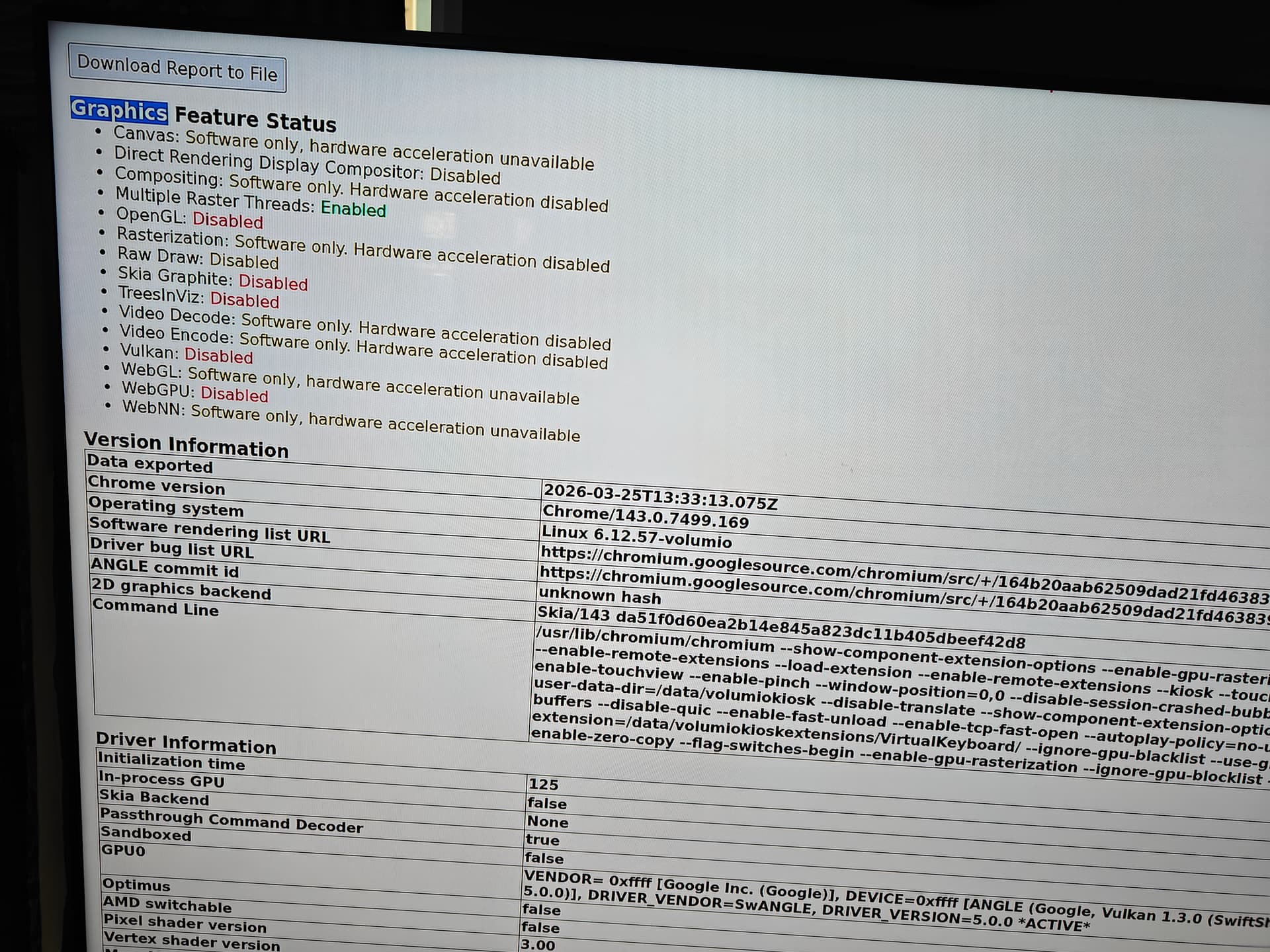
Please share the chrome://gpu report you mentioned. That will show immediately whether hardware acceleration is active, whether WebGL is enabled, whether canvas 2D acceleration is working, and what is blocking GPU compositing if anything is.

In the meantime, the most common causes on Volumio x86 kiosk setups:

  • Chromium launched without --ignore-gpu-blocklist (Intel UHD 620 may be on Chromium’s internal blocklist)
  • Missing or incorrect --enable-gpu related flags
  • Chromium explicitly launched with --disable-gpu somewhere in the kiosk startup
  • Missing i915 firmware blobs in /lib/firmware/i915/
  • Missing mesa or EGL/GLX userland libraries

If you can also run these alongside the chrome://gpu report:

ls /lib/firmware/i915/ | head -20
glxinfo 2>&1 | grep -i "direct rendering"
cat /etc/chromium-flags.conf 2>/dev/null
ps aux | grep chromium

The last two will show what flags Chromium is actually launched with. The kiosk launch configuration lives somewhere in the Volumio backend or the x86 kiosk settings - if the flags are wrong, that is where the fix goes.

Kind Regards,

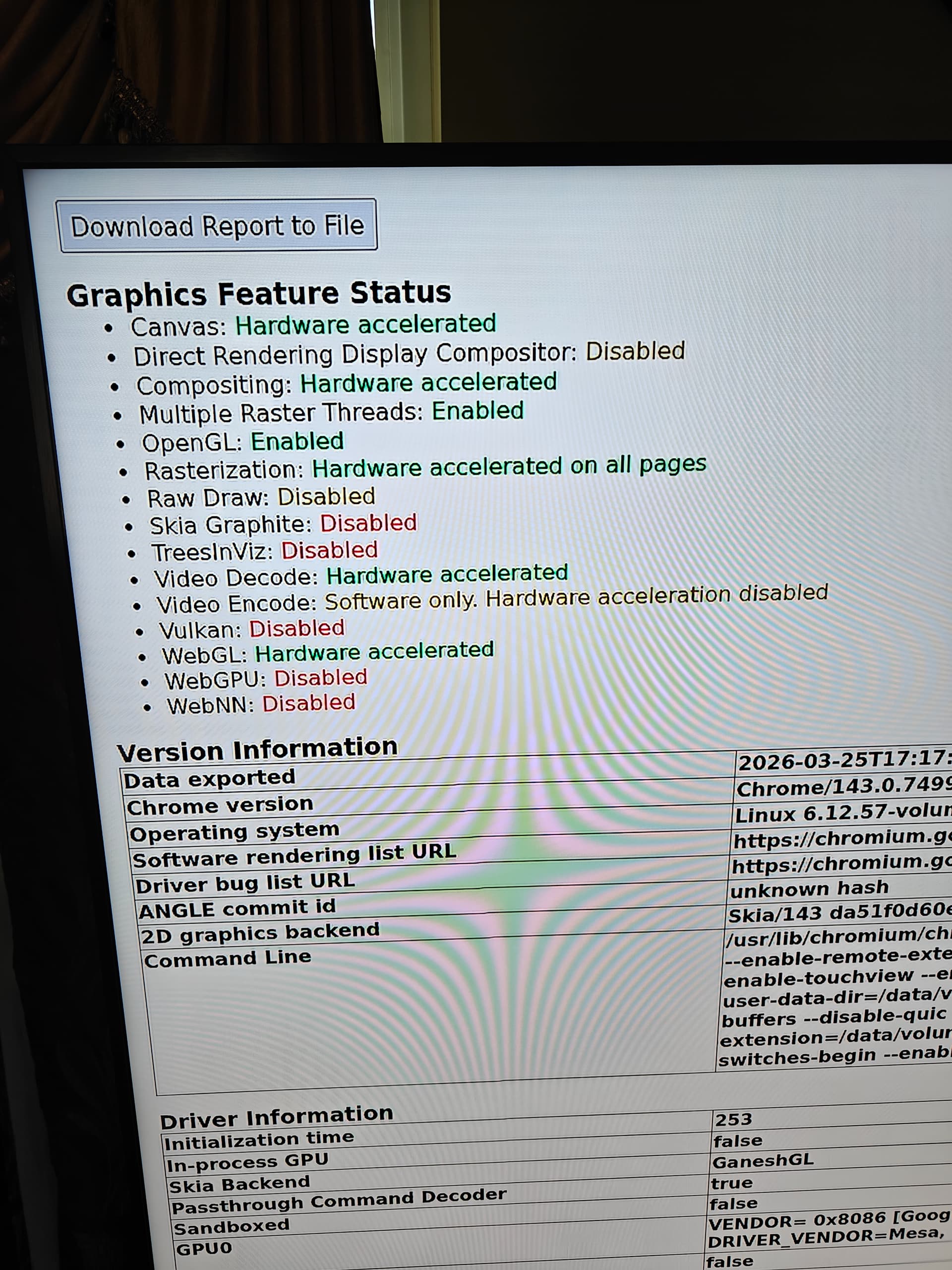
Appreciate the response. I couldn’t find the downloaded report file on the command line. Do you know where the location would be? (attached a screenshot instead)

Also the output of your command above:

adlp_dmc.bin
adlp_dmc_ver2_09.bin
adlp_dmc_ver2_10.bin
adlp_dmc_ver2_12.bin
adlp_dmc_ver2_14.bin
adlp_dmc_ver2_16.bin
adlp_guc_62.0.3.bin
adlp_guc_69.0.3.bin
adlp_guc_70.1.1.bin
adlp_guc_70.bin
adls_dmc_ver2_01.bin
bmg_dmc.bin
bxt_dmc_ver1_07.bin
bxt_dmc_ver1.bin
bxt_guc_32.0.3.bin
bxt_guc_33.0.0.bin
bxt_guc_49.0.1.bin
bxt_guc_62.0.0.bin
bxt_guc_69.0.3.bin
bxt_guc_70.1.1.bin
root        8785  0.0  3.5 51190272 282164 ?     S<l  Mar24   0:30 /usr/lib/chromium/chromium --show-component-extension-options --enable-gpu-rasterization --no-default-browser-check --disable-pings --media-router=0 --enable-remote-extensions --load-extension= --enable-remote-extensions http://localhost:3000 --kiosk --touch-events --disable-touch-drag-drop --disable-overlay-scrollbar --enable-touchview --enable-pinch --window-position=0,0 --disable-session-crashed-bubble --disable-infobars --disable-sync --no-first-run --no-sandbox --user-data-dir=/data/volumiokiosk --disable-translate --show-component-extension-options --disable-background-networking --enable-native-gpu-memory-buffers --disable-quic --enable-fast-unload --enable-tcp-fast-open --autoplay-policy=no-user-gesture-required --load-extension=/data/volumiokioskextensions/VirtualKeyboard/ --ignore-gpu-blacklist --use-gl=desktop --disable-gpu-compositing --force-gpu-rasterization --enable-zero-copy
root        8803  0.0  0.0 50346588 4120 ?       Sl   Mar24   0:00 /usr/lib/chromium/chrome_crashpad_handler --monitor-self --monitor-self-annotation=ptype=crashpad-handler --database=/root/.config/chromium/Crash Reports --annotation=channel=built on Debian GNU/Linux 12 (bookworm) --annotation=lsb-release=Debian GNU/Linux 12 (bookworm) --annotation=plat=Linux --annotation=prod=Chrome_Linux --annotation=ver=143.0.7499.169 --initial-client-fd=5 --shared-client-connection
root        8805  0.0  0.0 50338376 3996 ?       S    Mar24   0:00 /usr/lib/chromium/chrome_crashpad_handler --no-periodic-tasks --monitor-self-annotation=ptype=crashpad-handler --database=/root/.config/chromium/Crash Reports --annotation=channel=built on Debian GNU/Linux 12 (bookworm) --annotation=lsb-release=Debian GNU/Linux 12 (bookworm) --annotation=plat=Linux --annotation=prod=Chrome_Linux --annotation=ver=143.0.7499.169 --initial-client-fd=4 --shared-client-connection
root        8808  0.0  0.8 50762388 67708 ?      S    Mar24   0:00 /usr/lib/chromium/chromium --type=zygote --no-zygote-sandbox --no-sandbox --crashpad-handler-pid=8803 --enable-crash-reporter=,built on Debian GNU/Linux 12 (bookworm) --user-data-dir=/data/volumiokiosk --change-stack-guard-on-fork=enable
root        8809  0.0  0.8 50762392 67772 ?      S    Mar24   0:00 /usr/lib/chromium/chromium --type=zygote --no-sandbox --crashpad-handler-pid=8803 --enable-crash-reporter=,built on Debian GNU/Linux 12 (bookworm) --user-data-dir=/data/volumiokiosk --change-stack-guard-on-fork=enable
root        8853  0.0  1.2 50766796 103544 ?     Sl   Mar24   0:09 /usr/lib/chromium/chromium --type=utility --utility-sub-type=network.mojom.NetworkService --lang=en-US --service-sandbox-type=none --no-sandbox --use-gl=desktop --disable-quic --crashpad-handler-pid=8803 --enable-crash-reporter=,built on Debian GNU/Linux 12 (bookworm) --user-data-dir=/data/volumiokiosk --change-stack-guard-on-fork=enable --shared-files=v8_context_snapshot_data:100 --metrics-shmem-handle=4,i,13178799376546350029,16709853279437068823,524288 --field-trial-handle=3,i,10551711160835756234,16275789363165578087,262144 --variations-seed-version --trace-process-track-uuid=3190708989122997041
root        8861  0.0  0.6 50829008 48936 ?      Sl   Mar24   0:01 /usr/lib/chromium/chromium --type=utility --utility-sub-type=storage.mojom.StorageService --lang=en-US --service-sandbox-type=utility --no-sandbox --use-gl=desktop --disable-quic --crashpad-handler-pid=8803 --enable-crash-reporter=,built on Debian GNU/Linux 12 (bookworm) --user-data-dir=/data/volumiokiosk --change-stack-guard-on-fork=enable --shared-files=v8_context_snapshot_data:100 --metrics-shmem-handle=4,i,15449910076654444155,13584714043592512018,524288 --field-trial-handle=3,i,10551711160835756234,16275789363165578087,262144 --variations-seed-version --trace-process-track-uuid=3190708990060038890
root        8922  0.1  2.0 51158476 161208 ?     S<l  Mar24   1:21 /usr/lib/chromium/chromium --type=gpu-process --no-sandbox --enable-gpu-rasterization --ozone-platform=x11 --enable-native-gpu-memory-buffers --crashpad-handler-pid=8803 --enable-crash-reporter=,built on Debian GNU/Linux 12 (bookworm) --user-data-dir=/data/volumiokiosk --disable-breakpad --change-stack-guard-on-fork=enable --gpu-preferences=UAAAAAAAAAAgAAAMAAAAAAAAAAAAAGAAAAAAAAAAAAAAAAAAAAAAAIAAAAAAAAAAAAAAAAAAAAAYAAAAAAAAABgAAAAAAAAAAQAAAAAAAAAIAAAAAAAAAAgAAAAAAAAA --use-gl=angle --use-angle=swiftshader-webgl --shared-files --metrics-shmem-handle=4,i,7808134618185286798,16812117015171011418,262144 --field-trial-handle=3,i,10551711160835756234,16275789363165578087,262144 --variations-seed-version --trace-process-track-uuid=3190708994745248135
root      152789  0.0  0.9 50749304 79176 ?      Sl   08:36   0:00 /usr/lib/chromium/chromium --type=utility --utility-sub-type=audio.mojom.AudioService --lang=en-US --service-sandbox-type=none --no-sandbox --use-gl=desktop --disable-quic --crashpad-handler-pid=8803 --enable-crash-reporter=,built on Debian GNU/Linux 12 (bookworm) --user-data-dir=/data/volumiokiosk --change-stack-guard-on-fork=enable --shared-files=v8_context_snapshot_data:100 --metrics-shmem-handle=4,i,14037182245328896765,9404113568800850903,524288 --field-trial-handle=3,i,10551711160835756234,16275789363165578087,262144 --variations-seed-version --trace-process-track-uuid=3190709036912131340
root      153421  0.8  2.5 1459767580 203936 ?   Sl   08:38   0:06 /usr/lib/chromium/chromium --type=renderer --crashpad-handler-pid=8803 --enable-crash-reporter=,built on Debian GNU/Linux 12 (bookworm) --user-data-dir=/data/volumiokiosk --change-stack-guard-on-fork=enable --no-sandbox --autoplay-policy=no-user-gesture-required --touch-events --ozone-platform=x11 --disable-gpu-compositing --lang=en-US --num-raster-threads=2 --enable-zero-copy --enable-main-frame-before-activation --renderer-client-id=65 --time-ticks-at-unix-epoch=-1774391052317745 --launch-time-ticks=54875595136 --shared-files=v8_context_snapshot_data:100 --metrics-shmem-handle=4,i,14110695602902463347,13512503593719832747,2097152 --field-trial-handle=3,i,10551711160835756234,16275789363165578087,262144 --variations-seed-version --trace-process-track-uuid=3190709047219591679
root      153460  0.0  0.8 1459732348 70176 ?    S<l  08:38   0:00 /usr/lib/chromium/chromium --type=renderer --crashpad-handler-pid=8803 --enable-crash-reporter=,built on Debian GNU/Linux 12 (bookworm) --user-data-dir=/data/volumiokiosk --change-stack-guard-on-fork=enable --no-sandbox --autoplay-policy=no-user-gesture-required --touch-events --ozone-platform=x11 --disable-gpu-compositing --lang=en-US --num-raster-threads=2 --enable-zero-copy --enable-main-frame-before-activation --renderer-client-id=67 --time-ticks-at-unix-epoch=-1774391052317745 --launch-time-ticks=54878558625 --shared-files=v8_context_snapshot_data:100 --metrics-shmem-handle=4,i,2839497359290381466,11742051427189136860,2097152 --field-trial-handle=3,i,10551711160835756234,16275789363165578087,262144 --variations-seed-version --trace-process-track-uuid=3190709049093675377
volumio   155569  0.0  0.0   6340  2196 pts/0    S+   08:50   0:00 grep chromium
![IMG20260325083346|666x500](upload://7STZlFudGB5tXPm8CUCsXEPmtSz.jpeg)

Hey @KCAudio,

The chrome://gpu report and the process list tell the full story. There are two separate problems, both clearly visible.

Problem 1 - Chromium is running on SwiftShader (software GPU)

The GPU process command line in your process list shows:

--use-gl=angle --use-angle=swiftshader-webgl

Despite the kiosk script launching Chromium with --use-gl=desktop, Chromium failed to initialise the real Intel GPU and fell back to Google SwiftShader - a pure CPU-based software renderer. The Driver Information section in your chrome://gpu report confirms this:

GPU: VENDOR=0xffff (Google), DEVICE=0xffff
ANGLE (Google, Vulkan 1.3.0 (SwiftShader 5.0.0))

That is SwiftShader, not your Intel UHD 620. Chromium cannot see your real GPU at all. This is why everything in the Graphics Feature Status section says “Software only, hardware acceleration unavailable” - there is no hardware to accelerate with as far as Chromium is concerned.

Problem 2 - --disable-gpu-compositing is explicitly set

Your kiosk launch script includes --disable-gpu-compositing. This flag explicitly prevents GPU compositing even if hardware were available. It is set in the Volumio kiosk startup script and it needs to be removed. However, removing it alone will not fix the problem if Chromium still cannot see the real GPU.

Additionally, --ignore-gpu-blacklist is a deprecated flag. It was renamed to --ignore-gpu-blocklist in Chromium 91. You are running Chromium 143. The old flag is silently ignored.

What needs to happen:

Before changing any flags, I need to confirm whether the Intel i915 driver is actually loaded and whether the DRI (Direct Rendering Infrastructure) device nodes exist. Please run the following:

lsmod | grep i915
ls -la /dev/dri/
cat /var/log/Xorg.0.log 2>/dev/null | grep -iE "EGL|GLX|DRI|i915|intel" | head -30
dpkg -l | grep -iE "mesa|libgl|libegl"

If i915 is loaded and /dev/dri/card0 and /dev/dri/renderD128 exist, the kernel side is fine and the problem is in Chromium’s userland configuration. If those device nodes are missing, the GPU driver is not initialising and that needs fixing first.

Once we confirm the driver situation, the kiosk flags will need updating. At minimum:

  • Remove --disable-gpu-compositing
  • Replace --ignore-gpu-blacklist with --ignore-gpu-blocklist
  • Potentially adjust --use-gl=desktop to --use-gl=egl depending on the display server

The kiosk launch script lives at /opt/volumiokiosk.sh on the running system. You can inspect it with:

cat /opt/volumiokiosk.sh

Regarding the chrome://gpu report download location - Chromium typically saves downloaded files to ~/Downloads or /root/Downloads when running as root. Hmmm, I have my doubts here.

Kind Regards,

Here’s the response from your last command

i915                 3588096  7
drm_buddy              16384  2 amdgpu,i915
video                  69632  4 amdgpu,radeon,i915,nouveau
drm_display_helper    147456  4 amdgpu,radeon,i915,nouveau
ttm                    73728  5 amdgpu,radeon,drm_ttm_helper,i915,nouveau
cec                    53248  1 i915
drm_kms_helper        167936  6 drm_display_helper,amdgpu,radeon,drm_ttm_helper,i915,nouveau
drm                   548864  19 gpu_sched,drm_kms_helper,drm_exec,drm_gpuvm,drm_suballoc_helper,drm_display_helper,drm_buddy,amdgpu,radeon,drm_ttm_helper,i915,ttm,amdxcp,nouveau
total 0
drwxr-xr-x  3 root root        100 Mar 24 17:24 .
drwxr-xr-x 16 root root       4000 Mar 24 18:04 ..
drwxr-xr-x  2 root root         80 Mar 25 02:11 by-path
crw-rw----  1 root video  226,   0 Mar 25 02:11 card0
crw-rw----  1 root render 226, 128 Mar 24 17:24 renderD128
[  1407.913] 	X.Org Video Driver: 25.2
[  1407.913] 	X.Org XInput driver : 24.4
[  1407.915] (II) xfree86: Adding drm device (/dev/dri/card0)
[  1407.939] (II) LoadModule: "glx"
[  1407.939] (II) Loading /usr/lib/xorg/modules/extensions/libglx.so
[  1407.940] (II) Module glx: vendor="X.Org Foundation"
[  1407.940] (==) Matched modesetting as autoconfigured driver 0
[  1407.940] (==) Matched fbdev as autoconfigured driver 1
[  1407.940] (==) Matched vesa as autoconfigured driver 2
[  1407.940] (==) Assigned the driver to the xf86ConfigLayout
[  1407.940] (II) Loading /usr/lib/xorg/modules/drivers/modesetting_drv.so
[  1407.940] 	Module class: X.Org Video Driver
[  1407.940] 	ABI class: X.Org Video Driver, version 25.2
[  1407.940] (II) Loading /usr/lib/xorg/modules/drivers/fbdev_drv.so
[  1407.940] 	Module class: X.Org Video Driver
[  1407.940] 	ABI class: X.Org Video Driver, version 25.2
[  1407.941] (II) Loading /usr/lib/xorg/modules/drivers/vesa_drv.so
[  1407.941] 	Module class: X.Org Video Driver
[  1407.941] 	ABI class: X.Org Video Driver, version 25.2
[  1407.941] (II) modesetting: Driver for Modesetting Kernel Drivers: kms
[  1407.941] (II) FBDEV: driver for framebuffer: fbdev
[  1407.941] (II) VESA: driver for VESA chipsets: vesa
[  1408.003] (II) modeset(0): using drv /dev/dri/card0
[  1408.003] 	ABI class: X.Org Video Driver, version 25.2
[  1408.003] (II) Loading sub module "glamoregl"
[  1408.003] (II) LoadModule: "glamoregl"
[  1408.003] (II) Loading /usr/lib/xorg/modules/libglamoregl.so
[  1408.006] (II) Module glamoregl: vendor="X.Org Foundation"
[  1408.041] (II) modeset(0): glamor X acceleration enabled on Mesa Intel(R) HD Graphics 620 (KBL GT2)
[  1408.737] (II) modeset(0): [DRI2] Setup complete
ii  glyrc                              1.0.10-1                                amd64        command-line interface to libglyr
ii  libegl-mesa0:amd64                 22.3.6-1+deb12u1                        amd64        free implementation of the EGL API -- Mesa vendor library
ii  libegl1:amd64                      1.6.0-1                                 amd64        Vendor neutral GL dispatch library -- EGL support
ii  libgl-dev:amd64                    1.6.0-1                                 amd64        Vendor neutral GL dispatch library -- GL development files
ii  libgl1:amd64                       1.6.0-1                                 amd64        Vendor neutral GL dispatch library -- legacy GL support
ii  libgl1-mesa-dri:amd64              22.3.6-1+deb12u1                        amd64        free implementation of the OpenGL API -- DRI modules
ii  libgl1-mesa-glx:amd64              22.3.6-1+deb12u1                        amd64        transitional dummy package
ii  libglapi-mesa:amd64                22.3.6-1+deb12u1                        amd64        free implementation of the GL API -- shared library
ii  libgle3:amd64                      3.1.0-10                                amd64        OpenGL tubing and extrusion library
ii  libglib2.0-0:amd64                 2.74.6-2+deb12u8                        amd64        GLib library of C routines
ii  libglu1-mesa:amd64                 9.0.2-1.1                               amd64        Mesa OpenGL utility library (GLU)
ii  libglvnd0:amd64                    1.6.0-1                                 amd64        Vendor neutral GL dispatch library
ii  libglx-dev:amd64                   1.6.0-1                                 amd64        Vendor neutral GL dispatch library -- GLX development files
ii  libglx-mesa0:amd64                 22.3.6-1+deb12u1                        amd64        free implementation of the OpenGL API -- GLX vendor library
ii  libglx0:amd64                      1.6.0-1                                 amd64        Vendor neutral GL dispatch library -- GLX support
ii  libglyr1:amd64                     1.0.10-1                                amd64        search engine for music-related metadata
ii  mesa-common-dev:amd64              22.3.6-1+deb12u1                        amd64        Developer documentation for Mesa
ii  xscreensaver-gl                    6.06+dfsg1-3+deb12u1                    amd64        GL(Mesa) screen saver modules for screensaver frontends
ii  xscreensaver-gl-extra              6.06+dfsg1-3+deb12u1                    amd64        Extra GL(Mesa) screen saver modules for screensaver frontends

Hey @KCAudio,

First - apologies. I took us down a rabbit hole investigating Chromium GPU flags and SwiftShader that had nothing to do with your actual question. That was a waste of your time.

To recap your original question: USB-C display output and HDMI audio-only to your AV processor.

The USB-C display issue is a kernel-level problem as covered in my earlier post - the x86 defconfig is missing CONFIG_TYPEC_MUX_INTEL_PMC and CONFIG_INTEL_SCU_IPC. That is not something you can work around at the user level. It needs a kernel defconfig change.

For the HDMI audio path - audio output and display output are independent on Volumio. You select your audio output device in Volumio’s playback settings. If HDMI is connected to your AV processor, you select the HDMI audio device there and audio goes to your AV processor regardless of what is happening on the display side. If the USB-C display issue were resolved at the kernel level, running HDMI for audio and USB-C for display would work - the two are completely separate subsystems (ALSA for audio, i915/DRM for display).

Kind Regards,

First - apologies. I took us down a rabbit hole investigating Chromium GPU flags and SwiftShader that had nothing to do with your actual question. That was a waste of your time.

This was a separate issue for Chrome rendering webgl/canvas (spectrum analyzer) slowly and not using hardware acceleration. The Chromebox is connected via HDMI to the 4K TV and resolution is set to 1920X1080 already. When loading spectrum analyzer via plugin, it is very slow to render.

The USB-C issue is not that important. But I would like Chromium to use Hardware acceleration. All the command outputs you send me are there. I think we were making good progress, if you can help me with it.

Hey @KCAudio,

No problem - glad we got that cleared up. The GPU acceleration issue is real and worth fixing. We already have all the diagnostics needed.

The good news: your GPU stack is fully functional. The i915 kernel module is loaded, /dev/dri/card0 and renderD128 are present, Xorg reports “glamor X acceleration enabled on Mesa Intel(R) HD Graphics 620 (KBL GT2)”, and the Mesa libraries are all installed. The hardware is ready and working.

The problem is entirely in how Chromium is launched. Three issues in the kiosk flags:

  1. –disable-gpu-compositing is explicitly set in the launch command. This forces all compositing onto the CPU. It must be removed.

  2. –ignore-gpu-blacklist is deprecated and silently ignored since Chromium 91. You are running Chromium 143. Replace it with --ignore-gpu-blocklist.

  3. As a result of the above, Chromium fails to use the real GPU and falls back to SwiftShader (software). Your chrome://gpu report confirms this - the driver shows VENDOR=0xffff (Google) with SwiftShader instead of VENDOR=0x8086 (Intel).

To fix, take a backup of /opt/volumiokiosk.sh then edit the kiosk launch script:

nano /opt/volumiokiosk.sh

In the Chromium command line:

  • Remove --disable-gpu-compositing
  • Replace --ignore-gpu-blacklist with --ignore-gpu-blocklist

Save and restart the kiosk:

systemctl restart volumio-kiosk

Then check chrome://gpu again. You should see Canvas, Compositing, WebGL all reporting “Hardware accelerated” and the driver should show your Intel UHD 620 instead of SwiftShader.

If Chromium still falls back to SwiftShader after those changes, try also changing --use-gl=desktop to --use-gl=egl in the same command line.

Note that changes to /opt/volumiokiosk.sh may not survive an OTA update. The script is generated during the image build process.

Kind Regards,

Thank you for the suggestions. The changes are applied, and I restarted the volumio-kios, but chrome://gpu shows exact the same (disabled)

# Start Openbox
openbox-session &
  /usr/bin/chromium \
    --kiosk \
    --touch-events \
    --disable-touch-drag-drop \
    --disable-overlay-scrollbar \
    --enable-touchview \
    --enable-pinch \
    --window-position=0,0 \
    --disable-session-crashed-bubble \
    --disable-infobars \
    --disable-sync \
    --no-first-run \
    --no-sandbox \
    --user-data-dir='/data/volumiokiosk' \
    --disable-translate \
    --show-component-extension-options \
    --disable-background-networking \
    --enable-remote-extensions \
    --enable-native-gpu-memory-buffers \
    --disable-quic \
    --enable-fast-unload \
    --enable-tcp-fast-open \
    --autoplay-policy=no-user-gesture-required \
    --load-extension='/data/volumiokioskextensions/VirtualKeyboard/' \
    --ignore-gpu-blacklist \
    --use-gl=egl \
    --force-gpu-rasterization \
    --enable-zero-copy \
    --ignore-gpu-blocklist \
    http://localhost:3000

Here are the changes. There was no --ignore-gpu-blacklist so I added --ignore-gpu-blocklist

I also want to clarify that the CPU is older gen i3-7130U (Kaby Lake) not sure if it makes a difference.

Hey @KCAudio,

The changes look correct. To understand why chrome://gpu still shows the same result, I need the Chromium startup log from your system. The kiosk script writes all output to /var/log/volumiokiosk.log. Please run:

cat /var/log/volumiokiosk.log | grep -iE "gpu|gl|egl|angle|swift|render|error" | head -40

This log is in tmpfs and will be lost on reboot, so grab it while the system is running.

One thing I noticed - --ignore-gpu-blacklist is still in your script on the line above --use-gl=egl. You mentioned there was none, but it is there. Not harmful, just noting it.

Kind Regards,

Sorry my bad, I removed that --ignore-gpu-blacklist line

Here’s the log output…

ERROR: openbox-xdg-autostart requires PyXDG to be installed
[174781:174829:0325/102722.116888:ERROR:dbus/bus.cc:406] Failed to connect to the bus: Could not parse server address: Unknown address type (examples of valid types are "tcp" and on UNIX "unix")
[174781:174829:0325/102722.119993:ERROR:dbus/bus.cc:406] Failed to connect to the bus: Could not parse server address: Unknown address type (examples of valid types are "tcp" and on UNIX "unix")
[174848:174848:0325/102722.130560:ERROR:ui/gl/init/gl_factory.cc:102] Requested GL implementation (gl=egl-gles2,angle=none) not found in allowed implementations: [(gl=egl-angle,angle=default)].
[174848:174848:0325/102722.132240:ERROR:components/viz/service/main/viz_main_impl.cc:189] Exiting GPU process due to errors during initialization
[174781:174829:0325/102722.154416:ERROR:dbus/bus.cc:406] Failed to connect to the bus: Could not parse server address: Unknown address type (examples of valid types are "tcp" and on UNIX "unix")
[174781:174829:0325/102722.189882:ERROR:dbus/bus.cc:406] Failed to connect to the bus: Could not parse server address: Unknown address type (examples of valid types are "tcp" and on UNIX "unix")
[174781:174829:0325/102722.208127:ERROR:dbus/bus.cc:406] Failed to connect to the bus: Could not parse server address: Unknown address type (examples of valid types are "tcp" and on UNIX "unix")
[174781:174829:0325/102722.208175:ERROR:dbus/bus.cc:406] Failed to connect to the bus: Could not parse server address: Unknown address type (examples of valid types are "tcp" and on UNIX "unix")
[174781:174781:0325/102722.276441:ERROR:dbus/object_proxy.cc:573] Failed to call method: org.freedesktop.DBus.NameHasOwner: object_path= /org/freedesktop/DBus: unknown error type:
[174781:174829:0325/102722.276863:ERROR:dbus/bus.cc:406] Failed to connect to the bus: Could not parse server address: Unknown address type (examples of valid types are "tcp" and on UNIX "unix")
[174781:174781:0325/102722.276895:ERROR:dbus/object_proxy.cc:573] Failed to call method: org.freedesktop.DBus.NameHasOwner: object_path= /org/freedesktop/DBus: unknown error type:
[174781:174829:0325/102722.276897:ERROR:dbus/bus.cc:406] Failed to connect to the bus: Could not parse server address: Unknown address type (examples of valid types are "tcp" and on UNIX "unix")
[174781:174829:0325/102722.276917:ERROR:dbus/bus.cc:406] Failed to connect to the bus: Could not parse server address: Unknown address type (examples of valid types are "tcp" and on UNIX "unix")
[174781:174829:0325/102722.276935:ERROR:dbus/bus.cc:406] Failed to connect to the bus: Could not parse server address: Unknown address type (examples of valid types are "tcp" and on UNIX "unix")
[174781:174829:0325/102722.279870:ERROR:dbus/bus.cc:406] Failed to connect to the bus: Could not parse server address: Unknown address type (examples of valid types are "tcp" and on UNIX "unix")
[174781:174781:0325/102722.284543:ERROR:dbus/object_proxy.cc:573] Failed to call method: org.freedesktop.DBus.NameHasOwner: object_path= /org/freedesktop/DBus: unknown error type:
[174781:174781:0325/102722.298477:ERROR:dbus/object_proxy.cc:573] Failed to call method: org.freedesktop.DBus.NameHasOwner: object_path= /org/freedesktop/DBus: unknown error type:
[174781:174829:0325/102722.298984:ERROR:dbus/bus.cc:406] Failed to connect to the bus: Could not parse server address: Unknown address type (examples of valid types are "tcp" and on UNIX "unix")
[174900:174900:0325/102722.304386:ERROR:ui/gl/init/gl_factory.cc:102] Requested GL implementation (gl=egl-gles2,angle=none) not found in allowed implementations: [(gl=egl-angle,angle=default)].
[174781:174781:0325/102722.305589:ERROR:dbus/object_proxy.cc:573] Failed to call method: org.freedesktop.DBus.NameHasOwner: object_path= /org/freedesktop/DBus: unknown error type:
[174781:174781:0325/102722.305909:ERROR:dbus/object_proxy.cc:573] Failed to call method: org.freedesktop.DBus.NameHasOwner: object_path= /org/freedesktop/DBus: unknown error type:
[174900:174900:0325/102722.308875:ERROR:components/viz/service/main/viz_main_impl.cc:189] Exiting GPU process due to errors during initialization
[174781:174781:0325/102722.321851:ERROR:dbus/object_proxy.cc:573] Failed to call method: org.freedesktop.DBus.NameHasOwner: object_path= /org/freedesktop/DBus: unknown error type:
[174781:174829:0325/102722.322149:ERROR:dbus/bus.cc:406] Failed to connect to the bus: Could not parse server address: Unknown address type (examples of valid types are "tcp" and on UNIX "unix")
[174781:174781:0325/102722.326793:ERROR:dbus/object_proxy.cc:573] Failed to call method: org.freedesktop.DBus.Properties.GetAll: object_path= /org/freedesktop/UPower/devices/DisplayDevice: org.freedesktop.DBus.Error.ServiceUnknown: The name org.freedesktop.UPower was not provided by any .service files
[174781:174781:0325/102722.337106:ERROR:dbus/object_proxy.cc:573] Failed to call method: org.freedesktop.DBus.NameHasOwner: object_path= /org/freedesktop/DBus: unknown error type:
[174781:174829:0325/102722.337433:ERROR:dbus/bus.cc:406] Failed to connect to the bus: Could not parse server address: Unknown address type (examples of valid types are "tcp" and on UNIX "unix")
[174781:174781:0325/102722.347372:ERROR:dbus/object_proxy.cc:573] Failed to call method: org.freedesktop.DBus.NameHasOwner: object_path= /org/freedesktop/DBus: unknown error type:
[174781:174829:0325/102722.347466:ERROR:dbus/bus.cc:406] Failed to connect to the bus: Could not parse server address: Unknown address type (examples of valid types are "tcp" and on UNIX "unix")
[174781:174781:0325/102722.359241:ERROR:dbus/object_proxy.cc:573] Failed to call method: org.freedesktop.DBus.NameHasOwner: object_path= /org/freedesktop/DBus: unknown error type:
[174910:174910:0325/102722.382581:ERROR:ui/gl/init/gl_factory.cc:102] Requested GL implementation (gl=egl-gles2,angle=none) not found in allowed implementations: [(gl=egl-angle,angle=default)].
[174910:174910:0325/102722.398143:ERROR:components/viz/service/main/viz_main_impl.cc:189] Exiting GPU process due to errors during initialization
[174883:174897:0325/102722.567070:ERROR:gpu/ipc/client/command_buffer_proxy_impl.cc:122] ContextResult::kTransientFailure: Failed to send GpuControl.CreateCommandBuffer.
[174781:174832:0325/102727.331323:ERROR:google_apis/gcm/engine/registration_request.cc:292] Registration response error message: DEPRECATED_ENDPOINT
[174781:174832:0325/102753.430518:ERROR:google_apis/gcm/engine/registration_request.cc:292] Registration response error message: DEPRECATED_ENDPOINT
Warning: vkCreateInstance failed with VK_ERROR_INCOMPATIBLE_DRIVER
    at CheckVkSuccessImpl (../../third_party/dawn/src/dawn/native/vulkan/VulkanError.cpp:106)
[174927:174927:0325/102757.987403:ERROR:ui/gl/egl_util.cc:92] EGL Driver message (Error) eglCreateContext: Requested version is not supported
Warning: eglCreateContext failed with EGL_BAD_ATTRIBUTE

Hey @KCAudio,

Thanks for the log. The key line:

Requested GL implementation (gl=egl-gles2,angle=none) not found in allowed implementations: [(gl=egl-angle,angle=default)].

The --use-gl=egl I suggested was wrong. On Chromium 143 it maps to egl-gles2 which is also rejected. The only backend Chromium 143 accepts is egl-angle.

In /opt/volumiokiosk.sh, find:

--use-gl=egl \

Replace with:

--use-gl=angle \

Then restart the kiosk:

sudo systemctl restart volumio-kiosk

Check chrome://gpu after restart.

Kind Regards,

Yes!!! Success!! You are the best :slight_smile: :ok_hand:
The Visualization is noticeably faster. Is there anyway to allocate more memory to make it more faster? I have 5GB unused. Thanks for your help so far.

Hey @KCAudio,

Good to see it working. Canvas, Compositing, Rasterization, Video Decode, and WebGL all on hardware now.

Regarding memory - the Intel UHD 620 is integrated graphics sharing system RAM. GPU memory allocation is controlled by the BIOS, not the OS. Check your Chromebox BIOS settings for a “DVMT Pre-Allocated” or “GPU Memory” option - increasing it from the default (usually 64MB or 128MB) to 256MB or higher would give the GPU more dedicated allocation. The GPU can also dynamically use system RAM beyond the pre-allocated amount, which is what it is already doing.

On the Chromium side, you already have --enable-native-gpu-memory-buffers and --enable-zero-copy in your flags, which are the relevant memory optimisation flags.

If the visualiser is still not as smooth as you want, share what frame rates you are seeing and at what resolution - there may be other optimisations to look at.

Kind Regards,

Thanks. I am getting 30fps spot on which leads me to think its either due to my 4K TV connected via HDMI limited to 30fps (even though I set resolution like this in the volumiokiosk.sh as

xrandr -s 1920x1080_60

Will try in other devices later.

PS: xrandr output shows

Screen 0: minimum 320 x 200, current 1920 x 1080, maximum 16384 x 16384
HDMI-1 connected primary 1920x1080+0+0 (normal left inverted right x axis y axis) 1660mm x 934mm
   3840x2160     30.00 +  25.00    24.00    29.97    23.98  
   4096x2160     24.00    23.98  
   1920x1080     60.00*   50.00    59.94    30.00    24.00    29.97    23.98  
   1920x1080i    60.00    50.00    59.94  
   1680x1050     59.88  
   1600x900      60.00  
   1280x1024     60.02  
   1152x864      75.00  
   1280x720      60.00    50.00    30.00    59.94    29.97    24.00    23.98  
   1024x768      60.00  
   800x600       60.32  
   720x576       50.00  
   720x576i      50.00  
   720x480       60.00    59.94  
   720x480i      60.00    59.94  
   640x480       60.00    59.94  
DP-1 disconnected (normal left inverted right x axis y axis)
HDMI-2 disconnected (normal left inverted right x axis y axis)
DP-2 disconnected (normal left inverted right x axis y axis)
HDMI-3 disconnected (normal left inverted right x axis y axis)