Help needed with 6.9" 280x1424 bar display settings

Hello,

Just started on a new Volumio DIY streamer project.
Since it will be build in a very slim 19" case, the display needed to be very narrow.
I have found and ordered a 6.9" 280x1424 MIPI display with an HDMI interface board to connect it to a Rpi4 model B.

https://nl.aliexpress.com/item/1005011535005606.html?spm=a2g0o.order_list.order_list_main.52.14cf79d25ivG2K&gatewayAdapt=glo2nld

After much trial and error and searching the net, I managed to get it working with Volumio with the following settings in volumioconfig.txt

hdmi_group=2
hdmi_mode=87
hdmi_cvt=600 1424 60 6 0 0 0
hdmi_force_hotplug=1
hdmi_ignore_edid=0xa5000080
display_rotate=3
display_hdmi_rotate=3

It now shows the top half of the images. I could place alle important stuff on this top half of the screen so the display shows it.
There is still a problem on both sides. There are black bars left and right. So the image shown would be approx.1280 pixels in stead of the 1424.

Is there anyone who has more experience with these displays and can share the proper settings?

Picture of the black bars left and right. Peppy meter is not yet configured. It is just setup so I have a 1424x280 image to test.

If your screen is 1424x280, I am sure the 600 is a bit to much.
Would try:
hdmi_cvt=280 1424 60 6 0 0 0

Hello Wheaten,

I tried the 280 1424 settings first. With none of these settings in any combination, an image appeared on the display, only a few vertical stripes. When I changed to 600 pixels I started to get an image.
It appears the HDMI interface that converts the signal to MIPI has to be set to 600 pixels. This according some info I found on a website of another seller of this display. Unfortunately, no further info.

Last brain fart:

hdmi_cvt=1424 280 60 6 0 0 0

I had the same idea. Unfortunately this does not give an image. All combinations with 280 and 1424 have been tried.

Do you know if the overscan commands can help with the black bars on the sides.

Finally used :

hdmi_group=2
hdmi_mode=87
hdmi_cvt=600 1424 60 0 0 0 0
hdmi_force_hotplug=1
hdmi_ignore_edid=0xa5000080
display_rotate=3
display_hdmi_rotate=3

It now shows an image of 280 x 1280 pixels.
With Now Playing plugin you can place all important info on the top 280 pixels of the screen.

When somebody get this screen to work in the full 1424 resolution, please let me know!

Hey @z8man,

A few points before any further timing tuning.

Configuration location. Custom HDMI parameters must live in /boot/userconfig.txt, not /boot/volumioconfig.txt. volumioconfig.txt is system-managed and gets overwritten on the next Volumio update, taking your working settings with it. Move what you have working into userconfig.txt now.

What is confirmed about the hardware:

  • The panel itself is a MIPI DSI 4-lane device with native resolution 280 x 1424, driven by JD9365DA-H3, active area 33.6 x 170.88 mm. That matches the 40-pin pinout you posted (D0/D1/D2/D3 differential pairs plus CLK) and matches the published specs of equivalent panels from buydisplay (ER-TFT069-1) and other manufacturers.
  • The 412 x 1280 figure visible on the mechanical drawing does not reconcile with the active-area dimensions. Pixel pitches do not agree (8.33 px/mm for 280 x 1424 across both axes versus 12.26 px/mm horizontal and 7.49 px/mm vertical for 412 x 1280). Treat the 412 x 1280 annotation as a generic drawing label, not the panel resolution.
  • Your Pi 4 is not driving the panel directly. An HDMI-to-MIPI bridge board sits between the Pi and the panel. The bridge is what consumes the HDMI timing and produces MIPI DSI for the panel.

The 144-pixel deficit you are seeing (1280 visible instead of 1424) is happening inside the bridge, not in the Pi or the panel. Without identifying the bridge IC, any hdmi_cvt or hdmi_timings line proposed in this thread is guesswork.

To make progress, please supply the following:

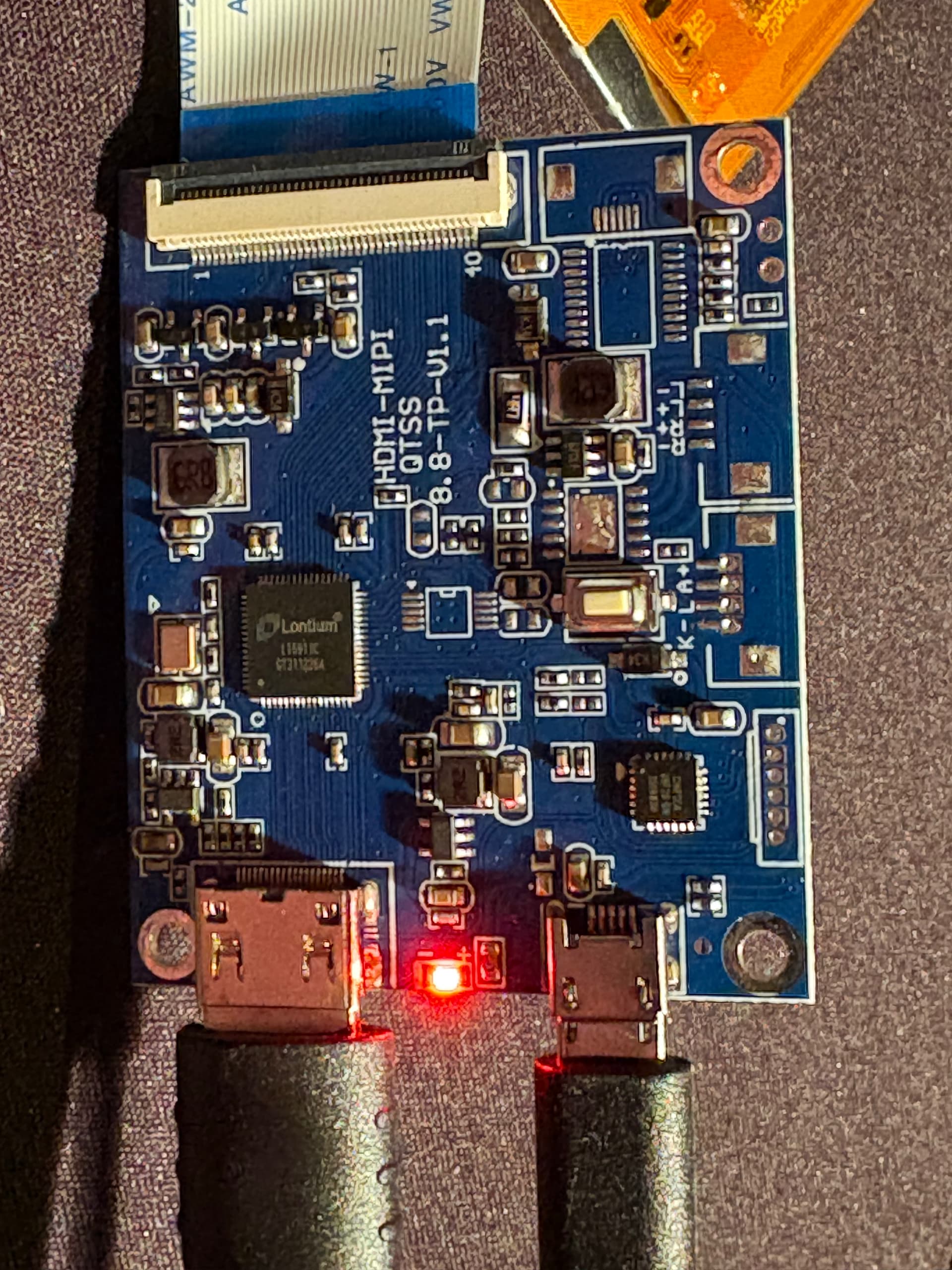
  1. A clear top-side photo of the bridge board, sharp enough to read the markings on the main IC. Common parts in this class are Lontium LT8911EXB and Toshiba TC358778XBG, but the marking on your board is the only thing that settles which datasheet applies.
  2. Any documentation, seller notes, or EDID file that came with the display kit.
  3. A Volumio log link from http://volumio.local/dev taken on a boot with the bridge connected and hdmi_ignore_edid temporarily commented out. That tells us what (if any) EDID the bridge advertises, and what mode the HDMI side negotiates without your overrides forcing it.
  4. Confirmation of your Pi 4 model per the revision-code guide: [GUIDE] Identifying Your Raspberry Pi Board on Volumio: A Comprehensive Guide to Revision Codes

One observation, not a fix. display_rotate and display_hdmi_rotate are legacy non-KMS parameters. I think these are shipped with the Touch Display plugin. Volumio 4 enables vc4-kms-v3d on Pi 4 by default. That those parameters appear to be doing something for you suggests either the bridge is rotating internally or the KMS and legacy paths are interacting in a non-obvious way on your build. The log will clarify which.

With the bridge IC identified and the log available, settings can be derived from the bridge datasheet rather than guessed.

Kind Regards,

Hello @nerd,

Thank you for your response.

I did make some images of the board some time ago. Attached the image of the board and the main IC.
There was no documentation with the board or on the website of the seller.
I will provide a log link asap.


Hello @nerd

The Volumio log link can be found here: http://logs.volumio.org/volumio/5Vxksr5.html

I used a newly purchased Rpi4 model B.

Details : processor : 0
model name : ARMv7 Processor rev 3 (v7l)
BogoMIPS : 324.00
Features : half thumb fastmult vfp edsp neon vfpv3 tls vfpv4 idiva idivt>
CPU implementer : 0x41
CPU architecture: 7
CPU variant : 0x0
CPU part : 0xd08
CPU revision : 3

processor : 1
model name : ARMv7 Processor rev 3 (v7l)
BogoMIPS : 324.00
Features : half thumb fastmult vfp edsp neon vfpv3 tls vfpv4 idiva idivt>
CPU implementer : 0x41
CPU architecture: 7
CPU variant : 0x0
CPU part : 0xd08
CPU revision : 3

processor : 3
model name : ARMv7 Processor rev 3 (v7l)
BogoMIPS : 324.00
Features : half thumb fastmult vfp edsp neon vfpv3 tls vfpv4 idiva idivt>
CPU implementer : 0x41
CPU architecture: 7
CPU variant : 0x0
CPU part : 0xd08
CPU revision : 3

Hardware : BCM2711
Revision : b03115
Serial : 100000009fa88c2e
Model : Raspberry Pi 4 Model B Rev 1.5

raspberrypi,4-model-b^@brcm,bcm2711^@

Please let me know if you need additional info!

Hey @z8man,

Thanks for the photos and the log. The photo of the chip resolves a lot.

The bridge IC is a Lontium LT6911C. That is a HDMI 1.4 to MIPI DSI/CSI/LVDS converter with an integrated microprocessor and an embedded EDID shadow, configured through firmware programmed into the chip at the factory. The relevant points from the Lontium product brief and datasheet are:

  • Single or dual port MIPI DSI output, 1 to 4 configurable data lanes per port, 80 Mbps to 1.5 Gbps per lane.
  • Integrated microprocessor.
  • Embedded EDID shadow.
  • Configuration via I2C slave for register programming.

Reference: https://www.lontiumsemi.com/UploadFiles/2021-06/LT6911C_Brief_R1.pdf and the LT6911C datasheet R1.2.

Practical consequence for your case: the LT6911C is not a passive HDMI to MIPI converter. Its HDMI input timing and its MIPI output mode are both fixed by the firmware the seller programmed into it. The Pi can choose any HDMI mode it wants, but the bridge only accepts what its firmware was set up for and only emits what its firmware drives onto the panel. The 144-pixel difference you are seeing (1280 visible out of 1424 native) is a property of the firmware on this specific board. No combination of hdmi_cvt, hdmi_timings, hdmi_group, hdmi_mode, video=, or rotation parameters on the Pi side can reach panel rows that the firmware is not addressing. Reaching the full 1424 requires a different firmware on the bridge, which is not user-flashable in any practical sense (Lontium tools, panel-specific init sequence, MIPI lane and timing programming - none of which the seller publishes).

Now to the configuration on your system. There is some confusion that needs cleaning up before any further tuning.

In the log I see ps output showing you are currently editing /boot/volumioconfig.txt with nano. Do not edit that file. It is system-managed and will be overwritten at the next Volumio update. All custom HDMI parameters belong in /boot/userconfig.txt. Anything KMS related (the modern video=HDMI-A-1:… line) belongs in /boot/cmdline.txt.

Your active kernel command line currently contains:

video=HDMI-A-1:600x2440M@60,rotate=90

The 2440 has no basis in this hardware (typo?). The panel is 1424 native on its long axis. The bridge maps 1280 of those. There is no 2440 anywhere in the chain. The framebuffer in the log registered at 1280x600, which is what the bridge actually accepted, not what you asked for. The 2440 figure should be replaced. The closest known-working HDMI mode for this bridge is 600 wide by 1424 tall, which is the timing your earlier hdmi_cvt experiments confirmed produced a picture. So in /boot/cmdline.txt the relevant fragment becomes:

video=HDMI-A-1:600x1424M@60,rotate=90

Your /boot/userconfig.txt at log time contains only the Touch Display plugin’s auto-added legacy rotation lines:

display_lcd_rotate=1
display_hdmi_rotate=1

Under KMS on Pi 4 Volumio 4 (vc4-kms-v3d is enabled), these legacy parameters are not the path that drives rotation. The video= rotate=90 in cmdline.txt is. Leave the Touch Display plugin lines alone, do not stack a second rotation by adding display_rotate as well.

Summary of what I would do in this order:

  • Move every custom hdmi_* entry out of volumioconfig.txt. Restore volumioconfig.txt to its stock content (do not keep your edits there).
  • Place all custom HDMI parameters in userconfig.txt only.
  • In cmdline.txt, replace the 2440 with 1424 in the video= line.
  • Reboot and capture a fresh log link from http://volumio.local/dev so the change can be confirmed.

After that, the picture you have will be the picture this bridge can deliver. To recover the missing 144 pixels you have to go back to the seller and ask whether they offer a bridge board firmware that addresses the panel’s full 1424 native rows. If they do not, the 1280 visible figure is the ceiling for this hardware combination.

One unrelated observation from the log, just for the record. mpd.log shows repeated “Decoder is too slow; playing silence to avoid xrun” entries during Qobuz and web-radio playback. Not a display issue, and not a topic for this thread, but worth knowing about if you see audio dropouts.

Kind Regards,

Hello @nerd,

I have removed the HDMI parameters from the volumioconfig.txt file.

Then I enabled the line vc4-kms-v3d in the volumioconfig.txt since this was commented out.

When I changed the value in cmdline.txt to 600x1424, I had no image on the screen. Changing to 280x1424 did also no good. Then when I changed back to the 600x2440 setting I suddenly got a complete image from left to right over all 1424 pixels! The only thing that is strange, is the startup screen showing 90 degrees off. Before all the above this was projected the correct way.

Attached the latest log file and an image of the entire screen filled. I can now see, I have to move the entire display a little to the right to center it neatly.

I am not 100% confident that the above was the only change I did. When you are thinkering around, sometimes you forget some steps you did!

The log I have sent was not after boot. The next link will give you a clean log.

http://logs.volumio.org/volumio/yFGXfNq.html

Hey @z8man,

Good result. Picture and the corrected log together change the picture significantly. I owe you some corrections first.

What I got wrong in my previous reply:

  • I told you to change 600x2440 to 600x1424. That was wrong. Your 600x2440 is the timing this bridge actually accepts, confirmed by your test.
  • I attributed the 1280-pixel limit to firmware mapping inside the LT6911C. The earlier log showed bcm2708_fb at 1280x600, which is a legacy non-KMS framebuffer artefact, not a bridge limit. The new log no longer shows it.

What we now know (verified):

  • The fix that actually mattered was enabling vc4-kms-v3d. The new log shows proper KMS active (vc4hdmi cards, card1-crtc kthreads, 512 MiB CMA pool). Without KMS the Pi was rendering through the legacy framebuffer path, which is what produced the 1280-wide image, not the bridge.
  • 600x2440 at 60 Hz is, empirically, a mode this LT6911C firmware accepts and drives onto the full 1424 panel axis.
  • userconfig.txt is now clean. Custom HDMI lines are commented out. Good.

What is theory (not verified):

  • Why specifically 600x2440 maps to 280x1424 on this bridge is unknown. The H and V ratios do not match, so it is not a simple uniform scaler. The LT6911C firmware on this board is a closed binary loaded at the factory and I have no way to inspect what input modes it accepts or how it maps them. Treat 600x2440 as a known-working magic number for this specific board, not a derived value.

One cleanup still needed:

You enabled vc4-kms-v3d by editing /boot/volumioconfig.txt. That file is system-managed and will be reverted at the next Volumio update, which will break your display again. Move that change to /boot/userconfig.txt instead so it survives OTA. Add this single line to userconfig.txt:

dtoverlay=vc4-kms-v3d

Then revert volumioconfig.txt to stock.

The 90-degree-off boot splash is a Plymouth versus KMS rotation issue, and it is solvable. The video=…,rotate= parameter only rotates the kernel framebuffer and console; Plymouth uses its own pre-rendered image sequence and needs to be told the matching rotation separately. The fix is the volumio-plymouth-adaptive theme plus a plymouth= parameter on cmdline.txt. Background and full instructions are here:

For your case, the cmdline.txt video= line uses rotate=90, so the matching Plymouth value is plymouth=270 (formula: plymouth = (360 - rotate) % 360). Append it to your existing cmdline.txt so the line ends with:

video=HDMI-A-1:600x2440M@60,rotate=90 plymouth=270

Make sure cmdline.txt remains a single line. The plymouth= parameter is in effect since the volumio-plymouth-adaptive theme is shipped with your build version.

For the small centring offset, try adding to userconfig.txt:

overscan_left=20

Reboot, observe, adjust the number up or down. If it has no visible effect, the bridge is accepting the timing rigidly and centring is not adjustable from the Pi side.

Kind Regards,

hi @nerd,

Thanks for the comprehensive explaining and the time you have put into this issue!
I remember now I have found the 600x2440 resolution on the web in an article on another DIY project were they had used the same adapter HDMI board.

The plymouth=90 setting worked fine for me to get the splash screen correct on the screen.

I think the “Decoder is too slow; playing silence to avoid xrun” issue can be related to a slow WiFi network. I will try if these messages disappear running on a network cable. I have found al lot of posts on the forum on this issue. Will try to resort it with this knowledge.

Kind Regards,

Hey @z8man

Would be great if you can locate the reference and post here.

Kind Regards,