[Guide] Prepare Raspberry Pi for boot from USB/NVMe

Hey @davinci,

Drive identified: Crucial P3 4TB (CT4000P3SSD8E), Gen3 x4, DRAM-less, firmware P9CR30D. P9CR30D is shared firmware across the P3 family - the 1TB sibling carries the same string - so it is not a 4TB-specific firmware oddity.

Now the real point.

The boot-from-NVMe path on Volumio Pi was validated against drives whose capacity is much smaller than yours. There is no public record of a 4TB Crucial P3 booting Volumio cleanly on a Pi 5. Beyond about 2TB, you are in self-validation territory - not a path the project has signed off on. Two factors compound at this size on this drive class:

  • The P3 is DRAM-less and relies on Host Memory Buffer for caching. The Pi kernel command line explicitly disables HMB (nvme.max_host_mem_size_mb=0). The install log captured the kernel rejecting the drive’s HMB request. The drive is operating without its expected cache backing.
  • The Volumio data partition (p3) was sized at 3.6T to fill the drive. The combination of that volume size, this drive class and HMB-disabled is what we are seeing fall over.

So we constrain the Volumio data partition to a size well inside known-good territory, and use the rest of the drive as a separate partition for music storage. The burden of doing this manual work is on you - the project does not validate or support it - but it puts the boot/data path back on stable ground.

Procedure, all run while booted from SD card with the NVMe attached.

  1. Run Install to disk again so you have a clean GPT layout on the NVMe. Wait for it to complete fully.

  2. Do NOT reboot into NVMe. Verify the layout:

    sudo lsblk -f /dev/nvme0n1
    
  3. Shrink p3 from 3.6T down to 512G. Filesystem first, then partition:

    sudo e2fsck -fy /dev/nvme0n1p3
    sudo resize2fs /dev/nvme0n1p3 512G
    sudo parted /dev/nvme0n1 ---pretend-input-tty resizepart 3 512GiB
    

    Confirm:

    sudo parted /dev/nvme0n1 unit GiB print
    
  4. Power down, remove the SD card, boot from NVMe. Watch the screen and do not connect to the WebUI for at least five minutes. We need to know whether it stays up under its own weight before we trust it with anything else.

  5. If the system stays up, report back. We can then deal with creating an additional partition in the freed space for music, mounted from inside Volumio’s network sources.

If the failure repeats with p3 at 512G, the working hypothesis (drive size + HMB) is wrong and we look at other angles - drive carrier, ribbon, PCIe gen, or the drive itself. But constrain p3 first and let me know the result.

One question on the PSU: the install log shows a 4-second undervoltage event at 08:58:32 during the install. You mentioned you had previously been on a Pi 4 supply and switched to the LinearPi Pro. Was the LinearPi Pro the one in use during the install where the undervoltage was logged, or were you still on the Pi 4 supply at that point?

Kind Regards,
@nerd,

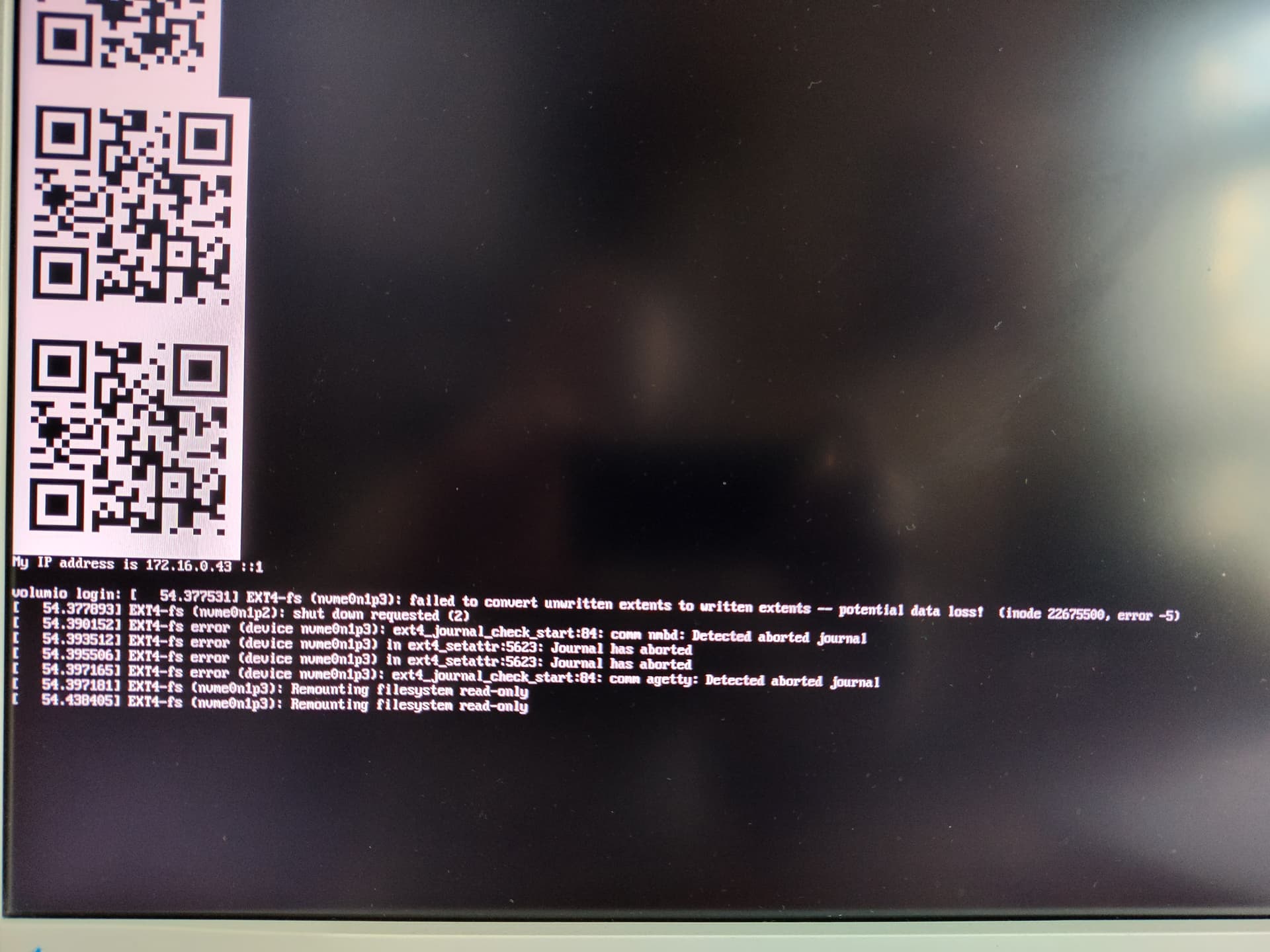
I executed your instructions unfortunately without success. Once booted, the system detects errors on the 512 GB partition and stops.

sudo lsblk -f /dev/nvme0n1

NAME FSTYPE FSVER LABEL UUID FSAVAIL FSUSE% MOUNTPOINTS
nvme0n1
|-nvme0n1p1 vfat FAT32 boot 6600-3306
|-nvme0n1p2 ext4 1.0 volumio 86334659-0e79-4b36-8cd4-642e2ee82d2e
`-nvme0n1p3 ext4 1.0 volumio_data 0ac9a521-3830-4ee9-a57f-64bae8a62811

sudo e2fsck -fy /dev/nvme0n1p3
e2fsck 1.47.0 (5-Feb-2023)
Pass 1: Checking inodes, blocks, and sizes
Pass 2: Checking directory structure
Pass 3: Checking directory connectivity
Pass 4: Checking reference counts
Pass 5: Checking group summary information
volumio_data: 11/243908608 files (0.0% non-contiguous), 15598789/975613772 blocks

sudo resize2fs /dev/nvme0n1p3 512G
resize2fs 1.47.0 (5-Feb-2023)
Resizing the filesystem on /dev/nvme0n1p3 to 134217728 (4k) blocks.
The filesystem on /dev/nvme0n1p3 is now 134217728 (4k) blocks long.

sudo parted /dev/nvme0n1 —pretend-input-tty resizepart 3 512GiB
Warning: Shrinking a partition can cause data loss, are you sure you want to continue?
Yes/No? y
Information: You may need to update /etc/fstab.

sudo parted /dev/nvme0n1 unit GiB print
Model: CT4000P3SSD8 (nvme)
Disk /dev/nvme0n1: 3726GiB
Sector size (logical/physical): 512B/512B
Partition Table: gpt
Disk Flags:

Number Start End Size File system Name Flags
1 0.00GiB 0.36GiB 0.36GiB fat32 primary boot, esp
2 0.36GiB 4.35GiB 3.99GiB ext4 primary
3 4.35GiB 512GiB 508GiB ext4 primary

I suspected the drive size of 4 TB to be an issue. The reason is that my entire music library fits onto it. I want to avoid streaming from a NAS or any other remote device.
The reason for the NVMe boot is speed. But I can live with SD boot and use the NVMe drive as storage for the music library, that works perfectly.
I wouldn’t pay much attention to the undervoltage. Al tests are done with the LinearPi Pro. The setup I have now is for testing purposes. A long USB-C to USB-C cable is now used and could be a factor. The final setup will be done with the shortest possible wires. I already tested with short wires from the LinearPi Pro to the GPIO pins and that works fine, albeit without any protection against polarity mistakes, etc.
I’m building this:

The NVMe boot was the last step in testing the components.

For your information:
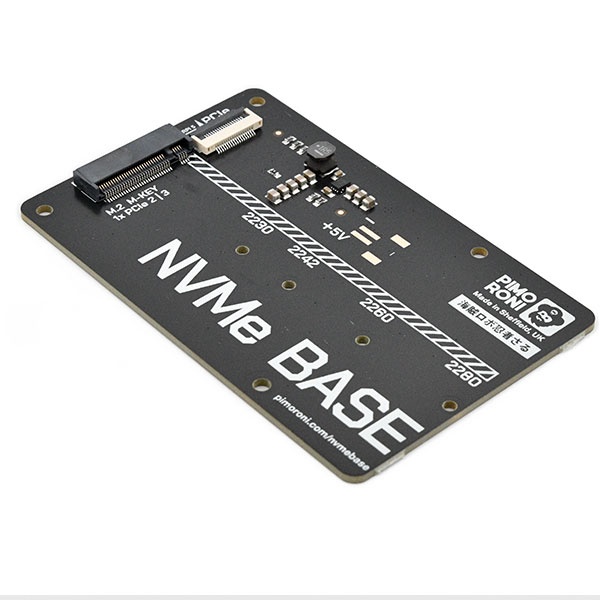
NVMe Base for Raspberry Pi 5 by [Pimoroni]

Ribbon cable (50 mm):

The longer cable is required because the PI 5 is mounted in the Galactic Case for the Raspberry Pi 5:

This shields the Pi from the audio parts in the chain.

I really appreciate your skilful help.
Kind regards

Hey @davinci,

The shrink to 512GiB reproducing the same EXT4 cascade rules out partition size as the cause. So I went and did the arithmetic on the power budget end to end, and the picture this drive class on this carrier is showing us makes sense.

The numbers, from manufacturer specifications:

  • Crucial P3 4TB label: 3.3V at 2.5A, so up to 8.25W peak draw from the M.2 3.3V rail.
  • Pi 5 PCIe FFC connector specification (Raspberry Pi Ltd, PCIe Connector Standard document): pin 1 and pin 2 supply 5V, rated 500mA each, total 1A at 5V which is 5W maximum sourced into the carrier through the ribbon.
  • Pimoroni NVMe Base: passive carrier. It has a 3.3V buck converter on board that feeds the M.2 slot, and that converter is fed by the 5W FFC input only. There is no auxiliary power input on the Base.

So the upper bound on what the Base can deliver to the M.2 slot is roughly 4.5W after conversion losses. The drive’s declared peak is 8.25W. The carrier cannot meet the drive’s peak draw. Not marginally - by roughly a factor of two on bursts.

This is consistent with what we are seeing. At idle the drive draws perhaps half a watt and everything is fine. As soon as the kernel and Volumio init hit the disk with real I/O - especially on a QLC drive doing first-boot SLC-cache promotion and journal replay - the drive’s controller demands its peak budget, the FFC cannot supply it, the rail collapses momentarily, the controller resets, the kernel sees the resulting I/O errors, EXT4 aborts the journal and remounts read-only. Shrinking the partition does not change any of this - the drive’s electrical profile is the same regardless of how much of it is partitioned.

Same drive class on the same carrier has been flagged on Pimoroni’s own forum, where users have raised this concern about Team MP33 drives with identical 3.3V/2.5A labels. The math is the math.

What this means for your project:

Option 1 - Different drive. A drive in the 3.3V/1.5A class (about 5W peak) fits within what the Pimoroni Base can deliver. SK hynix Gold P31, Samsung 970 EVO Plus, some WD Blue SN570 SKUs are documented as well-behaved on this carrier. You would not get 4TB in those families easily.

Option 2 - Different carrier. The Geekworm X1002, Pineboards HatDrive! PoE+, and similar HATs accept auxiliary 5V power either through GPIO or a dedicated jack, bypassing the FFC’s 1A ceiling. These can supply the full M.2 budget. This means re-engineering your audio chain shielding, which I know matters for your build.

Option 3 - The path you have already arrived at. Boot Volumio from SD card, use the 4TB P3 mounted as music storage. Mounted-source I/O is dominated by sequential reads which sit well below the peak budget and which you already report works perfectly. This is the supported configuration on your hardware combination.

Given your build context - the Galactic Case, the audio shielding, the LinearPi Pro feeding GPIO in the final layout - option 3 is the pragmatic answer and you have already validated it. The boot-speed gain from NVMe is small relative to the engineering cost of adding a powered carrier into a shielded enclosure.

The undervoltage event in the install log is a separate matter and probably the long USB-C cable you mentioned. I would not chase it further if you intend to wire LinearPi Pro to the GPIO pins in the final build, because that path bypasses the USB-C input and the cable issue with it.

Kind Regards,

Hi @nerd,

I work in the datacenter business, all flash memory increases in cost day by day, ruling out option 1 for now.
Option 2 will put me beyond the partition limitation size, so is option 1.
Option 3 is what I will use.

Again, thanks for your excellent support.
Kind regards.

Hey @davinci,

That makes complete sense. Coming from the datacenter side you already know that “validate the unsupported configuration” is a line item nobody wants to sign off on, especially when the spot price of NAND tells you to hold the drive and not torture it.

Option 3 it is. Boot stays on the SD card, the P3 carries your library, the LinearPi Pro feeds the GPIO in the final build, and the Galactic Case stays sealed the way you designed it. The boot-time delta from NVMe was never going to be the differentiator on a streamer that runs for weeks at a time anyway.

Glad we got to a clean answer. Enjoy the build - that DAC chain looks like a serious piece of work.

Kind Regards,

1 Like

Hi @nerd,

I wanted to share the following with the community.
I got everything working, SD card boot and NVMe (4 TB) as music storage.
However, when I started to copy the music files from my NAS (backup) to the NVMe drive attached to the RPI 5 with the Pimoroni NVMe base, I had disconnections after a few minutes. And low voltage errors on the RPI 5, which proves your statement about the NVMe burst power consumption. Even when I soldered 5V leads to the power supply from the Pimoroni solder pads.

I ordered a Geekworm X1001 with a longer FFC cable (80 mm).

That combinations is now happily copying for several hours now without any hiccup.