I am running rPi4’s and rPi5’s, mainly for supporting Volumio. (only 1 rPi5 is used on a remote location as main player)
The rPi5’s run stable , on both IR- as BT-Remote.
I have 1 rpi5 running with a 4.3 Inch DSI, 1 with a 7Inch DSI, both function without a glitch.
Only thing to consider with the rPi5, is a 5A PSU and cooling.
My frustrating but ultimately successful experience setting up Volumio to boot via NVMe. Maybe I’m the only person to make this small mistake that led to me pulling my hair out for a whole morning, but maybe it’ll help someone.
I was trying to use SD Copy on Raspberry Pi OS to copy Volumio Beta from a USB SSD to a new M.2 NVMe mounted on a Pimoroni PCIe hat.
I had up-to-date Raspbian on an SD card and on the NVMe drive (clue!) and Volumio 4.062 on the USB drive.
What I tried:
Updated my Pi5 to the latest EEPROM firmware using the new updater plugin.
Set boot order to SD-USB-NVMe using the EEPROM config plugin.
Boot to Raspbian using the SD card so I could use the SD Copy program.
Each time it would show options to copy from USB-SD, SD-USB, NVMe-SD and NVMe-USB, but not SD or USB to NVMe. I tried different combinations of boot order using the EEPROM Config plugin, even excluding NVMe, so USB-SD (another USB drive with Raspbian) and SD-USB. Nothing worked.
Then it dawned on me that the Raspberry Pi OS on the NVMe was a clone of the SD. Even if it booted Raspberry Pi OS via SD, the NVMe was taking over! The solution was to change the system name on the SD’s OS and then it saw the SD as a separate system. Finally SD Copy offered the option to copy from SD /USBto NVMe. It works, it’s great!
Thanks to the devs for the excellent new EEPROM plugins.
I’m still having some difficulties. I found several pieces of information in community threads. I’ve tried multiple things, but I still can’t solve my issue: I am able to boot using SSD with USB enclosure but I am never able to reboot.
I’ve tested this with 3 different SSD drives/enclosures.
I tried rebooting with the same hardware using different distributions : (Raspberry Pi OS Debian Trixie, Moode Audio 9.4.1, and LibreELEC and I have no issue rebooting via USB-SSD.
I tried plugging the drives into USB 2.0 ports, and that didn’t work either.
Power supplies: Allo Shanti and another 4A linear power supply
Volumio 4.062 and Volumio 3.832
HAT Allo Digione Signature (tried with Pi and DigiOne powered by micro USB of Pi, clean side not powered)
One setup with Official Display V2 / One setup with HDMI touchscreen (also tested without HDMI plugged)
Why does it works with all other distributions but not with Volumio 3 or 4? I don’t think the issue lies with the EEPROMs since everything works fine with other distributions.
Does anyone has such configuration working, can you please share any relevant information or workaround that can help. Of course maybe I am wrong but I am now totally lost…
It’s hard for myself to imagine that the issue could be related to the Pi’s EEPROM configuration or the hardware itself, since everything works fine with the other distributions I tested and with all three SSD enclosures.
From my recent experience…and elaborated by @nerd re: NVME boot…
For my Pi4, I had no issues when booting NVME via USB3 when I was using POE to power the Pi. While testing with USB power alone, I also faced instabilities while booting off NVME via USB3/2. It is very likely you’re running the same issue. Look for a post or thread by nerd re: NVME boot for more info.
As mentioned, the pci=pcie_bus_safe parameter was retired in build 4.080. Version 4.073 on the public download page is the current stable release. Newer builds with this fix are available through the test channel.
For your convenience and future reference, the process to switch release channels is documented here:
The forum search function is also quite useful for finding answers to common questions - searching “test mode” or “beta channel” returns multiple threads with step-by-step guidance. Or simple searching for 4.080 as such.
BTW:
Welcome to the community. I can see you are new to Volumio - thank you for taking the time to report this.
HI nerd,
thank you for welcoming me.
it took me several days to find the solution.
The forum search did not get me there.
On my journey i also found this thread.
I only posted here, to let users like wheaten have the solution.
Regards from some incognito dude
I followed the instructions, making sure the RPI 5 is at the latest firmware level, boot order, etc.
I flashed a fresh SD card with volumio-4.119-2026-03-24-pi.img.
When I boot from the SD card, I can install to NVMe (Pimoroni NVMe base with a Crucial P3 4 TB NVMe drive).
When I remove the SD card, boot the RPI 5, the screen shows that Volumio is starting and a logon screen is shown. It doesn’t show (like when booting from SD card) the QR code and the local IP address. I can ping the RPI 5, but there is no web interface, nor can I connect with Putty nor Winscp. I did enable SSH before installing to the NVMe drive.
Another issue is when I boot from SD card, wipe the NVMe drive (sudo wipefs -a /dev/nvme0n1), I cannot create a partition of 4 TB. The maximum size I can create is about 1,8 TB.
What you are describing - Volumio starting, then a console logon prompt with no QR code and no IP shown on the display, ping responding but no Web UI and no SSH - means the boot reached multi-user but the Volumio user-space did not finish coming up. Without diagnostic data we cannot tell which step failed.
Two things are needed from you, in this order.
Logs from the Install to disk session, captured before you reboot.
Boot from the SD card again and run Install to disk to the NVMe as you did before. When the installer reports completion, do NOT power-cycle and do NOT remove the SD card yet. While still on SD card, open http://volumio.local/dev in a browser, use the Send button under the Log section, and paste the resulting URL here. This captures what the installer actually wrote and any errors it produced.
The text behind the Plymouth splash on NVMe boot.
After the log link is submitted, shut down, remove the SD card, attach a USB keyboard to the Pi 5, and power on from NVMe. When the Volumio splash appears, press the Esc key. That switches the framebuffer from the splash to the kernel and systemd console output. Let the boot run to the point where it settles on the logon prompt you described, then take a clear photograph of the screen and post it. If text scrolls off, photograph the final stable screen and any error lines you saw on the way.
Without both of those captures the report cannot be advanced.
On the separate observation about not being able to create a 4TB partition manually after wipefs: that is the msdos partition table limit, not a Volumio behaviour, and the Install to disk workflow does not involve manually wiping or partitioning the target drive. Park that question for now. We will come back to it once the boot issue has been worked through.
Once I rebooted from the NVMe drive, the process terminated with the QR code and I could connect to the web interface. But after a few minutes the system did a shutdown with several error codes on the RPI 5, see picture in attachment.
I listed the disk configuration booted from de SD card, after installing to NVMe:
volumio@volumioic:~$ sudo lsblk
NAME MAJ:MIN RM SIZE RO TYPE MOUNTPOINTS
loop0 7:0 0 693.1M 0 loop /static
mmcblk0 179:0 0 29.1G 0 disk
|-mmcblk0p1 179:1 0 366M 0 part /boot
|-mmcblk0p2 179:2 0 4G 0 part /imgpart -mmcblk0p3 179:3 0 24.8G 0 part nvme0n1 259:0 0 3.6T 0 disk |-nvme0n1p1 259:2 0 366M 0 part |-nvme0n1p2 259:5 0 4G 0 part -nvme0n1p3 259:6 0 3.6T 0 part
Thanks for the log link and the photograph. A few corrections and a request before we go further.
What the install log shows:
Install to disk completed cleanly. The installer wrote a GPT layout. p3 was sized at 3.6T to fill the drive.
A brief undervoltage event was logged during the install operation.
What the photograph shows:
The Plymouth/getty handover painted the welcome banner and QR code on tty1.
At about 53 seconds of uptime, EXT4 began aborting journals on both p2 and p3.
The data partition was remounted read-only and the system requested shutdown.
Errors -5 (EIO) and -30 (EROFS) on the screen are the filesystem reacting to I/O failures coming from below it, not corruption baked in at install time.
You wrote that you could connect to the WebUI for “a few minutes” before the shutdown. The kernel view shows the abort cascade beginning 53 seconds in, so the actual WebUI-reachable window was at most that, and likely shorter. The boot painted a banner that says “WebUI available at…” but painting that banner is not the same as the system having reached and stayed in a stable serving state. Worth being precise about, because it influences what we look at next.
Two things I need from you before recommending further changes.
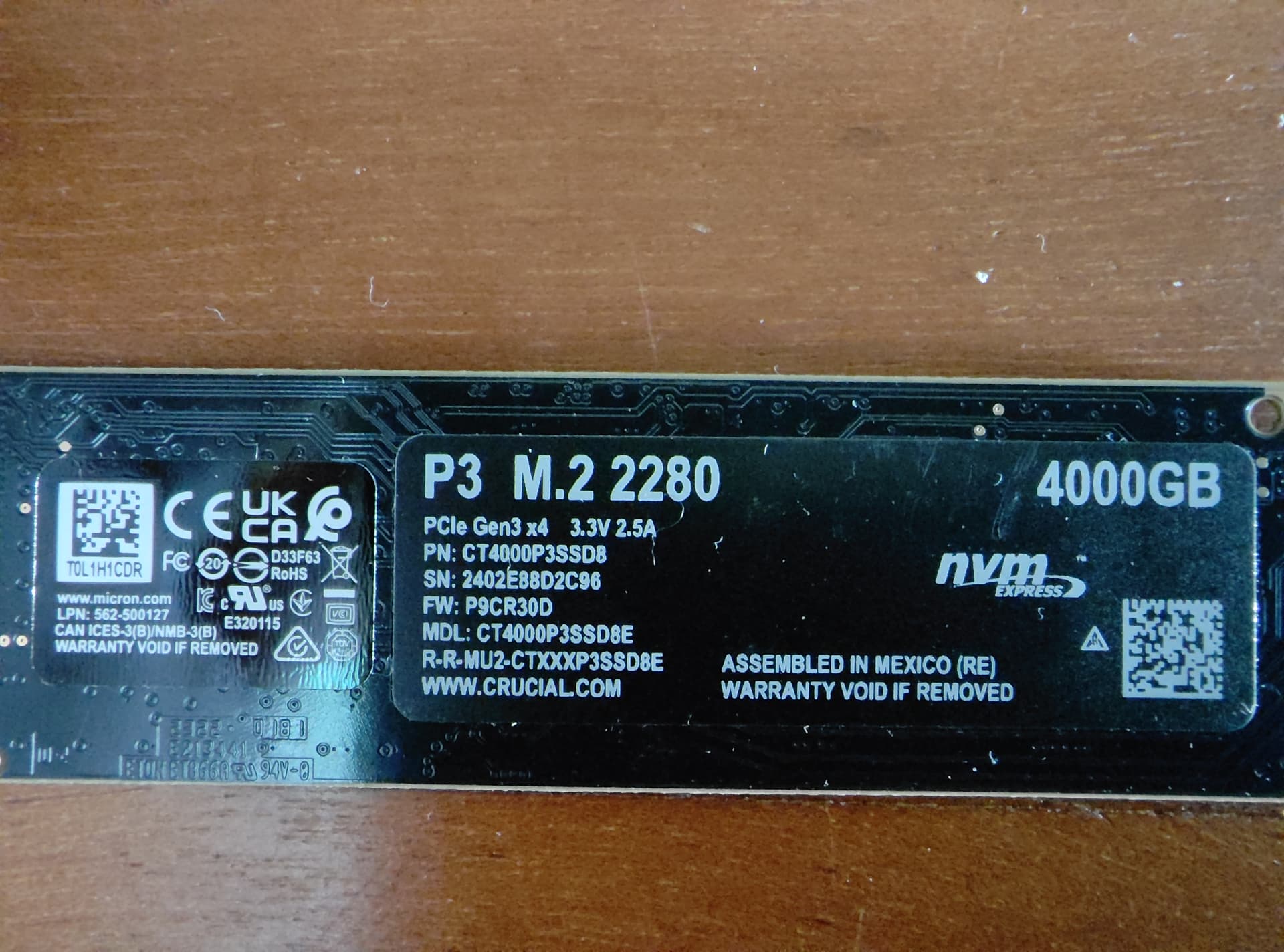
The exact NVMe model. “Crucial P3 4TB” is ambiguous - there is the P3 (CT4000P3SSD8, Gen3, DRAM-less), the P3 Plus (CT4000P3PSSD8, Gen4, DRAM-less), the T500 (CT4000T500SSD8, Gen4, with DRAM) and others. Behaviour on Pi 5 differs significantly between these. Take a photograph of the drive’s label sticker showing the full part number and the firmware revision, and post it here.
The power supply. Make, model, rated wattage and current. The Pi 5 with a 4TB NVMe on a Pimoroni base needs a properly negotiated 5V/5A supply. The undervoltage event during install means we cannot rule out marginal power.
Separately, a working hypothesis worth testing in parallel. The Pi NVMe boot path has been validated in practice with drives well below the 4TB size of yours. 4TB DRAM-less drives on a Pi 5 carrier with HMB disabled by the kernel command line are documented elsewhere as unstable. If the drive identification confirms this is a P3 or P3 Plus, then the pragmatic path is to constrain the Volumio data partition to a more modest size and use the remainder of the drive as a separate music-storage partition - putting the boot/data path back on ground that is known to work. We are not there yet. Confirm the drive and the PSU first.
@nerd,
Connecting to the WEB UI was indeed possible for very short period of time. I will be more precise in the future.
The model of the Crucial P3 is CT4000P3SSD8E, firmware version is P9CR30D. According to Google no updates yet.
I assumed that the undervoltage was from when I used an RPI 4 power supply. That is why I switched to the LinearPi Pro. According to Ian himself, this power supply should be adequate for my setup.