I have had this message (in Raspbi / HAT DAC systems) several times in the past. Sometimes it helped to deactivate the I2S DAC, press save, then reactivate, select the correct DAC and then save again. What also helped sometimes was changing a few parameters in the volume output options in the playback options, saving them and then resetting them.
After a while, however, I got this message again. What has helped the most so far is to remove the DAC from the PI and then reconnect it.
I therefore suspect that the problem has to do with small changes in transition resistors and that the hardware used is simply too sensitive for this (?).
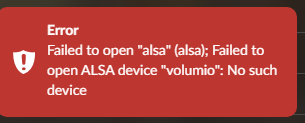
I am having same issue as others on this thread. I have a HifiBerry DAC2 HD on rpi 4 and If I reboot, I get the “Failed to open alsa device volumio no such device” error.
The workaround works for me (set to headphones, save, set to DAC2 HD, save & reboot) although it doesn’t always work and it may be due to ensuring everything has fully started before attempting to play anything.
What I am seeing when the problem occurs is that the mixer attributes in the following file have changed - mixer_type has been set to “undefined” and mixer has been set to blank from “DAC”.
I tried running “volumio vstop”, editing this file to reinstate the original values and then running “volumio vstart” but as soon as the volumio service starts up, those attributes return to “undefined” and blank.
I’ve tried comparing files in /boot when its working and when its broken but don’t see any differences.
The only other thought I had was, does it matter if my browser is still open at the plugin/audio_interface-alsa_controller page during reboot, does refresh of the page once volumio is back up cause this corruption of the configuration?
Is there any other stored config related to the DAC that could be causing this?
/data/configuration/audio_interface/alsa_controller/config.json
   "mixer_type": {
     "type": "string",
-    "value": "undefined"
+    "value": "Hardware"
   },
   "mixer": {
     "type": "string",
-    "value": ""
+    "value": "DAC"
   },
Hello
I have RPI3+ /Volumio System 3784 /Hifiberry DAC Plus
also have problem with Alsa error .playback switch to headphones /save then switch to I2S DAC /save often helps but annoying .
(MPD oled adapter may be in question just disabled because it uses the same GPIO)
but what works is to switch it on a few times (pull current)
Having the same issue with rPi4, Volumio: V3.784 + Hifiberry DAC Plus.
After reboot it occasionally forgets it has a HW mixer. When it does understand it, it generates ALSA errors.
Please try the following and confirm if it solved your issue.
- Select as output the audio jack and save it
- Shut down your device
- Pull the power plug
- Reconnect power
- Once up and running, select the HifiBerry DAC Plus again and save it.
- Shut down your device
- Pull the power plug
- Reconnect power
This solved the issue for me.
2 Likes
Thank you, it works according to the description.
alsa error done and Youtube2 is running again
1 Like
Are you guys using some kind of linear power supply?
My setup, rpi4b and hifiberry digi (not+)
sometimes I got the same alsa error since I use a linear power supply (lm317). With a phone charger it was working good. I noticed that following sequence gives no error:
Shut down rpi, disconnect the power cable, switch off power supply.
Switch on power supply, connect the usb power cable to pi, it start automatically and works 
I have tried the “headphone” method but not helped. Maybe it helps for somebody… or helps the community to find the root cause.
this solution also works for me who have this configuration:
- HiFiBerry DAC+ bundle Pi 4
- HiFiBerry board: HiFiBerry DAC+ Pro
- Volume 3,799
but if I turn off the raspberry to use it the next day, I have to redo the procedure every time I start it. the not too efficient solution is to leave it on all the time. Does anyone have a definitive solution?
Hi @medfranz
For me once configured it runs very stable and I don’t have to do it again.
What is the output of:
cat /boot/config.txt
cat /boot/userconfig.txt
Hi Wheaten ! Tankyou for your reply !
config.txt
DO NOT EDIT THIS FILE
APPLY CUSTOM PARAMETERS TO userconfig.txt
initramfs volumio.initrd
gpu_mem=128
gpu_mem_256=32
gpu_mem_512=32
gpu_mem_1024=128
max_usb_current=1
[pi5]
usb_max_current_enable=1
[all]
include volumioconfig.txt
include userconfig.txt
Volumio i2s setting below: do not alter
dtoverlay=hifiberry-dacplus
Volumio i2s setting below: do not alter
dtoverlay=hifiberry-dacplus
Volumio i2s setting below: do not alter
dtoverlay=hifiberry-dacplus
Volumio i2s setting below: do not alter
dtoverlay=hifiberry-dacplus
Volumio i2s setting below: do not alter
dtoverlay=hifiberry-dacplus
Volumio i2s setting below: do not alter
dtoverlay=hifiberry-dacplus
userconfig.txt
Add your custom config.txt options to this file, which will be preserved during updates
dtparam=i2c_arm_baudrate=800000
dtparam=spi=on
please try to remove or comment this line
800 kHz is not a standard frequency for I2C, it might be the root cause of your problem
1 Like
please also try to disable the startup sound
I have restored Volumio version 3.779 without errors. Higher versions cause problems, the last one is very bad only “alsa”.
(DAC Model HiFiberry DAC Plus)
1 Like
I expect you experience these errors due to the many entries for the DAC, please remove 5 of them:
#### Volumio i2s setting below: do not alter
dtoverlay=hifiberry-dacplus
1 Like
hi i tried all yours advice and now it works well
i’m so happy !
Thankyou !!
1 Like
glad that you solved your problem!
1 Like
Hi folks, I’ve been having this issue for the last week or two, my set up is a Pi Zero 2 with a Boss Mini Dac and I’ve had this little workhorse for the last 5 years as my everyday household streaming system through various amps, powered speakers. It was in the kitchen for a while, it got moved into my studio for a few years where I ran it a lot and for the last year or so I’ve used it to play drones/white noise/Eliane Radigue through the night in our bedroom.
I thought it’s time had come and the DAC had given up the ghost. I tried the switching i2S off trick a few times with no joy so I unplugged everything, disassembled the Boss Mini from the Pi, gave it a quick brush down and reassembled. Got the start up melody and it is running again.
Seems fine after that.
Thinking about it, while I was switching off the I2S and switching the output, I switched it to HDMI and had hooked up a monitor (just in case it made a difference) and there was an error, potentially to do with the USB drive I have plugged into the pi with a music library on it (the error related to SDA I think although I wasn’t properly paying attention), so maybe removing and replacing this might have played a part.
We are in 2026 and this bug is still there.
Your workaround work sometimes, sometimes not.
But Volumio still send the bills. Monthly.
Hey @net4u,
Volumio is billing you for fixing HiFiBerry DACs hardware? Are you sure? What dots am I missing to connect?
Kind Regards,