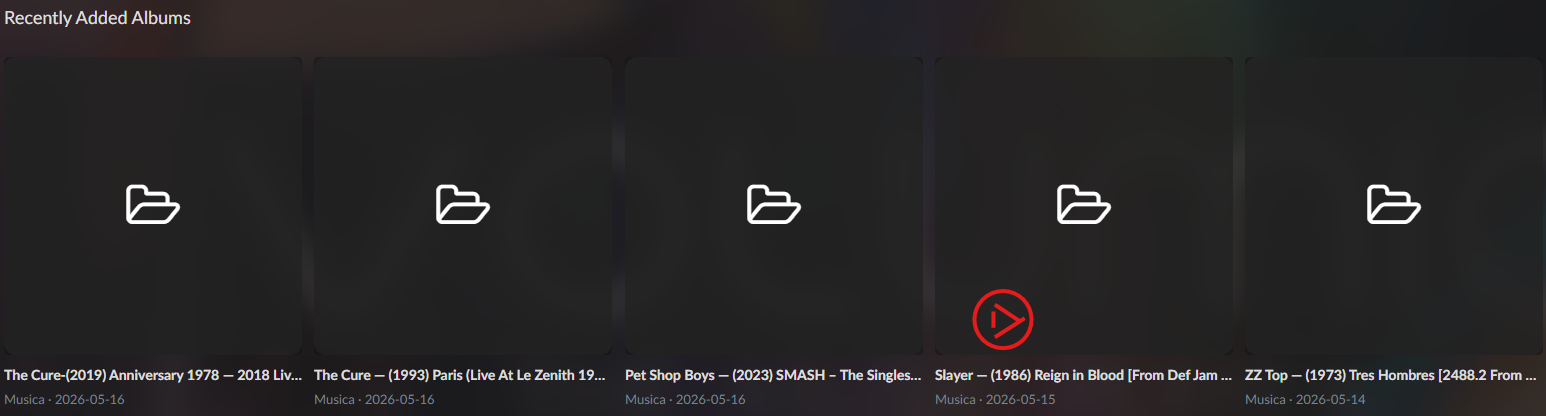
Hi all,
I’ve been working on a small Volumio music-service plugin called Recently Added and wanted to share it here in case it is useful to anyone else. @Zhapox just provided his prototype, which looks slick.
This is still a prototype, not an official Volumio Store plugin, so please treat it as experimental.
The plugin adds a new browse source called Recently Added. Under that source you get three views:
- Recently Added Albums
- Albums by Artist
- Albums by Title
The main purpose is to make it easier to browse newly added albums from local or NAS music folders. It scans configured folder paths directly from the filesystem, rather than relying on MPD’s “added” metadata. Albums are sorted using folder modified time, newest first.
The plugin currently supports mixed folder layouts, for example you might have your folder structured like this:
Root / Album / Tracks
Root / Artist / Album / Tracks
Root / Genre / Artist / Album / Tracks
There are settings for:
Music folder paths
Maximum albums shown
Maximum folder depth
Excluded folder names
A few notes about how it works:
Browse → Recently Added → Recently Added Albums → Album → Track list
Playback is intentionally started from the track level. The higher levels are browse-only. This is because track-level playback gives the most reliable Now Playing metadata and album art behaviour.
FLAC track ordering can use embedded metadata through metaflac, especially DISCNUMBER, TRACKNUMBER and TITLE. If that is not available, it falls back to filename-based ordering.
I’ll attach:
-
the plugin zip: recentlyadded_v17.zip (32.8 KB)
-
a txt guide with install and usage instructions (hey admin, why no pdf files allowed!?):
recently_added_volumio_plugin_guide_plain_text.txt (9.1 KB) -
an iCloud video link showing the navigation before you decide whether to install it: iCloud Photo Sharing
Again, this is a proof of concept rather than a polished official plugin. It has been built and tested around my own Volumio/NAS setup, so feedback from other folder structures and installations would be very welcome.
In particular, I’d be interested to know:
Does it install cleanly?
Does it detect your album folders correctly?
Do the settings behave as expected?
Does track-level playback show correct metadata and album art?
Are there folder layouts it does not handle well?
Thanks, and I hope it is useful to someone.