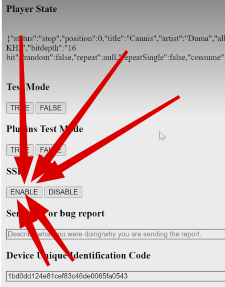
I already did that before.
This what I get after typing volumio:
rob@rob-hp:~$ sudo ssh 192.168.0.249
[sudo] password for rob:
root@192.168.0.249's password:
Permission denied, please try again.
root@192.168.0.249's password:

And this without sudo:
rob@rob-hp:~$ ssh 192.168.0.249
rob@192.168.0.249’s password:
Permission denied, please try again.
rob@192.168.0.249’s password:
ssh volumio@192.168.0.249
Yes just tried and still permission denied
then you either are typing the wrong password or didn’t enable ssh.
please place a screenshot of your attempt as it should just work.

Ok, after a factory reset I tried again.
See screenshots.
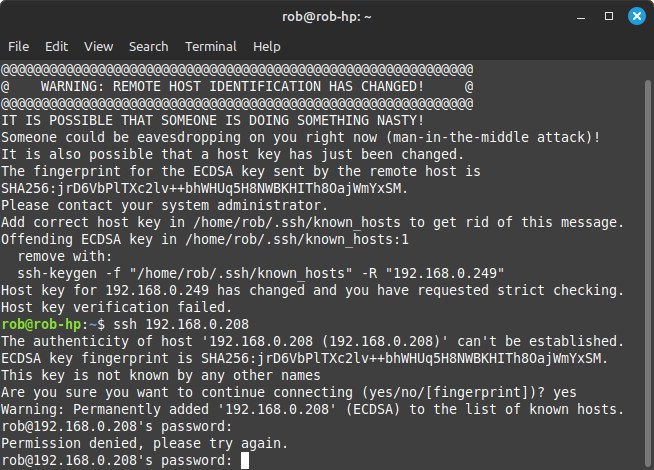
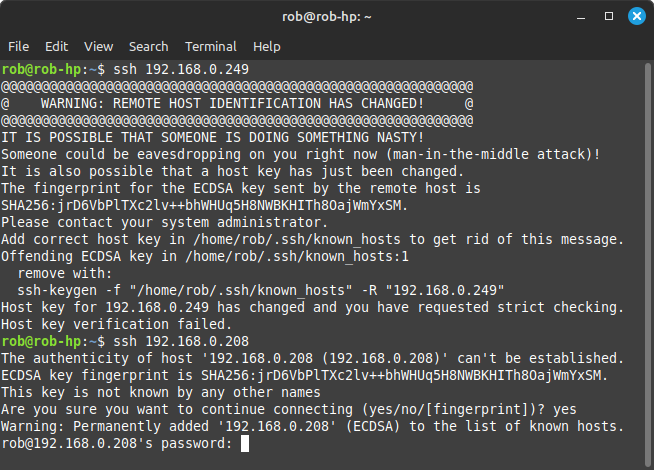
Hey @robg,
Your command:
ssh 192.168.0.249
is simply and plain wrong.
You are continuously ignoring @Wheaten instructions and until you doing this you will not succeeded.
Before ip address add user: volumio. As such the command will be:
ssh volumio@192.168.0.249
Kind Regards,
I’m done here. You’re not following the instructions I’m giving you.
ssh volumio@<ip-address>
I can think of better ways to spend my free time.
Ok fair enough and that’s me done with volumio now. Anyway I did follow the instruction here and now I am in volumio.
olumio@volumio:~$ ls -als
total 26
4 drwxr-xr-x 1 volumio volumio 4096 Jan 31 16:15 .
8 drwxr-xr-x 1 root    root    4096 Dec 11 16:42 ..
1 -rw-r--r-- 1 volumio volumio  220 Apr 18  2019 .bash_logout
4 -rw-r--r-- 1 volumio volumio 3526 Apr 18  2019 .bashrc
1 -rw-r--r-- 1 volumio volumio   49 Dec 11 16:45 .cdcdrc
1 -rw-r--r-- 1 volumio volumio  171 Dec 11 16:45 .cdserverrc
4 drwx------ 3 volumio volumio 4096 Jan 31 15:36 .config
4 drwx------ 3 volumio volumio 4096 Jan 31 16:15 .gnupg
1 -rw-r--r-- 1 volumio volumio  807 Apr 18  2019 .profile
volumio@volumio:~$ ls -als /mnt/NAS/TrueNAS
ls: cannot access '/mnt/NAS/TrueNAS': No such file or directory
run:
ls /mnt/NAS
as your log shows the folder TrueNAS which seems to not excist
volumio@volumio:~$ ls /mnt/NAS
Music
volumio@volumio:~$ cd Music
-bash: cd: Music: No such file or directory
volumio@volumio:~$
That is strange !! In Volumio sources the music has this path:
\192.168.0.42\Music
There are now 14 artists listed in Music now
run:
ls -als /mnt/NAS/Music
And list the output here.
Also confirm if the listing match what you see in Volumio
That looks better:
volumio@volumio:~$ ls -als /mnt/NAS/Music
total 4
0 drwxrwxrwx 2 root root    0 Jan 31 12:52  .
4 drwxrwxrwx 1 root root 4096 Jan 31 15:57  ..
0 drwxrwxrwx 2 root root    0 Jan 24 08:37 '3_Doors_Down-The_Better_Life_20th_Anniversary_Edition-(Remastered)-2CD-2021-C4'
0 drwxrwxrwx 2 root root    0 Jan 24 18:08  A-Ha
0 drwxrwxrwx 2 root root    0 Jan 24 19:49  ABC
0 drwxrwxrwx 2 root root    0 Jan 24 15:25  Big_Country-Driving_To_Damascus-Deluxe_Edition_Boxset-4CD-2023-D2H
0 drwxrwxrwx 2 root root    0 Jan 24 08:18 'Billy Idol'
0 drwxrwxrwx 2 root root    0 Jan 23 22:08 'Bruce Springsteen'
0 drwxrwxrwx 2 root root    0 Jan 24 08:19  Coldplay
0 drwxrwxrwx 2 root root    0 Jan 24 19:52 'Culture Club'
0 drwxrwxrwx 2 root root    0 Jan 24 08:21 'David Bowie'
0 drwxrwxrwx 2 root root    0 Jan 24 15:19 'Depeche Mode'
0 drwxrwxrwx 2 root root    0 Jan 24 18:06 'Dire Straits'
0 drwxrwxrwx 2 root root    0 Jan 21 20:11 'Dougal_Fox-Culture_Club_(Lost_Astronaut_Remix)-(ROL083S)-WEB-2025-PTC'
0 drwxrwxrwx 2 root root    0 Jan 24 20:03 'Duran Duran'
0 drwxrwxrwx 2 root root    0 Jan 21 19:58 'Electric Light Orchestra (ELO) discography Mp3 @320'
0 drwxrwxrwx 2 root root    0 Jan 24 15:15 'Elton John'
0 drwxrwxrwx 2 root root    0 Jan 22 15:19 'Fleetwood Mac'
0 drwxrwxrwx 2 root root    0 Jan 24 15:19 'Florence and the Machine'
0 drwxrwxrwx 2 root root    0 Jan 21 22:58  Foreigner-4-Reissue-4CD-2025-DDS
0 drwxrwxrwx 2 root root    0 Jan 24 17:49  Genesis
0 drwxrwxrwx 2 root root    0 Jan 24 16:14 'Guns and Roses'
0 drwxrwxrwx 2 root root    0 Jan 24 16:22 'Joy Division'
0 drwxrwxrwx 2 root root    0 Jan 23 14:35  Kasabian
0 drwxrwxrwx 2 root root    0 Jan 24 17:24 'Lenny Kravitz'
0 drwxrwxrwx 2 root root    0 Jan 24 17:54 'Manic Street Preachers'
0 drwxrwxrwx 2 root root    0 Jan 24 16:52 'Manic_Street_Preachers-Gold_Against_the_Soul_(Remastered)-WEB-2020-ENTiTLED'
0 drwxrwxrwx 2 root root    0 Jan 22 15:18  OMD
0 drwxrwxrwx 2 root root    0 Jan 22 08:49 'Pet_Shop_Boys-SMASH_(The_Singles_1985-2020)_Remastered-WEB-2023-CIT_INT'
0 drwxrwxrwx 2 root root    0 Jan 24 16:12 'Pink Floyd'
0 drwxrwxrwx 2 root root    0 Jan 24 18:14  REM
0 drwxrwxrwx 2 root root    0 Jan 23 22:05  Road.Diary.Bruce.Springsteen.and.the.E.Street.Band.2024.DV.HDR.2160p.WEB.H265-AccomplishedYak
0 drwxrwxrwx 2 root root    0 Jan 24 16:55 'Roxy Music'
0 drwxrwxrwx 2 root root    0 Jan 24 20:04 'Spandau Ballet'
0 drwxrwxrwx 2 root root    0 Jan 31 09:54  Stereophonics-Decade_In_The_Sun_Best_Of_Stereophonics-16BIT-WEB-FLAC-2018-OBZEN
0 drwxrwxrwx 2 root root    0 Jan 31 09:29  Stereophonics-Make_em_Laugh_Make_em_Cry_Make_em_Wait-WEB-2025-ENViED
0 drwxrwxrwx 2 root root    0 Jan 24 20:05 'Stone Roses'
0 drwxrwxrwx 2 root root    0 Jan 24 15:04 'The Doors'
0 drwxrwxrwx 2 root root    0 Jan 24 17:52 'The Verve'
0 drwxrwxrwx 2 root root    0 Jan 22 09:30  The_Beatles-The_Anthology_Collection-REMASTERED-24BIT-96KHZ-WEB-FLAC-2025-OBZEN
0 drwxrwxrwx 2 root root    0 Jan 26 16:28 'Tom Petty'
0 drwxrwxrwx 2 root root    0 Jan 24 19:51  U2
0 drwxrwxrwx 2 root root    0 Jan 22 19:55 'Van Morrison'
No it doesn’t match what I see in volumio, as volumio is only showing 4 artists now!
Should I chmod or something
This is a problem on your NAS or the credentials used to mount the NAS in Volumio.
This is not within the scope of community support.
Everything is owned by root and Volumio has no access to the folders, as all folders show 2 in the 3rd column (is the directory count itself(.) = 1, Parent(…) = 2), so there is no accessible content for Volumio.
what happens if you run:
ls -als /mnt/NAS/Music/ABC
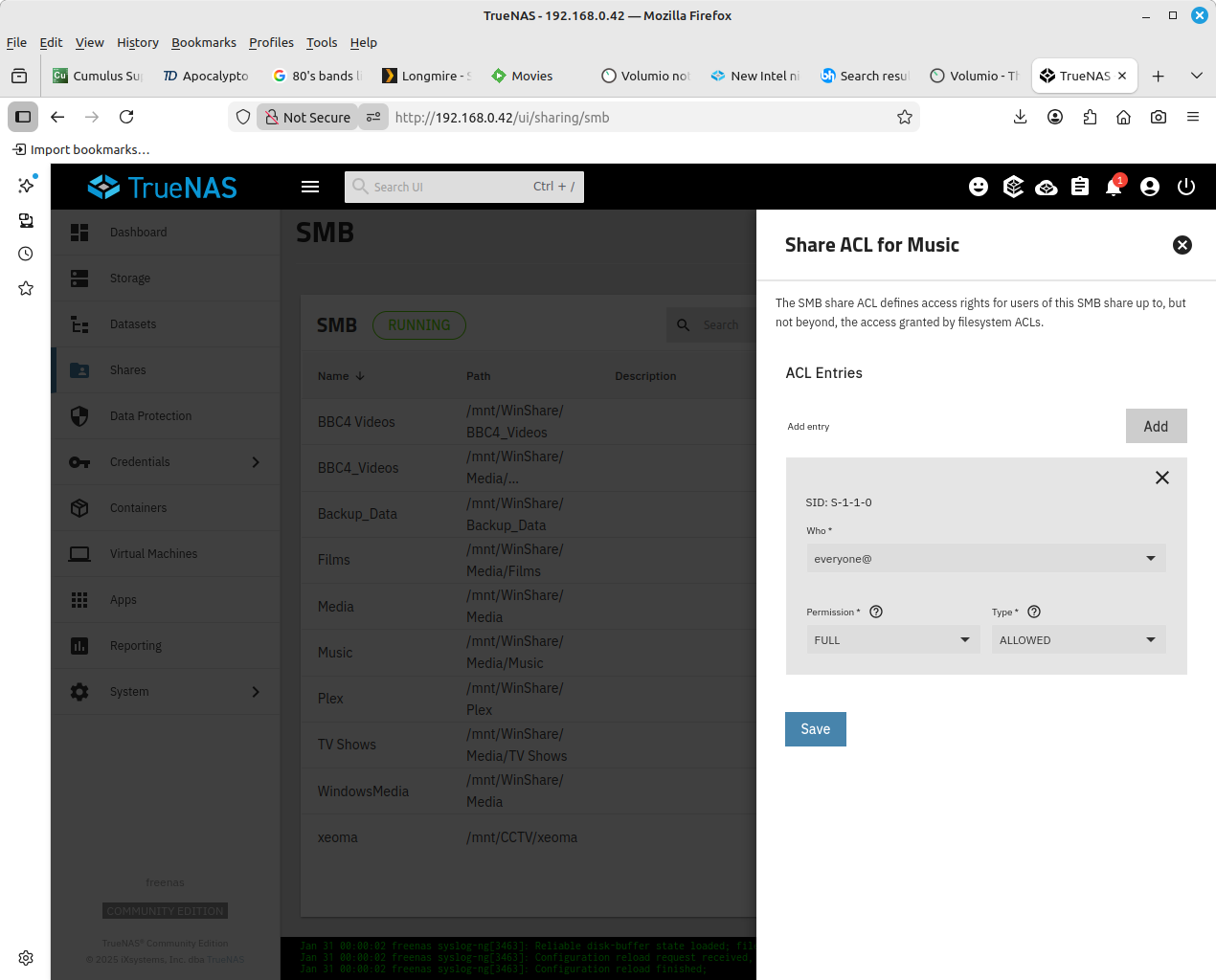
Well I have no idea why the user and group are both owned by root, because in TrueNAS the permissions are set to everyone with Full permission as per screenshot:
volumio@volumio:~$ ls -als /mnt/NAS/Music/ABC
total 0
0 drwxrwxrwx 2 root root 0 Jan 24 19:49 .
0 drwxrwxrwx 2 root root 0 Jan 31 12:52 ..
0 drwxrwxrwx 2 root root 0 Jan 24 19:05 ABC-Abracadabra-Reissue_Expanded_Edition-WEB-2005-MARR
0 drwxrwxrwx 2 root root 0 Jan 24 18:26 ABC-The_Lexicon_Of_Love-Remastered-24BIT
Pardon me for saying, but I am not new to volumio, as I have been using it for many years without any problems, and I don’t know why something has changed the owner and group to root, when in TrueNAS it isn’t.
I googled this problem and it turns out that it is samba which changes the owner and group from what I have in TrueNAS to root in volumio as a share. So basically I’m in a no win situation.
Thanks anyway for your time
You’re not in a no‑win situation. Samba doesn’t arbitrarily ‘change’ ownership, it maps permissions based on how the share is configured. If your TrueNAS dataset uses permissions that don’t translate cleanly to the Volumio side, Samba will fall back to the user it’s running as.
If you want to fix it, you’ll need to adjust the share settings or the UID/GID mapping. It’s not a Samba bug.
You should start paying attention to what people write and try to support you in their free time…

Ok then please tell me where to adjust UID and GID settings , in TrueNAS or volumio.
I have created shares on a linux computer and used UID= 3000, GID=1000, so can you advise please.
Thanks
On my NAS I created a user volumio1 with a password and R/W access to the Music folder.
I’m connecting to the share (using the mount option in Volumio) using that same user and credentials.
Since you’re on Windows, you’ve probably copied files to the NAS at some point, so make sure the permissions on those files are set correctly and applied recursively.
No, I am using Linux mint and have done for the last 8 - 10 years.
Out of interest what NAS are you using, as I’m using TrueNAS Scale 25
I’ll look at doing the same when I have more time.
Thanks