The dongle should work in V4.071 - x86
1 Like
I regret to say the update to 4.071 does not solve my problem. See post 93 in this thread for a description of my problem: cannot connect to wifi.
Output of
cat /proc/cpuinfo | grep Revision:
Revision : a020d3
Output of
cat /sys/firmware/devicetree/base/model:
Raspberry Pi 3 Model B Plus Rev 1.3
Boot is from microSD card.
Allo Boss HAT attached.
Link to log file: http://logs.volumio.org/volumio/bnGJymW.html
Have you tried rebooting the device with eth0 disconnected?
Yes, I’ve tried rebooting with eth0 disconnected, and double-checked using nmap. Also tried using a different Raspberry Pi power supply. Tried booting another device (with same Raspberry Pi model, different DAC) using the micro-sd card from the Pi/Boss combination, and no wi-fi there either.
So … could it be the micro-sd card, or the way the OS was written to it? Downloaded v4.071, wrote it to a different micro-sd card using a different usb-writing software, booted from that. Still no wi-fi.
Until now, I’ve been able to resolve all of my Volumio-related issues by reading the excellent advice on this forum and/or by reading various Linux fora. But this time, I have to admit I’m stumped.
Can somebody tell me where I can download V4.071?
txs
You can download here: Get Started - Volumio
I had a similar experience with wifi, also on a 3B+. I pulled the SD card from a RPI3B+ that had been in regular use running 3.832, connected to my home wifi and playing music from an attached USB flash drive without problem. I put in another SD card imaged with 4.067, connected it to my router with an ethernet cable, and fired it up. Went through a minimal configuration, tried to make a wifi connection, and was unsuccessful. I did see all the access points I usually see, just couldn’t connect to mine.
After turning on SSH, I tried connecting via raspi-config. After setting the country code (US) I got “no wireless interface” (or some such) and could get no further. I replicated the problem with another SD card, with 4.069, and with no hat or DAC connected.
I was able to eventually get wifi working after installing network-manager, turning on a
‘managed’ flag int its config file, and connecting via raspi-config. Sorry not to be more precise but I was fumbling around trying things. I think this is what worked, but am not positive.
If I get a chance to spend more time on this I’ll try to do more controlled tests and collect logs, etc, but other priorities prevent it for the time being. I hope this helps, even if only a little.
You got me thinking about whether the issue is particular to Raspberry Pi 3B+. Given that this thread is not flooded with reports of wifi connectivity problems, one might conclude that things are running fine on most devices.
So, I tried v4.071 on a Raspberry Pi 4B+ … and the wifi works.
Tried 4.069 on a 3B with the same results as the 3B+.
That’s useful to know. I wonder if this issue is peculiar to the Raspberry Pi 3 family …
Hello Volumio!
Got the same problem on my RPi5 with onboard wifi.
System is version 4.071
Bug report under http://logs.volumio.org/volumio/s9PiZ8Z.html
THX for help!
Kind regards
Uli
Germany
Not for me yet. I keep getting a box that pops up and says volumio error. Very useful.
I don’t have time to collect dat, but what is it you want. Jeepers this is frustrating!
Installed version 4.071 yesterday and the following plugins active and running without problems until now:
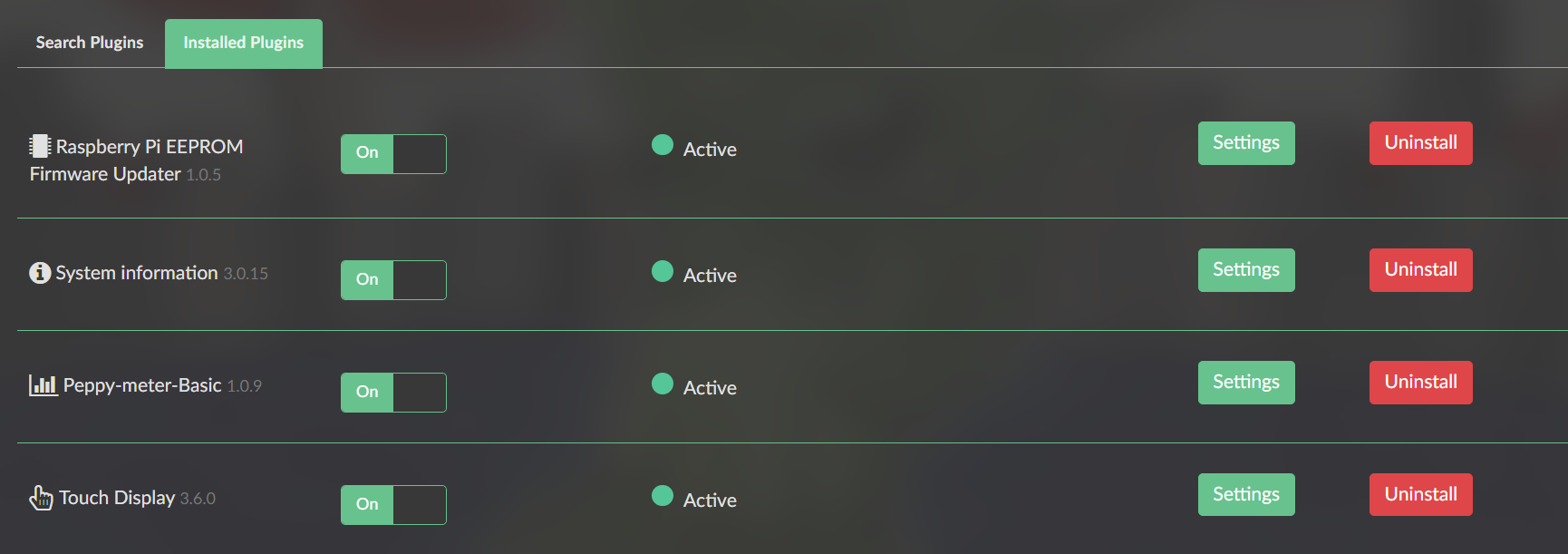
I’m currently using only my USB 2TB drive with near 2000 albums.
All OK! 
PS1 - I already done a firmware update on the Pi via Rapsberry PI EPROM Firmware Updater and all ok also.
PS2 - I have Pi connected to a 1920x1080 Samsung HDMI 22" monitor. I didn’t have to edit any files. Was plug and play as with version 3.xxx
MyVolumio error seems to be a general problem on any installation (V3, V4, RPi3, RPi4, RPi5) at the moment.
So it’s impossible to login. There’s no access to new plugins.
see: below topic. There is a global issue with Cloudflare.
A post was merged into an existing topic: New 2023 Spotify Plugin
Hey @Kampf_Keks_3000,
I’ve analyzed both complete logs. The stuttering is caused by multiple critical issues working together.
Primary Issue - Time Desynchronization:
Client log line 3249 shows: "diff to server [ms]: 21983.7"
Your client and server have a 22-second time offset. This destroys Snapcast synchronization and causes the buffer overflows you’re seeing (server log lines 4349, 4353).
Diagnose time sync on both devices:
Follow this guide:
Since you’re running Volumio 4.071, the Time Sync Watchdog is already built-in and should be running. The 22-second offset means something is preventing proper sync.
SSH to each device and run these diagnostic commands:
Verify actual time offset:
hdr="$(curl -sI --max-time 3 https://time.is | sed -n 's/^[Dd]ate:[[:space:]]*//p')"
echo "hdr: $hdr"
echo "sys: $(date -u)"
echo "delta_sec=$(( $(date -u +%s) - $(date -ud "$hdr" +%s) ))"
If delta_sec is large on either device, force a manual sync:
sudo /usr/bin/setdatetime-helper.sh --force --verbose
Then recheck the offset with the curl command above.
Second Issue - client on WiFi:
Client log lines 32-37 show ethernet interface is down (no IP assigned). Lines 47-53 show WiFi active on 192.168.178.26 (5GHz, signal -56 dBm).
Your statement “Both devices on wired network connection does not make a difference” contradicts the logs - the client is actually on WiFi during this test.
Connect ethernet cable to client, disable WiFi in Volumio settings, verify ethernet gets IP, then test again.
Third Issue - SMB/NAS Filesystem Problems:
Server log lines 3816, 4066-4075 show multiple "CIFS: VFS: bogus file nlink value 0" errors from your FritzBox NAS mount. This indicates filesystem metadata corruption or instability.
Update SMB mount to force SMB 2.1:
In Volumio UI > Settings > Sources > Network Drives:
- Find your FritzBox mount and click Edit
- In the “Options” field, add:
vers=2.1 - Click Save
Do this on both server and client devices.
Fourth Issue - DHCP IP Changes:
Your devices keep getting different IPs between tests:
- Original report: server .54, client .46
- These logs: server .25, client .26
- Server was offered .36 during boot
This breaks Snapcast discovery and causes connection failures.
Set static IP addresses:
In Volumio UI > Settings > Network:
- Server: 192.168.178.25, gateway 192.168.178.1
- Client: 192.168.178.26, gateway 192.168.178.1
Complete troubleshooting sequence:
- Diagnose time sync on both devices using commands above
- If large offset found, force sync with setdatetime-helper
- Switch client to ethernet
- Set static IPs on both devices
- Update SMB mount to vers=2.1 on both devices
- Reboot both devices
- Wait 5 minutes, verify time sync again
- Test multiroom grouping
- Submit new logs if still stuttering
The 22-second time offset is likely the main cause of stuttering, but the WiFi connection and SMB errors are making it worse. All issues need to be fixed.
Kind Regards,
Hi @nerd ,
Primary Issue - Time Desynchronization:
time delta after optimizations.
server:
sys: Tue Nov 18 18:29:48 UTC 2025
delta_sec=66588 (before 62954)
time delta client:
sys: Tue Nov 18 18:29:22 UTC 2025
delta_sec=66562 (before 63369)
Manual sync didn’t change this.
Second Issue - client on WiFi:
Yes, i tested the client also with a wired connection to eliminate the WiFi as the source of the problem.
I can’t connect the client permanent with a lan cable, it has to be on WiFi.
Third Issue - SMB/NAS Filesystem Problems:
Done
Fourth Issue - DHCP IP Changes:
My bad…
The IPs were assigned by the fritz box before, but i changed that for test reasons.
I now set the IP-adresses on the volumio side. (Server .21 and Client .22)
Test result after reboot and 5min pause:
Still stuttering.
Here are the logs.
Server:
http://logs.volumio.org/volumio/Zyi8qfI.html
Client:
http://logs.volumio.org/volumio/15TcMg1.html
Kind regards
Can you try, from Multiroom settings (Sources → Multiroom → Settings) to increase the default values of buffer and stream buffer and see if that helps?

Hi @volumio ,
it was already at 1500ms and 200ms
With 2000ms an 200ms there is no sound at all.
Kind regards