I am having difficulty making an KY-040 work for volume control and play/stop on my Volumio system. Here is the data on my system:
- Platform: Raspberry Pi 4B 8Gig
- Volumio System Version: 4.119
- Active Plugin Version I have Tried: Rotary Encoder II (V2.2.0, V2.2.1)
- Other Active Plug Ins: Now Playing (v1.0.6), Touch Display (3.6.0)
- Inactive Plugins: FusionDSP (v2.0.79)
- Encoder Type: KY-040
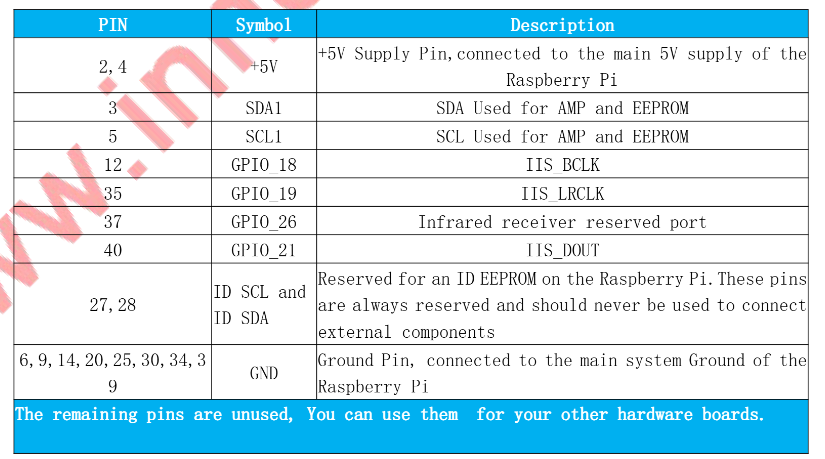
- HAT: Innomaker Amp Pro HAT
- Plugin Driver: Innomaker Amp Pro
- Pins Used to Interface: I have used multiple combinations of pins. There was only one instance when I was able to get the Play/Pause to work. The volume has never worked
- Error Statements Received: Error in parameters - Failed to add Overlay,…
I am using the BCM designations when I configure the plugin, not the pin numbers that the wires are attached to. Every time I go down to save the config, it will briefly flash a long error statement beginning with what I show above. Then, it will give me a gray box that said the config was saved.
ROTARY ENCODER II Settings:
- Rotary Encoder 1: On
- Periods Per Tick: 1/2
- Pin A GPIO: 22
- Pin B GPIO: 17
- Dial Action: Volume
- Pushbutton GPIO: 27
- Debounce-Time(Ms): 100
- Button Logic-Level Active Low: On
- Short Press Action: Play
- Long Press Action: Stop
- Delay for A Long Button Press(MS): 1500
- Double Press Action: Repeat
- Maximum Interval for Double Press(Ms): 700
In the Playback Options, I have it set up as follows:
AUDIO OUTPUT:
-I2S DAC: On
-DAC Model: Innomaker Amp Pro
GENERAL PLAYBACK OPTIONS:
-DSD Playback Mode: DSD Direct
-DSD Auto Volume Level: On
-Volume Normalization: On
-Audio Buffer: 2MB
-Persistent Queue: On
-Playback Mode: Continuous
VOLUME OPTIONS:
-Mixer Type: Software
-Default Startup Volume: Disabled
-Max Volume Level: 100
-OneClick Volume Steps 1
-MPD Clients Volume Control: Off
AUDIO RESAMPLING:
-Off
Any suggestions on what I can do to make this work would be appreciated.
John G.