even louder
1 Like
Make noise by voting:
https://community.spotify.com/t5/Live-Ideas/Soloist-Optional-ALSA-Backend-for-Better-Integration-with-Audio/idi-p/7536267#M358383
3 Likes
done
Now everything works fine!
please read:
Volumio version: 4.119 (VOLUMIO_BUILD_DATE: Tue Mar 24 17:20:52 UTC 2026)
Device model, DAC/output, and connection: Raspberry Pi 4 Model B Rev 1.1. Output is a USB DAC connected directly to a USB port; it only identifies itself generically as USB PnP Sound Device (lsusb: 8086:0808, ALSA card 5). I don’t have a brand/model beyond that — happy to update this if it matters for reproduction.
What I did, what I expected, what happened:
I run Soloist Connect (0.8.5, shim 0.2.9) alongside Volumio’s built-in AirPlay receiver (airplay_emulation) on the same device, used as AirPlay target streamed to from a separate OwnTone server.
I expected Soloist to stay idle in the background when I’m not actively using Spotify Connect, and not interfere with an active AirPlay session.
Instead, an active AirPlay stream gets killed and restarted (audible dropout/skip) , even with no Spotify activity towards Volumioat all.
Root cause, as far as I could trace it:
SoloistConnect.setStatus() calls this.takeOverPlayback() whenever the Soloist daemon reports a playback_state that maps to ‘play’, even when is_active=false and no cache file is open (fds=0 empty). This fires on a roughly 3-5 minute cadence regardless of real playback activity. takeOverPlayback() calls coreCommand.volumioStop(), which reaches airplay_emulation’s stop(), which unconditionally sends kill -USR2 to shairport-sync followed by a full systemctl restart shairport-sync — tearing down any AirPlay session in progress, not just a genuine handoff.
Confirmed by disabling soloist_connect entirely: the same multiroom AirPlay setup then ran without a single dropout. Re-enabling it reproduced the issue again within minutes.
Two clean reproductions in the attached log (device local time, CEST):
17:52:15 Airplay playback start → 17:52:18 SoloistConnect: taking over playback → Airplay Stop → kill -USR2 → shairport-sync restarted
17:52:57 Airplay playback start → 17:53:01 same sequence again
Periodic false-positive takeovers with nothing playing, same log: 17:23:37, 17:26:39, 17:30:38, 17:35:22, 17:41:06, 17:44:11, 17:51:14 — all roughly 3-5 minutes apart, all with is_active=false at the time.
Log: Verbose logging was on before and during reproduction, log sent before any reboot:
http://logs.volumio.org/volumio/dnrN9Gn.html
Side note, not a Soloist issue:
airplay_emulation itself also had an unrelated bug on my system — its unsetVol() callback had a stray unconditional fallthrough that sent the same kill -USR2 + shairport-sync restart on any Volumio state-machine change, not just a real AirPlay handoff. I’ve already patched that locally, so it’s not contributing to the reproductions above.
Worth knowing regardless: airplay_emulation also supports an on-demand mode (SHAIRPORT_SYNC_ON_DEMAND=true, set via volumio.service, no UI toggle) that only starts shairport-sync on a genuine AirPlay connection instead of keeping it running/interruptible at all times — that’s a Volumio/airplay_emulation-side option, not something Soloist needs to change, but it may reduce collateral damage for anyone hitting a similar interaction until this is fixed.
Update: 10-09-2026
Update: I have fixed it for myself by patching the Soloist Connect plugin — not the AirPlay one.
It turned out Soloist was the thing asking for the stop. The daemon reports the playback status of the Spotify account, not of this speaker, so while my phone was playing, the Pi kept receiving is_active: false together with status: "playing", with no audio stream open locally at all. setStatus() in /data/plugins/music_service/soloist_connect/index.js looks only at that status and calls takeOverPlayback() → volumioStop(), which stops whatever is actually playing — my AirPlay session — and then hands it back two seconds later when the inactive hold expires. 235 times in seven days.
The fix is one guard in setStatus(), directly after the existing pendingYieldAt check:
if (!this.queueMode && !this.deviceActive && !this.isCurrentService()) {
  this.logger.info('SoloistConnect: not claiming: playing while is_active=false');
  this.state.status = 'pause';
  this.syncSeekTimer();
  return;
}
Volumio 4.119, Soloist Connect 0.8.5. I worked this out with the help of an AI assistant and I’m not a Node developer, so treat it as a working starting point rather than a finished patch.
Hey @Sterke-Jerke,
Your diagnosis with AI help was right. setStatus() treated the daemon’s account playing as a local claim even when is_active=false and nothing was open here. That called takeOverPlayback() → volumioStop(), which is what tore down AirPlay (and whoever else was current). The 3-5 minute repeats were the daemon re-reporting playing; after the inactive hold the plugin had reset to stop, so the next report claimed again.
That is in 0.8.6 on GitHub only. Store stays 0.8.5. Your guard was the right row: Connect mode does not claim unless this speaker is the Connect target; status stays pause so a later play here still claims. Queue mode and leftover-yield play were left alone. Code itself needed more love than the generic suggestion.
I am Apple-free, so I cannot run the AirPlay session. That confirmation is yours: install 0.8.6 from the repo (uninstall the store plugin first), stream AirPlay from OwnTone as before, and watch for SoloistConnect: not claiming: playing while is_active=false without a following taking over playback / volumioStop. Selecting this Pi in Spotify and pressing play must still take over.
On the AI assistant: useful for tracing, not for landing a Volumio change. Those tools do not know this ecosystem - volatile vs consume, volumioStop reaching airplay_emulation’s kill -USR2, shairport-sync, the inactive hold, queue mode. A generic “add a guard” or a patch on the AirPlay plugin can stop the symptom and break the next neighbour. Treat the output as a starting point, then read the actual path in index.js before you keep it.
If the AirPlay run is clean, say so and I will leave 0.8.6 as the GitHub line until the next store cut.
Kind Regards,
HI, as soon as you make 0.8.6. available I will test
Hey @Sterke-Jerke,
0.8.6 is already on GitHub. That is the cutting-edge line; the store is still 0.8.5.
How to install from the repo is in the opening post and has been restated in this thread. Uninstall the store plugin first, then install from git sparse clone.
There is nothing further to wait for on my side as I am not pushing this version to store without AirPlay thorough testing.
Kind Regards,
You sure you did a push?
| check | result |
|---|---|
| git ls-remote HEAD | 42cd1c4, not changed |
| package.json via raw.githubusercontent | version: 0.8.5 |
| index.js via raw, md5 | 4ffa92830dcb6e6418d0b048ede35697 — exactly as tyhe clean 0.8.5 |
| laatste commit op index.js | 2 sep 2026, feat: 0.8.5 named settings backups on this device |
Hey @Sterke-Jerke,
Git head is 498f94b
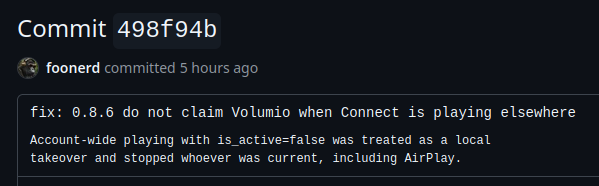
Package json is 0.8.6 - proof here: alsa_soloist_connect/soloist_connect/package.json at 498f94bc1574c26514058e977c62831cfa98166e · foonerd/alsa_soloist_connect · GitHub
Yes, it is pushed.
Kind Regards,
Yes,
I can see it now
commit 498f94b geschreven : 2026-09-11 11:19:46 UTC (13:19 NL)
repo pushed_at : 2026-09-11 16:23:51 UTC (18:23 NL)
Hi,
Just a quick note first: I do not have much programming knowledge myself, so I asked AI to help me organize the technical details based on what I found. If I have misunderstood anything technically, please correct me.
When playing the same track through Spotify Lossless and Qobuz on my RIVO+, Spotify is clearly several dB quieter. This seems to be caused by Spotify’s loudness normalization being enabled in Soloist.
I initially thought normalization could not be disabled in Soloist, but I found that Music Assistant already provides an option for this. Their implementation appears to use:
audio.normalize_v2=false
Reference:
Would it be possible to add a simple Loudness Normalization ON / OFF option to the Volumio Soloist Connect plugin as well?
What I would like is simply for OFF to disable Spotify’s own loudness normalization, so that Spotify plays at the original track level rather than being normalized.
I am currently leaving Output Trim at 0 dB, since a fixed gain adjustment cannot fully compensate for normalization when the amount of attenuation varies between tracks.
Thanks for all the work on the plugin.
1 Like
I am excited to see this new plugin and have been trying it since yesterday on an x86 build. It often fails to advance from one track to the next. I tried adjusting the queue and timing threshold settings (Spotify Queue Wait, Inactive Hold, Quality Retry Wait/Retries), but none of them made any difference.
Below is a log from this morning that happens to show both a successful transition and a failed one back to back — same session, same code path — which seems to point at exactly what’s different between the two.
Plugin version: 0.8.6 / Soloist binary 1.3.8.36
Successful transition (Debussy “Clair de lune” → Saint-Saëns “The Swan”, 09:56:03–04): buffering starts about 1 second before the track’s true end (position 293987/294960ms). It resolves in ~1 second, fires a track_changed event to the next track, and plays on cleanly.
Failed transition, immediately after (The Swan trying to advance to whatever was queued next, 09:58:58 onward): the exact same buffering trigger fires about 1 second before the end (173306/174266ms) — but this time it takes ~10 seconds to resolve. When it finally does, it doesn’t fire track_changed — it fires playback_changed: playing for the same track again, at essentially the same position (173311ms). One more buffer blip 5 seconds later, then nothing at all — no further events, no advance, indefinitely.
Full log excerpt (click to expand)
Sep 13 09:56:03 volumio launch-soloist.sh[1345]: soloist-shim: pa_stream_cork
Sep 13 09:56:03 volumio launch-soloist.sh[1345]: soloist-shim: cork 0 pcm=1
Sep 13 09:56:03 volumio volumio[1054]: info: SoloistConnect: ws event {"type":"playback_changed","status":"buffering"}
Sep 13 09:56:03 volumio volumio[1054]: info: SoloistConnect: ws event {"type":"playback_state","status":"buffering",...,"position":{"position_ms":293987,...}}
Sep 13 09:56:04 volumio volumio[1054]: info: SoloistConnect: ws event {"type":"track_changed","item":{...,"identity":{"name":"The Carnival of the Animals... The Swan"}},...}
Sep 13 09:56:04 volumio volumio[1054]: info: SoloistConnect: publish play uri=spotify:track:0jOnZhF75V68VsBObWx2XO title="...The Swan" artist="Camille Saint-Saëns, Yo-Yo Ma, Kathryn Stott"
Sep 13 09:56:04 volumio volumio[1054]: info: SoloistConnect: ws event {"type":"playback_changed","status":"playing"}

[... The Swan plays normally for its ~2:54 duration ...]

Sep 13 09:58:58 volumio launch-soloist.sh[1345]: soloist-shim: pa_stream_cork
Sep 13 09:58:58 volumio launch-soloist.sh[1345]: soloist-shim: cork 0 pcm=1
Sep 13 09:58:58 volumio volumio[1054]: info: SoloistConnect: ws event {"type":"playback_changed","status":"buffering"}
Sep 13 09:58:58 volumio volumio[1054]: info: SoloistConnect: hold publish: playback_changed buffering uri=spotify:track:0jOnZhF75V68VsBObWx2XO
Sep 13 09:58:58 volumio volumio[1054]: info: SoloistConnect: ws event {"type":"playback_state","status":"buffering",...,"position":{"position_ms":173306,...}}
Sep 13 09:59:08 volumio launch-soloist.sh[1345]: soloist-shim: pa_stream_cork
Sep 13 09:59:08 volumio launch-soloist.sh[1345]: soloist-shim: cork 0 pcm=1
Sep 13 09:59:08 volumio volumio[1054]: info: SoloistConnect: ws event {"type":"playback_changed","status":"playing"}
Sep 13 09:59:08 volumio volumio[1054]: info: SoloistConnect: publish play uri=spotify:track:0jOnZhF75V68VsBObWx2XO title="...The Swan" artist="Camille Saint-Saëns, Yo-Yo Ma, Kathryn Stott"
Sep 13 09:59:08 volumio volumio[1054]: info: SoloistConnect: ws event {"type":"playback_state","status":"playing",...,"position":{"position_ms":173311,...}}
Sep 13 09:59:13 volumio launch-soloist.sh[1345]: soloist-shim: pa_stream_cork
Sep 13 09:59:13 volumio launch-soloist.sh[1345]: soloist-shim: cork 0 pcm=1
[nothing further — daemon confirmed alive via systemctl status/ps aux, just idle]
I am not versed in these details but AI suggests: “This looks like a race between however long the pre-buffer/prefetch for the next track takes and whatever’s supposed to commit to the actual track transition. When the buffer resolves quickly (~1s), it correctly fires track_changed. When it’s slower (~10s here), the daemon seems to give up waiting and falls back to just resuming the current (already-finished) track instead — and since nothing re-checks for completion after that, it’s stuck permanently with zero further activity.”
Hety @shinichi.nochise,
You had the right cause. Spotify Lossless sitting quieter than the same track on Qobuz is Spotify’s own loudness matching, not Output Trim and not Align volume.
Soloist still has no official on/off for that. No CLI flag, no WebSocket command. Spotify’s own docs still say Soloist does not read a configuration file. What we can do is write the engine prefs key (audio.normalize_v2) under the data dir before Soloist starts. That is the same undocumented store Music Assistant already uses. It is Spotify’s key, not theirs, and it is not a published Soloist API.
That last part matters. If a later Soloist build ignores the line, or Spotify renames or drops it, the plugin switch will still be there and the file will still be written - and the level may not move. I will not pretend that is a contract. There is nothing we can do in the audio shim either: by the time we see the samples, Soloist has already done the matching.
0.8.7 is on GitHub only. Store stays 0.8.5. Under Sound there is now Loudness normalization. Default is on, which is what boxes do today. Off writes the key false and restarts Soloist. That is not a dB trim. If you already raised Output Trim to chase Qobuz, turn that back before you judge the switch.
I have not claimed this matches Qobuz. That listen is yours on the RIVO+. After Save & Restart the journal should show SoloistConnect: loudness_normalization=off. If the tracks stay quiet with that on the log, the binary is ignoring the prefs and there is nothing further on our side until Spotify gives us a real switch.
Crossfade is left alone.
Install from the opening post. Uninstall the store plugin first.
I will not push this to the plugin store until it is confirmed working. Until then it stays on the cutting-edge line.
Kind Regards,
1 Like
Hey @mogelsvs,
The opening post already says how a report has to look. Same rule as everyone else. The pair of cuts is useful, but it is not a report I can work from.
What I can say from that paste: this is Spotify Connect advancing its own list, not the Volumio queue. The plugin does not pick the next track. It waits for Soloist’s track_changed. On the good cut that event arrived and we published The Swan. On the bad cut it never arrived. Ten seconds later Soloist said playing for the same track at the same place. We published what the daemon sent. Then the events stopped. I cannot see why the binary did that from a trimmed extract.
Spotify Queue wait, Inactive hold, and Quality retry are not on that path. They are the Browse tile, yield after the session leaves, and the quality label. They cannot fix or cause a missing track_changed. That they did nothing is expected.
A note on the AI write-up. Those tools do not know this plugin or the Volumio state machine. They invent a race in whatever text they can see and blame the nearest setting. There is no plugin timer that waits for prefetch and then commits or abandons the cut. hold publish is a hold so we do not republish the old title while buffering. It is not a lock and it does not wait ten seconds. That is not the problem.
What I cannot do without a proper report: say whether a next track existed, whether the socket died, whether ALSA stalled, or whether this was the last item with repeat off. I will not guess a patch from that.
One post, please, in the form already in the opening post:
- Device model, DAC or output in use, and how it is connected
- Exact Volumio version (for example 4.123, not “x86 build”)
- What you did, what you expected, what happened instead
- A log with verbose logging on in plugin setting
For the log: turn Verbose logging on, reproduce a good cut and a stuck cut, then take the link from http://<volumio_IP>/dev before any reboot. /tmp and /var/log live in RAM. A reboot wipes them. Pasted extracts are not a substitute for the full link.
Also say whether Play Spotify tracks from the Volumio queue is on or off, mixer type, FusionDSP or Peppy if any, cache Disk or RAM, and whether the Spotify app still showed a next track when it stuck.
Treat the API key as a secret. Do not post it, and do not post an unredacted log that contains it.
Kind Regards,
1 Like
Hi Nerd,
Thank you very much for implementing this so quickly.
I tested the new loudness normalization option on my RIVO+, and I was able to confirm that the underlying method does work.
At first, switching Loudness Normalization to OFF in the UI did not change the playback level. After checking the logs and prefs, I found that:
/data/soloist/soloist.env
still contained:
LOUDNESS_NORMALIZATION="true"
and Soloist was therefore starting with:
engine_prefs loudness=on
I then manually changed it to:
LOUDNESS_NORMALIZATION="false"
and restarted Soloist.
After that, the log showed:
engine_prefs loudness=off
and the user prefs contained:
audio.normalize_v2=false
After a full reboot of the RIVO+, playback returned to normal, and the Spotify volume now seems to match Qobuz very closely.
So the good news is that the normalization-off method itself appears to work correctly with the current Soloist build.
The only remaining issue seems to be that, on my system, the UI setting is not being persisted to soloist.env.
Thank you again for adding this feature so quickly. This is very useful for comparing Spotify Lossless with Qobuz and local playback, and I really appreciate the work you are putting into this plugin.
Hey @shinichi.nochise,
I am not sure why you need to do manual changes to env file at all. This is wired in UI already.
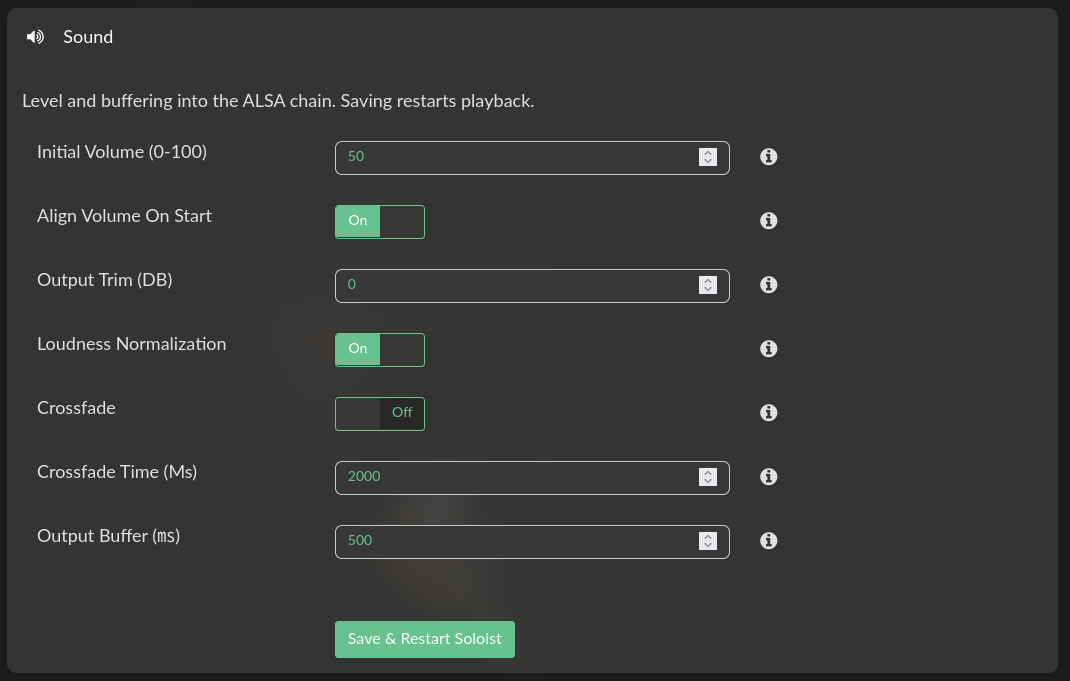
Please inspect your setup.
Kind Regards,
1 Like
I checked again after using Save & Restart Soloist with Loudness Normalization set to Off. It is now being saved and applied correctly:
config.json → false
soloist.env → false
engine_prefs loudness=off
So at the moment the UI path is working correctly on my RIVO+. The earlier true state may have been a one-off or timing issue on my side.
Thanks again for the very quick implementation and support.
Hey @shinichi.nochise,
Good. That is the path: Sound, Loudness normalization Off, Save & Restart Soloist. You should not need to edit soloist.env or the prefs by hand.
On install the switch is on. That is the current Spotify behaviour, so existing boxes do not jump in level. After the plugin is up, anyone who wants the original track level turns it off. I do not see a reason to ship the default as off and make every new install louder.
If the community later wants that default flipped, say so. Until then it stays on, and Off is one save.
Kind Regards,