Hey @balbuze,
Please check if any of your plugins uses payload method.
Kind Regards,
Hi,
For those that want to use GPIO-Buttons and emitting a websocket command, take a moment and read the how-to below:
Marvellous! Can’t thank you enough (I’m assuming it’s @nerd & @Wheaten - but whoever it was you have saved me a lot of time adapting the plugin).
Without the Websocket addition I was beginning to think I would have to do a major re-think of my whole system.
Is this new or have I just been slack in my housekeeping?
I have updated the [plugin] Randomizer page to list the Methods available.
All credits go to @Nerd.
I just did the testing and announcement.
Where would Volumio be without this sort of commitment? A duller place for sure!
In Italy cooking spaghetti and zipping cappuccinos 
Hey @Old_Duffer, @Wheaten,
I am using the RTL-SDR Radio plugin (FM/DAB) as an alarm clock. Currently this requires custom code to handle preset stations. The gpio-buttons plugin v1.9.0 custom emit feature simplifies this considerably - preset stations can be assigned directly to physical buttons.
The gpio-buttons custom emit can trigger Volumio’s replaceAndPlay socket command to start any rtlsdr_radio station.
Example - FM Station Preset (BBC Radio 2 on 88.1 MHz):
Action:       emit
Emit Command: replaceAndPlay
Emit Data:    {"service":"rtlsdr_radio","uri":"rtlsdr://fm/88.1","title":"BBC Radio 2"}
Example - DAB Station Preset (BBC Radio 1 on ensemble 12B):
Action:       emit
Emit Command: replaceAndPlay
Emit Data:    {"service":"rtlsdr_radio","uri":"rtlsdr://dab/12B/BBC%20Radio1","title":"BBC Radio1"}
Note: For DAB, the service name in the URI must be URL-encoded (spaces become %20). The exact service name must match what appears in your station database after scanning.
URI Format Reference:
This eliminates the need for separate alarm clock code - each GPIO button becomes a direct station preset.
Kind Regards,
Please forgive me being BRAND NEW here, I think this plugin and Volumio is the exact thing I need to make a super simple music box for my father-in-law who’s on hospice and dealing with mild dementia. I’m trying to make something that will allow him to pick from maybe 3 playlists just by pressing a button for each. Maybe one more button to pause/stop playback.
I’m waiting on my buttons and jumpers etc to come in, but trying to wrap my head around the setup beforehand, and I’m hoping that this is exactly what the “Custom Emit” setting is for.
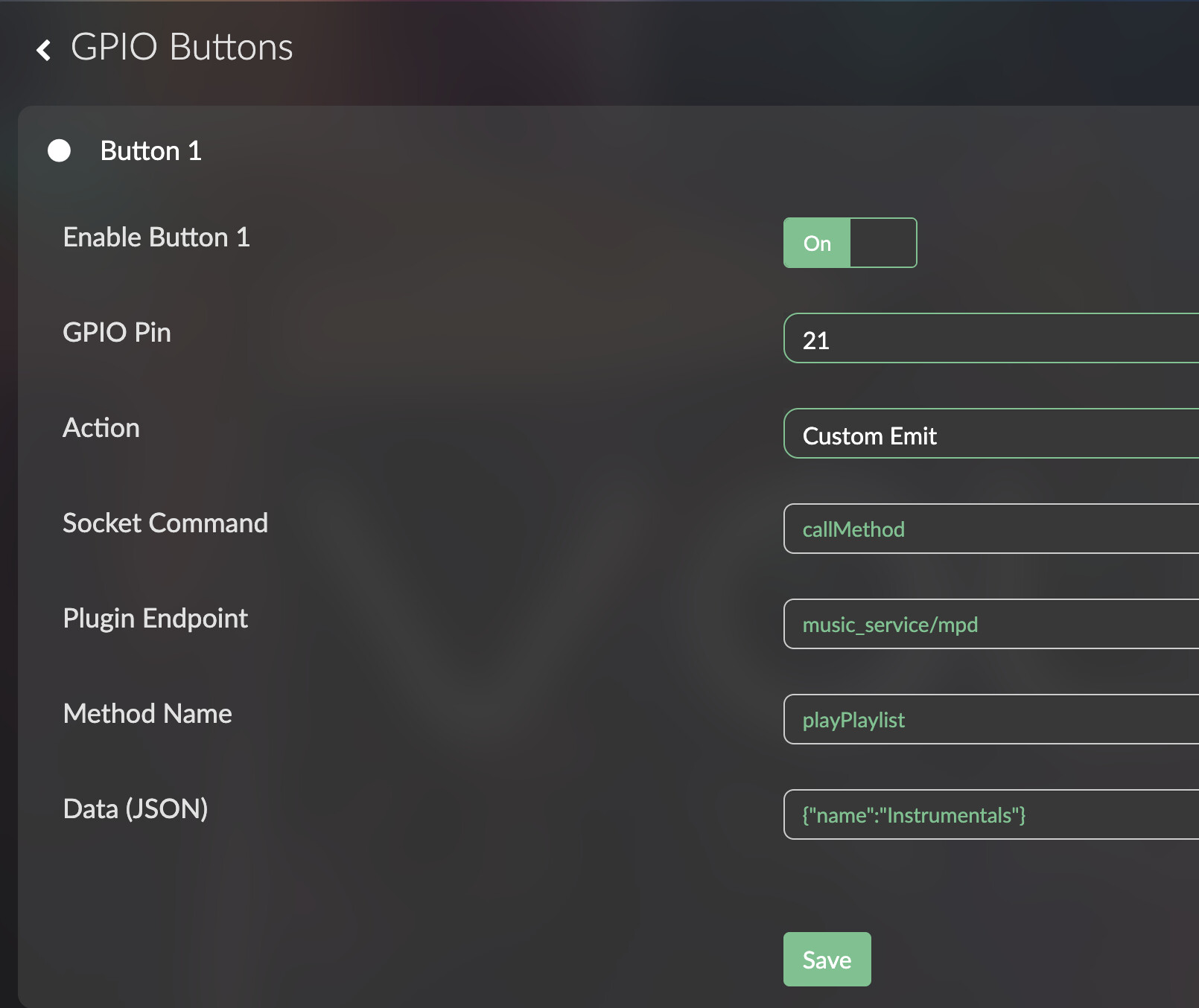
This is what I’ve come up with based on a couple of days of forum reading. I’m not seeing how to access the plugin config files that everyone is posting so all I’ve got is a screenshot of the GUI. Should this work in principle? (I’ve got the music collection on the SD card in the RPi and it’s indexed and working fine)
Replying to myself here, it looks like I don’t need to actually use the callMethod to mpd, I can just use “playPlaylist” as the Socket Command. Still don’t have my buttons set up to test. Makes me think it would be amazing if you could test the button functions from the UI at some point.
I’m BACK with buttons. And trying to use the playPlaylist function when setup exactly as described in the documentation (leave endpoint and method empty") throws a red on-screen error in the webinterface “custom emit requires endpoint and method” when I press the button.
Is this a bug with the settings menu for the emit function that I could work around by writing the config correctly myself?
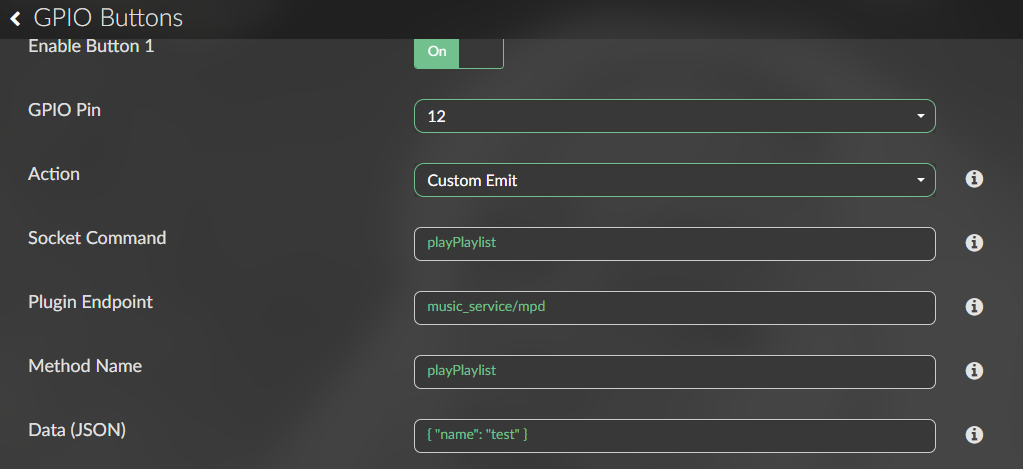
Try it like this:
Socket Command: playPlaylist
Plugin Endpoint: music_service/mpd
Methode Name: playPlaylist
Data: {"name": "Instrumentals"}
That did it! Thank you!
Hello Everyone, after the GPIO plugin has been enabled, I’ve read that the following is the configuration process - can anyone confirm this, in particular the reference to grounding the pin to trigger the required action
Connect buttons between GPIO pins and GND (Ground):
GPIO Pin ----[Button]---- GND
The plugin enables internal pull-up resistors, so no external resistors are needed.
| Function | GPIO Pin | Physical Pin |
|---|---|---|
| Play/Pause | GPIO 17 | Pin 11 |
| Volume Up | GPIO 18 | Pin 12 |
| Volume Down | GPIO 22 | Pin 15 |
| Previous | GPIO 23 | Pin 16 |
| Next | GPIO 24 | Pin 18 |
| Shutdown | GPIO 3 | Pin 5 |
Note: GPIO 3 (Pin 5) is special - it can also wake the Pi from halt state.
Please use resistors, to avoid blowing up GPIO pins.
Take a look at this drawing to get the idea.
Thanks – just to clarify: if I enable the GPOI plugin and follow the 3.3V rail / switch / 10k resistor / wiring configuration shown in the image then everything should work without damage to my PI 5?
Yes. The resistors act as current limiter and they protect to avoid floating inputs.
Super - thanks
Hello All,
I have a problem controlling internet radio playback with GPIO buttons. I’d like the button press to start playing internet radio stream. GPIO wiring works fine (controls volume up or down).
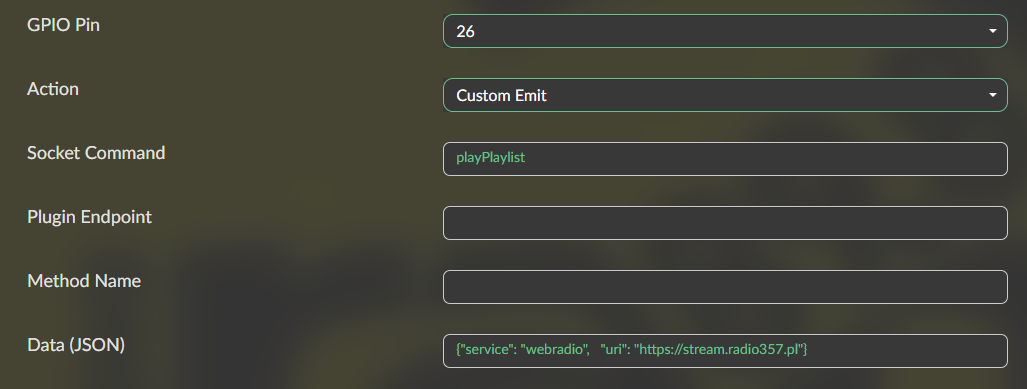
I’m trying custom emit with following parameters:
It seems not working, how to investigate that?
Any other ideas?
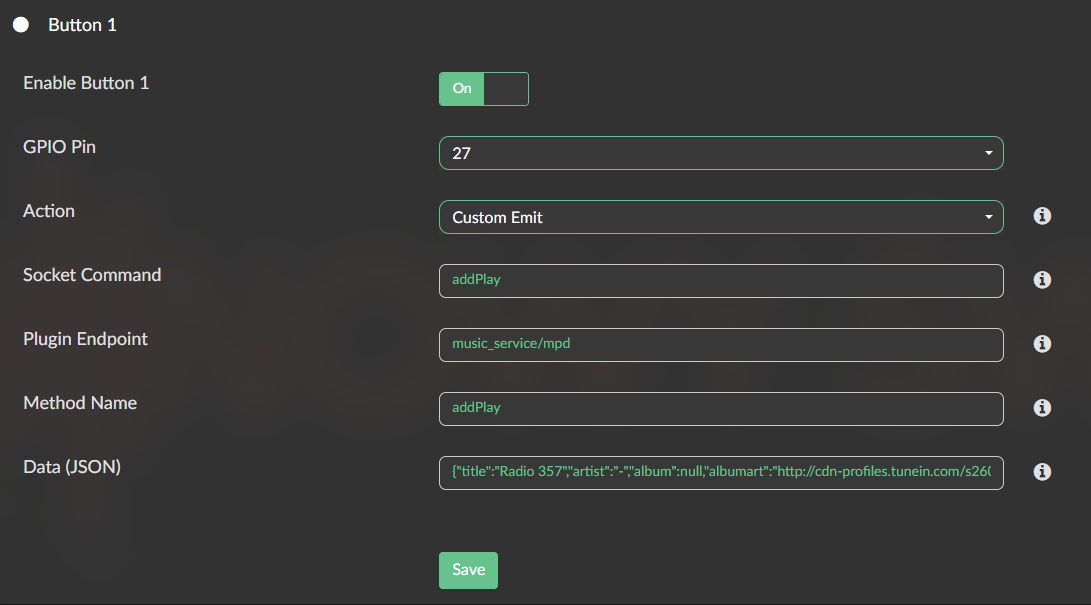
Answering to myself as apparently playPlaylist is not a proper command. It always plays Pos 0 from the current playlist ignoring specified uri.
addPlay does the right job even when other streaming is already playing in the queue.
Is there a way to clear the queue and add new stream in one button command?