[PLUGIN] FM/DAB Radio - RTL-SDR

Dear Volumionauts,

v1.0.7 (Current)

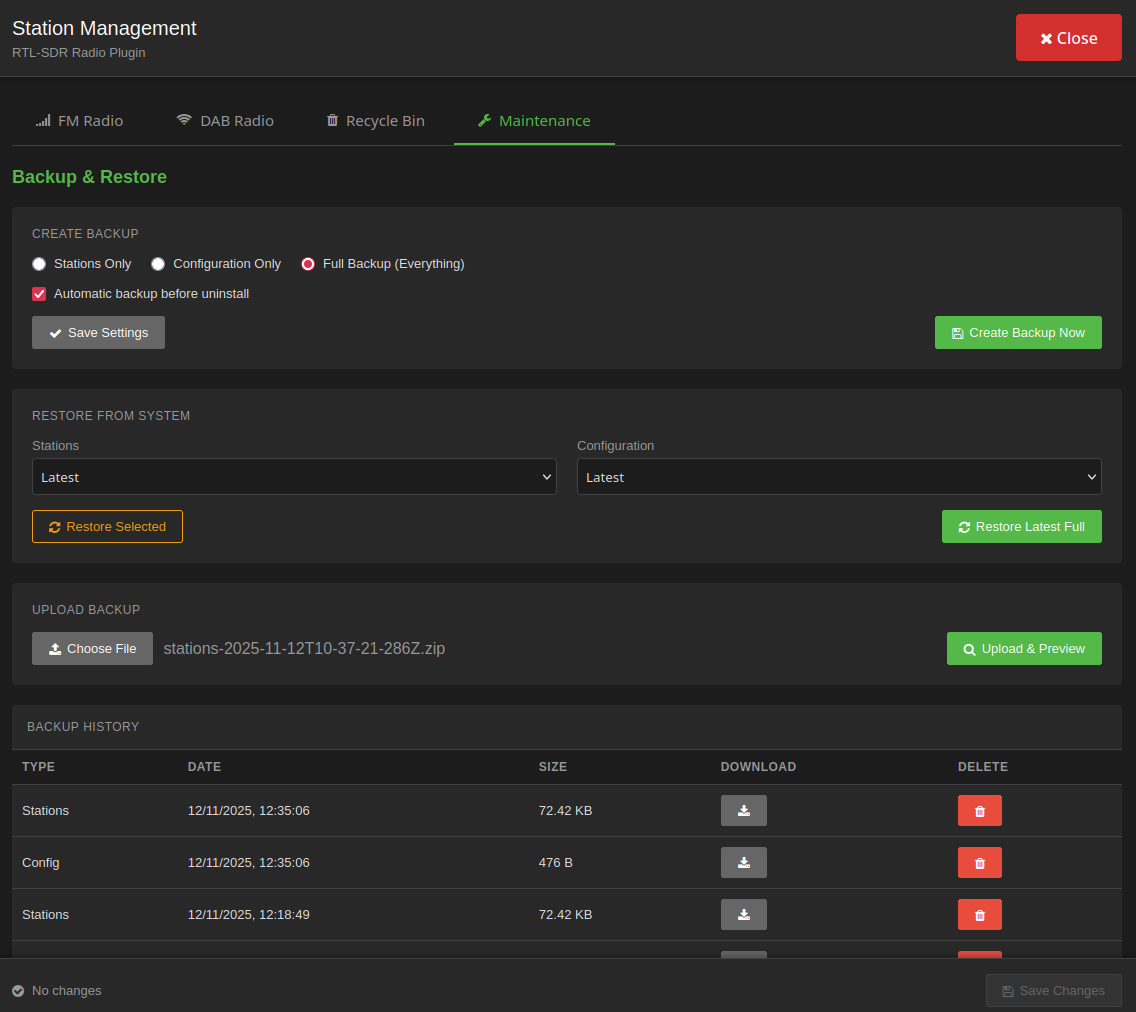
  • Added comprehensive backup and restore system
  • Three backup types: Stations Only, Configuration Only, Full Backup
  • Automatic backup pruning (keeps 5 most recent per type)
  • ZIP export/import functionality
  • Upload and validate external backups with preview
  • Mix-and-match restore capability
  • Backup history table with download/delete actions

Kind Regards,

2 Likes

hello,
i just got this one NESDR SMArTee XTR
finds the device fine. the only thing finding stations on the very sensitive. playing ok
is it just the signal poor here?

Dear Volumionauts,

IMPORTANT: This is NOT an out-of-the-box FM/DAB radio

This plugin uses RTL-SDR USB dongles - software-defined radio devices that require understanding of RF (radio frequency) principles to use successfully. Unlike consumer radios with a single purpose and automatic tuning, RTL-SDR is a DIY solution where YOU must understand:

  • How radio signal propagation works
  • Why antenna type and placement are critical
  • What gain settings mean and how they affect reception
  • The difference between signal strength and signal quality
  • Why your indoor setup might not receive the same stations as a car radio

This is the blueprint for RTL-SDR success: Understanding how RTL-SDR works is not optional - it’s the foundation. The plugin provides the software interface, but the hardware setup and RF knowledge are YOUR responsibility.

Reception Quality Factors:

  • Antenna quality and placement: 75%
  • RTL-SDR dongle quality and positioning: 20%
  • Plugin configuration: 5%

Common New User Misconceptions:

  • “It should work like my car radio” - No. Consumer radios have purpose-built tuners and optimized antennas
  • “I plugged it in, why no stations?” - RTL-SDR requires proper antenna, correct gain, good signal environment
  • “The plugin is broken” - 95% of reported issues are actually reception/antenna problems

Before Reporting Issues:

  1. Test your RTL-SDR hardware with standalone tools (rtl_test, rtl_fm, gqrx, SDR#)
  2. Research RTL-SDR basics - antenna requirements for your frequency range
  3. Understand your dongle’s specifications (NESDR Smart vs generic RTL-SDR have different gain characteristics)
  4. Verify signal availability in your location (use online coverage maps for DAB)

If you’re new to RTL-SDR: This is a learning curve, not a consumer product. The RTL-SDR community has extensive documentation. Invest time understanding the technology before expecting plug-and-play results.

Once you’ve confirmed your RTL-SDR setup works with standard tools, then we can troubleshoot plugin-specific issues. But hardware/reception problems cannot be fixed in software.

Kind Regards,

2 Likes

could you please provide some examples of a recommended Combined FM/DAB antenna?

1 Like

Any plans for AM reception? I like my morning talk show!

Dear Volumionauts,

Antenna Guide for RTL-SDR Radio

After spending way too much time chasing weak signals and dealing with noisy reception, following on @Darmur request, I figured it’s time to put together some practical antenna guidance. This covers both FM and DAB+, from budget options to what actually works.

The uncomfortable truth about antennas

Your antenna matters more than your dongle. A terrible antenna with an expensive RTL-SDR V3 will sound worse than a proper antenna with a cheap generic dongle. The physics don’t care about your budget.

FM (88-108 MHz) and DAB+ (174-240 MHz) need different antenna designs because of wavelength differences. FM wavelengths are roughly 2.8-3.4 meters, while DAB+ is about 1.25-1.7 meters. An antenna optimized for one won’t be ideal for the other. If you want both, you either need two antennas or accept compromise performance.

The dongle is part of the problem

Before blaming your antenna, check your dongle:

  • Cheap dongles have poor shielding. They pick up electrical noise from your Pi, USB hub, power supply, and everything else nearby. Metal-cased dongles are better than plastic.
  • USB cable quality matters. That sketchy 3-meter extension cable? It’s an antenna for interference. Keep cables short (under 1 meter if possible) or use shielded cables.
  • USB port location affects reception. Front panel USB ports on cases can be electrically noisy. Try different ports.
  • The dongle itself radiates interference. Moving it 20cm away from your Pi using a short quality cable often improves reception noticeably.

As @Wheaten discovered: same antenna, same location, but switching from Pi5 to x86 hardware gave dramatically better audio quality and stronger signals. The Pi wasn’t defective - it just generates more electrical noise near the USB ports.

Safety warnings - please read

Outdoor antenna installation can kill you:

  • Never install outdoor antennas near power lines. If your antenna or mast touches mains voltage, you’re dead.
  • Lightning strikes antennas. If you mount anything outdoors permanently, ground it properly or disconnect during storms.
  • Working at height is dangerous. Falling off a roof ruins your whole day.
  • Metallic antennas near existing TV/radio antennas can cause interference. Your neighbors won’t appreciate you wrecking their reception.

Indoor antennas are safer but perform worse. It’s a trade-off.

Antenna pattern comparison

Pattern Type Reception Best For Worst For
Omnidirectional Equal all directions Urban areas, scattered transmitters, unknown signal direction Rejecting interference, weak distant signals
Directional (Yagi) Focused beam, high gain Rural areas, single transmitter direction, weak signals Multiple transmitter locations, mobile setups
Log-Periodic Directional, wideband Covering FM + DAB+ with one antenna Space-constrained indoor use

Antenna types by performance

Price Range Antenna Type Gain (dBi) Polarization FM Performance DAB+ Performance Notes
Budget (under €15) Telescopic whip 0-2 Adjustable Fair (strong signals) Poor Indoor only, length matters
Budget Basic dipole 2-3 Horizontal or Vertical Good (local) Fair (local) Simple, works for testing
Mid (€15-50) Powered indoor 3-8 Varies Good Good Amplifies noise too, can overload
Mid FM outdoor dipole 3-5 Horizontal Very good Poor Wrong band for DAB+
Mid DAB Band III 3-6 Vertical Poor Very good Wrong band for FM
High (€50+) Log-periodic 5-10 Directional Very good Very good Requires aiming, weatherproof
High FM Yagi 8-15 Horizontal Excellent None Single band only
High DAB Yagi 8-15 Vertical None Excellent Single band only

Gain specifications guide

Gain Range Use Case Typical Distance Environment Risk
0-3 dBi Strong local signals 0-20 km Urban, line of sight Overload in strong signal areas
3-8 dBi Balanced performance 10-50 km Suburban, mixed Safe for most situations
8-15 dBi Weak distant signals 40-100+ km Rural, obstructed Useless in urban areas, too directional

Higher gain is not always better. A 15dBi antenna in a strong signal area will overload your dongle and cause distortion. A 3dBi antenna in weak signal areas won’t help much.

Do-it-yourself antenna principles

I’m not giving construction plans (too many variables, liability concerns), but here are the principles:

  • Quarter-wave and half-wave antennas are mathematically simple: Divide 300 by frequency in MHz to get wavelength in meters, then divide by 4 or 2. An FM quarter-wave antenna at 100 MHz needs roughly 75cm length.
  • Wire antennas work. Coat hanger wire, speaker wire, solid copper wire - they all conduct RF. Fancy materials don’t matter much.
  • Antenna placement beats antenna design. A mediocre antenna outdoors will destroy an excellent antenna buried behind your TV.
  • Vertical polarization for DAB+, horizontal for FM. This matters more than most people realize.
  • Ground planes improve performance for vertical antennas. A large metal surface (roof, car body, pizza pan) under your antenna changes everything.
  • Avoid coiling excess cable. Coiled coax becomes an inductor and wrecks your signal.

Troubleshooting common issues

Symptom Likely Cause Solution
No stations found during scan Loose connection, wrong polarization, no coverage Check F-connector, verify antenna orientation, confirm DAB+ available in region
Scan finds stations but won’t play Signal too weak, digital cliff effect Better antenna, outdoor placement, higher mounting
Audio is noisy/distorted USB interference, signal too strong or too weak Try different USB port, add ferrite beads, adjust antenna position
FM works, DAB+ fails completely Wrong frequency range, different antenna needed DAB+ needs Band III antenna (174-240 MHz), not FM antenna
Signal strength varies wildly Multipath interference, reflections Use directional antenna, change mounting location
Works during day, fails at night Atmospheric conditions (FM skip) Normal for distant stations, directional antenna helps

Regional DAB+ reality check

Region DAB+ Status Band Used Coverage Notes
UK Widespread Band III (174-240 MHz) Excellent national coverage
Germany Widespread Band III Good coverage, expanding
Netherlands Good Band III Major cities well covered
Norway Widespread Band III National rollout complete
Australia Limited Band III Major cities only
Italy Growing Band III Uneven regional coverage
USA/Canada Essentially none N/A Use HD Radio or internet instead
Parts of Asia Very limited Band III or L-Band Check local coverage maps

Before buying a DAB-specific antenna, verify your region actually has DAB+ transmitters. Check your country’s DAB coverage maps online. Don’t assume.

Some countries use L-Band DAB (1452-1492 MHz) instead of Band III - completely different antennas needed. Research your local standard first.

Bottom line recommendations

Your Situation Recommended Antenna Budget Why
FM only, strong signals, urban Simple telescopic or basic dipole €5-15 Adequate performance, not worth spending more
FM + DAB+, urban, good coverage Wideband log-periodic or separate FM/DAB antennas €30-60 Covers both bands, reasonable compromise
Weak signals, rural, distant transmitters Directional Yagi or log-periodic, outdoor mounted €50-100+ Height and aiming matter more than antenna model
Testing, experimenting, unknown conditions Cheap basic antenna first €10-20 Identifies actual problem before investing
Indoor only (apartment, rental) Powered omnidirectional or window-mount dipole €20-40 Best compromise for installation restrictions

Universal truth: The best antenna is the one that’s outside, up high, and properly oriented. Everything else is compromise.

Quick decision flowchart

  1. Do you have DAB+ coverage in your area? (Check maps first)

    • No: Get FM-only antenna, save money
    • Yes: Continue to step 2
  2. Can you install outdoor antenna?

    • Yes: Continue to step 3
    • No: Get powered indoor omnidirectional, expect limited DAB+ performance
  3. Are your transmitters all in one direction?

    • Yes: Get directional antenna (Yagi or log-periodic), aim it properly
    • No: Get omnidirectional or rotate directional antenna per station
  4. How strong are your signals? (Try cheap antenna first to test)

    • Strong: Low gain (0-3 dBi) to avoid overload
    • Medium: Mid gain (3-8 dBi) balanced
    • Weak: High gain (8-15 dBi) directional required

Kind Regards,
2 Likes

many thanks, but you could also provide some examples with links of recommended Combined FM/DAB antenna? Something I can add to cart and buy

Hey @jocoman,

AM Radio Reception - Technical Feasibility

Short answer: Yes, the RTL-SDR hardware can receive AM. No, I’m not planning to implement it anytime soon.

Hardware capability:

RTL-SDR dongles can tune AM frequencies:

  • Medium Wave AM (530-1700 kHz): Requires direct sampling mode on most dongles
  • Shortwave AM (3-30 MHz): Standard tuning mode works fine

The R820T/R820T2 tuner chips in typical dongles support these frequencies. Some cheaper dongles struggle below 24 MHz, but many work down to 500 kHz with direct sampling enabled.

Implementation reality:

Adding AM support means:

  • Different demodulation pipeline (rtl_fm has AM mode, but needs testing)
  • Separate frequency range handling (530-1700 kHz vs 88-108 MHz)
  • UI changes for AM band (different scan ranges, different step sizes)
  • Direct sampling mode configuration (hardware-dependent, tricky)
  • Extensive testing across different dongle models (AM reception quality varies wildly)
  • Antenna considerations (AM needs completely different antenna than FM/DAB+)

This is weeks of development and testing, not an afternoon project.

Where we are now:

Getting FM and DAB+ working properly took substantial development effort. If you’ve been following this thread, you know hardware quirks, and UI iterations were needed just to make two bands work reliably. Look at the repo and chat history - it’s extensive.

AM adds another layer of complexity because:

  • Lower frequencies are more susceptible to electrical interference
  • Direct sampling mode is finicky and hardware-dependent
  • Audio quality expectations differ (talk radio vs music)
  • Antenna requirements are completely different (long wire vs dipole)

Community contribution:

The repository is public: volumio-plugins-sources-bookworm/rtlsdr_radio at RTL-SDR · foonerd/volumio-plugins-sources-bookworm · GitHub

If AM radio is important to you or others in the community, contributions are welcome. The codebase is there, the patterns are established (look at how FM is implemented), and the infrastructure exists.

What’s needed:

  • Someone willing to do the implementation work
  • Testing on actual hardware (multiple dongle models)
  • Patience for debugging direct sampling quirks
  • Documentation for users

I’m happy to review pull requests and provide guidance on plugin architecture, but I’m not committing development time yet. FM and DAB+ serve the majority use case.

Bottom line:

Technically possible? Yes.
Open to community implementation? Absolutely.

If there’s significant demand (multiple users requesting it, willingness to test), I might reconsider.

Kind Regards,

Hey @Darmur,

Fair point - here are some specific combined FM/DAB antennas you can actually buy.

Budget indoor options (€10-20):

RTL-SDR Blog Multipurpose Dipole Antenna Kit

Around £17-20. This is the antenna that comes with the RTL-SDR bundles. I use this one myself - works quite well in vertical orientation right outside the window. Includes telescopic elements, magnetic base, suction mount, tripod, and 3m extension cable. Good starting point for most setups.

Ancable DAB/FM telescopic with magnetic base

Around £14. Telescopic, 3m cable, magnetic base. Good for testing if you can get reception at all. Mixed reviews - works well in strong signal areas, useless in weak ones.

Generic DAB/FM telescopic antenna

Around £13. Similar to above, slightly different connector adapters included. Band coverage: FM 88-108 MHz, DAB Band III 174-240 MHz.

Mid-range outdoor (€50-70):

Antiference FMDAB combined aerial

£53.39 + shipping. Proper outdoor antenna, omnidirectional FM (360 degrees), directional DAB (90 degrees). Pole mounted, weatherproof. This is a real aerial, not a toy. Requires outdoor installation and coax cable run.

Also available from various UK trade suppliers if Antiference direct shipping doesn’t work for you.

Higher-end options (€80+):

If you need serious gain for weak signals, you’re looking at separate antennas:

Antiference 4-element DAB aerial (DAB2304T) - around £70-80
5-element FM aerial (FM1085T) - around £80-90

These are directional high-gain antennas. You’d need to combine the outputs. Only worth it if you’re in a genuinely poor reception area and outdoor mounting is possible.

Reality check:

Start cheap. The RTL-SDR dipole kit or the £14 Ancable antenna will tell you if your problem is “no signal at all” or “weak signal that needs better antenna”. If the cheap one finds nothing, a £80 antenna probably won’t help either - your area might just lack coverage.

If the cheap antenna finds stations but they’re choppy/noisy, then upgrade to the Antiference FMDAB outdoor antenna.

For most people in urban areas with decent coverage, the RTL-SDR dipole kit mounted vertically near a window is adequate.

Kind Regards,

2 Likes

Jeepers

Thank you for that response. I had no idea of the complexity to make AM work.
So, definitely not worth the effort!

thanks for the hints, I got the first one you’re using too

@nerd

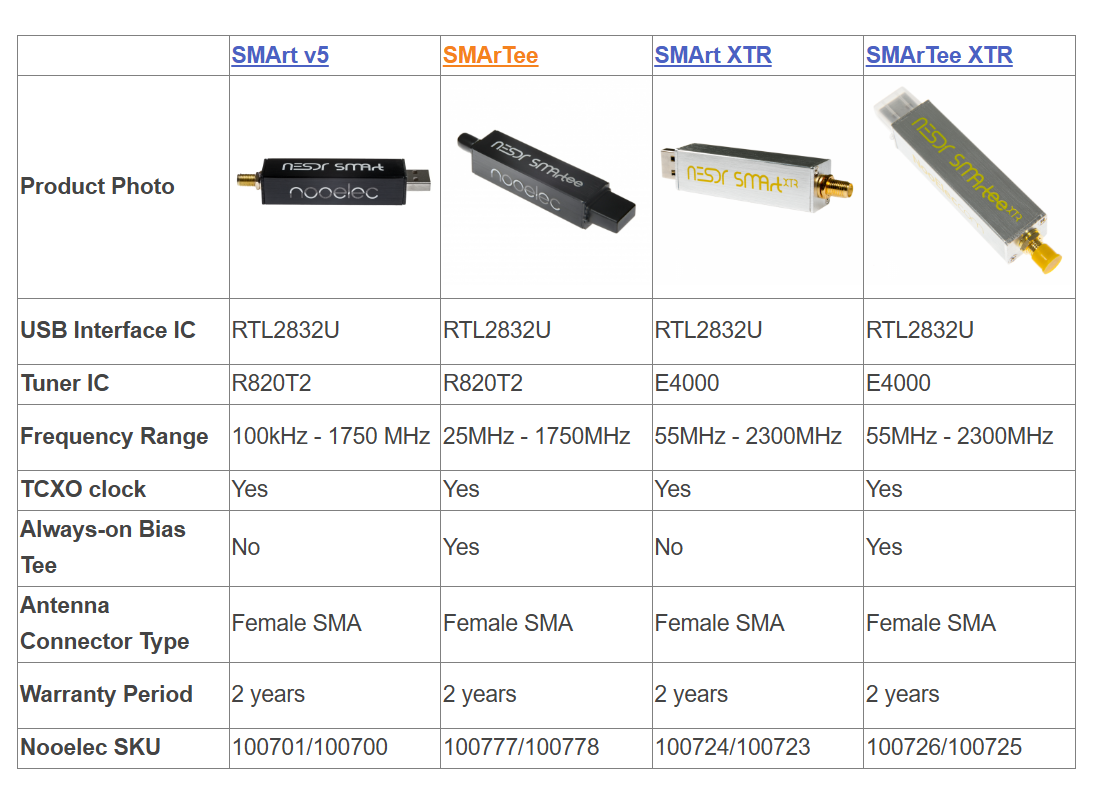
Which device should I choose between SMArt v5 and SMArt XTR?

The XTR models are not ideal for DAB+ reception, as they’re optimized for L-band and satellite frequencies.

That leaves the SMArt V5 and SMArTee as better choices.
The SMArTee is recommended if you plan to use an LNA or active antenna, thanks to its built-in bias tee

1 Like

@nerd

Something weird is happening with the delete function via port 3456.
If I delete all FM and DAB+ channels, I see them in “Deleted Stations”.

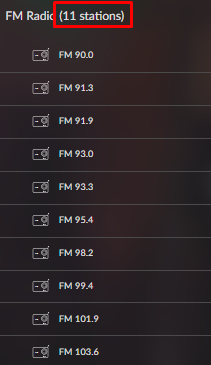
If I scan FM stations again, I see:
image

But only 3 are added:

Dear Volumionauts,

v1.0.8 (Current)

  • Fixed purge deleted stations action not working from Music Library interface.

Thank you for reporting and testing @Wheaten - appreciated.

Kind Regards,

1 Like

Hardware:

Volumio:

  • V4.071

Testing:

  • Removed previous version, rebooted, installed V1.0.8 (Beta)
  • Rebooted
  • Settings: FM Gain = 80, DAB Gain = 100
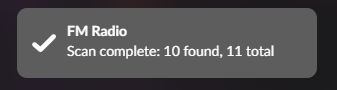
  • Scanning FM: 10 Stations (Count says 11?)
    image
  • Scanning DAB: 0 (Which is strange as previous version scanned 44, antenna not moved)
    It seems that if you change the GAIN of DAB, a reboot is required. After reboot channels are found.
    image

Maintenance:

Suggestion:
Would it be possible to implement a live signal strength scan to assist with antenna alignment? Right now, it takes three minutes to realize DAB has vanished into thin air.

Hey @Wheaten,

To get the assets refresh - you will need to start browsing from the root of Music Library:

image

There is no concept in the backend UI of the child container assets count dynamic refresh. This is simply cached.

Will need to evaluate, how dynamically re-query statically calculated signal floor.

Kind Regard,

Dear Volumionauts,

FM/DAB Radio Plugin - Version 1.0.9

New Feature: Antenna Positioning Tools

Version 1.0.9 introduces professional-grade antenna positioning tools to help you optimize your RTL-SDR reception. These tools provide real-time feedback as you adjust your antenna placement and orientation.

What’s New

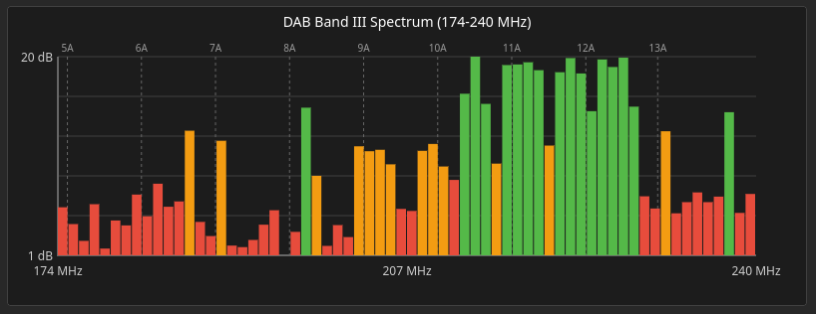
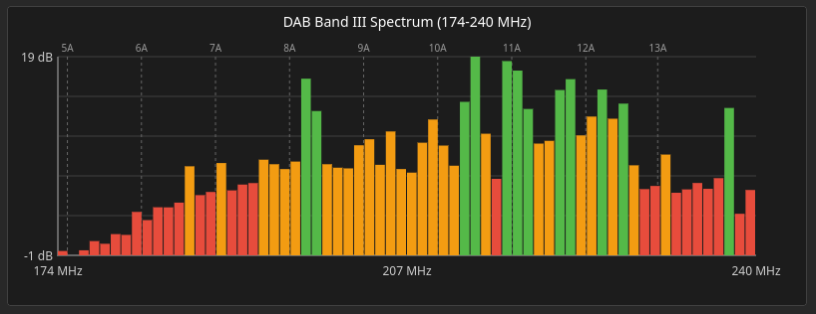
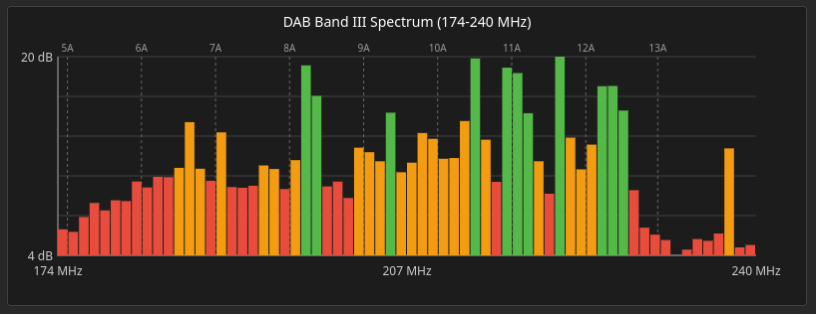
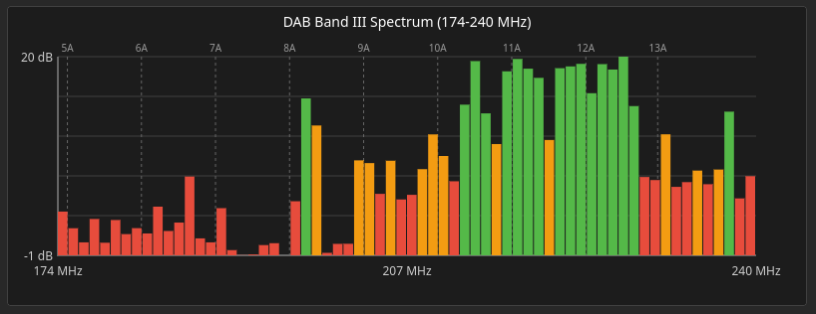
Tool 1: RF Spectrum Scan

  • Full-band spectrum analysis (174 MHz to 240 MHz)
  • 2-second scan covering DAB frequencies
  • Visual spectrum chart showing signal strength across entire band
  • Perfect for quick antenna orientation checks

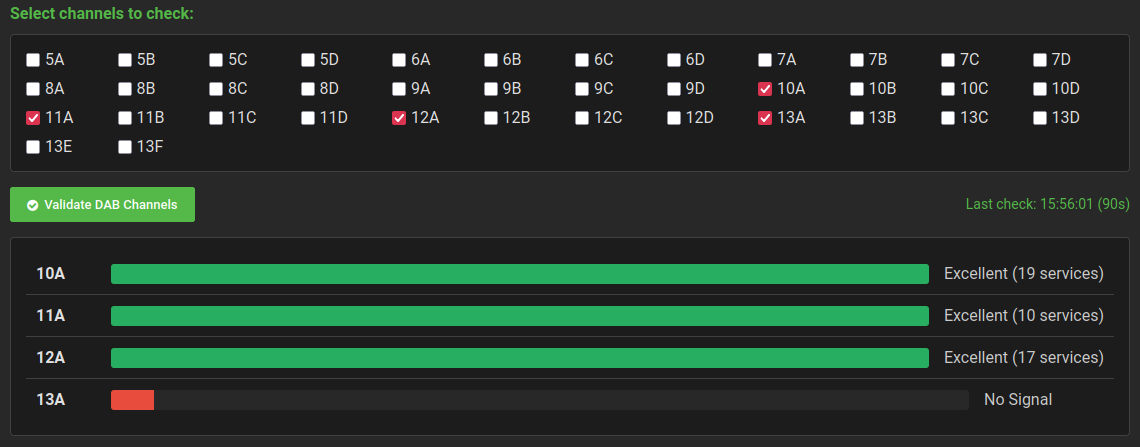
Tool 2: DAB Channel Validation

  • Progressive validation of specific DAB channels
  • Real-time results as each channel completes (no waiting for batch)
  • Shows sync status and service count per channel
  • Typical validation: 10-15 seconds with signal, 2-3 seconds no signal

Three Critical Bug Fixes:

  1. Service count detection now accurate (was always showing 0)
  2. Validation completes immediately (no 30-second timeouts)
  3. No-signal channels terminate in 2-3 seconds (no overshoot)

How to Use

  1. Navigate to plugin settings: Settings > Plugins > FM/DAB Radio
  2. Click “Open in New Tab” to access web station manager
  3. Click “Antenna Positioning” tab
  4. Start with Tool 1 (RF Spectrum Scan) for quick overview
  5. Follow up with Tool 2 (DAB Channel Validation) to verify decode capability

Recommended Workflow

  1. Run RF Spectrum Scan to see available signals
  2. Adjust antenna position/orientation
  3. Re-scan to see signal strength changes
  4. Once spectrum looks good, validate specific DAB channels
  5. Fine-tune based on validation results
  6. Perform full station scan when optimal position found

Why Two Tools?

RF Spectrum Scan shows WHERE radio frequency energy exists in your location. Channel Validation shows IF that RF energy is actually decodable DAB. Strong RF does not guarantee usable signal - it could be interference or wrong modulation type.

Antenna Position Examples

The screenshots below demonstrate spectrum scan results with a bi-dipole antenna in different orientations (described using clock face positions):


Baseline reference position


Slight tilt showing signal variation


Different orientation demonstrating peak shifts


Horizontal position showing different reception pattern

Channel Validation Examples


Per-channel sync status and service counts

Technical Details

  • Spectrum scan uses rtl_power for wide-band analysis
  • Channel validation uses custom dab-scanner-3 binaries
  • Server-Sent Events (SSE) provide progressive results
  • No browser refresh needed during validation
  • All 11 languages fully supported

Location Context

Test environment: Urban London with multiple DAB ensembles
Dongle: RTL-SDR V3
Antenna: Bi-dipole (DAB Band III optimized)

The screenshots show real-world signal variations with antenna positioning changes. Your results will vary based on:

  • Local transmitter locations
  • Building interference
  • Antenna type and quality
  • Dongle sensitivity

Installation

Version 1.0.9 available through Volumio plugin repository.

Kind Regards,

2 Likes

:tada: :tada: :tada: :tada: :tada: :tada: :tada: :tada: :tada: :tada: :tada: :tada: :tada: :tada: :tada:

How did you connect this antenna? Plug type?