@patrickkfkan
Thanks! Great to have the plugin back.
@balbuze could you please release the version 1.2.0 as stable for all the devices and products?
done! 
awesome, thank you!
I would like to note that when logging in and opening the “network” tab in the console, Bandcamp no longer saves the session cookies with your username as the name but instead with “discover”:
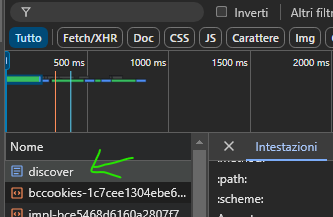
The other steps outlined by @patrickkfkan on the ‘How to obtain Cookie’ page remain the same.
Happy New Year, everyone! 
2 Likes
I have Bandcamp Discover installed, but I can listen to music that I haven’t purchased. It seems that you can also listen to high-resolution music on Volumio. For example, the music on the British BBE label’s “J Jazz: Deep Modern Jazz from Japan 1969 - 1984” is displayed as 44.1kHz 24bit. I look forward to comments from people who use this plugin.
Please use the plugin’s thread to get its users attention. Don’t forget to follow the cookie instructions to listen to higher quality streams when playing your purchased Bandcamp music.
1 Like
@SimonE
Thank you.
I noticed the existence of the Bandcamp thread after posting. Thank you for transferring the thread.
The plug-in version was outdated, so I installed the latest version and finished setting up cookies. I was able to confirm that the music I purchased was played in MP3 format. It seems that it just wasn’t displayed correctly before the update.
Hi @patrickkfkan
The Bandcamp plugin has stopped working for me (Failed to obtain fan info by cookie. Error no results).
What I tried:
- Copy a new cookie as per your guide
- Uninstall plugin
- Restart Volumio, reinstall plugin
- Re-add the cookie
Plugin version 2.0.0
Volumio version 4.021 (Bookworm beta latest version)
Log
1 Like
I’ve been struggling to get the plug-in working for the last couple of days. I’m pretty sure I’m getting the cookie from the right place (based on the instructions from github as well as the post from Ema82 above.
I’m also getting the “Failed to obtain fan info by cooke” and “error no results” error messages.
I’ve also followed the same steps as SimonE
- Uninstalled plugin
- Restart volumio
- Reinstall plugin
- Re-add cookie
Volumio system version: 3.832
Bandcamp Discover plugin version: 1.2
1 Like
@patrickkfkan
Struggling with getting the cookie based on instructions:
DeveloperOptions with any used browser (Chrome, IE, Firefox)
does not show the request header cookie for the username anymore
Heres my LOG:
info: CoreCommandRouter::executeOnPlugin: bandcamp , handleBrowseUri
info: [bandcamp-browse] browseUri: bandcamp
error: Failed to execute browseSource: Error: Failed to parse image constants: JSON error.
info: CoreCommandRouter::executeOnPlugin: system , getPrivacySettings
info: CALLMETHOD: system_controller my_volumio retreiveBackendEventStates undefined
info: CoreCommandRouter::executeOnPlugin: my_volumio , retreiveBackendEventStates
info: Received Get System Version
Pls help us!
Volumio system version: 3.832
Bandcamp Discover plugin version: 1.2
I get a “No results” error when trying to open the Bandcamp Discover plugin.
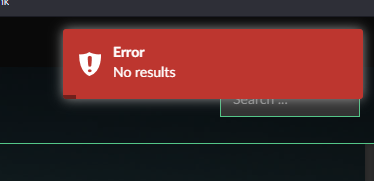
I’m on the 4.021 volumio beta and looks like the Bandcamp plugin is listed as 2.0.0
1 Like
anyone having the same issues and may have a solution for? 
Please see post 89. The problem has been reported, but not yet fixed. Please be patient, Patrick will get round to it.
1 Like
Apparently, it does not work anymore, too 
this has broken for me too… my current stable volumio is installing 1.2.0, and the github as version 2.0.0 (released “Nov 22, 2024”)… any idea how to upgrade the release?
but sounds like it might be broken again on 2.0?
edit: I’ve upgraded to the latest v4 beta with the 2.0 plugin and it’s still broken. so confirmed.
1 Like
@patrickkfkan Pls have a look at - thanks a lot!
Thanks so much @patrickkfkan I saw there was an update to 2.1.0. I uninstalled and reinstalled and it’s been working great.
1 Like
Yes it’s working again! Thanks @patrickkfkan