New 2023 Spotify Plugin

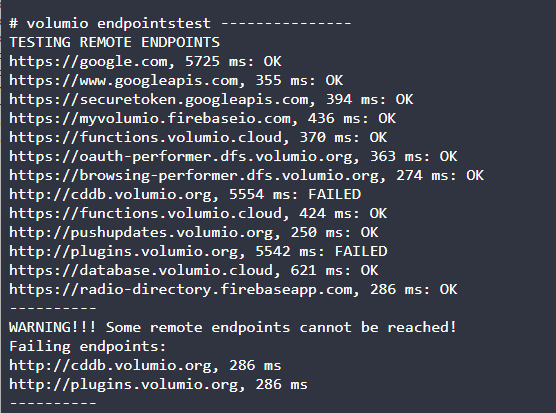
I’m using AdGuard at home, so I tried to create an exception for volumio. Here is a new log http://logs.volumio.org/volumio/WXw1fin.html. It seems like latency issue is solved, but spotify problem is still here. I tried to use chatgtp to analyze the log:

It’s clear now. The main issue is not Spotify login, but failure to retrieve the audio key for playback in go-librespot.

The key log lines are:

  • Spotify Successfully logged in
  • authenticated AP
  • then during playback:
    • failed retrieving audio key: failed retrieving aes key with code 1
    • Failed to send command to Spotify local API: /player/play: Error: Internal Server Error

This means:

  • Volumio logs into Spotify successfully
  • it can find and prepare the track
  • it even selects the stream (OGG_VORBIS_320)
  • but it fails at the step where it needs to retrieve the AES audio key to decrypt the stream

Likely causes

  1. Bug / incompatibility in the Spotify plugin (Volumio 3.912)
  • log shows: running version from March 24, 2019
  • that’s a very old Spotify implementation underneath
  1. go-librespot / Spotify backend compatibility issue
  • authentication works, but audio key retrieval fails
  1. Broken plugin state after update
  • you updated to 3.912
  • there is also:
    • FATAL ERROR ... JavaScript heap out of memory
  • backend restarted → system may be in inconsistent state
  1. Less likely:
  • network issue to Spotify key servers
  • but AP auth and dealer connection work → not typical connectivity problem

Additional (non-root) issues seen in logs

These are not the main cause, but affect system stability:

  • volumio-streaming-daemon.service not found
  • cifs_mount failed w/return code = -113
  • Plugin gpio-buttons failed to start! Error: EBUSY
  • Cannot compose Albumart path
  • now_playing ... Cannot read property 'has' of undefined

Conclusion

Your issue is inside the Spotify/go-librespot integration in Volumio, not:

  • account
  • password
  • region

Login works — playback fails specifically at audio key retrieval.


What I would try first

In order of priority:

  1. Disable and re-enable Spotify plugin, log out and back in
  2. Clear Spotify plugin config/cache and re-login
  3. Disable problematic plugins:
  • now_playing
  • touch_display
  • gpio-buttons
  • optionally SoundCloud / 80s80s / Radio Paradise
  1. Reboot and test with minimal setup:
  • IQaudIO DAC
  • core Volumio only
  • Spotify
  1. If still broken → clean reinstall of Volumio 3.912 (no restore)
  2. If it still fails on clean install → very likely Volumio Spotify stack bug

Important note

You also have:

  • FATAL ERROR: ... heap out of memory

This means Volumio backend actually crashed due to memory exhaustion. On a Raspberry Pi with touchscreen + multiple plugins + streaming services, this can happen.


One-line summary

Spotify login works, but go-librespot fails to retrieve the AES audio key for the track, causing playback to fail due to an internal plugin/integration issue.

Instead of relying on AI, you still have missing end-points.
Bypass AdGuard completely, priority is to get Spotify working. I don’t opt. to battle on multiple fronts.

I would even more suggest to move to Volumio Bookworm (V4.xxx), as V3 is near EOL.

image

That make sense. So here is a V4. version with only spotify plugin, adguard disabled
http://logs.volumio.org/volumio/GWBWByP.html
thank you

Good afternoon!
I’ve tried spotify plugin in the newest version 4.4.1 for a while now but it is working for me even worse than 4.3.4.

What does that mean:
Spotify is currently my only usecase for my Volumio. I do have several long playlist and all I want to do is playing them from the beginning to the end.

The lists are somewhat about 250 titles, so not that big but defnitely too long to play it at once.
so I press “pause” several times when I do not want to listen anymore.
V. 4.3.4 allows this approx. 8-10, sometimes a dozen times but then fails to play further. Touch still works, so play/pause is showing its changing symbols, fast forward doesn’t work and no music is played.

I has hoped, new version will improve this.

But no luck: Several time in the morning the device is (may rebooted?) at the beginning of the playlist, Starting at default loudness (which leads to the reboot assumption). And after 2-3 pauses no music is to hear.
Today (first time ever) I experienced even track-skipping and stuttering.

So something is broken in my installation.

I’ve installed newest version with “update” - so I dont have de-installed and tried a fresh install.

  • Would a “fresh install” be an appropriate trial?

Config:
Volumio V 4.103
Pi5, 8GB, NVMe · Samsung SSD 980 500GB - WLAN connected.
Raspi 2 (touch) Display (DSI),
Two rotary encoders on several GPIOs
BT remote

Installed Plugins:
Spotify - 4.4.1
Backup&Restore 1.7.4
Bluetooth Remote 0.0.8
Rotary Encoder II 2.1.23
Now Playing 1.01
Touch Display 3.5.2

I’ve just written a logfile: http://logs.volumio.org/volumio/so3lash.html

Any idea/help/hint/guidance is highly appreciated!

Thanks a LOT!

Warmes regards,
Ralf

I’ve just experienced this behaviour - and for a while I couldn’t reach the web-interface.
Another log trial: http://logs.volumio.org/volumio/flBw4BZ.html

Regards,
Ralf

I’ve found another topic with spotify problem, see Spotify plugin not working with account - #12 by Minix_Neo

This is a quite old thread with a differnt problem - with my premium account I CAN play spotify - but not reliable…
Thanks anyway for your idea and support!

Warmest regards,
Ralf

Good Afternoon!

because there is no answer I have tried to use som artificial intelligence (mine is not sufficient :slight_smile: ).

As AI stated there may is a bug in go-librespot : - could you please kindly hav a look?

go-librespot may enters rapid-skip loop after Spotify Connect state PUT timeout (Plugin 4.4.1)

Summary

After a put connect state request to Spotify’s API fails with a timeout, go-librespot loses
synchronization with Spotify Connect and enters an unrecoverable rapid-skip loop, cycling through
multiple tracks in seconds without actually playing them. Volume also resets unexpectedly. The
player does not recover on its own — play/pause buttons still toggle their UI symbols but have no
effect, forward/skip is unresponsive, and no audio is played. The only way to restore
functionality is a full reboot of the device.

Environment

  • Volumio 4.103
  • Spotify Plugin 4.4.1
  • Pi 5, 8GB, NVMe (Samsung SSD 980 500GB)
  • HiFiBerry DAC+ Pro, OGG_VORBIS_320
  • WLAN connected (stable — plays for hours without issue when the bug doesn’t trigger)

Symptoms

  1. Playlist plays normally for hours
  2. After several pause/resume cycles, playback suddenly breaks
  3. Tracks skip rapidly (each loaded for <200ms, some loaded 3-6x in a row)
  4. Volume resets to a different value
  5. UI shows play/pause toggling but no audio output
  6. No recovery possible without reboot — touch UI responds visually but playback is completely
    broken, requiring a full device restart

This happened consistently with 4.3.4 (after ~8-10 pause/resume cycles) and has gotten worse with
4.4.1 (after 2-3 cycles).

Root cause in the logs

I traced the exact failure sequence in journalctl. Here is the complete chain of events from March
28, 2026:

Phase 1 — Normal operation (10:11:39)

Track resumes normally after a ~2h pause:
10:11:39 go-librespot: resume track at 219763ms
10:11:39 go-librespot: put connect state because PLAYER_STATE_CHANGED
10:11:39 go-librespot: emitting websocket event: playing
10:11:39 SPOTIFY: received: {“type”:“playing”, … “resume”:true}

Phase 2 — State PUT fails (10:12:36) ← THE TRIGGER

57 seconds after resume, the state PUT to Spotify’s API times out:
10:12:36 go-librespot: level=error msg=“failed put state after update” error=“context deadline
exceeded”
10:12:36 go-librespot: emitting websocket event: not_playing
10:12:36 go-librespot: loading track (paused: false, position: 1ms)
uri=“spotify:track:360UM2DaiHZPRu0EsrOvMp”

Note: The current track was abandoned immediately. The player jumped to a different track at
position 1ms — the playlist context appears to be lost.

Phase 3 — State corruption confirmed (10:13:24)

The follow-up state request fails with HTTP 400:
10:13:24 go-librespot: level=debug msg=“put state request failed with status 400: Missing payload”

At this point the Spotify Connect state is broken. go-librespot no longer has a valid session
state.

Phase 4 — Rapid-skip loop (10:13:27 – 10:14:00)

go-librespot now cycles through tracks at ~1 track/second, each played for 0-196ms:

10:13:27 loaded “If We Ever Meet Again” (position: 1ms) → pause at 196ms → skip
10:13:28 loaded “Calm After The Storm” (position: 0ms) → skip
10:13:29 loaded “Calm After The Storm” (position: 0ms) → skip ← same track AGAIN
10:13:31 loaded “Calm After The Storm” (position: 0ms) → skip ← and AGAIN
10:13:32 loaded “Calm After The Storm” (position: 0ms) → skip ← 4th time!
10:13:33 loaded “Who Knew” (position: 0ms) → skip
10:13:33 loaded “Lights - Single Version” (position: 0ms) → skip
10:13:35 loaded “Lights - Single Version” (position: 0ms) → skip ← duplicate
10:13:40 loaded “Lights - Single Version” (position: 0ms) → skip ← triplicate
10:13:41 loaded “Lights - Single Version” (position: 0ms) → skip ← 4x
10:13:43 loaded “Lights - Single Version” (position: 0ms) → skip ← 5x
10:13:44 loaded “Lights - Single Version” (position: 0ms) → skip ← 6x!
10:13:50 loaded “Lights - Single Version” (position: 0ms) → skip ← 7x!!
10:13:53 loaded “SexyBack” (position: 0ms) → skip
10:13:55 loaded “SexyBack” (position: 0ms) → skip
10:13:57 loaded “Mi Verdad” (position: 0ms) → skip
10:13:59 loaded “Stupid Love” (position: 0ms)

During this loop, each track triggers resolved context of track → loading track → loaded track →
put connect state → immediately resolved context for the NEXT track. The player never actually
plays audio — it just cycles.

Phase 5 — Volume reset (10:13:59 – 10:14:00)

At the end of the skip loop, unsolicited volume changes arrive:
10:13:59 go-librespot: update volume requested to 14417/65535
10:13:59 go-librespot: update volume requested to 15728/65535
10:14:00 go-librespot: put connect state because VOLUME_CHANGED

This explains why after the incident, the volume is different from what the user set.

Phase 6 — Player is stuck

After the skip loop, the logs show go-librespot still running and responding to pings, but the
player is in a broken state. The UI still responds to touch (play/pause symbols toggle) but no
audio is produced. Forward/skip has no effect. A full device reboot is required to restore
functionality.

Additional context: This is a pattern

The same “failed put state” → desync pattern also occurred on previous days in this boot cycle
(uptime: 8 days, single boot):

Mar 24 13:06:18 level=error “did not receive last pong from dealer, 59s passed”
Mar 24 18:26:48 level=error “did not receive last pong ack from accesspoint, 120s passed”
Mar 27 05:01:07 level=error “failed receiving packet” error=“connection reset by peer”
Mar 28 01:14:29 level=error “did not receive last pong from dealer, 60s passed”
Mar 28 07:11:59 level=error “did not receive last pong from dealer, 60s passed”
Mar 28 09:36:59 level=error “did not receive last pong from dealer, 60s passed”
Mar 28 10:12:36 level=error “failed put state after update” error=“context deadline exceeded” ←
this incident
Mar 28 12:36:29 level=error “did not receive last pong ack from accesspoint, 137s passed”

Analysis

The core issue appears to be that go-librespot has no graceful recovery path when a put connect
state request fails. Instead of retrying the state PUT or pausing playback, it:

  1. Fires not_playing
  2. Attempts to load the next track from a (now invalid) context
  3. Each load triggers another put connect state which may also fail
  4. This creates a feedback loop of load → state change → context resolve → load next
  5. After the loop, the player is left in a broken state that cannot be recovered without a reboot

Suggested fix

go-librespot should handle put connect state failures gracefully:

  • On timeout (context deadline exceeded): retry the PUT, do not abandon the current track
  • On 400 (Missing payload): re-authenticate/re-sync the session state before continuing
  • Do not enter a rapid-load loop when state is desynchronized
  • If state recovery fails, reset the player to a clean idle state rather than leaving it stuck

Existing log uploads

Thanks for any additional insight.
Warmest regards,
Ralf
Hi, is there any news yet about Spotify Lossless? After all, it’s been a few months now.

3 Likes

I had no idea that the Rivo Volumio streamer was based on open source Spotify Connect. My other streamer from Sonic also seems to be using open source. I ended up buying a second hand LUMIN streamer that has native Spotify Connect (and much better interface with my NAS). I love using Spotify in lossless.

I have started using an old AMD NUC running Xubuntu 2604 with Spotify for Linux (snap package) running automatically on boot up.

I can use this as a legitimate lossless Spotify Connect end point for audio and connect from my phone (running the NUC headless).

Spotify in lossless beats the pants off the ogg streaming Volumio (even at 320k) that I have stopped using Volumio now.

I just tried Spotify plugin for the first time, (free Spotify account) and I cannot get it working. When I try to play from my phone and use Volumio as a speaker, it appears to be playing but there is no sound output.

When I try playing from the Volumio UI, I am getting this error:

Apr 14 17:46:03 volumio volumio[743833]: error: Failed to send command to Spotify local API: /player/play: Error: Internal Server Error

Is this because of the free account?

Yes, you need a Premium account

1 Like

Yes, I enrolled in trial and it worked. Thanks.

I’m really waiting for Lossless version.
For me the experience with “connect” feature is way better on Spotify.

3 Likes

Hello, I’m checking in again since I haven’t received a response yet. Have there been any updates regarding the official Spotify SDK so I can finally enjoy lossless Spotify on my Volumio Primo? Surely Spotify can’t just keep ignoring Volumio’s requests, can they?

I am truly happy for all of you complaining about the lossless stuff. I have a premium account, and cannot play any spotify stuff even in lowest quality. Drives me crazy. Tidal and local files work, so I guess the volumio itself is not the issue…

Are you using Spotify connect or direct browsing? Make sure you have logged into Spotify via the http://volumio.local → Plugins → Spotify plugin

And it’s helpfull to post a log when Spotify fails, so we have something to work with.

<ip-address>/dev

Paste the URL here.

Spotify Connect, and I am logged in with the plugin at Spotify. Spotify tells about the connected App as well. I did also lift this permission, killed the plugin, restarted Volumio, and redid all the connection stuff. No chance.
